Hi all. Jerry Devore dropping in for a minute to share some insights about the BlockNtlmv1SSO setting that went into effect with the October 2026 update.
Why the change was necessary
When MS-CHAPv2 is used for solutions like VPN, Wi-Fi, NPS, and RADIUS, the authentication flow leverages the MD4 hash of the account’s password to respond to a challenge. If that sounds familiar, then you have at least a basic understanding of NTLM. The problem is that this relic from 1998 (NT 4.0 SP4) produces a response to the challenge that is cryptographically equivalent to NTLMv1. So, while a device using MS-CHAPv2 can have NTLMv1 disabled, it is still exposing the same type of challenge response that makes NTLMv1 trivial to crack.
The Change
B ack in August 2025, an update added support for the registry setting BlockNtlmv1SSO (HKEY_LOCAL_MACHINE\SYSTEM\CurrentControlSet\Control\Lsa\MSV1_0). The update did not create the registry setting, but it caused devices to start auditing for the use of "NTLMv1-derived credentials". With the October 2026 update, the default for Windows devices is to block the use of NTLMv1-derived credentials. This means that organizations that are still dependent on CHAPv2 are going to be impacted.
Bracing for Impact
For organizations that have already blocked NTLMv1 in their domains, there is no required action because MS-CHAPv2 using domain credentials is already impossible. For everyone else, you might want to do your due diligence before letting the October update rip if you are not certain whether you have any dependencies on MS-CHAPv2.
The documentation for this change mentions events 4024 (Warning) and 4025 (Error) which are logged to the NTLM log of the client (Microsoft-Windows-NTLM/Operational). Those events are extremely helpful, but very few organizations are forwarding the client NTLM logs to their SIEM.
Possibly a better approach
The October 2026 update giveth and the October update taketh away. What do I mean by that? Besides taking away NTLMv1-derived credentials, the update backported the enhanced NTLM auditing events to Server 2019 and Server 2022. As a result, you can leverage your domain controllers’ logs to determine if you have any MS-CHAPv2 dependencies prior to updating your endpoints.
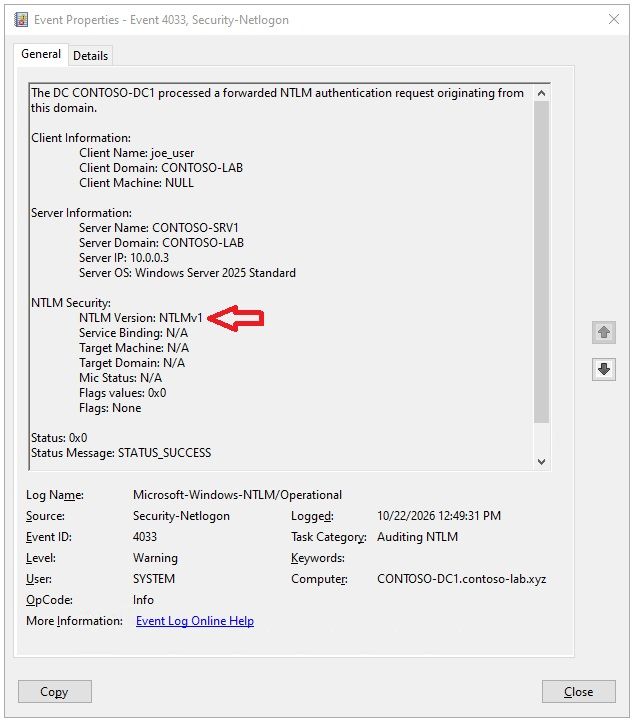
Here is an example of a 4033 event logged on a domain controller when the VPN server forwarded the challenge response for "credential validation". We can tell this was CHAPv2 because a true NTLMv1 authentication would have populated the other fields, such as MIC Status, Service Binding, and Flags.
Taking action
The October 2026 update is not one to sleep on. Here are some final quick pointers to help you get it rolled out ASAP.
- If you are uncertain about MS-CHAPv2 dependencies, don't defer rolling out the October 2026 update. Create the registry setting with a value of 0, which will keep your endpoints in audit mode and then apply the update. Applying the update will not automatically put you in enforcement mode if that registry setting exists.
- Modifications to the registry setting are effective immediately. The device does not need to reboot to pick up the change.
- If your domain controllers are running Windows Server 2019 or Windows Server 2022, apply the October 2026 update on them. That will not impact credential validation for clients using CHAPv2, but it will automatically enable the enhanced NTLM auditing. Windows Server 2025 domain controllers have supported the enhanced auditing since July 2025.
- Consider forwarding the domain controllers’ NTLM logs (𝗠𝗶𝗰𝗿𝗼𝘀𝗼𝗳𝘁-𝗪𝗶𝗻𝗱𝗼𝘄𝘀-𝗡𝗧𝗟𝗠/𝗢𝗽𝗲𝗿𝗮𝘁𝗶𝗼𝗻𝗮𝗹) to your SIEM. These rich NTLM events will have additional uses going forward, so this should not be treated as a short-term configuration.
- The default size for the NTLM log is 1 MB. If you are not going to forward the events, then you might want to increase its size on your domain controllers.

 Microsoft