Updated Jun 26, 2024
Version 1.0
Seneca_Friend Microsoft
MicrosoftMicrosoft
As others have illustrated, this is a regression. We have contractors who use a full desktop in order to launch multiple applications, and we have employees that generally run RemoteApps - all within the same host pool.
This didn't solve any problem and simply created a new one. We don't want two host pools; we want one that simply allows both connections. The user can choose which one they want. If the launch a RemoteApp and a desktop, that's their choice, and that's just fine. Now I'll have to figure out how to divide up a huge server farm where certain servers are dedicated to full desktops and the rest are dedicated to RemoteApps. It's needless planning that I didn't need before.
100% agree. I want to share some helpful advice at least before you go splitting your host pools up. You CAN have users connecting to a single host pool using different app group types (desktop or remoteapps) by separating out users into their own security groups and app groups. How I've done it is as follows...
- I made two security groups; "AVD Users - Full Desktop" and "AVD Users - RemoteApps". Assign users into one of the two groups.
- Assign these groups to the appropriate app group underneath the single host pool. This makes it so users either have Desktop or RemoteApps. They cannot have both.
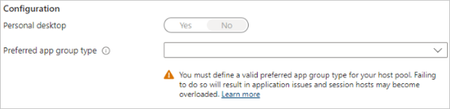
- If I user is accidentally inside of both AVD Users groups, then whichever the "Preferred app group type" setting for the host pool is, is what they will see. For example, if a user is in both groups, but the host pool preferred app group type is set to "Desktop", the only thing they'll see when logging into AVD is Desktop.
The only thing this change makes us lose is that users cannot have access to both at the same time; it is one or the other. In the event users need to have access to both Desktop and RemoteApps, then yes, you'd need a dedicated host pool for each. But, if users only need access to one, just separate users into specific groups, assign to an app group, and you're good.
Pro tip from experience - Rather than modifying the existing AVD Users group, keep that as-is, but make two new AVD Users groups for the Desktop vs RemoteApps. This saves you from having to redo FSLogix NTFS permissions, etc. In my environments where I had to redo groups, I have 3 groups now.
AVD Users = My original group. It now controls FSLogix permissions. All users must be a member of this group.
AVD Users - Desktop = New group for steering users to Desktop app group
AVD Users - RemoteApps = New group for steering users to RemoteApp app group
Good luck!