Blog Post

Azure Infrastructure Blog
3 MIN READ

Safely Migrating Terraform Managed Disks on Azure Using Stable Keys and Copilot

shwetayadav's avatar
shwetayadav
Icon for Microsoft rankMicrosoft
May 08, 2026

One of the most disruptive issues Terraform users encounter on Azure is an unexpected destroy-and-recreate of managed disks after what appears to be a minor change - such as adding a new data disk to an existing virtual machine. In large enterprise environments, this behavior is not just inconvenient; it is a production risk. This blog distills real-world findings from Azure Landing Zone–based deployments and demonstrates how to safely migrate from index-based "for_each" keys to stable keys for Azure managed disks, using Terraform state migration and a reusable GitHub Copilot skill. The goal: preserve existing disks, eliminate blast radius, and make disk expansion safe, repeatable, and automation-friendly.

The Root Cause: Index-Based "for_each" Keys:

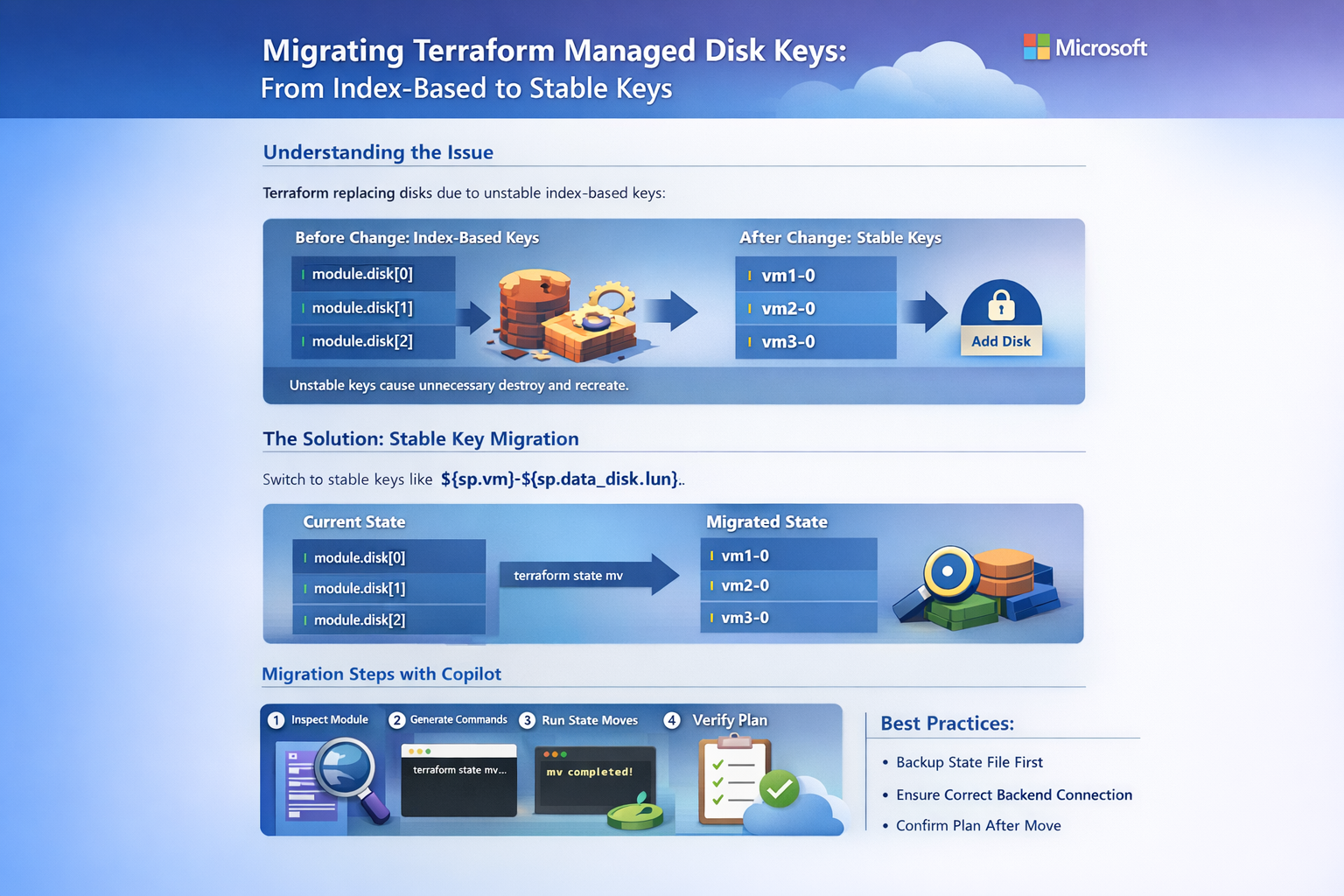
Many Terraform modules flatten VM and disk definitions into a list and use the list index as the for_each key:

for_each = { for index, sp in local.managed_disks : index => sp }

This pattern looks harmless, but the index is not stable:

  • Adding a disk to one VM shifts downstream indices
  • Reordering environment JSON changes flatten order
  • Terraform treats shifted indices as new resources

The result: Terraform plans to destroy and recreate all affected managed disks—even though nothing changed in Azure.

Why This Is Especially Risky on Azure:

Azure managed disks are often:

  • Attached to stateful application tiers
  • Used for databases, middleware, or batch workloads
  • Deployed across zones for resiliency

A forced disk replacement can mean:

  • Data loss
  • Extended outages
  • Failed change windows

This makes state stability a first-class design concern—not an implementation detail.

The Stable Key Pattern:

The fix is conceptually simple: use a domain-stable identifier for each disk.

A proven pattern is:

"${sp.vm}-${sp.data_disk.lun}"

This key is:

  • Deterministic
  • Independent of ordering
  • Human-readable
  • Stable across environments

Example:

VM

LUN

Stable Key

vm1

0

vm1-0

vm1

1

vm1-1

vm2

0

vm2-0

Once applied, adding a new disk results in exactly one new resource, with zero churn.

The Migration Challenge: Terraform State:

Changing for_each keys alone is not enough.

Terraform tracks resources by their state address, not by Azure resource ID. When keys change, Terraform believes:

“The old disks were deleted, and new ones must be created.”

To prevent this, we must move the state, not recreate the resource.

That is where terraform state mv comes in.

Automating the Migration with GitHub Copilot Skills:

To remove risk and human error, the team created a reusable Copilot skill for managed disk key migration.

What the Skill Does:

  • Inspects Terraform modules for index-based for_each
  • Reads environment JSON files (such as ALZ variable abstractions)
  • Reconstructs the exact flatten order used by Terraform
  • Generates precise terraform state mv commands
This ensures:
  • No guessing
  • No manual address mapping
  • No production surprises
The skill is stored directly inside the repository under .github/skills, making it:
  • Discoverable
  • Versioned
  • Shareable across teams

Example: Generating State Move Commands:

Based on environment JSON, Copilot can generate commands like:

terraform state mv \

  'module.managed_disk_windowsvm_app["0"]' \

  'module.managed_disk_windowsvm_app["vm1-0"]'

This is repeated deterministically for every existing disk—before any plan or apply.

Recommended Migration Workflow:

  1. Confirm clean state
    • terraform plan shows no pending changes
  2. Update the module
    • Replace index-based keys with stable keys
  3. Back up the state

    • Especially critical with remote backends (Azure Storage)
  4. Run terraform state mv

    • Only after terraform init is connected to the correct backend
  5. Re-run plan

    • Existing disks should show no changes
  6. Add new disks safely

    • Terraform creates only the new disk

CI/CD and Remote Backend Considerations:

A critical finding from this migration:

terraform state mv always modifies the currently initialized backend.

In pipeline-driven environments:

  • Ensure the correct environment is initialized
  • Run migrations once per environment
  • Never merge stable-key code before migrating all environments

Failing to align code and state can cause disk destruction in production.

Key Takeaways:

  • Index-based for_each keys are unsafe for long-lived Azure disks
  • Stable keys such as vm-lun eliminate accidental resource churn
  • State migration is mandatory—not optional
  • Copilot skills are powerful for institutionalizing safe patterns
  • Small Terraform design choices can have enterprise-scale impact
Closing Thoughts:

This pattern is broadly applicable beyond disks—to NICs, extensions, and any resource where identity must outlive ordering.

By combining:

  • Stable Terraform design

  • State-aware migrations

  • GitHub Copilot automation

Teams can make infrastructure changes boring again—and that is the ultimate reliability goal.

Updated May 08, 2026
Version 1.0
No CommentsBe the first to comment