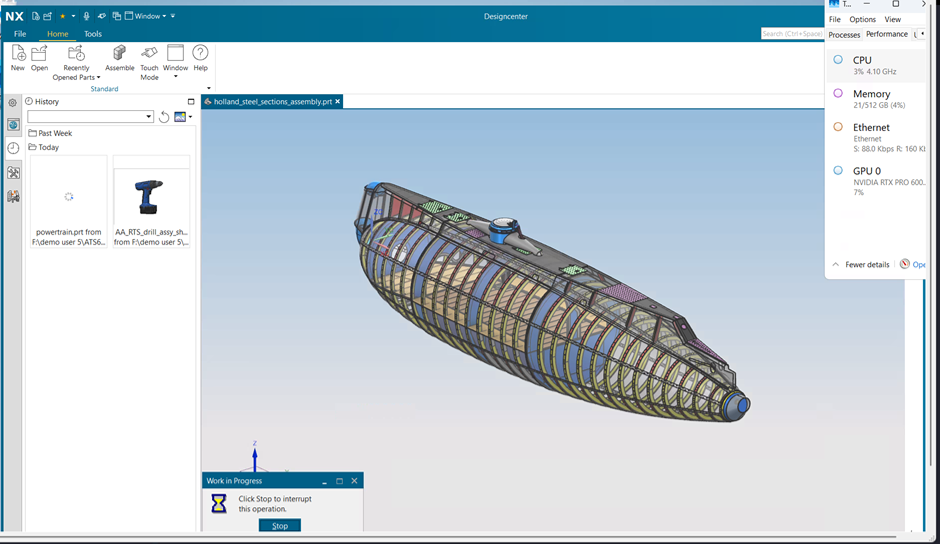
Engineering design teams are increasingly adopting multi-user virtual desktop environments to enable global collaboration and centralized infrastructure. However, running GPU-intensive CAD applications like Siemens NX at scale introduces challenges related to GPU sharing, responsiveness, and performance consistency. In this blog, we explore how Azure Virtual Desktop (AVD) powered by NVIDIA RTX PRO 6000 Blackwell GPUs enables up to 30 concurrent Siemens NX users on a single GPU-backed virtual machine and validate performance across real-world engineering workloads.
Overview of Siemens NX Multi-Session on Azure
This validation study evaluates how Siemens NX 2506 performs in a multi-user AVD environment, using an RTX-based Azure VM.
The focus was to test:
- 15 and 30 concurrent users
- Single-host vs multi-host configurations
- Consistent workloads under identical system configurations
The objective was to determine whether a single RTX PRO 6000 GPU can reliably support 30 users with:
- Stable graphics rendering
- Consistent user experience
- Scalable performance
Azure AVD Architecture for Multi-User NX
The architecture leverages Azure Virtual Desktop with GPU-backed session hosts:
- AVD clients connect through Azure control plane (Broker, Gateway)
- Session hosts run on Standard NC128ds_v6 RTX PRO 6000 VM
- GPU is shared across sessions via vGPU time-slicing
- Centralized Siemens License Server ensures consistent access
This setup enables up to 30 concurrent NX sessions on a single host, providing a scalable and centralized engineering environment.Test Configuration (30-User Multisession Focus)
Key setup:
- Azure VM: Standard NC128ds_v6
- Azure Virtual Desktop : Session Host, Application group, User
- GPU: NVIDIA RTX PRO 6000 Blackwell (96 GB VRAM)
- CPU/RAM: 128 vCPUs, 512 GB memory
- Concurrency: 15 and 30 users
- Execution Model: Automated ATS benchmarks
- Python
Workloads were executed using the Siemens NX ATS certification suite, covering real-world operations such as:
- Display modes, HD3D, raster rendering
- Face analysis, multiple views
- Visualization performance
- BackgroundSettingWireframe, DeEmphasis, DisplaySection, DisplayMode, ExportImage, FaceAnalysis ,GridDisplay,
- HD3D, LightDirection, ListingWindow, MirrorDisplay , MultipleViews, RasterImage ,SynchronizeViews, VisualizationPerformance.
- These tests covers Real-world Engineering models & Assemblies.
Workload Execution and Validation
All tests were executed in a production-like setup with default VSync, ensuring realistic user behavior.
Automated Python-based execution
- Multiple concurrent NX sessions
- GPU resource sharing via Azure vGPU
All ATS scenarios completed successfully with PASS results, confirming:
- Stable rendering
- No crashes or session failures
- Reliable GPU sharing
Performance Results: 30 Users on RTX
|
|
Concurrent Users - Single Host |
Concurrent Users - Two Hosts |
AVD multi Session Host gain(%) | |||
|
Test Cases |
15Users 1VM |
30Users 1VM |
15Users 2VM |
30Users 2VM |
15 1VM Vs 15 2VM |
30 1VM Vs 30 2VM |
|
BackgroundSettingWireframe |
29.67 |
41.10 |
30.10 |
48.96 |
-1% |
-19% |
|
DeEmphasis |
67.78 |
77.21 |
68.22 |
72.37 |
-1% |
6% |
|
DisplaySection |
55.22 |
69.24 |
56.11 |
63.43 |
-2% |
8% |
|
DisplayMode |
35.98 |
44.33 |
36.01 |
36.31 |
0% |
18% |
|
ExportImage |
365.72 |
700.23 |
246.24 |
375.08 |
33% |
46% |
|
FaceAnalysis |
257.17 |
280.09 |
254.32 |
255.43 |
1% |
9% |
|
GridDisplay |
30.91 |
33.07 |
26.72 |
28.27 |
14% |
15% |
|
HD3D |
21.76 |
23.74 |
19.77 |
20.73 |
9% |
13% |
|
LightDirection |
36.56 |
37.53 |
26.57 |
31.03 |
27% |
17% |
|
ListingWindow |
22.88 |
22.50 |
16.26 |
15.35 |
29% |
32% |
|
MirrorDisplay |
71.84 |
74.56 |
63.16 |
64.78 |
12% |
13% |
|
MultipleViews |
33.25 |
44.09 |
32.86 |
37.04 |
1% |
16% |
|
RasterImage |
24.62 |
32.06 |
24.15 |
25.17 |
2% |
21% |
|
SynchronizeViews |
25.94 |
33.43 |
24.71 |
25.73 |
5% |
23% |
|
VisualizationPerformance |
846.54 |
1033.23 |
712.78 |
826.84 |
16% |
20% |
Key Observations (30 Users)
- AVD scale-out (multi-session GPU across multiple hosts) reduces resource contention and delivers measurable performance gains, especially at higher user densities.
- Single VM (1 GPU) successfully supports 30 users with consistent execution across all test cases
- Performance scales predictably as concurrency increases
- GPU sharing remains stable even under heavy load
Multi-Host Scaling Advantage
At 30-user scale:
- Running across 2 VMs (distributed architecture) improves performance across most workloads
- Gains observed in GPU-intensive tasks such as:
- Export Image (~46% improvement)
- Listing Window (~32%)
- Raster Image (~21%)
- Visualization Performance (~20%)
Performance Trends
- At 15 users, performance differences between single and dual VM setups are minimal
- At 30 users, workload distribution significantly improves responsiveness
- Indicates GPU contention becomes more prominent at higher densities
Key Findings
- Strong Multi-Session Density on a Single GPU
- Successfully validated 30 concurrent NX users on one RTX PRO 6000 GPU
- Stable performance across all ATS workloads
- Consistent User Experience
- Smooth graphics rendering with default VSync
- No instability or performance degradation
- Scalable Architecture
- Single-host deployments are efficient for consolidation
- Multi-host deployments improve performance at higher user counts
- Enterprise-Ready GPU Virtualization
- Azure vGPU sharing enables efficient multi-user utilization
- Reliable performance across real-world engineering tasks
Conclusion
This validation confirms that Azure Virtual Desktop with NVIDIA RTX PRO 6000 Blackwell GPUs is a highly effective platform for running Siemens NX 2506 in multi-user environments.
Key takeaways:
- ✅ A single RTX PRO 6000 GPU can support up to 30 concurrent NX users with stable performance
- ✅ All certification workloads passed without issues, validating system reliability
- ✅ Performance remains consistent even under high user density
- ✅ Scaling across multiple VMs further improves responsiveness at higher loads
This makes Azure AVD a strong candidate for enterprise CAD deployments, enabling:
- Centralized GPU infrastructure
- Higher user density
- Reduced hardware dependency
- Scalable engineering workflows

 Microsoft