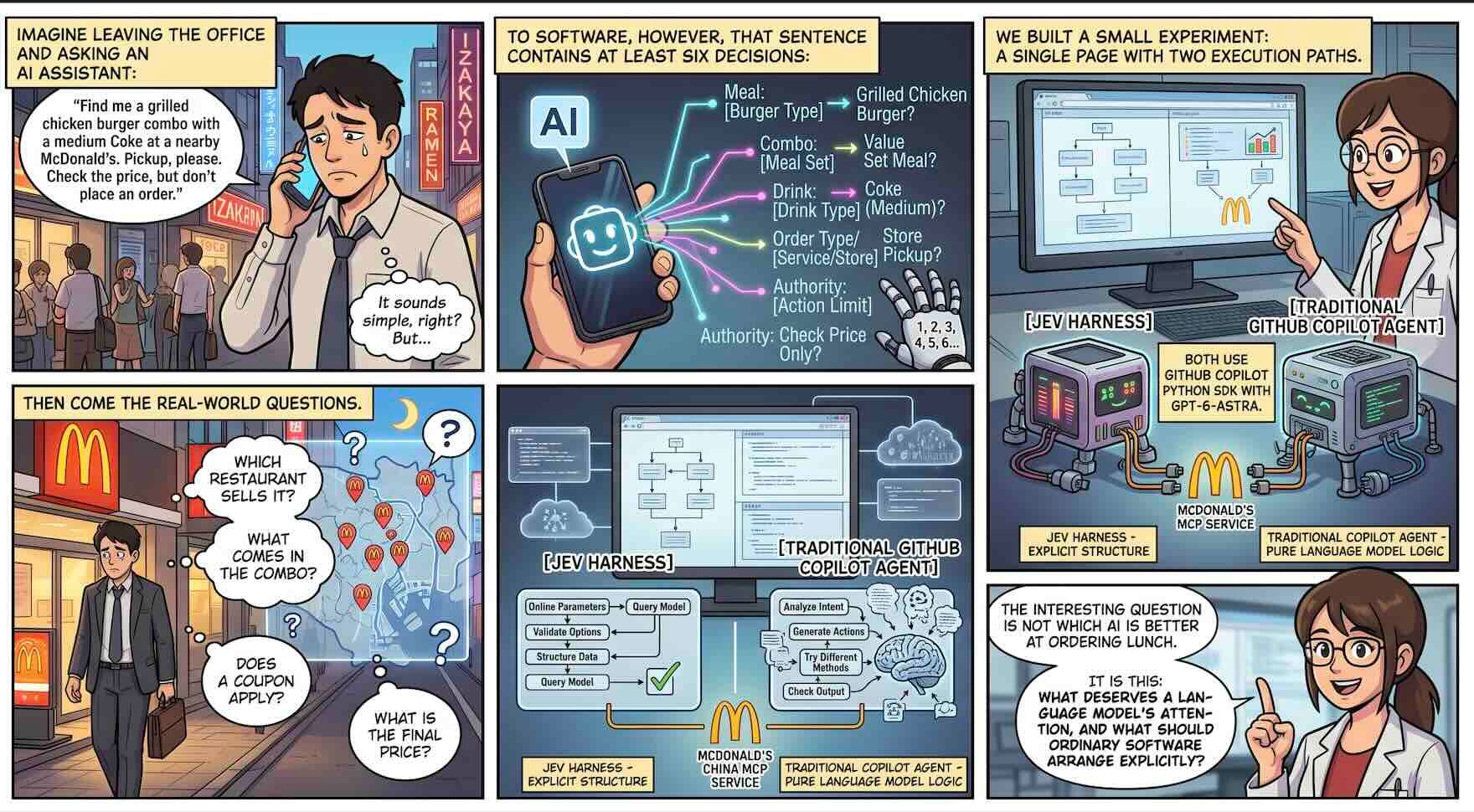
Imagine leaving the office and asking an AI assistant:
“Find me a grilled chicken burger combo with a medium Coke at a nearby McDonald’s. Pickup, please. Check the price, but don’t place an order.”
It sounds simple. To software, however, that sentence contains at least six decisions: which meal, how many, what size, which drink, how to collect it, and how far the system is authorized to proceed.
Then come the real-world questions. Which restaurant sells it? What comes in the combo? Does a coupon apply? What is the final price?
We built a small experiment around that request: a single page with two execution paths. On the left, a Jev Harness. On the right, a traditional GitHub Copilot Agent. Both use the GitHub Copilot Python SDK with gpt-6-astra, and both access the same McDonald’s China MCP service.
The interesting question is not which AI is better at ordering lunch. It is this: what deserves a language model’s attention, and what should ordinary software arrange explicitly?
1. Traditional Agents and LLMs: The Chef Is Not the Restaurant
Think of an LLM as an experienced chef.
Tell the chef you want something lighter, and they can interpret your preference. Change your mind halfway through, and they can adapt. That flexibility is valuable precisely because the world does not always fit a fixed menu of buttons.
But a chef alone cannot run a restaurant. Someone must take orders, check inventory, operate the till, and enforce the rules.
That is the distinction between an LLM and an agent. The LLM supplies language understanding, reasoning, and generation. The agent is the system around it that can use tools and advance a task. The harness provides the operating structure: context, tool access, execution, feedback, and stopping conditions.
A typical tool-using agent loop looks like this:
User request → LLM chooses a next step → Harness executes a tool → Tool result joins the context → LLM chooses another step → Finish or repeatThis is powerful. A coding agent can inspect a failed test, find the implementation, propose an edit, and test again. An ordering assistant can find a restaurant, inspect its menu, and calculate a quote.
The tradeoff is that the chef may also end up handling every small administrative decision: pickup or delivery, which tool to open, whether another lookup is necessary. Each round involves model processing, potentially more generated tokens, and tool latency. The conversation grows as results accumulate.
None of this makes traditional agents inherently inefficient. They can also use structured outputs, restricted tools, parallel calls, and deterministic workflows. The problem is not that LLMs are bad at their job. It is that we sometimes give one execution mechanism every job in the building.
2. What Is Jev? An Order Form Instead of an Essay
In Introducing System One Models & Jev, TypeSafe introduces Jev as its first publicly available System One model, released in early access.
The name borrows from the distinction between fast and deliberate thinking. You do not need to treat that as a literal model of a human brain.
A more useful definition is: Jev accepts state and predefined questions, then returns typed decisions with probability information rather than freely generating prose.
Back in the restaurant, a conventional LLM can explain why a meal fits your preferences. Jev is closer to an order taker who understands your wording and selects the appropriate boxes on an order form.
TypeSafe offers three primitives:
| Primitive | Everyday meaning | Example |
|---|---|---|
| Choice | Select from defined alternatives | Pickup, delivery, dine-in, or unspecified? |
| Noul | Estimate the probability that a proposition is true | Did the customer explicitly request a quote only? |
| Score | Evaluate against ordered criteria | Which impact level best describes this operation? |
Our project uses only Choice. Six questions go into one system_one request rather than six conversational turns. According to TypeSafe’s design, these questions are evaluated in parallel within the request.
A Choice answer includes the selected option, a probability distribution, and confidence. These should not be conflated. The distribution describes the alternatives; confidence is a separate measure of certainty. A confidence value of 0.99 is not proof that this particular order has a 99% chance of being correct.
TypeSafe calls its training approach Reinforcement Learning for Calibrated Decisions, or RLCD. The aim is to make reported uncertainty more useful to software. That is promising, but application thresholds still need evaluation on representative data.
There is an equally important limit. The announcement emphasizes type safety and uses the language of “no hallucinations.” An engineer should distinguish that claim from infallible judgment.
Selecting only from the menu does not guarantee selecting what the customer meant.
Jev can still misunderstand a request. It is not a code generator, should not be your calculator, and cannot grant permission to charge a card or deploy software. Schema conformance, semantic correctness, and authorization are different properties.
3. How Is This Different from a Model Router?
At this point, a reasonable question is: “Isn’t this just model routing?”
Picture a restaurant manager answering two different questions:
“Which chef should handle this dish?”
“Is this order for pickup or delivery, is it complete, and can it proceed?”
The first resembles a Model Router. The second is closer to Jev’s role in this project.
| Dimension | Model Router | Jev in this project |
|---|---|---|
| Main question | Which model or endpoint should handle the request? | What does the request mean, and which business branch applies? |
| Typical inputs | Difficulty, cost, latency, capabilities, availability | User intent, candidate answers, probabilities, confidence |
| Typical output | Model A, model B, or a fallback endpoint | Pickup, standard combo, quote only, or review required |
| Model switching here | Not implemented | Both paths retain gpt-6-astra |
A router is an architectural component. Jev is a model. They are not interchangeable categories.
They can also work together. Jev could classify task complexity, and a routing policy could use that signal to select a model. The application would still need to implement selection rules, budgets, availability checks, and fallback behavior.
So this project is not a demonstration of replacing GPT with a faster model. GPT-6-astra remains in place. What changes is the work assigned before it runs, and the context and tools it receives.
4. What Jev Changes: Give the Chef Less Administration
The most interesting change is not the appearance of JSON. It is the allocation of responsibility.
The traditional path sends the natural-language request straight into an agent that interprets and executes. The Jev path first produces bounded, inspectable decisions. Local code then determines whether execution may continue and which tools should be available.
Natural-language request → Jev API: bounded decisions and probabilities → Local Python gate: thresholds, required fields, permissions → Copilot SDK / Runtime: tool-calling agent loop → GPT-6-astra + MCP: lookups, interpretation, final responseThe Python gate is neither a separate AI API nor a CLI. It is ordinary application logic. It checks the minimum confidence against a configurable threshold, which defaults to 0.75, checks missing fulfillment, meal, and drink information, and narrows the exposed tool set. That threshold is a demo setting, not a universal safety standard.
Jev itself is accessed through the TypeSafe Python SDK over an API. The Copilot Python SDK controls the underlying runtime. Sharing a programming language does not erase those architectural boundaries.
For coding agents, this division is useful. “Fix this failing test” still benefits from a generative model that understands code and can write a patch. But whether a request is read-only, touches a database migration, or needs a particular tool family can be treated as a smaller decision first.
Code can then enforce allowed paths, write permissions, and required checks. A model’s low-risk classification must not replace a sandbox, authorization, or tests.
That coding-agent example is an architectural extension, not an implemented feature of our ordering demo. The project does not yet implement an end-to-end code-editing workflow.
Another distinction matters: the current Jev Harness has not eliminated the agent loop. Python enforces the front-end gates and tool filtering. The five-tool workflow is then described in a prompt; GPT-6-astra still chooses concrete calls and arguments. This is a hybrid prototype, not a workflow engine that enforces every transition in code.
5. The Project Story: Following One Burger Combo Through the System
Taking the order
Our scenario is a grilled chicken burger combo, medium Coke, pickup at a nearby restaurant in Guangzhou, with price calculation only.
The traditional path receives that raw request. The Jev path evaluates six Choice questions in src/harness_agent/jev.py. The application compiles the answers into an order plan shaped like this:
{ "fulfillment": "pickup", "meal": "grilled_chicken_combo", "size": "regular", "drink": "coke", "quantity": 1, "action": "quote_only" }This illustrates the compiled plan, not the complete raw API response.
The meal can fit a predefined choice. The location is open-ended text. We discovered that distinction the hard way: when we passed only the six fields, the executor no longer knew where to search for a restaurant.
The fix was not to ask Jev to invent an address. We retained the original request as location context. Typed decisions are useful; they are not a reason to throw away every piece of unstructured information.
Executing the quote
After the Python gate passes, the pickup path exposes five MCP tools:
query-nearby-stores → query-meals → query-meal-detail → query-store-coupons → calculate-priceThis is a simplified dependency sketch, not a requirement to serialize every operation. Once a restaurant is known, some menu and coupon lookups can be independent. Price calculation still depends on having the actual products and selections.
Product identifiers, combo contents, and prices come from MCP results, not from Jev inventing them. One successful execution found the grilled chicken burger, medium fries, and medium Coke, and returned a quote of CNY 34.50. The available coupons did not apply, and the assistant did not add unwanted items to meet a discount threshold.
That was a quote for a particular restaurant at that time, not a permanent nationwide price.
The dashboard does not expose create-order. This is a live lookup with a simulated purchasing decision, not an actual purchase. Explicit submission through the CLI is a separate capability; the walkthrough here stays within quotation.
Optimizing—and learning why the fastest run was not a win
Our first design simply put Jev in front of the existing Copilot Harness. It did not magically transform end-to-end performance.
That makes sense. The order taker had completed the form, but the chef was still carrying a large employee handbook, unrelated tools, and the full operating environment into the kitchen. Adding a classifier does not automatically remove downstream overhead.
We changed the Jev path to Copilot SDK empty mode, explicitly selected tools, disabled unnecessary skills, session storage, and configuration discovery, and overlapped runtime startup with Jev classification. We also requested a concise quotation table.
The first lean run looked impressive: about 28.8 seconds. But the menu had been truncated, and the stripped-down runtime lacked a tool for reading the full output. It had not calculated the price.
By the stopwatch, it won. By the user’s goal, it failed.
Keeping the large menu result inline restored the complete workflow. This is a tradeoff: fewer file-retrieval rounds, but more menu content in the model context. It worked for this demo; it is not a universal solution for arbitrarily large tool results.
Here are several individual observations from development console output. They are not a randomized, repeated benchmark of one frozen software version.
| Metric | Historical traditional run | Initial Jev Harness | Optimized Jev Harness |
|---|---|---|---|
| End-to-end time | 113.28 s | 92.68 s | 35.41 s |
| Copilot usage events | 10 | 7 | 5 |
| Tool execution-start events | 10 | 7 | 5 |
| Cumulative input tokens | 251,438 | 177,421 | 125,924 |
| Cumulative output tokens | 2,435 | 1,898 | 836 |
| Completed price quotation | Yes | Yes | Yes |
The Jev columns combine Jev API usage with Copilot usage across rounds. Cumulative input counts include repeated conversation context and cache-related usage; they are not unique text length or exclusively uncached billable input. Without per-tool attribution, execution-start counts should not automatically be relabeled as pure MCP request counts.
The optimized sample took roughly 68.7% less time than the historical traditional sample. That is not evidence that Jev alone caused a 68.7% improvement. Runtime configuration, context, tools, response length, and service conditions differed. Many optimizations also apply to the traditional path.
To isolate Jev’s contribution, add an equally lean non-Jev control with the same output requirements. Then compare repeated task success, p50/p95 latency, and actual billing.
Likewise, TypeSafe’s announcement figures of “193.6× faster” and “444.6× cheaper” refer to its specific System One workflow evaluations. They are neither results from this project nor promises about an entire restaurant-ordering workflow. A reported output_tokens field is also a usage measure, not proof that those tokens are charged under the same pricing rules as a generative model.
Watching the work, not just the stopwatch
We made the process visible in a light-only dashboard with Simplified Chinese, Traditional Chinese, and English support.
One button starts both paths concurrently. Chunked NDJSON carries progress events to the browser. The two consoles show decision phases, model rounds, tool starts and completions, and usage events as they arrive. Result panels expose Jev’s structured decisions, the application-supplied agent context, and token details.
These are observable execution events and application context—not private model reasoning or the SDK’s entire assembled internal prompt.
After installing the project and configuring credentials, start it with:
harness-dashboardOpen http://127.0.0.1:8765. Keep YOUR_MCP_TOKEN and TYPESAFE_API_KEY in the local .env, never in browser code or a published article.
Concurrent execution is useful for a live demonstration, but it introduces network, rate-limit, and caching effects. Rigorous evaluation needs fixed versions, repeated runs, and a success criterion that checks whether the correct quote was actually obtained.
That is the lesson I would take from the burger experiment:
Let the LLM handle open-ended work. Let Jev handle bounded judgments. Let code hold the permissions and workflow boundaries.
A better agent is not necessarily an agent with more autonomy. Sometimes it is a system that has finally learned to divide the work.
Please go to demo repo https://github.com/kinfey/jevHarnessAgent
Further Reading and Project Entry Points

 Microsoft