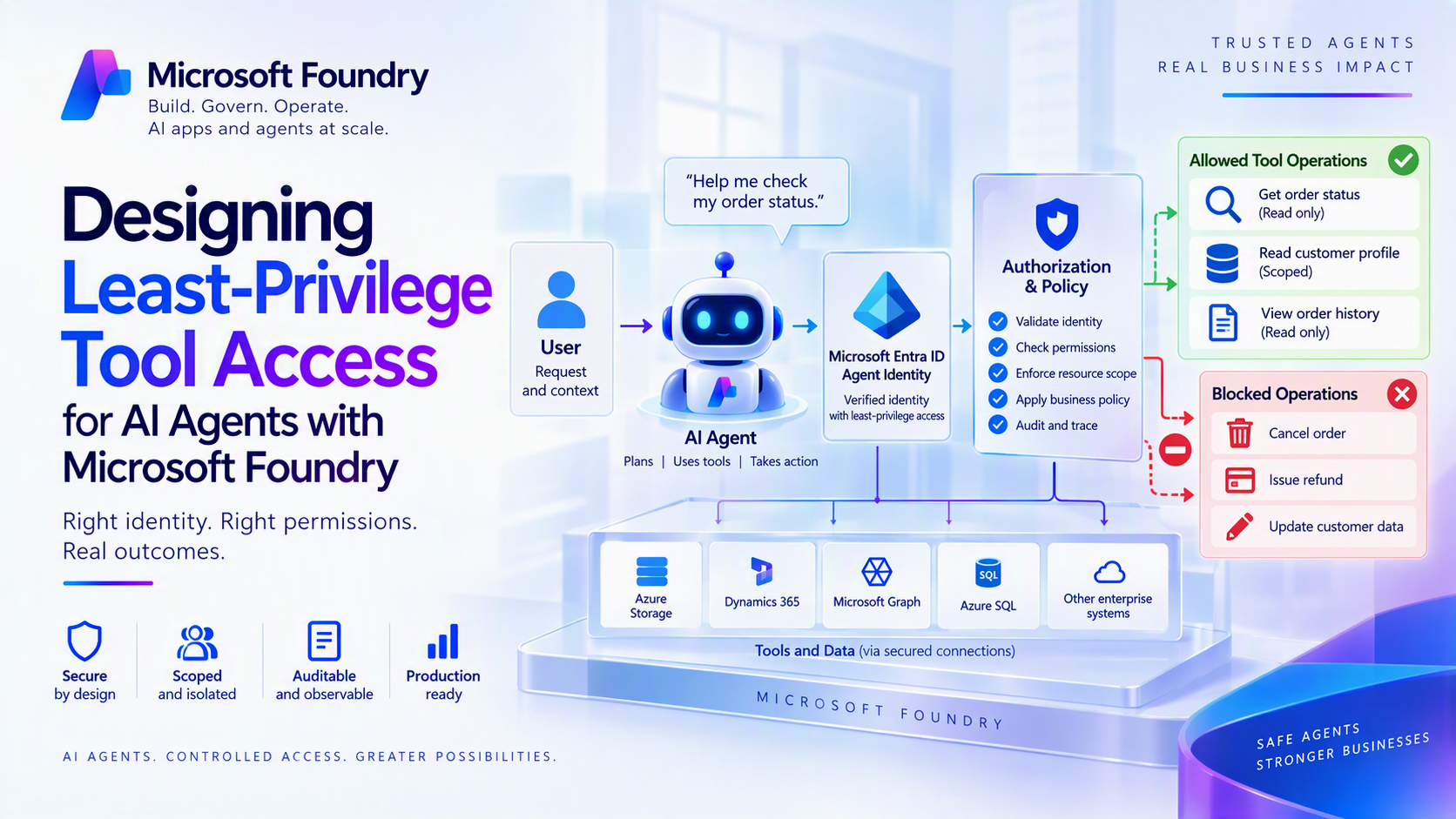
An AI agent does not need broad access because it might need a tool. It needs the smallest permission set required for the current task, under the correct identity, with a decision trail that explains every allow or deny.
That distinction matters. A prompt can tell an agent not to delete data, but a prompt is not an authorization boundary. Least privilege must be enforced by identity, connection configuration, Azure role-based access control (RBAC), narrow tool contracts, and runtime policy—outside the model.
This article shows an implementation pattern for doing that with Microsoft Foundry and Python.
1. Start with a capability contract
Before connecting a tool, document exactly what the agent is allowed to do.
| Decision | Example |
|---|---|
| Agent | Invoice review agent |
| Tool | Read one approved invoice |
| Identity | Dedicated agent identity |
| Azure resource | One storage container |
| Allowed operation | Read |
| Disallowed operations | List all, upload, overwrite, delete |
| User boundary | Current tenant and verified user context |
| Runtime limits | 20 reads per run, 5 MB per object |
| Evidence | Agent ID, user ID, resource alias, decision, policy version, trace ID |
This contract should produce both infrastructure configuration and application policy. If a requirement cannot be translated into an RBAC assignment, tool schema, or runtime check, it is not yet enforceable.
A useful rule is:
Do not expose infrastructure-shaped tools such as run_sql, call_url, or execute_command when the business capability is get_invoice, check_order_status, or create_refund_request.
The narrower the tool, the smaller the blast radius when the model makes a bad decision or receives a malicious instruction.
2. Choose the identity that should reach the tool
A production design usually has two authorization questions:
- May this agent invoke the tool?
- May the resulting call access this user’s or workload’s data?
Microsoft Foundry connections support different authentication modes for different answers: project managed identity for shared service-to-service access, agent identity for per-agent authority and auditing, and OAuth or Microsoft Entra user-token flows when a downstream call must honor the signed-in user’s permissions. Authentication belongs on the connection rather than in the prompt or agent code.
Use this decision table:
| Scenario | Preferred execution identity |
|---|---|
| Development agents with the same temporary permissions | Shared project identity |
| Production agent needing an independent audit trail | Dedicated agent identity |
| Unattended processing | Agent or workload identity with narrowly scoped application permissions |
| User-scoped data | Delegated user identity or OAuth connection |
| Public, anonymous endpoint | No authentication—only after validating that anonymous access is intentional |
Do not use a human developer’s credential in production, and do not use one shared identity for agents with different responsibilities. Foundry can use a shared identity for unpublished agents during development, while agents with distinct permissions, lifecycle requirements, or audit needs should use distinct identities.
A dedicated identity makes it possible to revoke one agent, scope one agent, and investigate one agent without affecting the rest of the system.
3. Authenticate without storing secrets
For Python development, DefaultAzureCredential provides a convenient local credential chain. In Azure-hosted production code, use ManagedIdentityCredential explicitly so another available credential is not selected unexpectedly. [learn.microsoft.com]
Python
import os
from azure.ai.projects import AIProjectClient
from azure.identity import (
DefaultAzureCredential,
ManagedIdentityCredential,
)
def build_credential():
if os.environ.get("APP_ENV") == "production":
# AZURE_CLIENT_ID is optional for a system-assigned identity.
# It selects the identity when a user-assigned identity is used.
client_id = os.environ.get("AZURE_CLIENT_ID")
if client_id:
return ManagedIdentityCredential(client_id=client_id)
return ManagedIdentityCredential()
return DefaultAzureCredential()
credential = build_credential()
project_client = AIProjectClient(
endpoint=os.environ["FOUNDRY_PROJECT_ENDPOINT"],
credential=credential,
)
The Microsoft Foundry Python client uses Microsoft Entra ID credentials and a project endpoint, making the same code structure usable with developer credentials locally and managed identity in Azure.
Removing application secrets does not create least privilege by itself. The selected principal still needs a minimal role assignment at the narrowest practical scope—for example, a single storage container rather than a resource group or subscription.
Also separate Foundry control-plane access from data-plane access. The identity that deploys or configures an agent does not automatically need permission to read production business data, and the runtime identity does not need permission to create projects, connections, or role assignments. Foundry separates resource configuration operations from runtime operations such as agent invocation, evaluation, tracing, and model inference.
4. Bind the resource on the server, not in model arguments
Suppose the invoice agent reads JSON documents from Azure Blob Storage. The unsafe design lets the model supply an account URL, container name, and blob path.
The safer design binds the account and container in trusted configuration and accepts only a validated business identifier.
Python
import json
import os
import re
from dataclasses import dataclass
from azure.storage.blob import BlobServiceClient
INVOICE_ID = re.compile(r"^[A-Z]{3}-\d{8}$")
INVOICE_AGENT_OBJECT_ID = os.environ["INVOICE_AGENT_OBJECT_ID"]
PRODUCTION_TENANT_ID = os.environ["PRODUCTION_TENANT_ID"]
@dataclass(frozen=True)
class ToolContext:
# Populate these fields from verified runtime identity and request
# metadata—never from model-generated arguments.
agent_oid: str
tenant_id: str
user_oid: str | None
run_id: str
@dataclass(frozen=True)
class ToolGrant:
actions: frozenset[str]
tenants: frozenset[str]
require_user: bool
GRANTS = {
INVOICE_AGENT_OBJECT_ID: ToolGrant(
actions=frozenset({"invoice.read"}),
tenants=frozenset({PRODUCTION_TENANT_ID}),
require_user=True,
)
}
def authorize(ctx: ToolContext, action: str) -> None:
grant = GRANTS.get(ctx.agent_oid)
if grant is None:
raise PermissionError("Unknown agent identity")
if action not in grant.actions:
raise PermissionError("Action is not allowed")
if ctx.tenant_id not in grant.tenants:
raise PermissionError("Tenant is not allowed")
if grant.require_user and not ctx.user_oid:
raise PermissionError("Verified user context is required")
class InvoiceReader:
def __init__(self, credential, account_url: str, container: str):
service = BlobServiceClient(
account_url=account_url,
credential=credential,
)
self._container = service.get_container_client(container)
def get_invoice(
self,
invoice_id: str,
ctx: ToolContext,
) -> dict:
authorize(ctx, "invoice.read")
if not INVOICE_ID.fullmatch(invoice_id):
raise ValueError("Invalid invoice ID")
# Verified identity determines the partition. The model cannot
# select another user's path.
blob_name = (
f"{ctx.tenant_id}/{ctx.user_oid}/{invoice_id}.json"
)
raw = self._container.download_blob(blob_name).readall()
if len(raw) > 5 * 1024 * 1024:
raise ValueError("Invoice exceeds the 5 MB tool limit")
invoice = json.loads(raw)
# Return only the fields needed by the agent.
return {
"invoice_id": invoice["invoice_id"],
"supplier": invoice["supplier"],
"amount": invoice["amount"],
"currency": invoice["currency"],
"status": invoice["status"],
}
The model can choose an invoice ID. It cannot redirect the tool to another storage account, switch containers, select another user’s partition, enumerate every object, or request arbitrary fields.
Use immutable agent and tenant object IDs in policy—not display names. Azure RBAC should independently restrict the identity to read-only access on the intended container; Blob data roles can be assigned at container scope. [learn.microsoft.com]
The application check and platform authorization are complementary controls—not substitutes for each other.
5. Separate read, propose, and commit capabilities
Combining reads and writes into one generic tool usually creates unnecessary privilege. Split them into capabilities with different identities or policies:
- get_invoice(invoice_id) — read-only and low consequence.
- propose_refund(invoice_id, amount, reason) — creates a reviewable proposal but does not move money.
- commit_refund(proposal_id, approval_token) — high consequence; requires approval, strict amount limits, and an idempotency key.
A small authorization decorator keeps enforcement consistent:
Python
from collections.abc import Callable
from functools import wraps
def requires(action: str):
def decorate(fn: Callable):
@wraps(fn)
def wrapped(*args, ctx: ToolContext, **kwargs):
authorize(ctx, action)
return fn(*args, ctx=ctx, **kwargs)
return wrapped
return decorate
@requires("refund.propose")
def propose_refund(
invoice_id: str,
amount: float,
*,
ctx: ToolContext,
) -> dict:
if amount <= 0 or amount > 1_000:
raise ValueError(
"Refund is outside the agent's proposal limit"
)
# Persist a proposal only. A separate approved workflow
# performs settlement.
return {
"state": "pending_approval",
"invoice_id": invoice_id,
"amount": amount,
"requested_by_agent": ctx.agent_oid,
"run_id": ctx.run_id,
}
In production, the approval token should be:
- Short-lived.
- Bound to the proposal and action.
- Bound to the approved amount.
- Associated with a verified approver.
- Validated by trusted server code.
- Single-use or protected with an idempotency key.
Never treat a model-generated phrase such as “approved” as authorization.
6. Make denial observable without leaking sensitive data
Log the authorization decision before calling the downstream service. Record stable identifiers and policy metadata, but not access tokens, secrets, full prompts, or business payloads.
Python
from opentelemetry import trace
tracer = trace.get_tracer("contoso.agent-tools")
def audited_authorize(
ctx: ToolContext,
action: str,
) -> None:
with tracer.start_as_current_span(
"tool.authorization"
) as span:
span.set_attribute("agent.id", ctx.agent_oid)
span.set_attribute("tenant.id", ctx.tenant_id)
span.set_attribute("tool.action", action)
span.set_attribute("policy.version", "2026-10-01")
span.set_attribute("run.id", ctx.run_id)
try:
authorize(ctx, action)
span.set_attribute(
"authorization.decision",
"allow",
)
except PermissionError:
span.set_attribute(
"authorization.decision",
"deny",
)
raise
Connect the Foundry project to Application Insights and propagate trace context across the agent, tool gateway, and downstream call. Foundry’s client-side tracing guidance uses OpenTelemetry instrumentation and can export traces to Azure Monitor for inspection in the Foundry portal.
A useful investigation should answer:
- Which verified identity acted?
- Which capability was requested?
- Which policy version evaluated it?
- Which resource alias was targeted?
- Was the request allowed or denied?
- Which agent run and distributed trace produced the request?
7. Test the deny paths first
A happy-path demonstration proves that a tool works. A least-privilege test suite proves that it fails safely.
Python
import pytest
@pytest.mark.parametrize(
"ctx,action",
[
(
ToolContext(
"unknown-agent-oid",
PRODUCTION_TENANT_ID,
"u1",
"r1",
),
"invoice.read",
),
(
ToolContext(
INVOICE_AGENT_OBJECT_ID,
"other-tenant-id",
"u1",
"r2",
),
"invoice.read",
),
(
ToolContext(
INVOICE_AGENT_OBJECT_ID,
PRODUCTION_TENANT_ID,
None,
"r3",
),
"invoice.read",
),
(
ToolContext(
INVOICE_AGENT_OBJECT_ID,
PRODUCTION_TENANT_ID,
"u1",
"r4",
),
"invoice.delete",
),
],
)
def test_unauthorized_requests_are_denied(ctx, action):
with pytest.raises(PermissionError):
authorize(ctx, action)
Add integration tests that verify the Azure identity cannot:
- List unrelated containers.
- Write or delete objects.
- Access another user or tenant partition.
- Redirect a tool to an unapproved endpoint.
- Invoke a high-consequence tool without approval.
- Reuse an approval token.
- Exceed the configured amount or request-rate limit.
Run these checks in continuous integration and after every identity, role, policy, or connection change.
Production checklist
Before publishing an agent, verify:
- Each production agent has an identity appropriate to its authority and audit requirements.
- Tool authentication is configured on the connection, not embedded in prompts or source code.
- Role assignments use the narrowest practical resource scope and data action.
- The model cannot supply arbitrary endpoints, scopes, queries, or resource names.
- Read, propose, and commit operations are separate capabilities.
- High-consequence actions require trusted approval and idempotency controls.
- Runtime policy uses verified identity context and defaults to deny.
- Traces capture authorization evidence without tokens or sensitive payloads.
- Negative tests confirm that the agent cannot cross user, tenant, resource, or action boundaries.
- A kill switch can disable the agent identity or connection without redeploying the model.
Get started
Choose one agent and one tool.
Replace the generic tool with a business-specific contract, assign a dedicated identity, scope its Azure role to one resource, and implement one deny-by-default policy check before the downstream call.
Then test four failures:
- Wrong agent.
- Wrong tenant.
- Missing user context.
- Disallowed action.
Least privilege is not a sentence in the system prompt. It is the combination of identity, connection, RBAC, code, and evidence that makes an unsafe action impossible—or at least reliably denied and investigated.
Implementation references
- https://learn.microsoft.com/en-us/azure/foundry/concepts/rbac-foundry
- https://learn.microsoft.com/en-us/python/api/overview/azure/ai-projects-readme?view=azure-python
- https://learn.microsoft.com/en-us/azure/foundry/observability/how-to/trace-agent-client-side
- https://learn.microsoft.com/en-us/azure/storage/blobs/assign-azure-role-data-access

 Microsoft
