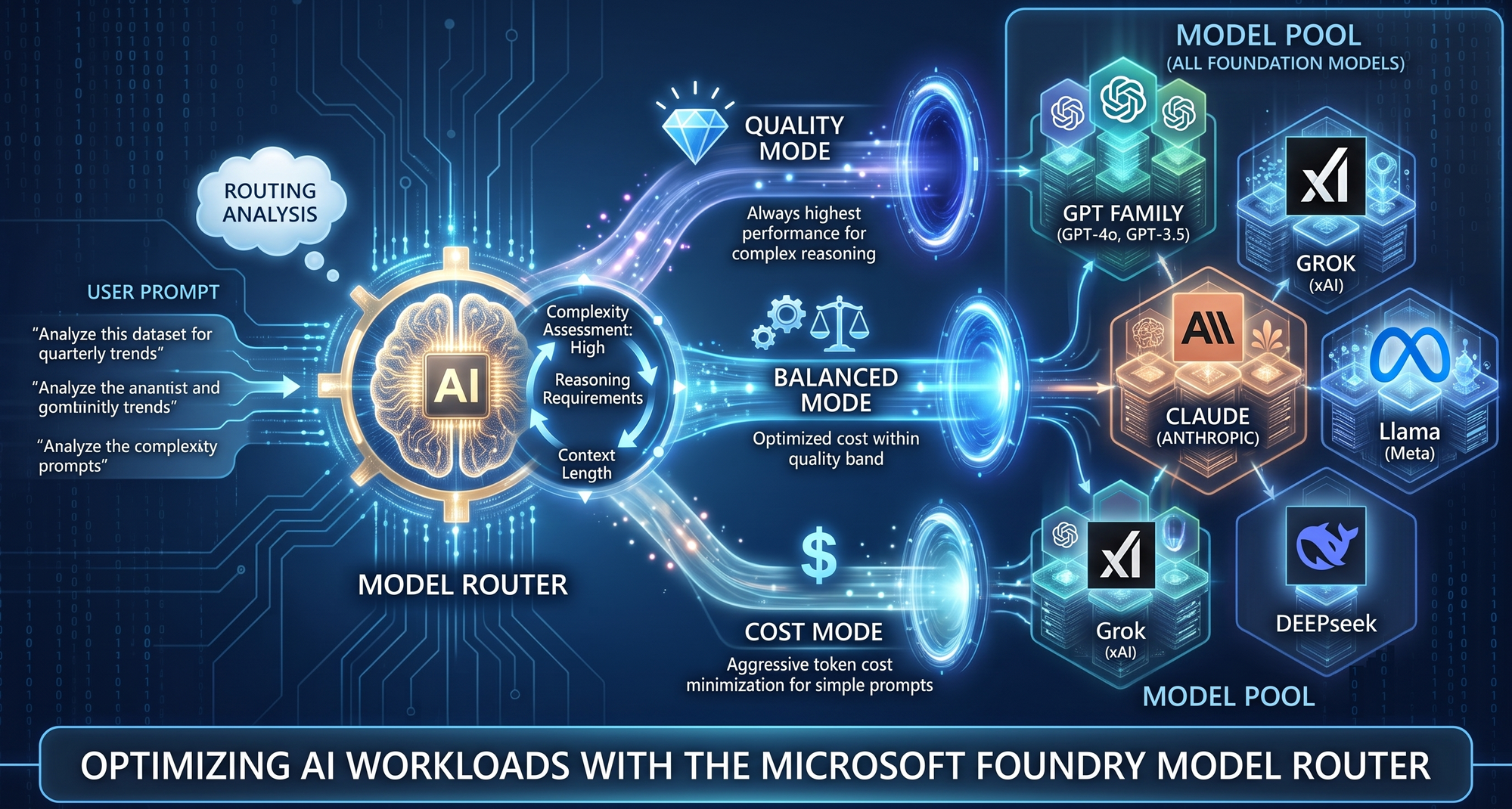
A hands-on accelerator for exploring, evaluating, and understanding the model router.
As enterprise generative AI applications mature, engineering teams face a continuous balancing act between cost, latency, and response quality. Hard-coding a frontier model for every request ensures high quality but maximizes token costs and latency. Conversely, defaulting to smaller, faster models risks degradation in accuracy for complex reasoning tasks.
To solve this architectural challenge, developers can use the model router in Foundry Models—an intelligent, real-time routing engine. By combining this capability with testing environments like RouteLab, developers can eliminate the guesswork of model selection, visually evaluate routing decisions on custom datasets, and build highly optimized AI systems.
What is the model router in Foundry Models?
The model router is a purpose-built machine-learning model that sits between your application and a configured pool of large language models (LLMs). Rather than relying on rigid, hard-coded rules, the router analyzes the complexity, required reasoning capabilities, and context of each incoming prompt in real time to select the most suitable LLM.
By targeting a single deployment, developers gain access to three distinct routing modes:
-
Balanced (Default): Evaluates all models within a narrow quality margin and selects the most cost-effective option for general-purpose scenarios.
-
Cost: Broadens the acceptable quality band to aggressively minimize token costs—ideal for high-volume, budget-sensitive workloads.
-
Quality: Always routes to the highest-performing model for that specific prompt, ignoring cost implications for complex reasoning tasks.
Getting Started: Running RouteLab Locally
Before diving into the visual evaluations, you need to spin up RouteLab in your local environment. The model-router-playground repository is designed for a frictionless developer experience right out of the box.
Part 1: Setting Up the Environment
- Clone the Repository and Open in VS Code: Start by cloning the repository to your local machine. Open the cloned folder directly inside Visual Studio Code (VS Code) so that all project assets, scripts, and dependencies are loaded in your editor workspace.
- Launch the Script: Open the integrated terminal in VS Code and execute the setup script by running
git clone https://github.com/Pandey-Vikas/model-router-playground.git
cd model-router-playground
./start.ps1.
This kicks off the environment initialization, installs required dependencies, and prepares the backend routing services.
Part 2: Interactive Authentication and Launch
- Complete the 6-Step Azure Login and Launch the UI: Once the script executes, it presents a guided, 6-step interactive authentication workflow directly in your terminal. This wizard safely connects your local setup with your Azure credentials, respects enterprise access boundaries, and wires up your designated Microsoft Foundry Model Router resource. Upon completing step 6, RouteLab automatically opens in your default browser, presenting the full testing harness.
Hands-On with RouteLab: The Developer Playground
Understanding how dynamic routing behaves in practice is critical before deploying it to production. The model-router-playground repository provides a practical, UI-driven approach to exploring this architecture through its RouteLab interface.
As seen in the RouteLab dashboard below, the environment is designed to demystify the routing process without requiring custom evaluation scripts. Here is how it empowers development teams:
1. Interactive Manual Evaluation- "Supports Bring your own Dataset"
One of the biggest questions developers have about dynamic routing is, "Which model will it pick for my specific prompt?" RouteLab’s central Manual Evaluation interface allows you to select your desired mode (Balanced, Cost, or Quality) and test the router. Crucially, this is where the "Bring Your Own Data" USP truly shines. Instead of relying solely on generic examples or typing prompts one by one, you can seamlessly import your custom dataset (CSV or JSONL) directly into the Manual UI. By running your proprietary, domain-specific questions through the interface, you gain instant, line-by-line transparency into how the router handles your exact enterprise workloads—immediately displaying the selected underlying model, token usage, and latency for your own data.
To get a comprehensive view of the router's decision-making process, you can execute your imported dataset three separate times—once for each routing mode. After completing these runs, simply navigate to the Analytics tab and launch the Compare button. This powerful feature allows you to evaluate all three executions side-by-side, providing a clear, empirical comparison of cost savings, latency overhead, and model selections across the Balanced, Cost, and Quality modes for your specific prompts.
2. Quick Testing with the Routing Range
To rapidly build intuition on how the router behaves, the UI features a "Test the routing range" capability. With a single click—such as the "Run 15 (quick)" or "Run 30 (full)" buttons—developers can fire off a spectrum of predefined prompts from direct instructions to complex synthesis. This allows you to watch the router actively adapt its model selection across a diverse ladder of complexities.
3. Auto Evaluation at Scale: Validating Custom Workloads
While manual testing builds intuition line-by-line, production readiness requires scale. RouteLab’s Auto Evaluation engine allows developers to run bulk assessments. It comes pre-loaded with bundled datasets (like mixed-prompts.jsonl or java_custom.jsonl) for quick benchmarking, but its ultimate USP is executing automated evaluations on your imported custom datasets.
To make formatting effortless, you can download a sample .jsonl file from the available bundled datasets directly within the UI, providing a perfect template to construct your own custom datasets. By uploading your populated proprietary files, teams can automate the execution of hundreds of their own prompts. This ensures your routing strategy and cost projections are validated against the real-world datasets your application will handle in production, bridging the gap between generic benchmarks and enterprise reality.
Under the Hood: The Code Behind Auto Evaluation Beyond the UI experience, the complete underlying code for this Auto Evaluation engine is available in its own dedicated repository: microsoft-foundry/Model-Router-Auto-Evaluation. By exploring this repository, developers can see exactly how the batch-processing, routing logic, and metric aggregations are programmatically implemented. This open-code approach makes it incredibly easy for engineering teams to lift and shift the evaluation framework directly into their own enterprise CI/CD pipelines or custom testing harnesses.
After successful completion of Auto Evaluation, you click the open button Click on the open button under Past Evaluation to get the dashboard.
4. Deep Dives with Analytics and Logs
Data drives deployment decisions. The top navigation of the RouteLab UI seamlessly transitions users from Evaluation into Analytics and Logs. Instead of parsing raw JSON telemetry, developers can visualize the aggregate results of their custom and bundled datasets:
- Cost Distribution: See the exact token savings achieved by routing simpler tasks to smaller models.
- Latency Overhead: Measure the actual response times to validate that the router's overhead is negligible.
- Model Utilization: View visual breakdowns of how often frontier models are invoked versus specialized models under different routing modes.
The Future is Dynamic
The era of static, one-size-fits-all LLM deployments are ending. By leveraging the model router and visually validating your strategy through RouteLab—using both bundled and custom datasets—your team can confidently deploy AI architectures that are highly responsive, scalable, and remarkably cost-efficient.
Ready to explore intelligent routing? Check out the model-router-playground on GitHub today and start optimizing your enterprise AI workloads!
References & Resources
- Microsoft Learn Documentation: Model router in Foundry Models | Learn
- RouteLab Developer Playground: model-router-playground on GitHub
- Auto Evaluation Source Code: Model-Router-Auto-Evaluation on GitHub

 Microsoft