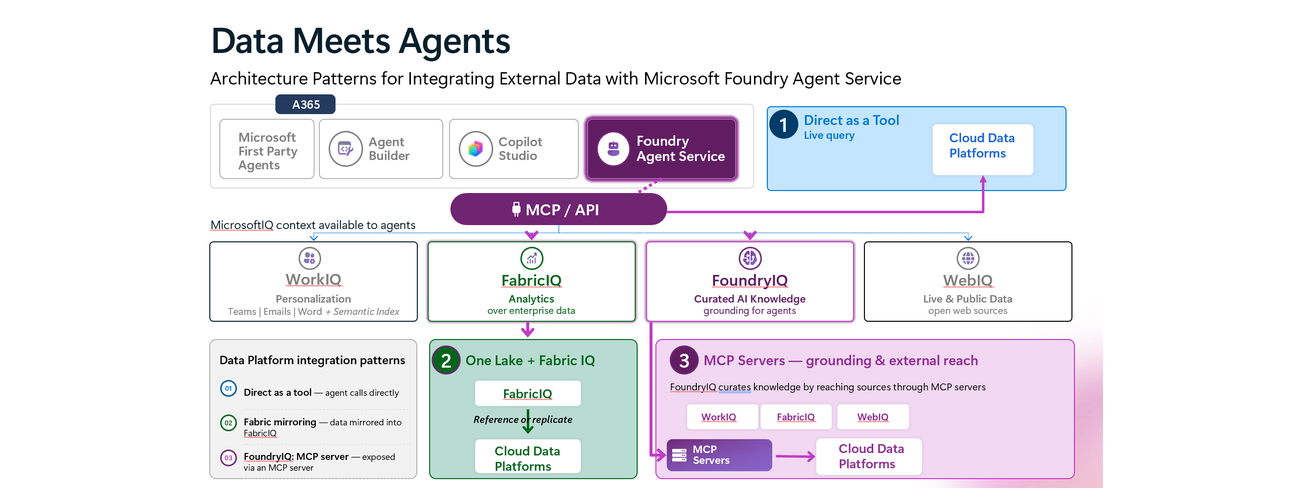
Integration Patterns for Connecting Microsoft Foundry Agents to Enterprise Data Platforms
Introduction
Enterprise agents become more valuable when they can securely access the data, knowledge and business systems organisations already rely on. And, Data Meets Agents is a way of framing a recurring architecture question we hear from customers: How should an agent access enterprise data that already resides across Microsoft Fabric, Azure Databricks, Snowflake, Google BigQuery, Amazon S3/Redshift, Salesforce and other platforms? How can we make that data and its insights available to agents in a secure and governed way? And are there repeatable architecture patterns and best practices that we can adopt across the organisation?
The challenge is not simply finding a connector. It is deciding how the agent should access that data while preserving the right security, governance, semantics, freshness and system-of-record boundaries.
Microsoft provides several ways to build agents, from Microsoft first-party agents and Microsoft 365 Agent Builder to Copilot Studio and Microsoft Foundry Agent Service, each serving different personas and levels of extensibility.
This umbrella blog briefly sets that broader agent-building landscape, but focuses on Microsoft Foundry Agent Service as a starting point and three complementary patterns for integrating enterprise data:
- Direct Tool Access through APIs/MCP – for live access to data and business operations.
- OneLake + Fabric IQ – for governed enterprise data, analytics and business semantics.
- Foundry IQ knowledge grounding – for reusable enterprise knowledge and retrieval.
Although Azure API Management (APIM) is not explicitly shown in the simplified architecture diagrams, we strongly recommend considering it as a runtime governance layer across these integration patterns, where applicable, to provide consistent controls around API and MCP exposure, authentication, policy enforcement, observability and lifecycle management.
We’ll explore where each pattern fits, the trade-offs involved, and how they can be combined within a multi-pattern enterprise architecture.
Microsoft Agent-Building Platform Landscape
Microsoft provides several approaches to building agents, designed for different personas, use cases and levels of extensibility.
| Platform / Approach | Primary audience | Development model | Typical use cases |
|---|---|---|---|
| Microsoft first-party agents | Business users | Ready-to-use / configurable | Purpose-built agent experiences across Microsoft products |
| Microsoft 365 Agent Builder | Information workers | No-code / declarative | Lightweight agents grounded in Microsoft 365 knowledge |
| Microsoft Copilot Studio | Makers and developers | Low-code with pro-code extensibility | Enterprise agents, workflows and business process automation |
| Microsoft Foundry Agent Service | Developers, AI engineers and architects | Pro-code with declarative options | Custom agentic applications, complex orchestration and deep enterprise integration |
Across this ecosystem, Agent 365 provides the cross-platform control plane for governing the enterprise agent estate, bringing together agent identity, inventory, security, compliance, lifecycle management and observability.
Microsoft Intelligence Layer
Alongside the agent-building platforms, Microsoft provides intelligence capabilities that help agents understand and reason over different types of context.
| Intelligence | Primary role |
|---|---|
| Work IQ | Organisational context from Microsoft 365, including people, communications, meetings and files |
| Fabric IQ | Business and analytical context through governed data, semantic models, entities and relationships |
| Foundry IQ | Enterprise knowledge grounding, retrieval and reusable knowledge across multiple sources |
| Web IQ | External context and knowledge from the web |
For Data Meets Agents, however, the focus is not the IQ capabilities themselves. Our focus is the enterprise data that already resides across different data platforms and operational systems — such as Azure Databricks, Snowflake and other cloud data platforms, as well as CRM, ticketing and line-of-business applications so focus will be Fabric IQ and Foundry IQ from intelligence layer.
For this umbrella blog, we briefly establish broader agent building landscape and Microsoft IQ before focusing on Microsoft Foundry Agent Service and the three Data Meets Agents integration patterns. The next section focuses on Microsoft Foundry Agent Service and three architectural patterns for enabling agents to access that existing enterprise data.
Why Microsoft Foundry Agent Service?
Microsoft Foundry Agent Service is positioned for organisations that need greater control over agent orchestration, enterprise integration and how agents execute and interact with tools, data and other agents. Developers can build sophisticated agents and multi-agent orchestration using Microsoft Agent Framework or other code-based agent frameworks, and deploy that application logic to Foundry as Hosted Agents, retaining control over their agent and orchestration logic. Foundry provides the managed control plane and runtime capabilities around those agents, including deployment and hosting, scaling, identity and access, endpoints, tool integration, tracing, monitoring, evaluation and lifecycle management. This combination of framework flexibility, code-level control and a managed enterprise control plane makes Foundry particularly relevant for complex agentic applications that need to orchestrate across multiple enterprise data platforms, knowledge sources and business systems.
Enterprise Data Integration Patterns with Foundry Agent Service
Enterprise data already resides across cloud data platforms, databases and operational systems such as CRM, ticketing and line-of-business applications. The architectural question is therefore not simply how to connect an agent to that data, but: Where should retrieval and semantic reasoning happen, under whose identity, and where should governance be enforced?
With Microsoft Foundry Agent Service, we frame this through three complementary patterns: Direct Tool Access, OneLake + Fabric IQ, and Foundry IQ knowledge grounding. The right pattern depends on whether the agent needs live operational access, governed analytical semantics, or reusable enterprise knowledge — and a single solution may combine all three.
Pattern 1 — Direct Tool Access: APIs and MCP
The Foundry agent accesses an external platform at runtime through a governed API or MCP capability, keeping the external platform as the system of record.
Prefer when: the agent needs live data, an exact lookup, a platform-native capability, or a controlled business action — for example querying Snowflake or Databricks, retrieving a CRM record, checking a ticket or triggering a workflow.
Architecture focus: identity, least privilege, runtime governance, tool design, latency and operational reliability.
Pattern 2 — Unified Data Platform: OneLake + Fabric IQ
Although Fabric capabilities can also be exposed to Foundry through MCP, we show this as a separate architecture pattern because the data strategy is fundamentally different.
Rather than having the agent directly query each external platform, enterprise data residing in Databricks, Snowflake and other cloud data platforms can be referenced, mirrored or intentionally ingested through OneLake. Fabric then provides a governed analytical and semantic layer through capabilities such as Fabric Data Agents, ontologies and Power BI semantic models, which Foundry can consume.
Fabric is the governed data and semantic layer between agents and heterogeneous enterprise data.
Prefer when: agents need shared analytics, governed business semantics, measures, entities and relationships across enterprise data, rather than direct access to individual source systems.
Architecture focus: reference versus replication, semantic ownership, data freshness, Fabric governance and reuse across AI and analytics.
Pattern 3 — Foundry IQ Knowledge Grounding
Enterprise knowledge is exposed through Foundry IQ knowledge bases, providing reusable retrieval and grounding across indexed and remote knowledge sources.
Prefer when: agents need to discover, retrieve and reason over trusted organisational knowledge with grounding and citations, rather than perform analytical queries or operational transactions.
Architecture focus: knowledge curation, retrieval quality, permissions, citations, reuse and knowledge governance.
Quick Pattern Selection Guide
|
Decision Criteria |
Direct as a Tool |
OneLake + Fabric IQ |
Foundry IQ |
|
Data location |
Remains in source |
Replicated or referenced |
Indexed or remotely accessed |
|
Freshness |
Runtime source result |
Depends on integration/query mechanism |
Depends on index freshness or remote source |
|
Best for |
Live query and controlled operation |
Shared analytics and business semantics |
Reusable grounding and unstructured knowledge |
|
Main control point |
MCP server + source permissions |
Source + Fabric governance |
Knowledge base + source permissions |
|
Can combine? |
Yes |
Yes |
Yes |
Conclusion
The three patterns are complementary. A single Foundry agent — or a multi-agent solution orchestrated using Microsoft Agent Framework or other agent frameworks and deployed to Foundry — may use Foundry IQ for enterprise knowledge, Fabric IQ for governed analytical context, and Direct Tool Access for live queries or business actions. The architectural decision should be made per data source and use case, rather than standardising every enterprise integration on a single approach.
This post establishes the architectural framework; follow-up posts will provide implementation details for each pattern.— Direct Tool Access with APIs/MCP, Unified Data Platform with OneLake + Fabric IQ, and Foundry IQ knowledge grounding — covering architecture, identity, governance and key design trade-offs.
We’ll also explore data-source-specific architectures, looking at how enterprise data already residing in platforms such as Azure Databricks, Snowflake, Microsoft Fabric and other data platforms and business systems can be integrated with Microsoft Foundry Agent Service. Where relevant and supported, we’ll also explore how these approaches apply to Copilot Studio, Microsoft first-party agents and Microsoft 365 Agent Builder, helping architects choose the right platform, integration pattern and data architecture for each use case.
A special thanks to Li Ma and Shilfi Gafur for reviewing and contributing to this work. I’m also looking forward to collaborating with them on the upcoming Data Meets Agents blogs as we take a deeper dive into these patterns and data-source-specific architectures.
Stay Connected - 📝 Coming soon: Deep-dive blogs on each pattern (subscribe to be notified) - 💬 Questions?: Drop a comment below
Get Started - 🚀 ⚡ Try now: Quickstart: Deploy your first hosted agent - Microsoft Foundry | Microsoft Learn
Microsoft Foundry documentation | Microsoft Learn
Browse all training - Training | Microsoft Learn
OneLake, the unified data lake - Microsoft Fabric | Microsoft Learn

 Microsoft