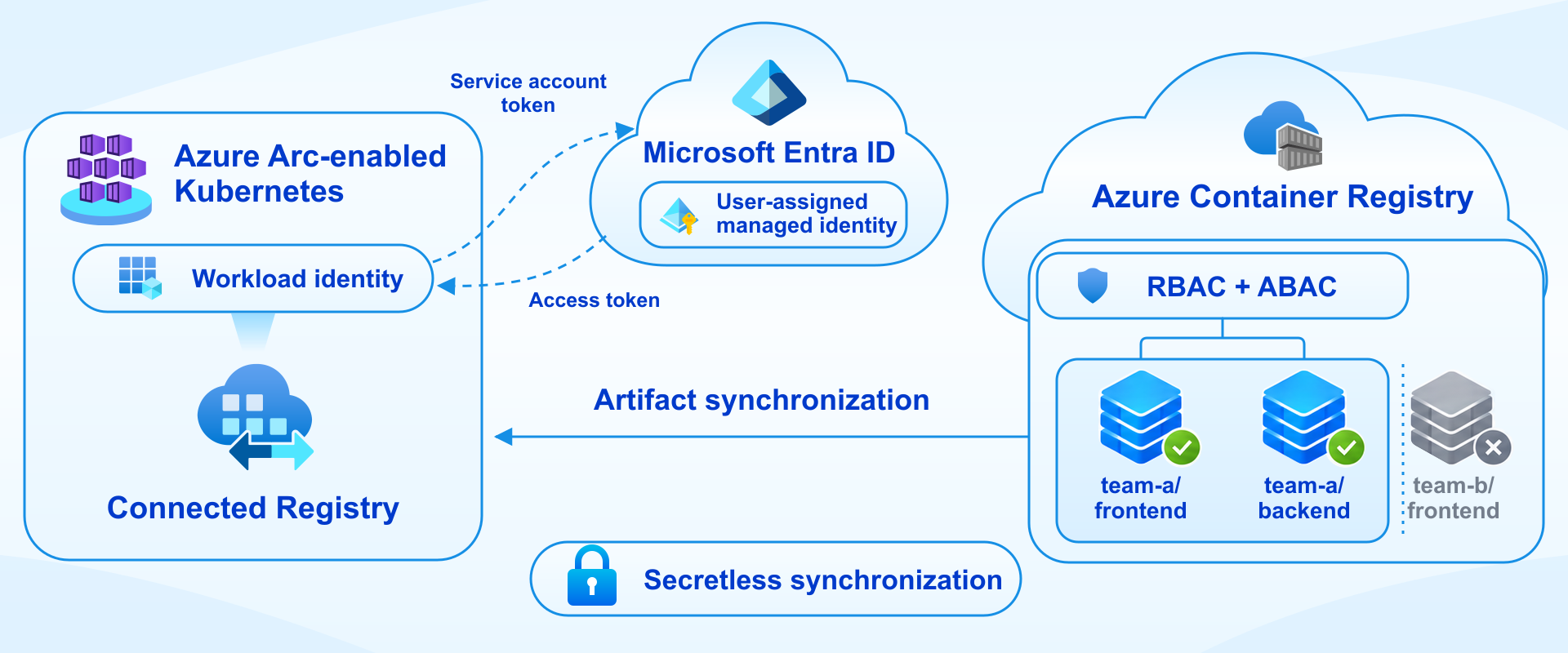
Now in private preview: authenticate Connected Registry synchronization with managed identity and control repository access with Azure RBAC and ABAC on Azure Arc-enabled Kubernetes.
Connected Registry is a feature of Azure Container Registry (ACR) that provides an on-premises or remote replica, synchronizing container images and other OCI artifacts with a cloud-based registry. It gives local workloads nearby access to those artifacts, including in environments with limited or intermittent cloud connectivity.
With this private preview, Connected Registry deployments on Azure Arc-enabled Kubernetes can use a user-assigned managed identity to authenticate synchronization through Microsoft Entra ID. Teams can manage repository access through Azure role-based access control (RBAC) with attribute-based access control (ABAC) conditions, without provisioning or rotating a shared synchronization password.
Managed identity is an additional authentication option. Existing sync-token deployments, with repository access defined by scope maps, continue to work unchanged.
Introducing managed identity for synchronization
The preview is available only for Connected Registry deployed on Azure Arc-enabled Kubernetes distributions that support Azure Workload Identity. With this option:
- No shared synchronization password. The connection string carries the identity's client ID, an identifier rather than a secret, so there's no customer-managed sync password to provision, distribute, or rotate.
- Automatic token management. Connected Registry obtains short-lived Microsoft Entra access tokens and handles registry token exchange and refresh for you.
- Familiar access management. You grant synchronization access with Azure role assignments, the same model you use for other Azure resources.
- Repository-level control. ABAC conditions can restrict access to individual repository names or prefixes. The identity's effective permissions determine which repositories are eligible for synchronization.
For organizations that limit the use of long-lived shared secrets, this brings Connected Registry synchronization into the identity-based model they already use across Azure.
| Sync token | Managed identity (preview) | |
|
Authentication |
ACR sync token |
User-assigned managed identity through Microsoft Entra ID |
|
Connection string carries |
Sync token password |
Identity's client ID (not a secret) |
|
Repository permissions | Scope map |
Azure RBAC role assignment with ABAC conditions |
Both options support repository scoping; they differ in how synchronization authenticates and where you manage its permissions. Only synchronization with the parent registry changes. TLS certificate requirements and local client access stay the same, and Docker, ORAS, and other OCI clients continue to use the Connected Registry's client tokens.
How it works
Authentication relies on a federated trust between the Kubernetes workload and Microsoft Entra ID. You add a federated identity credential to a user-assigned managed identity, trusting your Arc cluster's OIDC issuer and the Kubernetes service account used by the Connected Registry extension.
At runtime, Azure Workload Identity lets the Connected Registry workload exchange its Kubernetes service account token for a short-lived Microsoft Entra access token. Connected Registry uses that token to authenticate to its parent registry and obtain the registry tokens it needs for synchronization. Token acquisition and refresh happen automatically.
Choose what each Connected Registry deployment synchronizes
Connected Registry deployments that share a parent registry often need different subsets of its repositories. For example, a deployment serving Team A's applications might need repositories whose names start with team-a/frontend/ or team-a/backend/, while repositories under team-b/frontend/ stay outside its synchronization scope.
For a ReadOnly Connected Registry, assign its managed identity the Container Registry Connected Registry Sync Reader role on the parent registry, with an ABAC condition that permits repository names starting with either team-a/frontend/ or team-a/backend/. For a ReadWrite Connected Registry, use Container Registry Connected Registry Sync Contributor with the same repository-prefix restrictions. Include the trailing slash so a prefix such as team-a/frontend/ doesn't also match a sibling namespace such as team-a/frontend-legacy/.
The identity's effective permissions define the synchronization scope. Permissions are additive, so review every role assignment the identity holds, including inherited ones. A sync role assigned at the parent registry without an ABAC condition grants repository permissions for all of its repositories, and a restrictive condition on one assignment doesn't cancel broader access granted by another.
Configure permissions before deploying the extension. When role assignments and ABAC conditions are in place and have propagated before you install the Connected Registry extension on Arc, Connected Registry discovers its synchronization scope during initial synchronization. No additional manual resync is needed for that initial setup.
Resync after changing permissions on a running deployment. If you later update the managed identity's role assignments or ABAC conditions in a way that changes synchronization scope, run az acr connected-registry resync so the running Connected Registry rediscovers which repositories to synchronize. Repository operations remain subject to runtime authorization by the parent registry. Narrowing permissions alone doesn't remove artifacts that have already synchronized to the Connected Registry.
Try the private preview
The private preview is intended for evaluation in non-production environments. To get started, you need:
- A Premium parent registry in ABAC-enabled repository permissions mode, with its dedicated data endpoint enabled.
- An Azure Arc-enabled Kubernetes distribution that supports Azure Workload Identity. Arc connectivity alone isn't sufficient.
- One user-assigned managed identity, with a federated identity credential and a Connected Registry sync role assignment.
- Preview approval for your subscription.
The preview supports Connected Registries whose parent is the cloud registry and that have no child Connected Registries. The managed identity binding can't be changed after it's set, so choose the identity you intend to keep.
You can deploy a new Connected Registry with managed identity or migrate an eligible sync-token deployment. Migration is one-way and requires an offline maintenance window.
Ready to evaluate it? The private preview setup guide walks through requesting access, configuring the resources, deploying or migrating, and validating synchronization. As you try it, share your feedback on the setup experience and the repository permission model through the channels listed in the guide.
Resources

 Microsoft