If you've started working with MCP servers in GitHub Copilot, Claude, or any other agent host in an enterprise environment, you've probably hit a similar problem. You want to give your developers access to a useful MCP server, but not every tool it ships with. Maybe one tool is noisy and burns context for no good reason. Maybe one tool calls a paid API. Maybe one tool does something your security team is not comfortable with. The MCP server is all-or-nothing: install it and you get the lot.
Most MCP servers don't give you a way to switch individual tools off. The MCP spec doesn't define one either. So if you want fine-grained control, you need to put something in front of the server that can see the JSON-RPC traffic and make decisions about it. That something is an MCP gateway, and Azure API Management (APIM) can do the job.
What an MCP gateway actually is
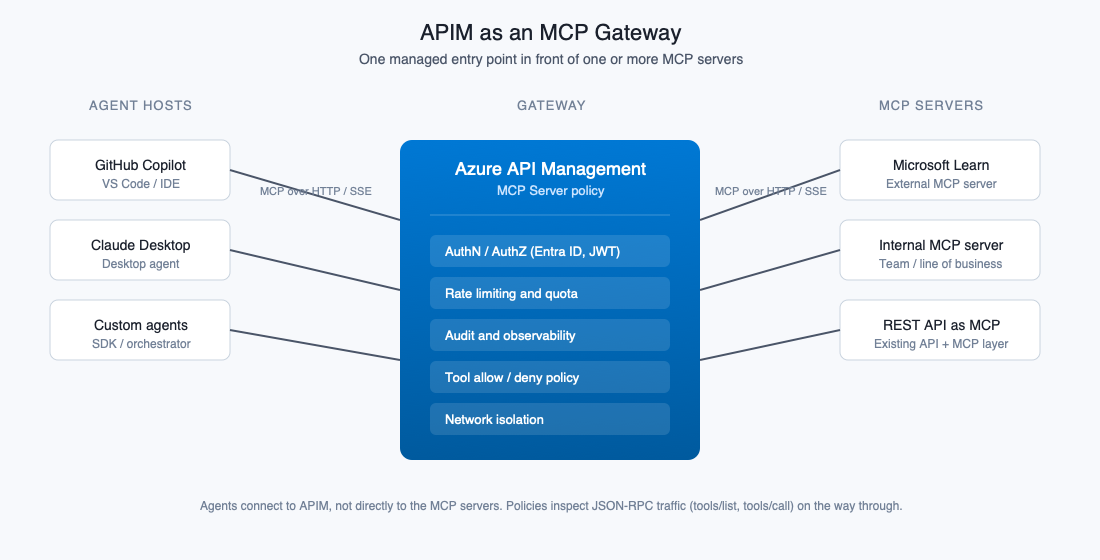
An MCP gateway sits between the agent (the client) and the MCP server (the backend) and inspects the MCP protocol traffic flowing between them. Because MCP is just JSON-RPC over HTTP or SSE, anything that can do reverse-proxy plus payload inspection can in theory act as a gateway. The interesting bit is what you do with that position in the network.
If you've worked with API gateways before, the mental model is the same: you're putting a managed entry point in front of one or more backends, and using policy to control what gets through. The differences are that the protocol is JSON-RPC over a long-lived connection, and the things you're filtering aren't routes but tools, prompts, and resources.
Out of the box, MCP gives you very little operational control. The protocol assumes a trusted one-to-one relationship between a client and a server. There's no built-in authentication story beyond what
the transport gives you, no rate limiting, no audit trail beyond the agent's own logs, and no way to share one MCP server safely across multiple users or teams. A gateway is how you fix all of that without modifying the MCP server itself.
MCP Gateway Functionality
The tool access problem is not the only reason to put a gateway in front of an MCP server. The list looks a lot like the list of reasons you'd put any API behind a gateway, with a few MCP-specific twists:
- Centralised authentication and authorisation. Add Entra ID, mTLS, or scoped tokens in front of MCP servers that ship with little more than an API key.
- Rate limiting and quota. Stop a runaway agent loop from hammering a paid upstream API and racking up a bill in minutes.
- Logging, audit and observability. Capture which user invoked which tool with what arguments and ship it to Log Analytics or your SIEM.
- Network isolation. Keep developer machines off the public internet by fronting external MCP servers with private endpoints and fixed egress IPs.
- Sharing one MCP server across many clients. Turn a single-tenant MCP server into a multi-tenant front door with per-user identity and per-team limits.
- Policy and governance. Control which tools are exposed, redact fields, validate arguments, or transform responses before they reach the agent.
- Aggregating multiple MCP servers. Present one logical MCP endpoint that fans out to several backends so agent hosts have a single connection point.
- Failure handling and resilience. Add retries, circuit breakers, and caching of tools/list rather than have every agent host grow its own.
- Cost management. Put caps, alerts, and per-team chargeback on MCP servers that wrap something paid by the call.
APIM as the gateway
APIM gives you all of the above, and Microsoft has been adding MCP-specific support over the last few releases. The relevant bits for this post:
- There's a dedicated MCP servers section in APIM, separate from the standard APIs blade. This is where MCP-aware features live.
- You can register an existing MCP server as an external MCP server. APIM proxies the protocol traffic and applies policies to it.
- You can also expose a normal REST API as an MCP server, by adding an MCP layer on top of an existing API.
- The standard APIM policy engine works on MCP traffic.
The shape of the problem
The MCP protocol has two methods that matter here:
- tools/list is what the client calls when it connects. The server returns the catalogue of tools available, with names, descriptions, and input schemas. The agent uses this to decide what it can do.
- tools/call is what the client sends when the agent actually wants to invoke a tool.
If you want to hide a tool, you have to deal with both. Filtering tools/list stops the agent ever knowing the tool exists, which is what you usually want. Blocking tools/call stops a determined client (or a tool the agent guessed at) from calling it directly. You need both to be confident the tool is genuinely off-limits.
For the rest of this post I'll use the Microsoft Learn MCP server as the example, because it's public, useful, and ships with three tools:
- microsoft_docs_search
- microsoft_docs_fetch
- microsoft_code_sample_search
Say I want to allow the first two and block the third. Here's how to do it.
Setting up APIM as an MCP gateway
I'm going to skip the bit where you provision APIM. The MCP-specific setup is:
- In your APIM instance, go to MCP Servers in the left-hand nav (it's its own section, not under APIs).
-
- Add a new MCP server. Choose External MCP server as the type.
- Point it at the Microsoft Learn MCP server endpoint. The transport will be HTTP or SSE depending on the upstream, which APIM handles for you.
- Save. APIM now proxies the MCP traffic. Configure the agent to point at the APIM-exposed URL instead of the upstream.
At this point you have a working passthrough. The next step is the policy.
Two ways to control tool access
There are two patterns that work, and the right choice depends on how much maintenance you want to take on.
Option A: Static allowlist
You hardcode the list of tools APIM will expose. APIM intercepts tools/list and returns your fixed list, ignoring whatever the backend says. It also blocks tools/call for anything not on the list.
Pros: predictable, doesn't read the response body, doesn't care what the upstream changes.
Cons: you have to maintain the schemas yourself. If Microsoft adds a useful new tool to the Learn MCP server, you won't see it until you update the policy. If they change the input schema for an existing tool, you'll need to update that too.
This is the option I'd reach for first if I wanted strict control and wasn't expecting the upstream to change much.
Option B: Dynamic deny-list
You let tools/list flow through, then rewrite the response on its way back out, removing the tools you don't want. You also block tools/call for those tools.
Pros: lower maintenance. New tools appear automatically. Schema changes are picked up.
Cons: this reads and rewrites context.Response.Body, and Microsoft's own guidance for MCP policies warns that response-body access can interfere with streaming. In practice, tools/list is non-streaming JSON-RPC and this works fine, but you need to test it carefully in your environment, particularly if your agent host is fussy about response handling. This method also requires you to keep on top of when new tools are added and add them to the list if you don't want them used, they will automatically be available to users if you do not.
Pick this one when you're confident in the upstream and want to minimise toil.
Option A: the allowlist policy
Here's the full policy for the static allowlist. It goes into the MCP Server policy editor in APIM. You'll notice there's no <base /> in the sections. Some MCP Server policy editors don't include them, and the policy works fine without them.
<policies> <inbound> <choose> <when condition="@{ var body = context.Request.Body.As<Newtonsoft.Json.Linq.JObject>(preserveContent: true); if (body == null) { return false; } var rpcMethod = (string)body["method"]; return string.Equals(rpcMethod, "tools/list", System.StringComparison.OrdinalIgnoreCase); }"> <return-response> <set-status code="200" reason="OK" /> <set-header name="Content-Type" exists-action="override"> <value>application/json</value> </set-header> <set-body>@{ var req = context.Request.Body.As<Newtonsoft.Json.Linq.JObject>(preserveContent: true); var id = req != null ? req["id"] : Newtonsoft.Json.Linq.JValue.CreateNull(); var tools = new Newtonsoft.Json.Linq.JArray( new Newtonsoft.Json.Linq.JObject( new Newtonsoft.Json.Linq.JProperty("name", "microsoft_docs_search"), new Newtonsoft.Json.Linq.JProperty("description", "Search official Microsoft/Azure documentation"), new Newtonsoft.Json.Linq.JProperty("inputSchema", new Newtonsoft.Json.Linq.JObject( new Newtonsoft.Json.Linq.JProperty("type", "object"), new Newtonsoft.Json.Linq.JProperty("properties", new Newtonsoft.Json.Linq.JObject( new Newtonsoft.Json.Linq.JProperty("query", new Newtonsoft.Json.Linq.JObject( new Newtonsoft.Json.Linq.JProperty("type", "string") )) )) )) ), new Newtonsoft.Json.Linq.JObject( new Newtonsoft.Json.Linq.JProperty("name", "microsoft_docs_fetch"), new Newtonsoft.Json.Linq.JProperty("description", "Fetch a Microsoft documentation page as markdown"), new Newtonsoft.Json.Linq.JProperty("inputSchema", new Newtonsoft.Json.Linq.JObject( new Newtonsoft.Json.Linq.JProperty("type", "object"), new Newtonsoft.Json.Linq.JProperty("properties", new Newtonsoft.Json.Linq.JObject( new Newtonsoft.Json.Linq.JProperty("url", new Newtonsoft.Json.Linq.JObject( new Newtonsoft.Json.Linq.JProperty("type", "string") )) )), new Newtonsoft.Json.Linq.JProperty("required", new Newtonsoft.Json.Linq.JArray("url")) )) ) ); var response = new Newtonsoft.Json.Linq.JObject( new Newtonsoft.Json.Linq.JProperty("jsonrpc", "2.0"), new Newtonsoft.Json.Linq.JProperty("id", id), new Newtonsoft.Json.Linq.JProperty("result", new Newtonsoft.Json.Linq.JObject( new Newtonsoft.Json.Linq.JProperty("tools", tools) )) ); return response.ToString(Newtonsoft.Json.Formatting.None); }</set-body> </return-response> </when> <when condition="@{ var body = context.Request.Body.As<Newtonsoft.Json.Linq.JObject>(preserveContent: true); if (body == null) { return false; } var rpcMethod = (string)body["method"]; var toolName = (string)body["params"]?["name"]; return string.Equals(rpcMethod, "tools/call", System.StringComparison.OrdinalIgnoreCase) && string.Equals(toolName, "microsoft_code_sample_search", System.StringComparison.OrdinalIgnoreCase); }"> <return-response> <set-status code="200" reason="OK" /> <set-header name="Content-Type" exists-action="override"> <value>application/json</value> </set-header> <set-body>@{ var req = context.Request.Body.As<Newtonsoft.Json.Linq.JObject>(preserveContent: true); var id = req != null ? req["id"] : Newtonsoft.Json.Linq.JValue.CreateNull(); var error = new Newtonsoft.Json.Linq.JObject( new Newtonsoft.Json.Linq.JProperty("jsonrpc", "2.0"), new Newtonsoft.Json.Linq.JProperty("id", id), new Newtonsoft.Json.Linq.JProperty("error", new Newtonsoft.Json.Linq.JObject( new Newtonsoft.Json.Linq.JProperty("code", -32601), new Newtonsoft.Json.Linq.JProperty("message", "Tool disabled by API Management policy: microsoft_code_sample_search") )) ); return error.ToString(Newtonsoft.Json.Formatting.None); }</set-body> </return-response> </when> </choose> </inbound> <backend /> <outbound /> <on-error /> </policies>It's a chunk of XML, but it's doing only three things. Here's what each part is for.
The outer <choose> and the two <when> branches. This is just an if/else if. APIM peeks at the inbound JSON-RPC request and decides which branch to fire. The first branch handles tools/list. The second handles tools/call for the specific tool I want to block. If neither matches, nothing happens in the policy and the request flows through to the backend as normal. So tools/call for the allowed tools, plus initialize, ping, and anything else MCP throws at the gateway, all pass through untouched.
The tools/list branch: synthesise the catalogue. When the agent asks for the tool list, APIM never forwards the call. Instead, the policy reads the id off the incoming request (so the response correlates correctly), builds a JArray containing only the tools I want to expose, with their names, descriptions, and inputSchema blocks, wraps that in a JSON-RPC result envelope, and returns it directly with <return-response>. The backend never sees the request. That's the bit that makes Option A bulletproof: there is no upstream behaviour that can leak through, because the upstream isn't involved.
The tools/call branch: hard-block the disallowed tool. When the agent tries to call microsoft_code_sample_search directly (whether it guessed at it, cached it from a previous run, or someone added it to a config file), the policy short-circuits with a JSON-RPC error. The error code is -32601, which the spec defines as "Method not found", and the message says plainly that the tool was disabled by APIM. Well-behaved agents will surface that to the user and move on. Without this branch, hiding the tool from tools/list would only stop honest clients.
A couple of incidental things worth knowing. The preserveContent: true argument on context.Request.Body.As<...>() is important: without it, reading the body consumes it and the rest of the pipeline gets nothing. And the OrdinalIgnoreCase comparisons are belt-and-braces: MCP method names are case-sensitive in the spec, but agents in the wild are inconsistent.
Option B: the deny-list policy
Same scenario, different approach. Let tools/list flow through to the backend and rewrite the response on the way out. Still block tools/call for the disallowed tool.
```xml <policies> <inbound> <choose> <when condition="@{ var body = context.Request.Body.As<Newtonsoft.Json.Linq.JObject>(preserveContent: true); if (body == null) { return false; } var rpcMethod = (string)body["method"]; var toolName = (string)body["params"]?["name"]; return string.Equals(rpcMethod, "tools/call", System.StringComparison.OrdinalIgnoreCase) && string.Equals(toolName, "microsoft_code_sample_search", System.StringComparison.OrdinalIgnoreCase); }"> <return-response> <set-status code="200" reason="OK" /> <set-header name="Content-Type" exists-action="override"> <value>application/json</value> </set-header> <set-body>@{ var req = context.Request.Body.As<Newtonsoft.Json.Linq.JObject>(preserveContent: true); var id = req != null ? req["id"] : Newtonsoft.Json.Linq.JValue.CreateNull(); var error = new Newtonsoft.Json.Linq.JObject( new Newtonsoft.Json.Linq.JProperty("jsonrpc", "2.0"), new Newtonsoft.Json.Linq.JProperty("id", id), new Newtonsoft.Json.Linq.JProperty("error", new Newtonsoft.Json.Linq.JObject( new Newtonsoft.Json.Linq.JProperty("code", -32601), new Newtonsoft.Json.Linq.JProperty("message", "Tool disabled by API Management policy: microsoft_code_sample_search") )) ); return error.ToString(Newtonsoft.Json.Formatting.None); }</set-body> </return-response> </when> </choose> </inbound> <backend /> <outbound> <choose> <when condition="@{ var req = context.Request.Body.As<Newtonsoft.Json.Linq.JObject>(preserveContent: true); if (req == null) { return false; } var rpcMethod = (string)req["method"]; return string.Equals(rpcMethod, "tools/list", System.StringComparison.OrdinalIgnoreCase); }"> <set-body>@{ var bodyText = context.Response.Body.As<string>(preserveContent: true); if (string.IsNullOrEmpty(bodyText)) { return bodyText; } var resp = Newtonsoft.Json.Linq.JObject.Parse(bodyText); var tools = resp["result"]?["tools"] as Newtonsoft.Json.Linq.JArray; if (tools == null) { return bodyText; } var filtered = new Newtonsoft.Json.Linq.JArray(); foreach (var t in tools) { var name = (string)t?["name"]; if (!string.Equals(name, "microsoft_code_sample_search", System.StringComparison.OrdinalIgnoreCase)) { filtered.Add(t); } } ((Newtonsoft.Json.Linq.JObject)resp["result"])["tools"] = filtered; return resp.ToString(Newtonsoft.Json.Formatting.None); }</set-body> </when> </choose> </outbound> <on-error /> </policies>This policy splits the work across inbound and outbound. The shape is different from Option A, but again it's only doing a few things.
Inbound: block direct calls to the disallowed tool. This block is identical to the one in Option A. If the agent tries to invoke microsoft_code_sample_search directly, APIM returns the JSON-RPC -32601 error and the request never reaches the backend. Everything else (including tools/list and calls to the allowed tools) carries on through to the upstream MCP server.
Backend: nothing custom. The empty <backend /> is deliberate. We want the upstream server to handle every request that wasn't blocked in inbound, including tools/list. APIM forwards it, the server returns its full catalogue, and we get a chance to rewrite the response on the way back.
Outbound: filter the catalogue on the way out. This is the bit that does the dynamic work. The <when> condition checks the original request (not the response) to see if this was a tools/list call, because we only want to rewrite responses to that specific method. If it was, the policy reads the response body as a string, parses it as JSON, walks the result.tools array, builds a new array containing everything except the deny-listed tool, swaps it back into the response object, and writes the modified JSON back with <set-body>. For any other method, the response flows through untouched.
The reason this option is more fragile than Option A is right there in that last paragraph: it reads and rewrites context.Response.Body. Microsoft's own guidance for MCP policies flags that response-body access can interfere with streaming. For non-streaming JSON-RPC like tools/list, this works fine in practice, but if you ever extend this pattern to filter streamed responses (resource updates, long-running tool calls), you'll need to think much harder about it. For the narrow case of trimming tools/list, it's a reasonable trade for the lower maintenance cost.
Validating it works
Once the policy is saved, hit the APIM-exposed MCP endpoint with the agent of your choice and check three things:
- tools/list returns only microsoft_docs_search and microsoft_docs_fetch. The third tool should not appear.
- tools/call for microsoft_code_sample_search returns a JSON-RPC error with code -32601.
- The two allowed tools still actually work end-to-end.
Which one should you use
Default to Option A (the static allowlist) unless you have a specific reason not to. It's the most predictable and it doesn't touch the response body, which keeps you well clear of the streaming caveat. You will have to update it when the upstream tool catalogue changes, but this does give you greater control of when you make those changes available and creates a conscious decision to allow them, or not.
Reach for Option B when the upstream changes frequently, or when you'd rather block specific known-bad tools and let everything else through. Test it carefully and watch the agent's behaviour for any sign of streaming or framing issues.
If you've got a fully internal MCP server you control, the cleanest answer is to fix the tool list at the source and skip the gateway changes altogether. But for third-party MCP servers, this is an approach you can apply without changing the underlying MCP server.

 Microsoft