Useful walkthrough, and the telemetry first rule is the part most people skip. Two thoughts from the small estate side:
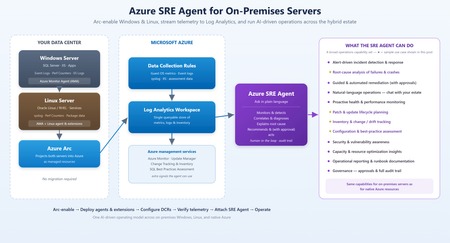
- Arc, the Azure Monitor Agent, data collection rules and a Log Analytics workspace are a solid foundation, but for a team with a few dozen Windows machines, and workstations as well as servers, that is a lot to stand up before the agent can help. A short "minimum viable setup" section would help smaller teams decide if it is worth it.
- Human approval plus an audit trail for anything that acts is the right default, and I hope that stays the case as the agent gets more capable.
For readers whose estate is mostly Windows endpoints and who want something lighter, there are agent-based tools that take the same diagnose and fix approach without the Azure plumbing. TFalke is one example (disclosure: I work on it): an AI agent investigates a device and fixes the problem with a command that is shown for approval first. I would see it as a different fit for endpoint fleets, not a replacement for Arc and Azure Monitor on server estates.

 Microsoft

