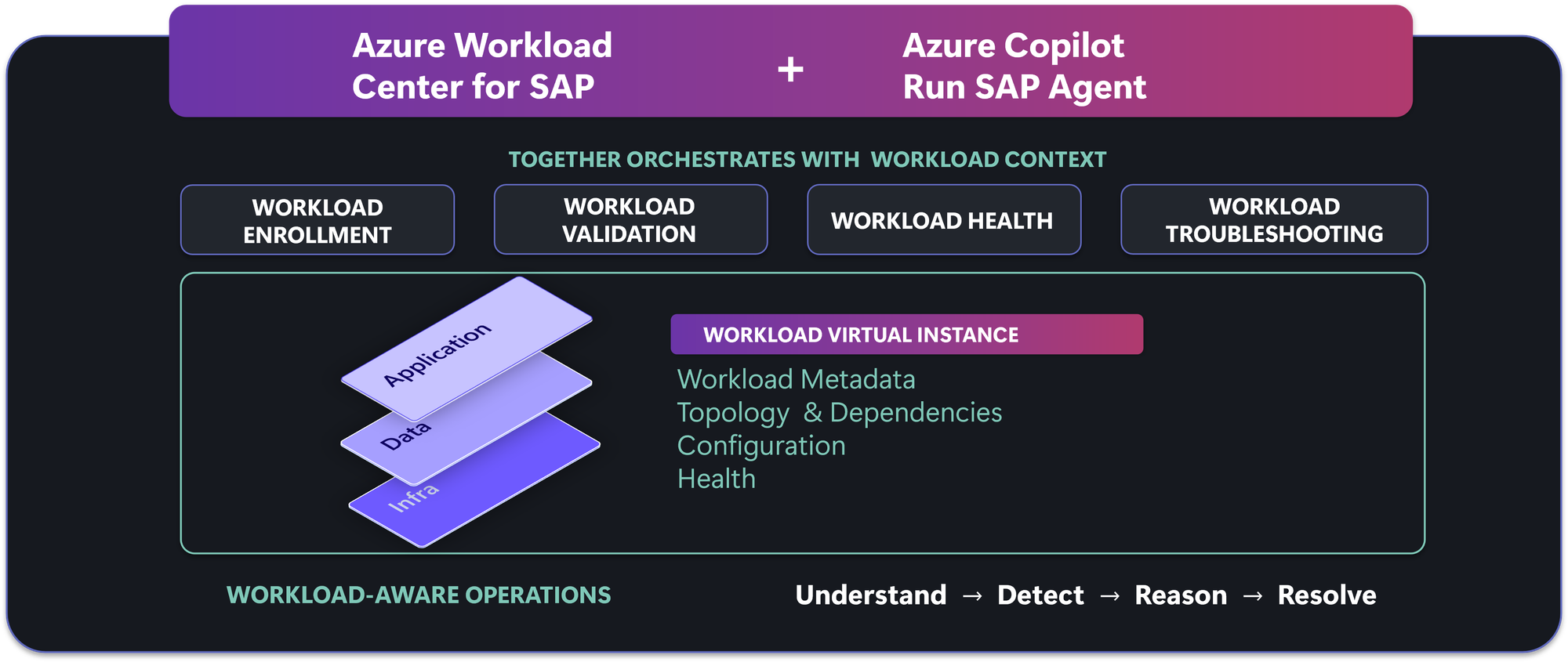
Running mission-critical SAP workloads on Azure require more than managing individual virtual machines, disks, networks, and alerts. SAP operations teams need to understand the health, configuration, and performance of the entire SAP system and quickly apply resources where attention is required.
Today we are announcing the limited preview of Azure Workload Center for SAP, together with the Azure Copilot Run SAP Agent. Azure Workload Center for SAP gives you one workload-level view of each SAP system, finds configuration deviation before it causes incidents, and speeds up troubleshooting with AI-assisted investigation.
Azure Center for SAP solutions is now Azure Workload Center for SAP
Azure Center for SAP solutions (ACSS) established SAP as a top-level workload in Azure. It supports guided deployment and registration of existing SAP systems, and it represents each system as a Virtual Instance for SAP solutions (VIS) with health and status, quality checks, application-tier start and stop, infrastructure metrics and cost analysis. As our capabilities have developed, we continue to invest resources into enhancing our product in order to drive additional value for our customers.
Azure Workload Center for SAP builds on that foundation. It represents a shift from a broader workload-centric foundation into day-two operations and best practices which include, reliability, health, and agent-assisted operations.
- Proactive prevention through configuration validation to industry best practices, and deviation detection as soon as they are detected.
- Faster detection and remediation, through workload health with application signals and guided remediation.
- Broader coverage, with support for more SAP system stacks and architectures.
“Managing complex SAP environments requires bringing together workload health, intelligent troubleshooting, root cause analysis, configuration insights and best-practice guidance across multiple operational tools. Azure Workload Center for SAP, brings these capabilities together with AI-driven operations to help teams identify what needs attention and respond more proactively.”
- Girish Phadke – Global Head – TCS Microsoft Azure Practice
Introducing the Workload Virtual Instance
Azure Workload Center for SAP introduces the Workload Virtual Instance (WVI), a logical collection of the components and Azure resources that make up a workload, such as a single SAP system. Each SAP system is enrolled as one WVI. Its child workload components represent SAP central services, application servers, the database and web dispatchers, and each component is mapped to its Azure compute, network and storage resources.
Beyond the resources, a WVI can also capture metadata such as the SAP system identifier (SID), product, environment, and high-availability architecture. This context lets Azure services and the Run SAP agent understand which resources exist and the role each one plays in the SAP system.
Agent-assisted operations with the Azure Copilot Run SAP agent
The Azure Copilot Run SAP agent, also in limited preview, brings AI for IT operations (AIOps) to SAP workloads through agentic AI experience. It combines proactive issue prevention with reactive troubleshooting, using the context and metadata stored in the WVI.
“Azure Workload Center for SAP brings workload information, operational signals, and expertise together across multiple technical layers. Its purpose-built agents help investigate issues and guide operations, while remaining easy to access and use through a straightforward portal interface. We believe this connected approach can simplify operations and help teams understand and resolve issues faster.
Additionally, for Protera, the potential for agent-to-agent integration gives us a way to bring Microsoft’s workload intelligence into the operational workflows and automation we already use to support our customers.”
-Sean Donaldson, Chief Technology Officer, Protera
Our vision places agents at the center of the customer experience. The Run SAP Agent streamlines operations, improves workload quality, resiliency, and accelerate troubleshooting. The agent keeps people in control. It analyzes, describes, recommends, and it can also generate remediation scripts, but you decide when and where any change runs.
Features and Benefits
A streamlined, flexible onboarding experience
Azure Workload Center for SAP extends registration to Java stack systems, disaster recovery (DR) systems, Web Dispatchers and SAP HANA scale-out architectures, so you can bring your entire SAP landscape under one management model.
You can choose the onboarding method that suits your environment. Automated discovery through the SAP Host Control API for ABAP based systems or Azure Resource Graph (ARG) to find supported systems and create a WVI for each. For Java based systems, ARG, or manual onboarding lets you define the Azure resources for each component. Both methods are available through the Azure portal and APIs.
Identify Configuration Risks Before They Become Problems
SAP environments depend on hundreds of configuration decisions across Azure infrastructure, operating systems, clustering, and SAP components. Settings that were correct at deployment can deviate over time, and new resources do not always follow the same configuration standards. Configuration Validation in Azure Workload Center for SAP checks your systems against Microsoft and SAP best practices and flags deviation risks before it becomes an operational problem.
With the Run SAP agent, you can ask what changed, understand the impact, check current settings through configuration retrieval and get a workload-aware remediation plan with scripts to immediately resolve the issue. Together, the portal and agent help you move from visibility to action with control over when and where you execute changes.
- Detect risk earlier and reduce investigation effort: We now offer more configuration checks as well as the ability to view all configuration checks and customize the ones to run through configuration templates. You can view validation results, affected components, and recommended fixes in the portal or ask the agent to summarize.
- Stay informed without constant monitoring: Notifications are consolidated by system, reducing repetitive alerts and enabling you to stay on top of high impact deviations, with the ability to quickly drill in to get more details.
- Move faster from findings to a coordinated plan. Use agent-generated remediation guidance and script to plan the next steps. Choose when and where to execute remediation steps and confirm resolution on the next validation run.
From detection to verification, the portal and agentic experience help you reduce configuration-related risk, maintain a more consistent SAP landscape, and spend less time turning troubleshooting and results into action.
Faster Time to Insights with Workload Health Observability
Understanding the health of your SAP workload starts with seeing how their components work together. Workload Health Observability shows the health of your SAP workload, its components and the underlying infrastructure in one view, so you can quickly determine if there are any issues and where they are located. Built on Azure Monitor health models, it combines infrastructure metrics with optional application signals and evaluates the overall workload as healthy, degraded, or unhealthy.
When you onboard a system as a WVI, it comes with predefined metrics, thresholds and health logic for infrastructure out of the box, and you can customize the model to define what healthy means for your environment. You can add application signals such as SAP HANA availability and set alerts at the workload or component level, so related issues are grouped together. When WVI health changes, the timeline, dependency-graph and resource-level views on the dashboard can show when the change occurred and which components are affected.
- Detect and triage issues faster. Bring workload signals together to help your team identify issues and decide where to investigate.
- Reduce manual correlation effort. Spend less time piecing together separate monitoring views.
- Communicate workload status more clearly. Give business stakeholders and operations teams a shared view of workload health.
- Build on existing operational tools. Complement your monitoring platforms and incident-management processes rather than replace them.
“Azure Workload Center for SAP innovation, combined with TCS’ experience in complex SAP landscapes, will help customers move toward more proactive operations, faster issue resolution and greater resilience for mission-critical SAP workloads on Azure.”
- Girish Phadke – Global Head – TCS Microsoft Azure Practice
The Workload Health Observability also includes an AI-generated health summary that highlights issues requiring attention and suggests where to begin investigating the underlying issue.
Understanding Impact Faster when Problems Occur
When an SAP workload experiences an outage, knowing where to begin can be a challenge. The clues may be spread across the SAP system. Azure Workload Center for SAP brings that investigation into a shared workload context through WVI. You can start with your SAP workload, identify the affected component, and explore the infrastructure associated with it.
The Impact Analysis capability helps you make sense of the complex issues affecting your Azure resources starting with virtual machines by bringing relevant diagnostic signals and evidence context into a focused investigation. It highlights key findings, affected resources and contributing conditions. By correlating Azure platform signals, the agent can tell you whether resource-level issues such as VM impacts have occurred and why. You can ask questions in natural language to:
- Determine the probable root cause of an outage or slowdown.
- Identify the affected virtual machines and other resources, and what contributed to the impact.
- Understand the scope of the issue, including other virtual machines affected by the same cause.
What's next
We plan to extend investigation into SAP performance and availability issues by correlating SAP application signals with Azure platform and infrastructure evidence. The goal is evidence-backed mitigation guidance, with you still in control of every change.
Alongside Azure Workload Center for SAP, Azure Workload Center for Oracle is also now in limited preview. Both workload centers are built on the Workload Virtual Instance.
Pricing and Availability
Azure Workload Center for SAP is available in Australia East, Central US, East US, East US 2, Germany West Central, Italy North, Japan East, Korea Central, North Europe, South Central US, West Europe.
There is no additional licensing fee for the product in limited preview. Customers only pay for the underlying infrastructure which is deployed as part of the product or services they enable.
Limited Preview Sign up
If your organization operates mission-critical SAP systems on Azure and wants to help shape the next generation of workload-level operations, sign up to try out the limited preview of Azure Workload Center for SAP Preview.
Learn more
To learn more about the preview of Azure Workload Center for SAP, please check out the following resources to get started.
- Documentation - Azure Center for SAP solutions | Microsoft Learn
- Ignite Session - Bring agentic operations to Oracle and SAP on Azure
- Sign up - Azure Workload Center for SAP Preview

 Microsoft