Introduction:
Empower SAP customers with a strategic understanding of GitHub Copilot offerings, including plan options, value realization, account models, and key considerations for enterprise adoption. Through a guided, step-by-step setup in Visual Studio Code, SAP developers will gain hands-on experience with GitHub Copilot and Copilot Chat in real-world development scenarios. In addition, a practical exercise demonstrates how to configure and optimize Copilot within Visual Studio Code enabling SAP teams to effectively adopt AI-assisted development and accelerate application delivery.
Imagine you are an SAP developer working within a fast-paced enterprise environment, tasked with delivering a new feature or extension for a business-critical application, such as SAP S/4HANA or SAP BTP. With limited familiarity with the existing codebase and tight delivery timelines, ensuring quality, performance, and reliability is essential. GitHub Copilot provides a powerful AI-assisted development experience that can help SAP developers accelerate delivery while maintaining high standards. It can interpret complex code, generate documentation, and assist in writing efficient, error-free code enabling teams to meet deadlines and deliver high-quality solutions with confidence.
GitHub Copilot plans for SAP Customers:
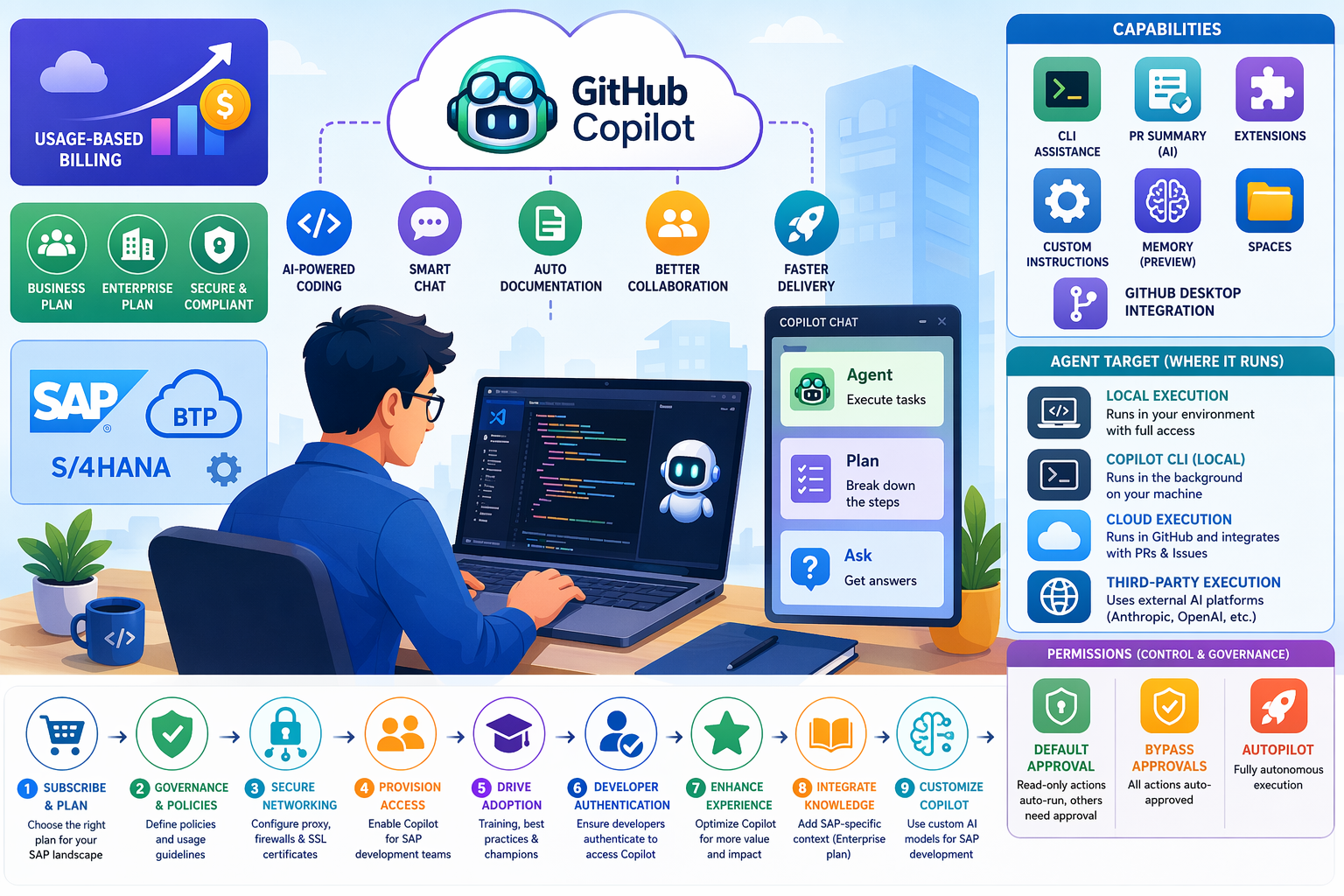
Starting June 1, 2026, GitHub is transitioning GitHub Copilot from a request-based billing model to a usage-based billing model. For SAP customers, this shift enables more granular cost alignment with actual AI usage across development teams, supporting improved transparency and budget control within SAP programs.
Organizations and enterprises can leverage this model to better manage consumption across SAP development scenarios such as S/4HANA extensions, BTP applications, and integrations while optimizing costs based on real usage patterns. Individual SAP developers will also benefit from flexible billing aligned to their actual Copilot usage.
GitHub Copilot Capabilities for SAP Development:
GitHub Copilot offers a range of capabilities designed to support SAP developers across the entire development lifecycle from coding and testing to collaboration and deployment.
- GitHub Copilot in the CLI: SAP developers can use a chat-like interface directly in the terminal to interact with command-line tools. Copilot provides command suggestions and explanations, helping streamline development workflows for SAP integrations, deployments, and automation tasks.
- AI-Generated Pull Request Summaries: Copilot generates intelligent summaries of pull requests, highlighting key changes, impacted files, and areas requiring attention. This enables SAP teams to accelerate code reviews and improve collaboration especially in complex enterprise environments. (Not available in the Free plan.)
- GitHub Copilot Extensions
Copilot Extensions allow SAP customers to integrate external tools and systems such as SAP BTP services or other enterprise platforms into the development workflow. These extensions can be customized and shared to support organization-specific SAP scenarios.
- Custom Instructions
SAP teams can tailor Copilot responses by providing context about development standards, tools and project requirements ensuring outputs align with SAP best practices and enterprise guidelines.
- GitHub Copilot Memory (Public Preview)
Copilot can learn from and retain context about a repository, improving the relevance and quality of suggestions. This is particularly valuable for SAP projects with complex codebases and domain-specific logic.
- GitHub Copilot Spaces
Organize SAP project assets such as code, documentation, and specifications into contextual “Spaces.” This ensures Copilot delivers responses grounded in the appropriate SAP business and technical context.
- GitHub Copilot in GitHub Desktop
Automatically generate commit messages and descriptions based on SAP code changes, improving consistency, traceability, and developer efficiency.
GitHub Copilot Agents for SAP Development:
GitHub Copilot Chat in Visual Studio Code provides specialized agents designed to support different stages of the SAP development lifecycle ranging from planning to implementation and knowledge exploration.
- Agent (Execution Agent)
Use the Agent when you need to implement a specific SAP development task, such as building extensions, integrations, or enhancements for SAP S/4HANA or SAP BTP.
The Agent can autonomously identify relevant files, propose code changes, execute supporting commands, and iteratively refine outputs to complete the task efficiently.
- Plan (Planning Agent)
Use the Plan agent when you want to define a structured, step-by-step approach before implementation. This is particularly useful for SAP scenarios requiring careful design such as complex integrations or multi-system workflows. The Plan agent breaks down requirements into clear steps that can be executed by the Agent.
- Ask (Knowledge Agent)
Use the Ask agent to explore SAP-related code, development patterns, or general technical concepts without making changes. This is ideal for understanding unfamiliar codebases, learning new SAP development paradigms, or clarifying architecture and best practices.
Implementing GitHub Copilot in SAP Environments:
SAP organizations can follow a structured approach to successfully set up and scale GitHub Copilot across development teams:
- Subscribe and Select the Right Plan
Begin by subscribing to GitHub Copilot and selecting the appropriate plan (Business or Enterprise) based on your SAP landscape, governance needs, and scale of adoption.
- Establish Governance and Policies
Define organizational policies to control how GitHub Copilot is used across SAP development scenarios. This includes enabling or restricting specific features to align with compliance, security, and SAP development standards.
- Configure Secure Networking
Ensure secure connectivity by configuring proxy servers or firewalls to allow required Copilot endpoints. SAP customers may also need to manage SSL certificates to align with enterprise security requirements.
- Provision Access to Development Teams
Enable GitHub Copilot for selected SAP developers or teams such as those working on SAP BTP extensions, integrations, or modernization initiatives. A phased rollout can help identify challenges and demonstrate early value before scaling organization wide.
- Drive Adoption Across SAP Teams
Establish a structured enablement strategy including training, best practices, and internal champions to promote effective usage of Copilot within SAP development workflows. A self-service licensing model can further accelerate adoption.
- Support Developer Authentication
In enterprise environments, ensure SAP developers complete the required authentication steps to access Copilot from their development tools, such as Visual Studio Code.
- Enhance the Copilot Experience
SAP organizations can further optimize value by:
- Integrating knowledge bases to provide SAP-specific context (Enterprise plan)
- Customizing Copilot through tailored AI models aligned to SAP development needs
- Leveraging Copilot Extensions to integrate SAP tools and other enterprise systems into the development workflow
Set Up GitHub Copilot in Visual Studio Code:
For SAP developers, setting up GitHub Copilot is a simple process:
- Ensure you are using the latest version of Visual Studio Code to support modern SAP development workflows (e.g., SAP BTP and full-stack development).
- In the Status Bar, select the GitHub Copilot icon and choose Use AI Features to begin setup.
- Sign in with your GitHub account and follow the authentication prompts to enable access.
- If your account is already authenticated, select Set up Copilot to complete activation.
- Follow the guided steps to authorize Copilot within your development environment.
If no subscription is assigned, SAP developers will be onboarded to the GitHub Copilot Free plan for initial evaluation.
Once setup is complete, GitHub Copilot is ready to assist with SAP development tasks such as code generation, documentation, and optimization.
Customize GitHub Copilot Settings for SAP Development:
SAP developers can tailor GitHub Copilot behavior to align with enterprise development standards and project requirements:
Access Settings by selecting the gear icon in the lower-left corner of Visual Studio Code.
Navigate to GitHub Copilot configurations, organized into key areas:
- Code Editing Settings
Configure inline code suggestions, next-edit predictions, and language-specific behaviors to support SAP development languages and frameworks.
- Chat Settings
Customize how Copilot Chat behaves, including terminal integration helpful for managing SAP build, deployment, and integration tasks.
- Agent Settings
Control advanced capabilities such as agent mode, request limits, and tool approvals to align with SAP governance, security, and compliance requirements.
Selecting Where GitHub Copilot Agents Run in SAP Development:
In addition to selecting the appropriate Copilot agent for a specific task, SAP developers can control where the agent executes using the Agent Target option in the Chat view. This capability determines how the agent interacts with SAP development environments and when results are delivered.
- Local Execution
Runs directly within the developer’s environment with full access to the workspace, tools, and codebase. Ideal for SAP developers working on real-time coding tasks, exploring complex SAP codebases, or making controlled updates where step-by-step review is required.
- GitHub Copilot CLI (Local Background Execution)
Executes tasks in the background on the developer’s machine. Suitable for SAP scenarios where predefined tasks such as script generation, automation, or batch updates can run while developers continue working on other SAP components.
- Cloud Execution
Runs remotely in GitHub and integrates with workflows such as issues and pull requests. This option is well-suited for SAP teams collaborating on large-scale projects, enabling developers to delegate tasks, generate pull requests, and streamline code reviews across distributed teams.
- Third-Party Execution
Uses external AI platforms (such as Anthropic or OpenAI) to run agents either locally or in the cloud. This provides flexibility for SAP customers to integrate advanced AI capabilities into their development workflows, depending on enterprise architecture and governance requirements.
Controlling Agent Permissions (for SAP Customers):
You can define how much autonomy your digital agents have by using the Permissions settings within the Chat experience. Adjusting these levels allows you to balance operational efficiency with governance and oversight an important consideration in SAP-driven business processes.
|
Permission Level |
Description |
|
Default Approval |
Only low-risk, read-only actions are executed automatically. Most agent-initiated actions require user confirmation, ensuring control over business-critical operations and data changes. |
|
Bypass Approvals |
All agent actions are automatically approved without user prompts. This setting streamlines workflows but should be used with appropriate governance controls, especially in sensitive SAP environments. |
|
Autopilot |
Enables fully autonomous execution. The agent handles actions end-to-end, including responding to clarification requests, without user intervention. Ideal for well-defined scenarios, but requires strong trust, monitoring, and compliance alignment. |
Conclusion:
GitHub Copilot offers SAP organizations a powerful way to modernize development through AI-assisted engineering. It combines intelligent code generation, contextual insights, and advanced features like agents, CLI integration, and memory to accelerate delivery while maintaining enterprise-grade quality and compliance.
It’s usage-based billing model further enhances value by aligning costs with actual adoption, providing transparency, scalability, and control across scenarios such as S/4HANA extensions, SAP BTP applications, and integrations. With a structured approach, covering plan selection, governance, secure configuration, and phased rollout, organizations can integrate Copilot effectively while meeting SAP-specific standards. Ultimately, Copilot enables SAP teams to boost productivity, enhance collaboration, and drive innovation at scale, delivering faster time to market and sustained business value.
Reference links:
Plans for GitHub Copilot - GitHub Docs
Usage-based billing for individuals - GitHub Docs
Usage-based billing for organizations and enterprises - GitHub Docs

 Microsoft