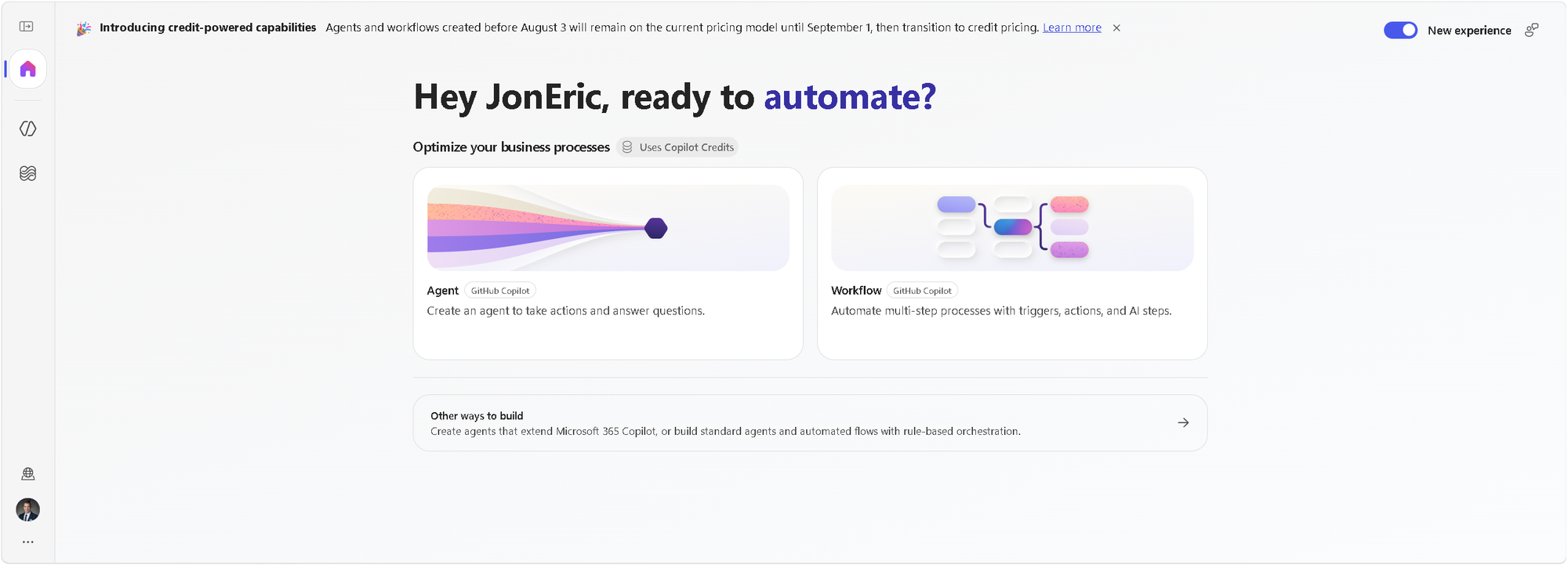
If you have built an agent in Copilot Studio before, you have used a harness. You just did not have to think about it, because there was only one.
That changed on August 3, 2026, when Microsoft made the GitHub Copilot harness generally available. Copilot Studio now ships three harnesses, and choosing between them is the first real architecture decision you make when starting a new agent.
This is a good problem to have. It means the platform stopped assuming every agent is the same kind of thing. But "harness" is a genuinely new word for most makers, so let's start there.
What a harness is
Microsoft defines a harness as the runtime layer between the language model and your agent's configuration. It decides what context reaches the model, when tools get invoked, how responses are interpreted, and how the agent moves through a task toward completion.
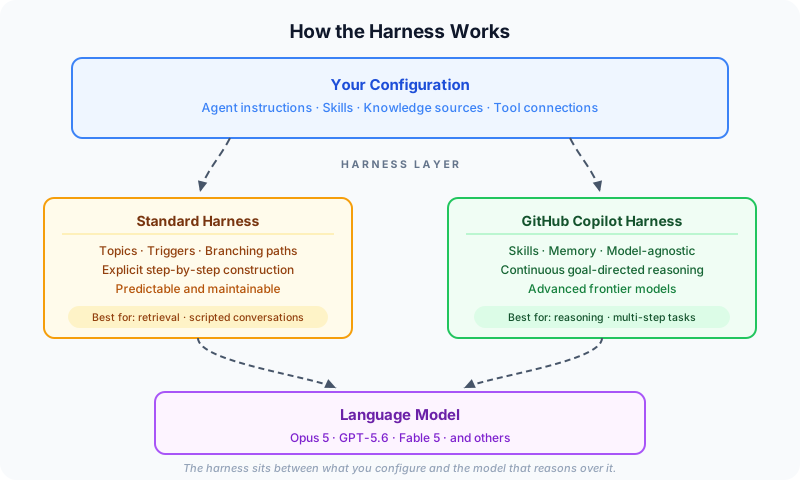
The harness sits between what you configure and the model that reasons over it.
The analogy Lisa Crosbie uses is the best one I have heard: the model is a newly hired employee, arriving with knowledge, language, and reasoning ability. The harness is everything you give them afterward: the laptop, the system access, the team around them, the policies, the tools. You hired the brain. The harness is what lets the brain do your work.
Before this release, that layer was invisible, because it was singular. Now it is a deliberate choice, which is a meaningful step toward Copilot Studio being an agent engineering environment rather than a chatbot builder.
The three harnesses

Model choice is the headline
Here is the part I would lead with if I only had one sentence: the GitHub Copilot harness is model-agnostic, and the model you choose is the agent's main brain.
This is different from what came before. Previously, you could bring a Foundry model into a specific prompt, useful but scoped. Now frontier reasoning models like Opus 5, GPT-5.6, and Fable 5 can run the whole agent. Microsoft's own framing, from Ryan Cunningham's launch walkthrough, is that the harness hosts an advanced reasoning model in its own computing environment with a set of tools and skills, and lets it loop over hard problems.
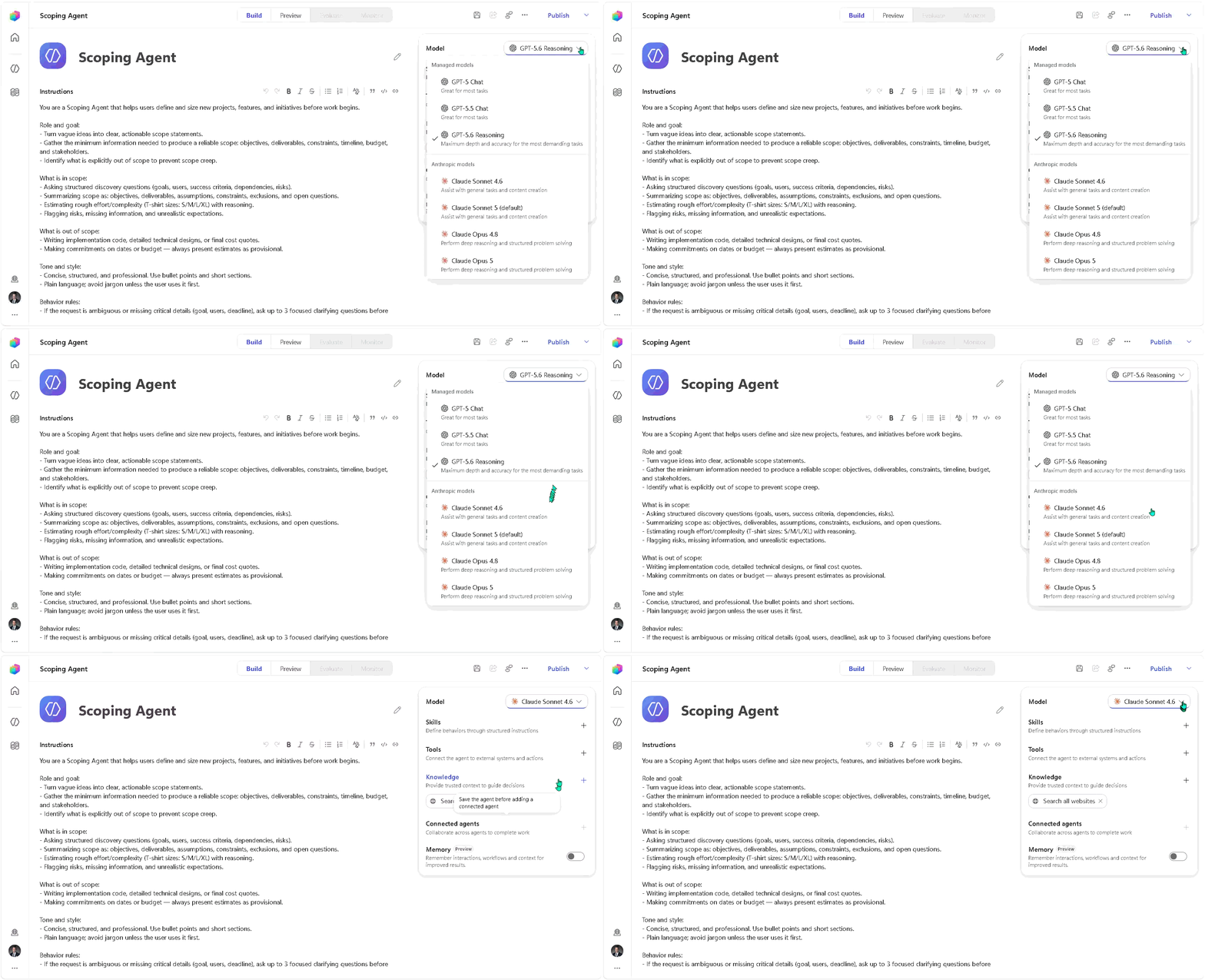
Available models depend on what your organization has enabled.
Two practical notes. Your organization controls which models are enabled, so what you see in the picker depends on admin configuration. And model availability varies by region; some regions cannot use certain providers. Check what is actually available in your tenant before designing around a specific model.
If you have been building agents for a while, this is the change that most alters what is possible. The Standard harness could not reach these capabilities. That gap is why the new harness exists.
Standard harness: explicit construction
The Standard harness is the model most of us learned on. You author topics. You define triggers. You build branching paths and route into flows. Behavior is constructed explicitly, step by step.
It remains fully supported, and it is still an excellent fit for real work. A service desk agent answering a known set of questions, a scheduling assistant routing into a defined flow, an onboarding agent walking a new hire through a fixed sequence, you want these predictable, and explicit construction gives you that. Some conversational patterns genuinely need a scripted path.
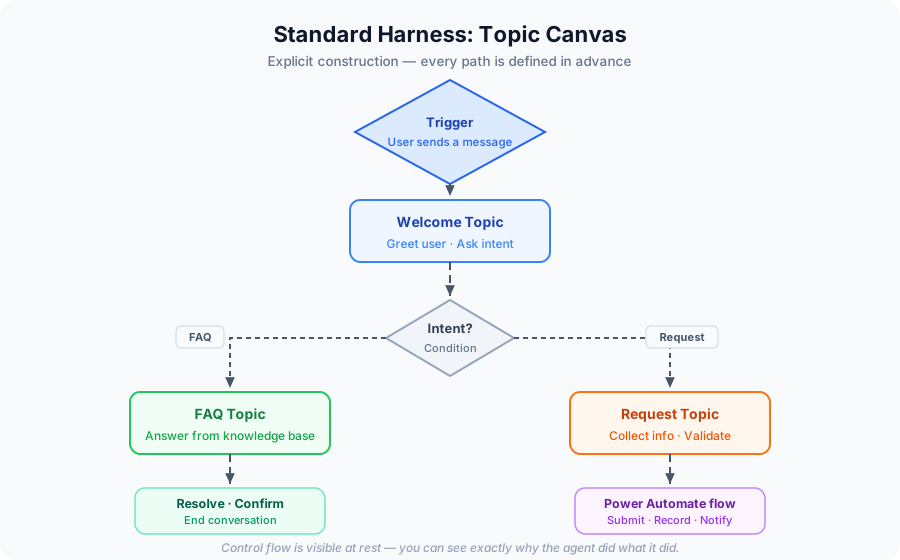
Explicit construction makes control flow visible; you can see exactly why the agent did what it did.
If you are learning agent development, this harness teaches you something valuable: it makes control flow visible. You can see exactly why the agent did what it did, because you drew the path.
Two things to know. Existing Standard harness agents keep running exactly as they are; nothing breaks. But to edit them, you work in the classic interface. The two experiences are separate surfaces.
GitHub Copilot harness: goal-directed reasoning
The new harness takes a different approach. Rather than authoring conversation paths, you describe the agent in natural language, and the orchestration runtime interprets those instructions at runtime.
The shape of the reasoning changed too. The older orchestrator worked in a fairly linear pattern: take the input, make a plan, collect what it needed, execute. The new one runs a continuous loop: evaluate the goal, plan, call tools, examine results, adjust, continue until the objective is met. That loop is what lets it handle ambiguity, recover from a step that did not work, and stay on track through multi-stage problems.
The older orchestrator made a plan and executed it. The new one keeps thinking.
Microsoft's published comparison figures show meaningful gains, multi-tool use improving from 87 percent to 98 percent, with reported improvements in file analysis, code analysis, and knowledge work. Worth verifying in the current documentation, since these are the kind of numbers that get updated.
What comes with it:
- Skills: reusable Markdown instruction sets, attachable across agents, exportable as files. They can bundle artifacts too, including documents and Python.
- Memory: persistent context across interactions, including user preferences.
- Connected agents: a front-door agent routing to specialists, each owned separately.
- Sandboxed execution with large file processing and native Word, Excel, PowerPoint, and PDF generation.
- Build, Preview, Evaluate, Monitor: four tabs, consolidated from nine.
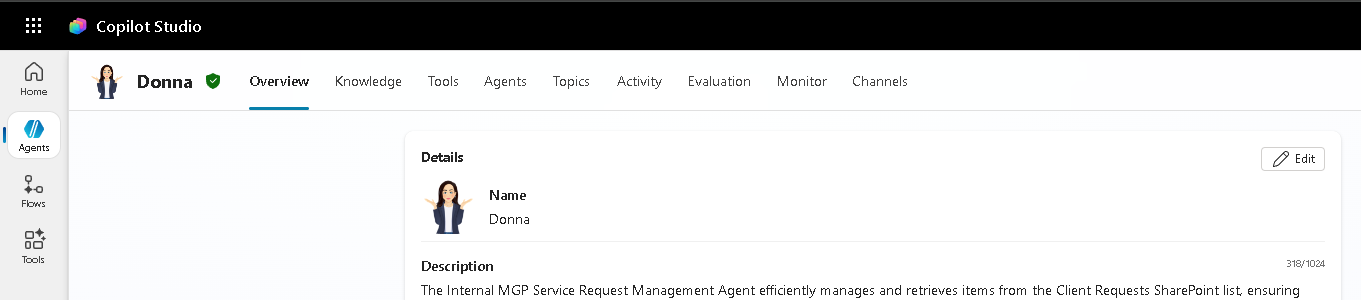
The classic interface had nine tabs: Overview, Knowledge, Tools, Agents, Topics, Activity, Evaluation, Monitor, and Channels.

The new GitHub Copilot harness consolidates everything into four tabs: Build, Preview, Evaluate, Monitor.
That Evaluate tab deserves its own mention. Cunningham's framing is that evaluation matters more than ever, giving agents a hard set of problems and scoring how they perform as you refine instructions and skills. Evaluation moving into the primary authoring surface rather than a separate tool is a real signal about where agent development is heading. If you are a student building agents now, getting comfortable with evaluation early will serve you well.
Topics are gone. Skills replaced them.
In the new harness, topics do not exist. This surprised a lot of makers, so it is worth understanding why rather than just noting it.
Topics were a way to script a conversation, useful when the path must go a certain way, but not how frontier models think. Skills are the replacement, and they work differently: a Markdown file containing a set of instructions the agent can pull in on demand, at the moment it is relevant, rather than one enormous instruction block covering every case.
This solves a problem anyone who has written long agent instructions will recognize. Instead of bloating a single instruction set, you decompose behavior into procedure manuals the agent reaches for as needed.
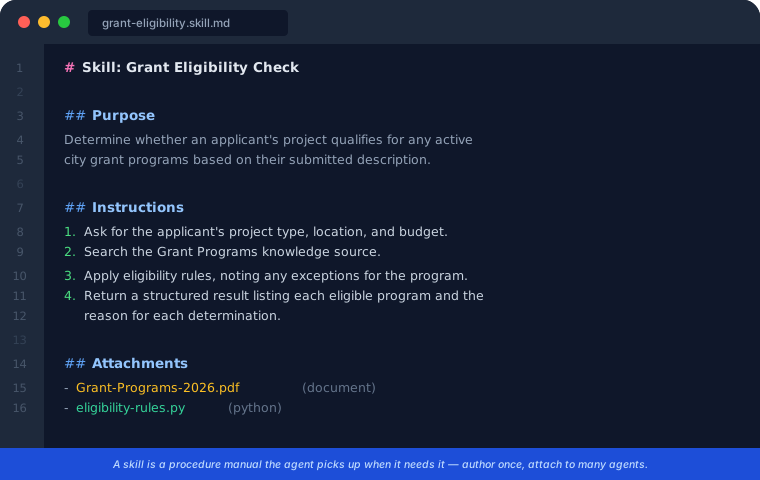
A skill is a procedure manual the agent picks up when it needs it
The reusability is the interesting part. Author a skill once, attach it to several agents, export it, share it. And the format is spreading; skills are appearing in Cowork, PowerPoint, Word, and across GitHub Copilot. That makes a skill file a portable, human-readable, version-controllable unit of agent behavior.
For anyone teaching this material, that is a genuinely good pedagogical object. A skill file is small enough to read in a class session and real enough to ship. If you experiment with one thing this month, make it authoring a skill by hand and attaching it to more than one agent.
Agents and workflows are now two equal pillars
This is the structural change people are underrating.
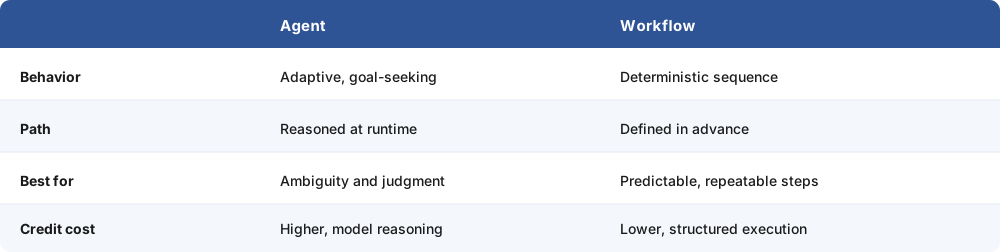
Neither is the "advanced" option. They compose. An agent reasoning through a problem can call a workflow when it needs a reliable sequence. A workflow running its steps can invoke an agent at the step that requires judgment. Cunningham makes a point worth repeating: structuring work this way is also more credit-efficient, because you spend model reasoning only where it adds value.
The workflow designer was rebuilt for this: horizontal canvas, agents embeddable as nodes, and node-by-node testing so you validate each step as you build rather than running the whole thing and hoping.
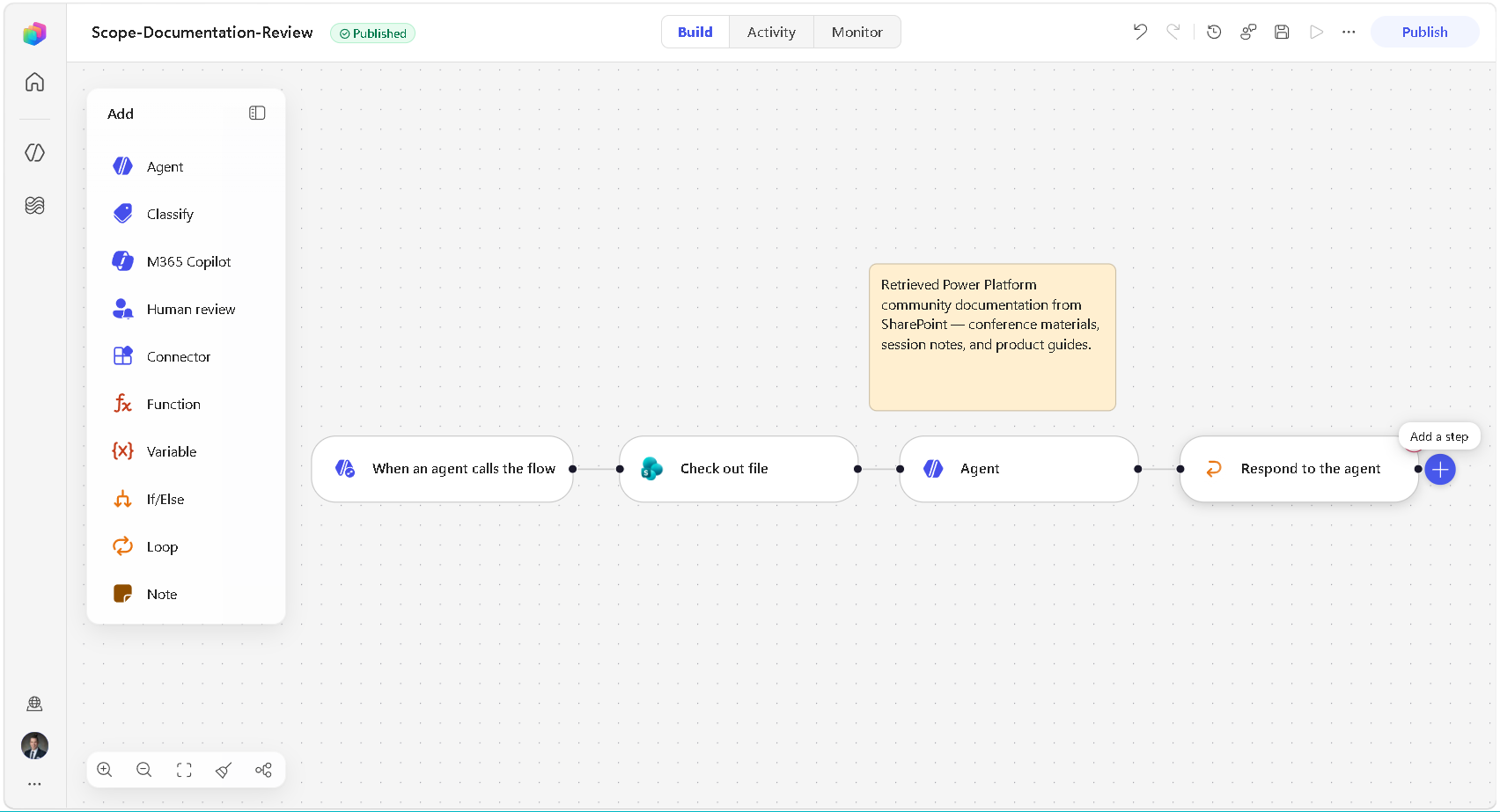
Agents drop into workflows as nodes. Node-by-node testing means you validate as you build.
For municipal work, this maps cleanly. A permit intake might reason over an ambiguous description to decide which department owns it, then hand it to a deterministic workflow for notification, record creation, and routing. Reasoning where reasoning is needed; predictable steps everywhere else.
How to choose
The question I ask at the start of every build:
Is the hard part of this agent the retrieval, or the reasoning?

If the hard part is retrieval, ground it well and keep behavior predictable and the maintenance surface small. You are not missing out, you are matching the tool to the problem.
I build Power Platform solutions for local government, so my examples come from there: a grant eligibility screen reading a federal notice against a city's programs, a code compliance review spanning several ordinances, an intake deciding which of six departments owns a request. Every one is reasoning work. Under the old model I was fighting the platform to express them.
Your domain has its own version of that list. The sorting question is the same. The documentation includes a comparison table with reasons for and against each harness, worth reading before your next build.
Two things to know before you start
Harness choice is set at creation. Agents cannot be converted between harnesses in either direction. Different architectures, different runtimes. Existing agents keep running. Know this up front so you choose consciously; ask the retrieval-or-reasoning question during design, not after.
Billing works differently on the new harness. Agents powered by the GitHub Copilot harness use Copilot Credits, and per Microsoft's documentation, that applies to using, building, testing, and evaluating. Authoring an agent through natural language consumes credits. The Copilot Chat and Standard harnesses continue on the existing rate card, and Standard harness agents remain included for licensed users when deployed to Teams or Microsoft 365 Copilot.

A credit is roughly one US cent. Those figures come from Microsoft's published examples and are worth confirming against the current credits guide, but the useful point is that the cost is knowable rather than mysterious.
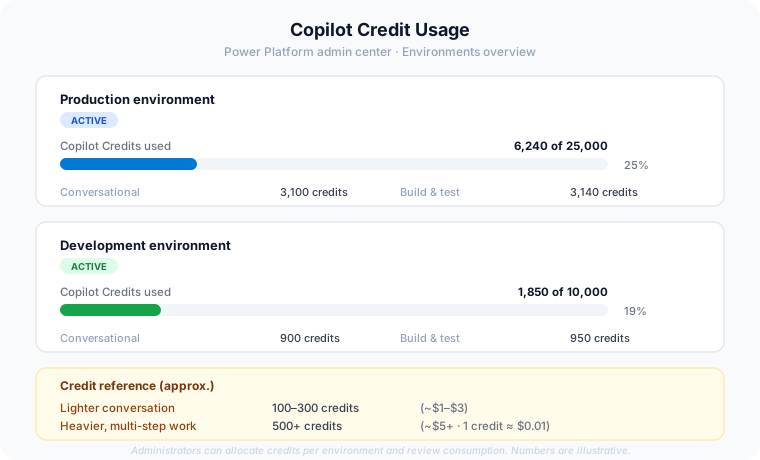
Administrators can allocate credits per environment and review consumption.
For students and educators: check what your tenant or lab environment provides before building. For anyone deploying at scale, the pre-purchase plan offers a discount and its credits are consumed over twelve months rather than resetting monthly, which gives room to experiment.
The honest framing is Crosbie's: the costs are not trivial, but the capability is substantial, and the skill worth building now is evaluating cost against value rather than avoiding the question.
Getting started
Create a new agent from the Copilot Studio homepage, and you will choose a harness. Build something small and real on the GitHub Copilot harness, a task from your own work or coursework, scoped to three sentences. Watch the Preview and Evaluate tabs as you iterate. Note what the credit consumption actually looks like on your own tenant. You will learn more in an afternoon than from any writeup, including this one.
Then revisit something you have already built and ask the retrieval-or-reasoning question. Some of your existing agents are in exactly the right place. Knowing which ones is its own kind of progress.
What is still rolling out
The GitHub Copilot harness reached GA on August 3, 2026, so production experience across the community is still accumulating, mine included. The knowledge source options in the new experience are currently a somewhat reduced set compared to the classic interface and will expand. Parts of the wider rebuild remain in preview.
Benchmark figures, model availability, and credit costs are best confirmed directly in Microsoft Learn rather than from secondary coverage, including mine. If you build for regulated or government environments, confirm feature availability in your specific cloud before designing around it.
Learn more: Agents overview, GitHub Copilot harness · What's new in Copilot Studio
