Hey everyone! I am Shivam Goyal, a Microsoft MVP, and I am super excited to share a workshop I created that is going to save you a massive amount of time.
Designing smart AI workflows is arguably one of the most creative and enjoyable parts of engineering. Trying to force a single, massive prompt to execute a complex, multi-step business pipeline perfectly? Not so much. We have all been there: you write a giant prompt to handle a multi-step task, only for the AI to get confused, miss critical details, and give completely different answers every time you run it.
To solve this giant prompt problem, I built a hands-on multi-agent workshop. Today, we are looking at how you can use the Foundry Toolkit for VS Code alongside the project blueprints I designed to build, debug, and deploy specialized multi-agent teams without any infrastructure headaches.
What is the Foundry Toolkit for VS Code?
The Foundry Toolkit for VS Code is a unified extension that brings cloud-scale AI development right into your local code editor. Instead of constantly jumping between web portals, command lines, and code files, the toolkit gives you a single place to manage your entire AI application.
With this toolkit installed in Visual Studio Code, you can:
- Access the Model Catalog: Instantly browse and connect your code to leading AI models.
- Build Locally: Write your agent logic using standard frameworks like the Microsoft Agent Framework (MAF).
- Inspect & Debug: Trace data flow and agent conversations in real-time before moving to production.
- Deploy with One Click: Ship your local project directly to the cloud as a fully managed Foundry Agent Service.
Inside My Workshop: Lab 02 Multi-Agent Workflow
To show you exactly how to make the most of this toolkit, I built a practical, real-world scenario in Lab 02: Multi-Agent Workflow, which you can find inside the open-source repository.
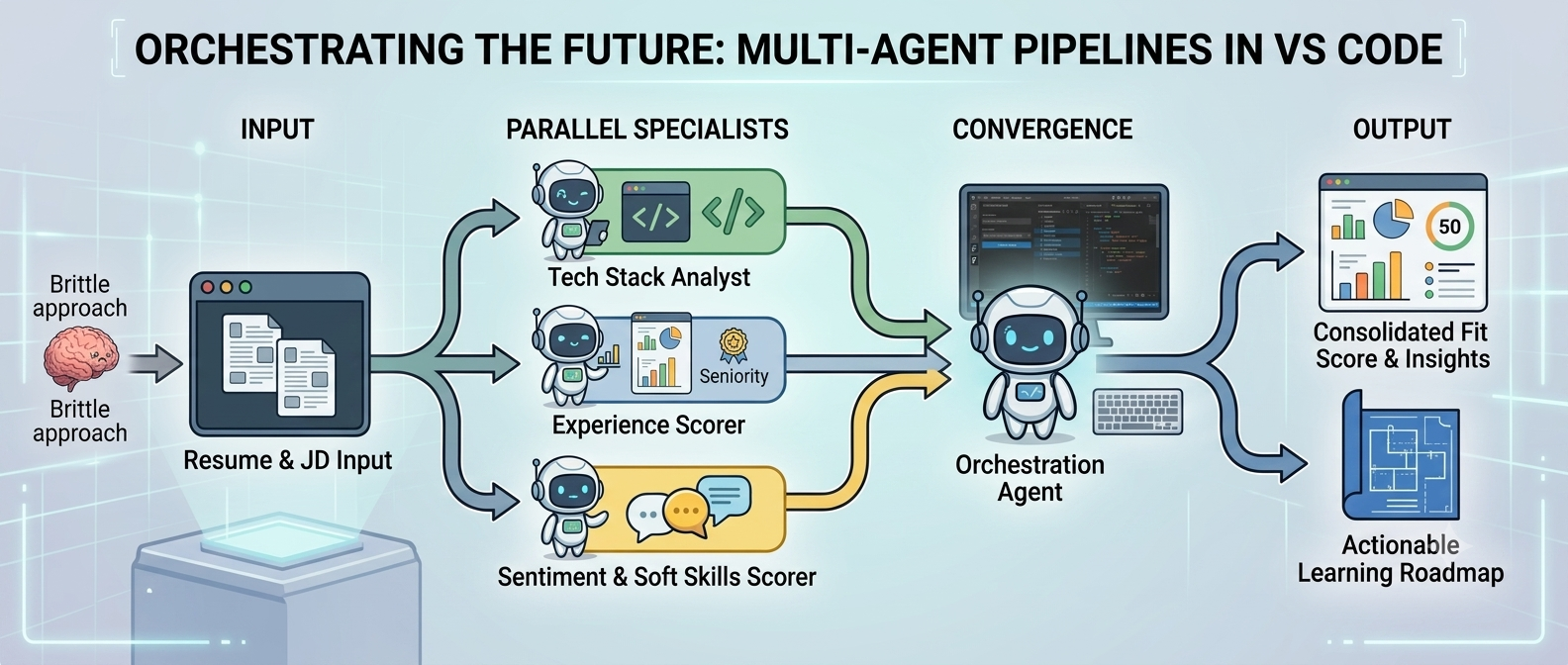
In this lab, I walk you through building a "Resume → Job Fit Evaluator" pipeline. Instead of relying on a single prompt, the workflow orchestrates a squad of four specialized AI agents working together using smart design patterns:
1. The Fan-Out Pattern (Parallel Work)
When a resume is submitted, the system splits the task and feeds it to two agents at the exact same time:
- The Tech Stack Analyst: Focuses entirely on programming languages, frameworks, and tools.
- The Experience & Impact Scorer: Evaluates career history, performance metrics, and leadership.
2. The Fan-In Pattern (Consolidation)
Once the parallel analysis is complete, the workflow channels their notes into the final two agents to consolidate the data:
- The Fit Evaluator: Synthesizes the information into a single compatibility score.
- The Roadmap Architect: Generates a custom step-by-step learning path to help the candidate bridge any skill gaps.
The Development Workflow: Step-by-Step
The lab I put together provides a straightforward walkthrough that takes you from an empty directory to a live cloud application without ever leaving your code editor.
Step 1: Click to Build Your Workspace
You don't need to write complicated setup code from scratch. By using the Agent Builder interface inside the VS Code extension, you can click a button to automatically generate all the starter configurations and project folders I've mapped out for you.
Step 2: Give the Agents Their Jobs
Next, you customize what each agent does using a simple configuration file (agent.yaml). This is where you tell the agents which AI models to use from the Foundry Model Catalog. You then add your project keys to connect to your cloud workspace:
FOUNDRY_PROJECT_ENDPOINT=https://<your-workspace>.services.ai.azure.com/api/projects/<your-project>
AZURE_AI_MODEL_DEPLsOYMENT_NAME=<your-ai-model>
Step 3: Test and Fix on Your Computer
Before sharing your project with the world, you can run the whole AI team locally on your machine. Using a tool called the Agent Inspector, you can see exactly how the agents talk to each other, trace data steps, and tweak your text instructions until they work perfectly.
Step 4: One-Click Cloud Launch
When your local tests work great, you don't need to be a server or container expert to deploy them. The VS Code extension automatically packages your code and registers it with the Foundry Agent Service as a live Hosted Agent.
Step 5: Test the Live App
Once your AI team is live in the cloud, you can open the built-in Remote Agent Playground web page. Drag and drop a real resume into the window, hit run, and watch the streaming logs show your cloud agents processing the data together in real-time.
Ready to Build Your Own AI Team?
Building reliable AI tools means moving away from massive, unpredictable prompts and moving toward small, organized teams of agents using standard patterns like Fan-Out and Fan-In. The combination of the Foundry Toolkit and the structured labs I've created makes it easy to build, test, and host these systems without worrying about server infrastructure.
The entire workshop is free, open-source, and ready for you to clone today. Jump into Lab 02 and see how easy multi-agent orchestration can be!
Get Started Now: Explore my lab repository at Foundry_Toolkit_for_VSCode_Lab/workshop/lab02-multi-agent at main · microsoft-foundry/Foundry_Toolkit_for_VSCode_Lab
Let's Connect!
If you enjoyed this walkthrough, have questions about the workshop, or want to share your own agent workflows, let's keep the conversation going:
