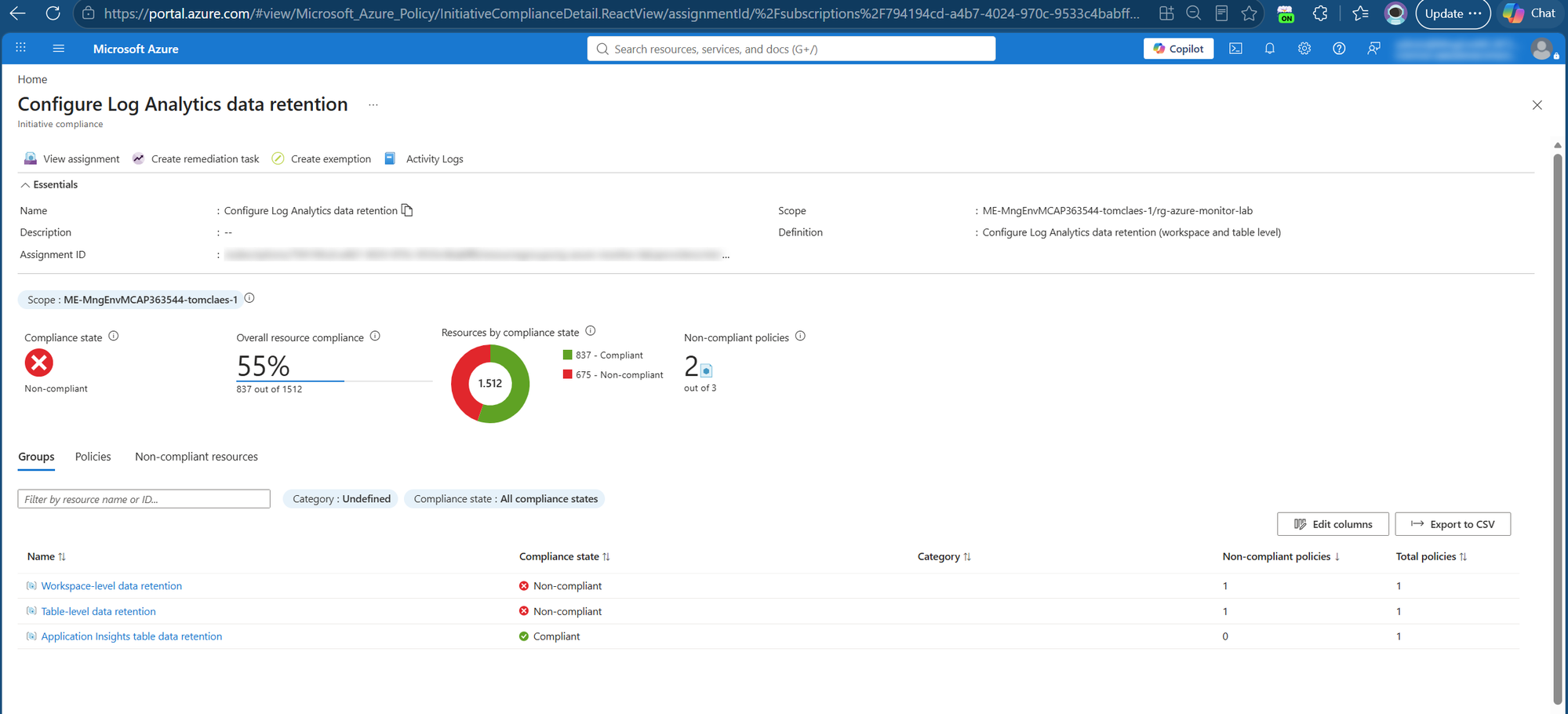
Managing Log Analytics data retention across many workspaces and tables is hard to do consistently, and small misconfigurations can quietly drive up Azure Monitor costs. This solution uses Azure Policy to continuously govern retention at both the workspace and table level - automatically detecting drift and bringing resources back in line, with no manual effort.
A Log Analytics workspace stores its data in tables, and data retention can be configured at two levels:
- Workspace level: a default interactive (Analytics) retention that applies to the whole workspace (30–730 days).
- Table level: each table has its own Analytics retention and its own total retention (Analytics + long-term/archive). By default a table's Analytics retention is set to "Workspace default", i.e. it inherits the workspace value.
Two ideas are worth keeping in mind:
- Analytics vs. long-term (archive) retention. Analytics retention is the "hot", fully queryable period. Beyond that, data can be kept in cheaper long-term retention for compliance, and restored or searched when needed. See Manage data retention in a Log Analytics workspace.
- Tables can be configured individually: instead of configuring retention on the highest level, the workspace, this can also be done at a table level.
The cost optimization opportunity
Here's a concrete, very common scenario.
A customer needs to retain data for 2 years. The typical reaction: set the workspace retention to 730 days.
The catch: because every table's Analytics retention defaults to "Workspace default", this quietly sets the interactive (Analytics) retention of all tables to two years. Analytics retention is the expensive tier; so in many cases this drives up storage cost significantly, for data that nobody queries interactively after the first few weeks.
A more cost-effective pattern is usually:
- Keep the workspace default retention low (for example 30 or 90 days - depending whether Sentinel and/or Application Insights are enabled).
- Set each table's Analytics retention to what it actually needs interactively (often 30–90 days).
- Use long-term (non-interactive) retention at the table level where you genuinely need to keep data longer (e.g. 2 years) for compliance, at a fraction of the Analytics cost. With a maximum of 12 years of retention.
The result is the same "keep data for 2 years" outcome, but only the data you actually query interactively sits in the expensive tier.
The governance opportunity
Configuring this once in the portal is straightforward. The real win is making it consistent, scalable, and self-maintaining - and that's very achievable with the right approach:
- A single workspace can expose hundreds to well over a thousand tables, so a repeatable, automated method pays off quickly.
- With a central definition of your target retention model, you can apply it uniformly across many workspaces and subscriptions.
- Add drift detection and you'll always know when a table's retention changes - and can bring it back automatically.
In other words, retention governance is a great candidate for policy-driven automation. To make it easy, I built a reusable solution and open-sourced it.
The solution: law-retention-guardrails
Repository: claestom/law-retention-guardrails
The solution is Azure Policy, end to end. Two custom policy definitions, grouped into one initiative, both using the DeployIfNotExists effect:
| Definition | Target | What it sets |
|---|---|---|
| Workspace retention | Microsoft.OperationalInsights/workspaces | the workspace default analytics retention |
| Table retention | Microsoft.OperationalInsights/workspaces/tables | per-table analytics and total retention |
Because it's DeployIfNotExists, the policy does both jobs at once:
- Audit: Azure Policy → Compliance shows every workspace and table whose retention drifts from your target, fleet-wide.
- Remediate: new and updated resources are configured automatically, and a remediation task brings existing workspaces and tables into compliance. The assignment's managed identity (granted Log Analytics Contributor) performs the change.
Keeping the free 90 days: Sentinel & Application Insights
One nuance worth calling out. Enabling Microsoft Sentinel on a workspace, or using workspace-based Application Insights, grants 90 days of interactive (analytics) retention for free. A blanket 30-day target would throw that away.
Application Insights is handled for you. The initiative ships a dedicated third policy that targets exactly the 11 workspace-based App Insights tables (AppRequests, AppDependencies, AppExceptions, AppTraces, ...). The general table policy excludes those same tables, so the two never overlap: a single assignment governs everything, with App Insights keeping its own values (appInsightsRetentionInDays / appInsightsTotalRetentionInDays, defaulting to 90 / 90) while the rest of your tables sit at the baseline. No second assignment, no wildcard juggling.
Sentinel is a scope split. Sentinel's free 90 days apply at the workspace level, which the table exclusions don't cover. Since Sentinel usually lives in a dedicated workspace or resource group, assign 90-day values there and carve that scope out of the baseline with -NotScopes. Keep any such extra assignments mutually exclusive, two DeployIfNotExists assignments that both match the same resource will fight over it.
How to deploy
You need rights to create policy and role assignments at the target scope (e.g. Owner). Pick one of two paths.
Option A: One click
The repo ships a Deploy to Azure button backed by a subscription-scoped ARM template. It creates the three definitions, the initiative, the assignment (with a managed identity), and the Log Analytics Contributor role assignment — then you fill in the retention values in the portal form. You can optionally scope the assignment to a single resource group right in the form.
Option B: The deploy script
git clone https://github.com/claestom/law-retention-guardrails.git
cd law-retention-guardrails

./deploy.ps1 -SubscriptionId <sub-id> `
  -WorkspaceRetentionInDays 30 `
  -TableRetentionInDays 30 `
  -TableTotalRetentionInDays 730 `
  -AppInsightsRetentionInDays 90 `
  -AppInsightsTotalRetentionInDays 90
That single command creates the definitions and initiative, assigns it with a system-assigned managed identity, grants the identity Log Analytics Contributor, and starts a remediation task to fix existing resources.
Scope it as narrowly or broadly as you like:
# A management group
./deploy.ps1 -ManagementGroupId <mgId>

# A single resource group
./deploy.ps1 -SubscriptionId <sub> -ResourceGroupName rg-monitoring

# A single Log Analytics workspace
./deploy.ps1 -SubscriptionId <sub> `
  -Scope /subscriptions/<sub>/resourceGroups/<rg>/providers/Microsoft.OperationalInsights/workspaces/<workspace>
Prefer the portal? Paste each definition's azurepolicy.portal.json into Policy → Definitions → + Policy definition, then assign at the scope you want with a managed identity and a remediation task.
A note on valid retention values
Azure accepts these total retention values: 4–730 days, and beyond two years only full years: 1095, 1460, 1826, 2191, 2556, 2922, 3288, 3653, 4018, 4383. The solution validates this up front so you get a clear message instead of per-table errors. (Note: Basic/Auxiliary plan tables have a fixed analytics retention and will always report non-compliant - exempt them or treat as noise.)
Wrapping up
Configuring retention per table, keeping the workspace default low, trimming interactive retention, and pushing long-lived data into cheaper long-term retention, can meaningfully reduce Azure Monitor cost while still meeting compliance requirements. With law-retention-guardrails, that model is enforceable and auditable across your whole environment using nothing but Azure Policy: it tells you where you stand and fixes drift, with no Automation Account to run.
I'd love your feedback and contributions on the repository.
Resources
- Manage data retention in a Log Analytics workspace | Microsoft Learn
- Log Analytics workspace overview | Microsoft Learn
- Azure Policy documentation | Microsoft Learn
- Remediate non-compliant resources with Azure Policy | Microsoft Learn
- Azure Policy DeployIfNotExists effect | Microsoft Learn
- claestom/law-retention-guardrails (GitHub)
Thank you!

 Microsoft