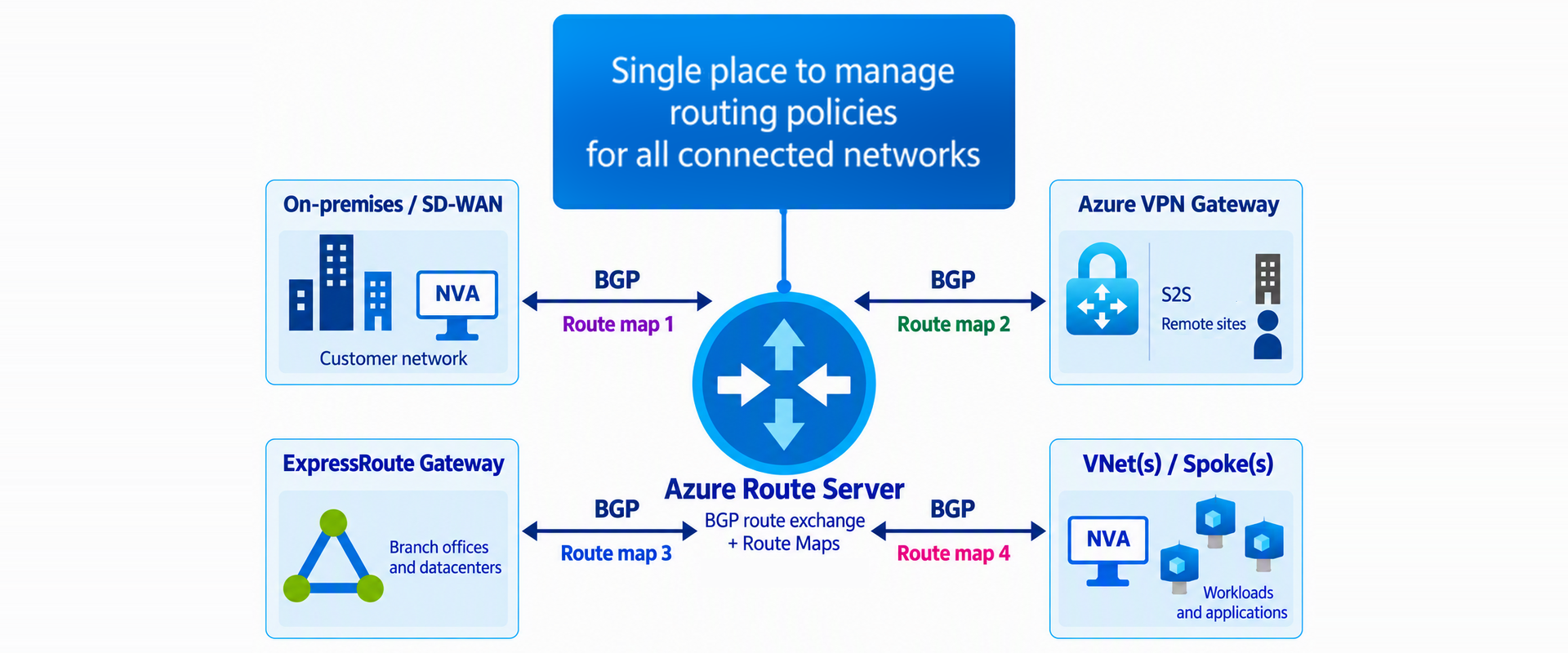
This post walks you through how to use route maps in Azure Route Server to summarize spoke prefixes before advertising them to on-premises networks over an ExpressRoute private peering. You’ll see how an outbound policy reduces 100 individual spoke routes to three aggregate prefixes while preserving reachability. Route summarization with route maps improves scalability and gives you greater control over route propagation.
Why hybrid networks need native routing policy
Hybrid networks connect remote sites across multiple routing domains to an Azure Virtual Network (VNet). As these environments grow, you need a consistent way to control which routes Azure Route Server learns and advertises at the VNet boundary. That control matters wherever Azure Route Server exchanges routes with hybrid connections:
- ExpressRoute and Azure VPN gateways: exchanged routes between Azure VNets and your on-premises networks.
- Software-defined WAN (SD-WAN): manage routing across distributed branches and appliances.
- Network virtual appliances (NVAs): control learned and advertised routes from remote sites or other clouds.
Without a native policy layer, your options for route control are limited, and they get harder to manage as the network grows.
This need becomes more urgent when branch-to-branch connectivity is enabled in Azure Route Server because routes can propagate across all connected networks. Production architectures, however, often require selective filtering, route summarization, segmentation, and predictable primary and backup paths.
Operational challenges without route maps
Without route maps, growing hybrid networks can become difficult to scale, secure, and operate. The main challenges include:
- Route scale: Without inbound or outbound summarization, every specific prefix must be carried across the hybrid environment. Large deployments can approach or exceed Azure platform route limits, making routing tables harder to manage and troubleshoot. For example, if a VNet advertises more than 1,000 prefixes to an ExpressRoute circuit, the route limit is exceeded and the BGP session between the ExpressRoute gateway and the circuit is disconnected.
- Path selection: When multiple connections reach the same remote site, customers need a straightforward way to define a preferred path and a backup path.
- Network isolation: Unrestricted route propagation among SD-WAN, VPN, ExpressRoute, and NVA connections can expose segments to networks that should remain isolated.
- Operational complexity in SD-WAN: Large SD-WAN deployments may require multiple NVAs for capacity and resiliency. Each appliance exchanges routes with the VNet, increasing the number of IP routes that operators must configure, monitor, and troubleshoot.
How route maps addresses these challenges
Route maps in Azure Route Server provide a native Azure policy layer for controlling the routes that enter and leave the VNet. They address the main operational challenges in the following ways:
- Reduce route count: Summarize prefixes before they cross connection boundaries, reducing the number of propagated routes and helping limit routing-table growth.
- Control path selection: Modify AS-PATH attributes to influence primary and backup path selection across hybrid connections.
- Strengthen network isolation: Apply independent inbound and outbound policies to limit route exchange among SD-WAN, VPN, ExpressRoute, and NVA domains.
- Simplify SD-WAN interoperability: Use BGP attribute manipulation to streamline route exchange with existing SD-WAN environments.
- Enable downstream policy enforcement: Attach BGP communities that downstream devices can use to apply additional routing policies.
How route maps work
Route maps in Azure Route Server provide granular control over routes received from and advertised to hybrid networks.
You can apply route maps to the following connection types:
- BGP peerings with a network virtual appliance (NVA) deployed in the virtual hub
- ExpressRoute gateway connections
- VPN gateway connections
If the NVA is deployed in a spoke virtual network, apply the route map to the hub's virtual network connection to that spoke.
An inbound route map processes routes as Azure Route Server learns them, whereas an outbound route map processes routes before Azure Route Server advertises them. Each route-map rule evaluates its configured match conditions and can modify route attributes, permit the route, or deny it. The following diagram illustrates this policy flow.
Core capabilities and supported connections
Route maps support route summarization, route filtering, path selection, and route tagging with BGP communities. They can advertise aggregate prefixes, control which routes enter or leave an Azure Route Server deployment, modify AS-PATH to influence preference, and attach BGP communities that downstream devices can use when applying routing policy.
You can apply route maps to BGP peerings with NVAs, ExpressRoute gateway connections, and Azure VPN gateway connections. Policies can be associated independently in the inbound and outbound directions, allowing the same connection to use different controls for received and advertised routes.
The following diagram shows three route maps, route-map1, route-map2, and route-map3, applied to an NVA peering, an Azure VPN gateway connections, and an ExpressRoute gateway connection, respectively.
With these capabilities in mind, consider a common use case: summarizing spoke VNet prefixes before advertising them to on-premises networks over ExpressRoute private peering.
Summarize spoke VNet prefixes for an ExpressRoute connection
For this walkthrough, consider a hub-and-spoke topology with 50 spoke VNets. The hub VNet contains an ExpressRoute gateway named er-gw and an Azure Route Server named rs1.
Each of the 50 spoke VNets uses two /24 prefixes, resulting in 100 individual routes. The first two spokes and the final spoke in the address range are shown below.
Spoke 1: 10.90.0.0/24 and 10.90.1.0/24
Spoke 2: 10.90.2.0/24 and 10.90.3.0/24
…
Spoke 50: 10.90.98.0/24 and 10.90.99.0/24
The spoke-to-hub and hub-to-spoke peerings are configured with the following settings:
|
Spoke-side virtual network peering setting | |
|
"allowVirtualNetworkAccess" |
true |
|
"allowForwardedTraffic" |
true |
|
"allowGatewayTransit" |
false |
|
"useRemoteGateways" |
true |
|
Hub-side virtual network peering setting | |
|
"allowVirtualNetworkAccess" |
true |
|
"allowForwardedTraffic" |
true |
|
"allowGatewayTransit" |
true |
|
"useRemoteGateways" |
false |
With the ExpressRoute gateway deployed in the hub, the spoke prefixes can be advertised to the connected on-premises network.
Before the route map is applied, the Azure Route Server Effective Routes include every individual spoke prefix.
The Azure private peering route table likewise lists the individual spoke prefixes advertised by autonomous system 65515. The following excerpt from the primary ExpressRoute connection’s routing table shows the routes before summarization is applied.
Because the spoke address spaces form a contiguous range from 10.90.0.0 through 10.90.99.255, the 100 /24 prefixes can be represented by three aggregate prefixes:
|
Subnet |
Range |
Addresses |
|
10.90.0.0/18 |
10.90.0.0–10.90.63.255 |
16,384 |
|
10.90.64.0/19 |
10.90.64.0–10.90.95.255 |
8,192 |
|
10.90.96.0/22 |
10.90.96.0–10.90.99.255 |
1,024 |
Instead of advertising all 100 spoke prefixes to the on-premises network, an outbound route map can advertise only 10.90.0.0/18, 10.90.64.0/19, and 10.90.96.0/22. This substantially reduces the number of advertised routes while preserving reachability across the complete spoke address range.
The next step is to create an outbound route map named summarization1 in the Azure portal.
- Open the Azure Route Server resource, select Routing > Route Maps, and then select Add Route-map.
- On the Create Route-map page, enter the route map name, and then select Add Route-map rule.
Create three rules, one for each aggregate prefix. Together, these rules replace the more-specific spoke advertisements with the three summarized routes.
After all three rules are added, review the route map and confirm that each aggregate is represented.
Select Save to commit the configuration.
After the route map is saved, apply it to the ExpressRoute connection in the outbound direction.
In Apply Route-maps to connections, select the ExpressRoute connection er-conn, and then apply summarization1 in the outbound direction. Azure Route Server will advertise the three aggregate prefixes instead of the more-specific spoke routes.
Wait for deployment to complete and verify that the provisioning state is Succeeded.
Use the Azure Route Server Connection Dashboard to inspect the routes advertised to the ExpressRoute connection. Select er-conn and review the outbound direction. The advertised routes should now contain only the three aggregate prefixes.
To confirm that the outbound summarization policy has not changed the routes received from on-premises, switch to the inbound direction and review the routes advertised by the customer edge toward the Azure VNet.
The network 10.1.11.0/25 is the on-premises network advertised from the customer's edge routers to the ExpressRoute private peering.
As a final validation, inspect the routing table for the primary connection in the ExpressRoute circuit private peering.
The ExpressRoute circuit now receives only the three configured aggregate spoke prefixes: 10.90.0.0/18, 10.90.64.0/19, and 10.90.96.0/22. The routing table also includes 10.1.0.0/25 for the on-premises network and 10.99.0.0/24 for the hub VNet address space.
Conclusion
Route maps are a significant step forward for Azure Route Server, adding a native routing policy layer that strengthens governance and control over route exchange across hybrid connectivity and Azure VNets. In this scenario, an outbound route map summarizes 100 spoke prefixes into three aggregate routes, reducing routing-table growth while preserving reachability across the complete spoke address range. The same policy model supports filtering, path selection, and BGP community tagging, helping customers control route propagation and operate growing hub-and-spoke environments more predictably.

 Microsoft