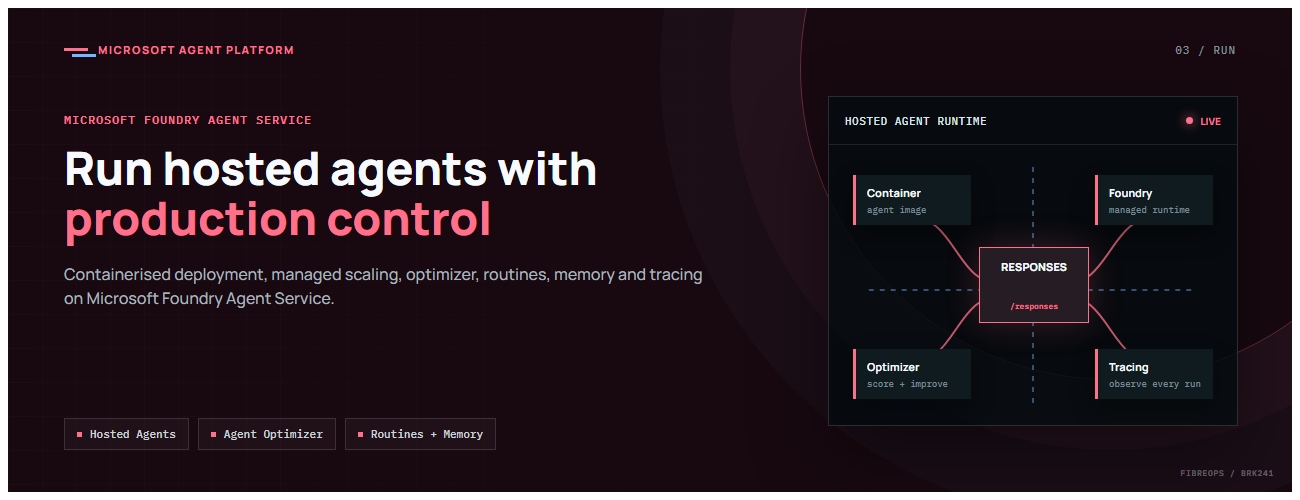
This is the third post in our series on the Microsoft agent platform. We focus on the Run in Foundry pillar, taking agents from development to production with Hosted Agents, the Agent Optimizer, Routines, Memory, Toolboxes, and Tracing.
All examples reference the FibreOps repository, demonstrated at Microsoft Build BRK241.
Hosted Agents (GA)
Hosted Agents are the core deployment primitive in Microsoft Foundry Agent Service. You package your agent as a container that serves the OpenAI /responses contract, define a manifest, and deploy. Foundry handles scaling, networking, and lifecycle management.
The Hosted Agent Artefacts
FibreOps packages its entire agent pipeline as a single hosted agent. Four artefacts define the deployment:
| Artefact | Purpose |
|---|---|
src/fibreops/agents/hosted_app.py | Entrypoint — wraps the agent in ResponsesHostServer (serves /responses + /readiness on port 8088) |
src/fibreops/agents/Dockerfile.hosted | linux/amd64 image that runs the entrypoint |
agent.yaml | Hosted-agent manifest: kind, image, CPU/memory, protocol versions, environment variables |
src/fibreops/agents/deploy.py | Builds a HostedAgentDefinition and calls agents.create_version, polling until active |
The agent.yaml Manifest
The manifest declares the hosted agent to Foundry Agent Service:
# agent.yaml
kind: hosted
api_version: V1Preview
name: fibreops-outage-response
image: <acr>.azurecr.io/fibreops-outage-response:v1
protocol_versions:
  - "2024-12-01-preview"
sandbox:
  cpu: "1"
  memory: "2Gi"
environment_variables:
  MODEL_DEPLOYMENT_NAME: gpt-4.1-mini
  FIBREOPS_AGENT_BACKEND: hosted
The platform injects FOUNDRY_PROJECT_ENDPOINT automatically — you never hard-code credentials in the manifest.
Deploying a Hosted Agent
The deployment flow uses Azure Container Registry (no local Docker required for the build):
# One-time: grant the Foundry project managed identity AcrPull
pwsh scripts/grant-mi-roles.ps1 `
  -ResourceGroup        rg-fibreops-demo `
  -FoundryAccountName   <your-foundry-account> `
  -FoundryResourceGroup <rg-that-holds-foundry>

# Build, push, and deploy the hosted agent
pwsh scripts/deploy-hosted-agent.ps1 `
  -RegistryName  <your-acr-name> `
  -ResourceGroup rg-fibreops-demo
Or drive it programmatically:
$env:FIBREOPS_HOSTED_IMAGE = "<acr>.azurecr.io/fibreops-outage-response:v1"
python -m fibreops.demo deploy-hosted
Validate locally before deploying (the model is only called on first request):
python -m fibreops.demo serve-hosted # http://localhost:8088/responsesRequired Permissions
| Role | Scope | Purpose |
|---|---|---|
| Azure AI Project Manager | Project | Deploy hosted agent versions |
| AcrPull | Container Registry | Foundry pulls the agent image |
| Azure AI Developer | Foundry account | Invoke hosted Prompt Agents + manage threads |
| Cognitive Services OpenAI User | Foundry account | Call the chat-completions deployment |
Agent Optimizer (Public Preview)
The Agent Optimizer evaluates every agent run against a defined rubric and produces actionable improvement suggestions. FibreOps demonstrates both local rubric evaluation and Foundry cloud Evaluators.
How the Optimizer Works
- Capture traces — Every agent decision, tool call, and output is recorded as an OpenTelemetry span.
- Score against rubric — Each run is evaluated on criteria like classification accuracy, dispatch appropriateness, SLA compliance, and communication quality.
- Generate suggestions — The optimizer analyses patterns across runs and produces specific, actionable improvements.
- Fold in Foundry Evaluators — When
FIBREOPS_FOUNDRY_EVALS=1, cloud-based evaluators (evaluate_traces) provide additional scoring dimensions.
# Run the optimizer manually
python -m fibreops.demo run     # Execute some signals first
# The optimizer runs automatically after each batch

# Or via the NOC console UI — click "Run optimiser"
Rubric-Based Evaluation
The rubric is defined in src/fibreops/optimiser.py. Each criterion has a weight, scoring function, and description. The optimizer aggregates scores across runs and identifies trends.
The NOC console displays the optimizer results live: average rubric score, per-criterion bars, and top suggestions for improving agent behaviour.
Routines (Public Preview)
Routines provide deterministic, declarative execution plans for agents. They are ideal when the workflow is well-understood and you want guaranteed step execution rather than LLM-driven decision-making.
FibreOps Routine Implementation
The NetOps coordinator has two interchangeable implementations:
# src/fibreops/agents/routines.py — simplified
NETOPS_ROUTINE_DEFINITION = {
    "steps": [
        {"action": "file_ticket", "tool": "create_incident"},
        {"action": "post_teams_notice", "tool": "post_outage_notice"},
        {"action": "remember_ticket", "tool": "store_memory"},
    ],
    "decision": {
        "expression": "severity in ('critical', 'major')",
        "true_branch": "HANDOFF:DISPATCH",
        "false_branch": "MONITOR",
    }
}
Enable the Routine path:
$env:FIBREOPS_NETOPS_ROUTINE = "1"
python -m fibreops.demo   # The netops pill shows "routine" mode
Routines with Event-Triggers
Routines now support event-triggers — they activate automatically when a matching event arrives (e.g., a critical telemetry signal from Event Hub). This enables fully reactive automation without polling or manual invocation.
When to Use Routines vs Chat Agents
- Use Routines when the workflow is deterministic, well-defined, and must execute consistently every time.
- Use Chat Agents when the workflow requires reasoning, adaptation to novel situations, or flexible tool selection.
- Hybrid — FibreOps proves both can coexist behind the same
.run()contract.
Memory (Public Preview)
Agent Memory in Foundry provides three types:
- Procedural memory — Lessons learned from previous incidents, applied to future reasoning.
- User memory — Per-user preferences and context that persist across sessions.
- Session memory — Context within a single conversation or run.
FibreOps uses procedural memory to improve dispatch decisions over time:
# The NetOps agent stores lessons after each incident
def store_memory(incident_id: str, lesson: str) -> dict:
    """Store a lesson learned for future reference.

    Uses FoundryMemoryProvider when FOUNDRY_MEMORY_STORE_NAME is set,
    otherwise falls back to local SQLite (state/memory.db).
    """
    ...
Set FOUNDRY_MEMORY_STORE_NAME to attach the Foundry Memory provider; otherwise the system uses a local SQLite database.
Toolboxes (GA)
Toolboxes are pre-built, Foundry-managed tool collections that agents can use without custom integration code. FibreOps can optionally light up Foundry Toolbox tools:
$env:FIBREOPS_FOUNDRY_TOOLBOX = "1"
python -m fibreops.demo   # Agents gain access to web_search and other Toolbox tools
This is useful when agents need capabilities beyond the custom tools you have built — web search, code execution, or file analysis — without writing integration code for each.
Tracing and Evaluation (GA)
Every agent interaction produces OpenTelemetry spans. FibreOps offers two output paths:
- Local — JSON spans persisted to
state/traces.jsonlfor offline inspection. - Application Insights — Set
APPLICATIONINSIGHTS_CONNECTION_STRINGto ship spans to Azure Monitor.
The repository includes paste-ready KQL queries in docs/KQL.md for common operational questions:
// Agent decision timeline for a specific incident
traces
| where customDimensions.incident_id == "INC-2026-001"
| project timestamp, name, customDimensions.agent, customDimensions.decision
| order by timestamp asc

// Per-agent latency percentiles
traces
| where name startswith "agent."
| summarize p50=percentile(duration, 50), p95=percentile(duration, 95)
    by tostring(customDimensions.agent)

// Optimiser score trend over time
traces
| where name == "optimiser.score"
| project timestamp, score=todouble(customDimensions.score)
| render timechart
Infrastructure as Code with azd
The repository ships a complete azd template that provisions everything:
- Azure App Service for Linux Containers (NOC console)
- Azure Container Registry (agent images)
- Azure Event Hub (telemetry ingestion)
- Azure Key Vault (secrets management)
- Log Analytics + Application Insights (observability)
azd auth login
azd env new fibreops-demo
azd env set AZURE_AI_PROJECT_ENDPOINT "https://<account>.services.ai.azure.com/api/projects/<project>"
azd env set AZURE_AI_MODEL_DEPLOYMENT "gpt-4.1-mini"
azd env set AZURE_LOCATION "swedencentral"
azd up
To also deploy the containerised hosted agent as part of azd up:
azd env set FIBREOPS_DEPLOY_HOSTED true
azd up   # Provisions infra, deploys NOC console, then registers hosted agent
Key Takeaways
- Hosted Agents (GA) let you deploy containers that serve the
/responsescontract — Foundry handles everything else. - The Agent Optimizer brings continuous improvement through rubric-based evaluation and actionable suggestions.
- Routines provide deterministic execution for well-defined workflows, now with event-trigger support.
- Memory (procedural, user, session) enables agents to learn and improve without retraining.
- Toolboxes offer pre-built capabilities without custom integration.
- Tracing is GA — every span ships to Application Insights with paste-ready KQL queries.
Next Steps
- Explore the FibreOps repository — try
python -m fibreops.demo serve-hostedto validate locally - Foundry Agent Service documentation
- Next in this series: Distributing Agents to Teams and Microsoft 365 Copilot

 Microsoft