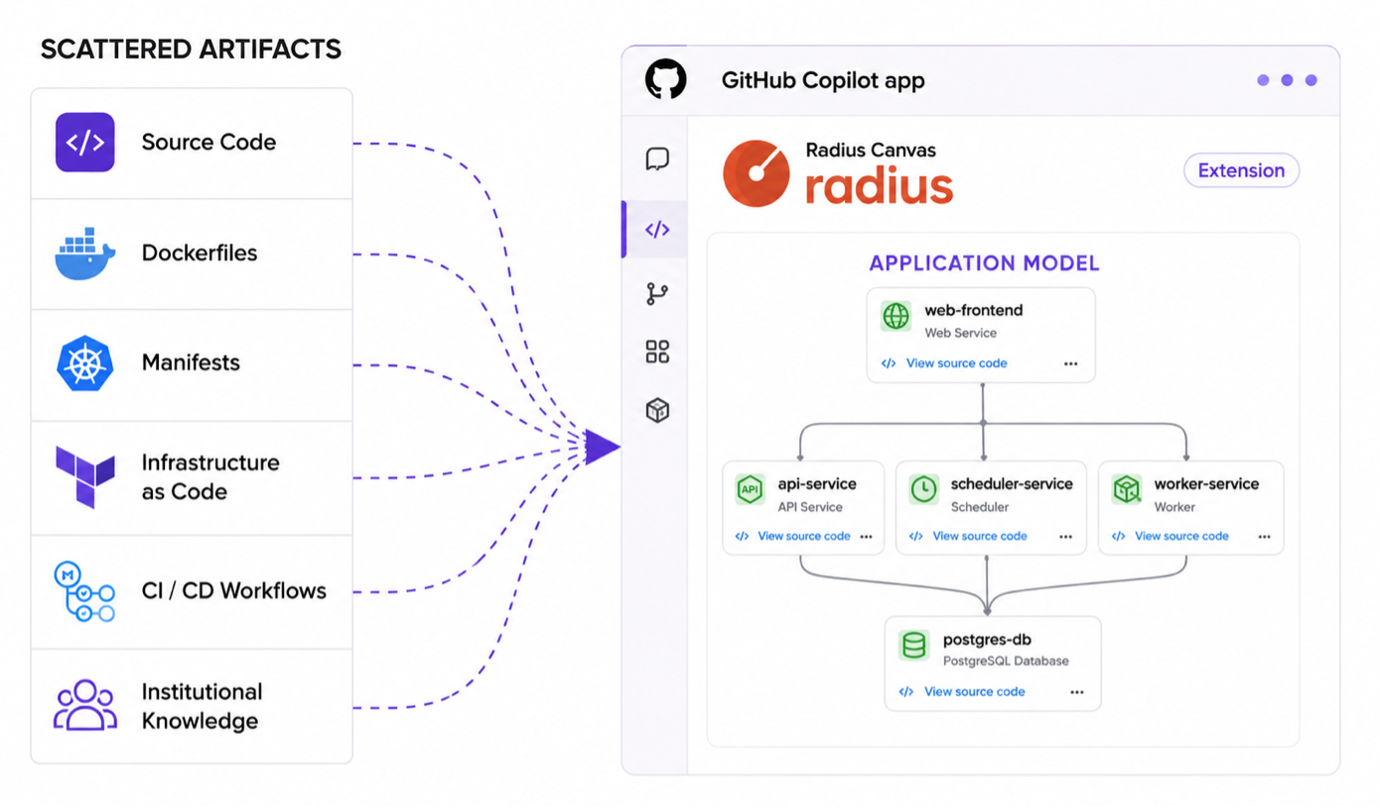
September 3, 2026 - AI can generate thousands of lines of code in minutes. Understanding what it changed across your application, and whether it is ready to deploy, takes far longer. The Microsoft Azure Incubations team announced the public preview of Radius Canvas for the GitHub Copilot app. With Radius, developers can visualize the structure of their modern cloud-native applications, see where code changes impact their applications, and deploy applications across different cloud providers. It gives developers and agents a shared, consistent, visual definition of the application to work from instead of reconstructing it from scattered artifacts on every code change.
Radius Canvas brings the application’s scattered representation into an application model inside the GitHub Copilot app.AI has made it easy to build increasingly sophisticated and large applications, but developers still have to determine how the AI-generated changes affect the application as a whole. A commit can add a service, expose a port, or change a dependency without revealing its impact on the architecture, and developers have to verify how components like containers, databases, and gateways stay connected after every change. That understanding is scattered across source code, Dockerfiles, manifests, infrastructure as code, CI/CD workflows, configuration, diagrams, and institutional knowledge.
As AI accelerates the pace of change, agents inherit the same problem and still lack a persistent understanding of the application. An agent working from raw files rebuilds that understanding ad hoc and differently on each run, leaving behind little for the next run to rely upon. Developers and agents need a structured, readable and updated definition of the application.
Deployment to the cloud adds another layer of risk. Developers become responsible for networking, identity, security, storage, and credentials in addition to the application itself. Those decisions also vary by environment. One application may run in multiple environments: locally, in staging, and in production. Environments may also span Azure, AWS, and/or on premises, with different infrastructure, identities, configuration, and security requirements in each. When those requirements are scattered across configuration, policies, and institutional knowledge, an agent can produce a deployment that works but still uses the wrong identity, region, or security settings.
Application comprehension, consistency across environments, and deployment reliability all trace back to the same architectural gap: the application has no shared definition that developers and agents can work from.
Introducing Radius Canvas
Canvas applications, which work side by side with code and chat sessions, create visual models for interacting with developers. Radius Canvas captures and visualizes the services, dependencies, connections, configuration, and infrastructure requirements that developers and agents need. It makes it easy to deploy your application to the cloud without leaving the GitHub Copilot app.
Interact with your applications visually
Modern cloud-native applications are inherently complex. Radius reduces the complexity by visualizing the application’s structure. For example, in the GitHub Copilot app, a developer can ask to see the application. Radius analyzes the source code repository to identify the workloads, dependencies, connections, and infrastructure requirements that make up the application, and captures that understanding in an application definition stored alongside the code and visualized in the Canvas. The definition can be versioned, reviewed, and updated as the repository evolves, rather than rediscovered from separate files and prompts on every run. Radius Canvas renders the application definition as an interactive graph from modeling through planning and deployment.
The Modeled view shows what Radius discovers from a repository. The Planned view shows what will be provisioned in an environment.Radius provides three visualizations of the application. First, the Modeled view shows the high-level architecture of the application as it is designed in code. Next, the Planned view previews the infrastructure that will be provisioned for each component if the application is deployed. Finally, the Deployed view depicts the application as it is currently running in an environment, with deep links to the provisioned infrastructure resources. Each view is generated from the same application definition, enabling the graph to stay accurate as the application moves from modeling through planning and deployment.
Review at the application level
The Diff view brings the application into code review. Regardless of whether a PR is a simple change or a massive AI-generated update, a developer can open the diff graph to see at a glance which components in the application were changed, whether a branch swapped PostgreSQL for MongoDB, added a new service, introduced a Redis dependency, or created a new connection. From there, they can focus their review, dropping into the line-by-line code changes if they want.
The Diff view shows how a branch changes the applicationDeploy across environments
Radius enables developers to deploy directly from the GitHub Copilot app, connecting their repository to the cloud. A developer selects an environment and deploys, and Radius generates a GitHub Actions workflow that provisions the infrastructure and ships the application. It also sets up OIDC trust between GitHub Actions and the target cloud, so deployments run on short-lived credentials instead of long-lived ones stored in the repository.
Each environment decides how the application's requirements are met. An application can declare that it requires PostgreSQL, and local development provides it as a container while production provides a managed database in an approved region with private networking and encryption. The application definition stays the same; the environment determines how the application requirements are fulfilled.
The Deployed view shows what is running in the environmentsAs AI accelerates software development, it is also increasing the complexity developers must understand and manage. Radius Canvas gives developers and agents a shared application model bringing review, planning, and deployment into a single workflow inside the GitHub Copilot app.
Get started!
Model and deploy your first application with Radius Canvas:
- In the GitHub Copilot app, open the Customize tab in the side menu, and then select Plugins. Search for radius, and then install the plugin.
- Open a repository and ask Copilot to model the application. The Radius Canvas analyzes it and creates a Radius application definition you can review in the canvas.
- Create a Radius Environment, review the planned resources, and deploy.
For a guided walkthrough, follow the Radius Canvas guide. Radius is an open-source application platform incubated by Microsoft and accepted as a Cloud Native Computing Foundation Sandbox project. Whether you are a developer or a platform engineer simplifying cloud deployments for your team, we would love to have you join the Radius community.
Share feedback, request features, or report issues on our GitHub repository.

 Microsoft