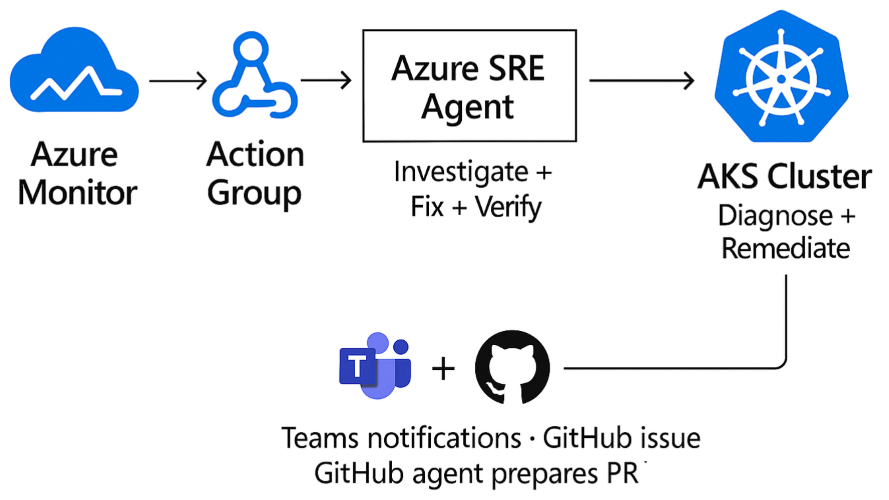
When a Sev1 alert fires on an AKS cluster, detection is rarely the hard part. The hard part is what comes next: proving what broke, why it broke, and fixing it without widening the blast radius, all under time pressure, often at 2 a.m.
Azure SRE Agent is designed to close that gap. It connects Azure-native observability, AKS diagnostics, and engineering workflows into a single incident-response loop that can investigate, remediate, verify, and follow up, without waiting for a human to page through dashboards and run ad-hoc kubectl commands.
This post walks through that loop in two real AKS failure scenarios. In both cases, the agent received an incident, investigated Azure Monitor and AKS signals, applied targeted remediation, verified recovery, and created follow-up in GitHub, all while keeping the team informed in Microsoft Teams.
Core concepts
Azure SRE Agent is a governed incident-response system, not a conversational assistant with infrastructure access. Five concepts matter most in an AKS incident workflow:
- Incident platform. Where incidents originate. In this demo, that is Azure Monitor.
- Built-in Azure capabilities. The agent uses Azure Monitor, Log Analytics, Azure Resource Graph, Azure CLI/ARM, and AKS diagnostics without requiring external connectors.
- Connectors. Extend the workflow to systems such as GitHub, Teams, Kusto, and MCP servers.
- Permission levels. Reader for investigation and read oriented access, privileged for operational changes when allowed.
- Run modes. Review for approval-gated execution and Autonomous for direct execution.
The most important production controls are permission level and run mode, not prompt quality. Custom instructions can shape workflow behavior, but they do not replace RBAC, telemetry quality, or tool availability.
The safest production rollout path:
Start: Reader + Review Then: Privileged + Review Finally: Privileged + Autonomous. Only for narrow, trusted incident paths.Demo environment
The full scripts and manifests are available if you want to reproduce this:
Demo repository: github.com/hailugebru/azure-sre-agents-aks. The README includes setup and configuration details.
The environment uses an AKS cluster with node auto-provisioning (NAP), Azure CNI Overlay powered by Cilium, managed Prometheus metrics, the AKS Store sample microservices application, and Azure SRE Agent configured for incident-triggered investigation and remediation. This setup is intentionally realistic but minimal. It provides enough surface area to exercise real AKS failure modes without distracting from the incident workflow itself.
Azure Monitor → Action Group → Azure SRE Agent → AKS Cluster (Alert) (Webhook) (Investigate / Fix) (Recover) ↓ Teams notification + GitHub issue → GitHub Agent → PR for reviewHow the agent was configured
Configuration came down to four things: scope, permissions, incident intake, and response mode. I scoped the agent to the demo resource group and used its user-assigned managed identity (UAMI) for Azure access. That scope defined what the agent could investigate, while RBAC determined what actions it could take.
I used broader AKS permissions than I would recommend as a default production baseline so the agent could complete remediation end to end in the lab. That is an important distinction: permissions control what the agent can access, while run mode controls whether it asks for approval or acts directly. For this scenario, Azure Monitor served as the incident platform, and I set the response plan to Autonomous for a narrow, trusted path so the workflow could run without manual approval gates.
I also added Teams and GitHub integrations so the workflow could extend beyond Azure. Teams provided milestone updates during the incident, and GitHub provided durable follow up after remediation. For the complete setup, see the README.
A note on context. The more context you can provide the agent about your environment, resources, runbooks, and conventions, the better it performs. Scope boundaries, known workloads, common failure patterns, and links to relevant documentation all sharpen its investigations and reduce the time it spends exploring. Treat custom instructions and connector content as first-class inputs, not afterthoughts.
Two incidents, two response modes
These incidents occurred on the same cluster in one session and illustrate two realistic operating modes:
- Alert triggered automation. The agent acts when Azure Monitor fires.
- Ad hoc chat investigation. An engineer sees a symptom first and asks the agent to investigate.
Both matter in real environments. The first is your scale path. The second is your operator assist path.
Incident 1. CPU starvation (alert driven, ~8 min MTTR)
The makeline-service deployment manifest contained a CPU and memory configuration that was not viable for startup:
resources: requests: cpu: 1m memory: 6Mi limits: cpu: 5m memory: 20Mi
Within five minutes, Azure Monitor fired the pod-not-healthy Sev1 alert. The agent picked it up immediately.
Here is the key diagnostic conclusion the agent reached from the pod state, probe behavior, and exit code:
"Exit code 1 (not 137) rules out OOMKill. The pod failed at startup, not at runtime memory pressure. CPU limit of 5m is insufficient for the process to bind its port before the startup probe times out. This is a configuration error, not a resource exhaustion scenario."
That is the kind of distinction that often takes an on call engineer several minutes to prove under pressure: startup failure from CPU starvation vs. runtime termination from memory pressure.
The agent then:
- Identified three additional CPU-throttled pods at 112 to 200% of configured limit using kubectl top.
- Patched four workloads: makeline-service, virtual-customer, virtual-worker, and mongodb.
- Verified that all affected pods returned to healthy running state with 0 restarts cluster-wide.
Azure SRE Agent's Incident History blade confirming full cluster recovery: 4 patches applied, 0 unhealthy pods — no human intervention required.
Outcome. Full cluster recovery in ~8 minutes, 0 human interventions.
Incident 2. OOMKilled (chat driven, ~4 min MTTR)
For the second case, I deployed a deliberately under sized version of order-service:
kubectl apply -f .\manifests\aks-store\order-service-changed.yaml -n petsI started this case from chat before the pod-phase alert fired to demonstrate the interactive troubleshooting flow. That was a demo choice, not an alerting gap. CrashLoopBackOff is a container waiting reason, not a pod phase, so production coverage should come from Prometheus based crash-loop signals rather than pod phase alone. Here is the PromQL query I use in Azure Monitor to catch this class of failure:
sum by (namespace, pod) ( ( max_over_time( kube_pod_container_status_waiting_reason{ namespace="pets", reason="CrashLoopBackOff" }[5m] ) == 1 ) and on (namespace, pod, container) ( increase( kube_pod_container_status_restarts_total{ namespace="pets" }[15m] ) > 0 ) ) > 0This query fires when a container has been in CrashLoopBackOff within the last 5 minutes and its restart count has increased in the last 15 minutes. In production, replace the hardcoded namespace with a regex matcher or remove it entirely to cover all namespaces.
The order-service pod in the pets namespace is not healthy. Please investigate, identify the root cause, and fix it.
The agent's reasoning:
"Container logs are empty. The process was killed before it could write its first log line. Exit code 137 confirms OOMKill. No NODE_OPTIONS in the ConfigMap rules out a V8 heap misconfiguration. The 20Mi limit is 12.8x below the pod's observed 50Mi runtime baseline. This limit was never viable for this workload."
The agent increased the memory limit (20Mi to 128Mi) and request (10Mi to 50Mi), then verified the new pod stabilized at 74Mi/128Mi (58% utilization) with 0 restarts.
Outcome. Service recovered in ~4 minutes without any manual cluster interaction.
Side by side comparison
| Dimension | Incident 1: CPU starvation | Incident 2: OOMKilled |
|---|---|---|
| Trigger | Azure Monitor alert (automated) | Engineer chat prompt (ad hoc) |
| Failure mode | CPU too low for startup probe to pass | Memory limit too low for process to start |
| Key signal | Exit code 1, probe timeout | Exit code 137, empty container logs |
| Blast radius | 4 workloads affected cluster wide | 1 workload in target namespace |
| Remediation | CPU request/limit patches across 4 deployments | Memory request/limit patch on 1 deployment |
| MTTR | ~8 min | ~4 min |
| Human interventions | 0 | 0 |
Why this matters
Most AKS environments already emit rich telemetry through Azure Monitor and managed Prometheus. What is still manual is the response: engineers paging through dashboards, running ad-hoc kubectl commands, and applying hotfixes under time pressure. Azure SRE Agent changes that by turning repeatable investigation and remediation paths into an automated workflow.
The value isn't just that the agent patched a CPU limit. It's that the investigation, remediation, and verification loop is the same regardless of failure mode, and it runs while your team sleeps.
In this lab, the impact was measurable:
| Metric | This demo with Azure SRE Agent |
|---|---|
| Alert to recovery | ~4 to 8 min |
| Human interventions | 0 |
| Scope of investigation | Cluster wide, automated |
| Correlate evidence and diagnose | ~2 min |
| Apply fix and verify | ~4 min |
| Post incident follow-up | GitHub issue + draft PR |
These results came from a controlled run on April 10, 2026. Real world outcomes depend on alert quality, cluster size, and how much automation you enable. For reference, industry reports from PagerDuty and Datadog typically place manual Sev1 MTTR in the 30 to 120 minute range for Kubernetes environments.
Teams + GitHub follow-up
Runtime remediation is only half the story. If the workflow ends when the pod becomes healthy again, the same issue returns on the next deployment. That is why the post incident path matters.
After Incident 1 resolved, Azure SRE Agent used the GitHub connector to file an issue with the incident summary, root cause, and runtime changes. In the demo, I assigned that issue to GitHub Copilot agent, which opened a draft pull request to align the source manifests with the hotfix. The agent can also be configured to submit the PR directly in the same workflow, not just open the issue, so the fix is in your review queue by the time anyone sees the notification. Human review still remains the final control point before merge. Setup details for the GitHub connector are in the demo repo README, and the official reference is in the Azure SRE Agent docs.
Azure SRE Agent fixes the live issue, and the GitHub follow-up prepares the durable source change so future deployments do not reintroduce the same configuration problem.
The operations to engineering handoff: Azure SRE Agent fixed the live cluster; GitHub Copilot agent prepares the durable source change so the same misconfiguration can't ship again.
In parallel, the Teams connector posted milestone updates during the incident:
- Investigation started.
- Root cause and remediation identified.
- Incident resolved.
Teams handled real time situational awareness. GitHub handled durable engineering follow-up. Together, they closed the gap between operations and software delivery.
Key takeaways
Three things to carry forward
- Treat Azure SRE Agent as a governed incident response system, not a chatbot with infrastructure access. The most important controls are permission levels and run modes, not prompt quality.
- Anchor detection in your existing incident platforms. For this demo, we used Prometheus and Azure Monitor, but the pattern applies regardless of where your signals live. Use connectors to extend the workflow outward. Teams for real time coordination, GitHub for durable engineering follow-up.
- Start where you're comfortable. If you are just getting your feet wet, begin with one resource group, one incident type, and Review mode. Validate that telemetry flows, RBAC is scoped correctly, and your alert rules cover the failure modes you actually care about before enabling Autonomous. Expand only once each layer is trusted.
Next steps
- Add Prometheus based alert coverage for CrashLoopBackOff, ImagePullBackOff, and node resource pressure to complement the pod phase rule.
- Expand to multi cluster managed scopes once the single cluster path is trusted and validated.
- Test the agent against multi service cascading failures to understand where human escalation is still needed.
Resources
| Resource | Link |
|---|---|
| Demo repository | github.com/hailugebru/azure-sre-agents-aks |
| Azure SRE Agent docs | learn.microsoft.com/azure/sre-agent |
| AKS Store Demo | github.com/Azure-Samples/aks-store-demo |
| Node Auto-Provisioning | learn.microsoft.com/azure/aks/node-auto-provisioning |

 Microsoft