office 365
6348 TopicsBraille Translator Challenge
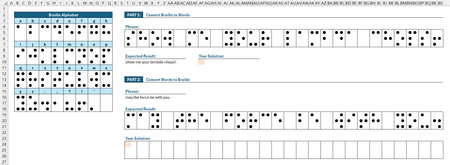
Using the Braille Alphabet lookup table provided: Part 1 - convert the given phrase from Braille to words. Part 2 - convert the given phrase from words to Braille. ✅ Solutions should be in the form of a single-cell formula. ✅ Generalized Lambda functions are welcome, provided the function definitions are included with your solution. ✅ Keep in mind, the "best" solution is not necessarily the shortest... Strive for conciseness, if you wish; just don't let your solutions be ordinary. 😉 Good luck and have fun!255Views0likes15Comments
Using tables, lists, and dropdowns and not sure how to make this work…
Hi! I have an Excel workbook with several worksheets that need to be filled in by the user. The first worksheet (Sheet A) has fields for employee names/addresses/id#s, their work classification, their tax filing status, their gross pay, the various taxes that come out, etc. There is also a worksheet titled "Data Sheet" with a table ("Table A") that has the employee names/addresses/id#'s. When filling in "Sheet A", the user can select from a dropdown list of those employee names/address/id#'s (the list comes from "Data Sheet - Table A") and the employee's info fills into that field. These are the steps I followed to set up the "Data Sheet" and the dropdown list on "Sheet A". 1. Added a worksheet to the end and named it Data Sheet. 2. To add a table, made a list of employee names with a header name and then selected an item in the list and Insert>Table, named the table (no spaces) in the Table Name box, and made sure that the header row is checked. 3. Next, I defined the list. Clicked on an item in the list, then under Formulas, selected Define Name. 4. Gave the list a name different than the table name or head name. In the reference section, highlighted all the items, but not the header. This allows the list to be added to without having to change the range. 5. On "Sheet A", I selected the cells I want to use the drop-down for. Selected Data Validation on the Data tab. Selected allow “list”, then in the source box hit F3 so that the lists I've made would pop up and selected the correct one. 6. Made sure that the column where users will input their info is unprotected. I've since set up a second table ("Table B") on "Data Sheet" and defined the list, etc., to be the employee fica rate. On “Sheet A” the fica withheld from the employee's paycheck goes into the field next to the employee name/address/id# field. When the user selects an employee name/address/id# from the dropdown list on “Sheet A”, is it possible to make the corresponding fica field auto-calculate from “Data Sheet” at the same time? The list/table (“Data Sheet – Table B”) would need to be the percentages that each employee pays and then “Sheet A” would need to pull the corresponding percentage from “Data Sheet – Table B” and multiply it with the wages the user has entered and the result of that calculation would land in the “fica” field. Thank you so much!! Diane6.3KViews1like38Comments
Corrupted Timestamp Display in Recent Files View
I am using Office 365 for iPadOS on a 2025 iPad Pro. With an Excel workbook open, the battery died. Ever since, the Recent Files (in List View) displays the timestamp of any workbook opened after the battery death into numbers: 0, 1, 2, 3, etc. The unopened files are not affected until they are reopened. The thumbnail view shows the correct timestamps, as does OneDrive. This carried over into Word as well. A second iPad shows the same corruption, but computer and iPhone are fine. So it is limited to just the iPadOS applications. Since it has propagated to a second iPad, it looks like the problem may exist on the server. The sorting algorithm or the user interface rendering loop may be hitting a fatal mathematical error, and to prevent the entire application from crashing, the app's code panics and falls back to simple numbering. Extensive troubleshooting has been done, including full app deletion/reinstall multiple times with sign-outs, account swap, time zone toggling, calendar format changes, and force restarts and updated/replaced the iPadOS using recovery mode. All settings have been reset. Since a backup to iCloud occurred after the incident, it may have the corrupt data. I have done everything but a full restore as a new iPad, which is impractical due to the number of applications.Solved72Views0likes2Comments
How to look up specific text in a specific column, multiple columns involved
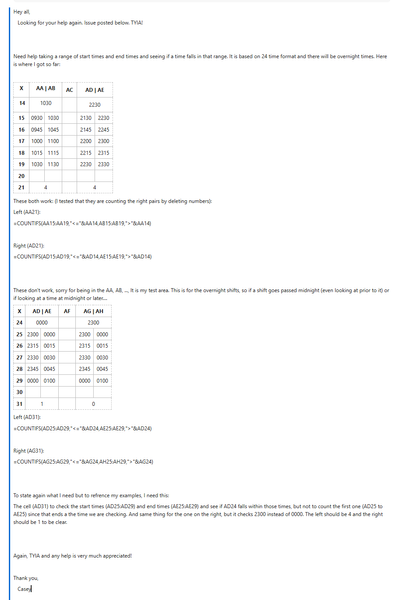
Hello, I am trying to implement a search field for a vertically oriented list, lets name it #1 for reference, looking for the number of results of the desired text within a range in a specific column in separate ranged list, #2, which is horizontally oriented. Neither list are Excel tables. Values in List 1 are automatically obtained and sorted from List 2 via dynamic functions which spill over underneath. For better reference, I have implemented a simple sanitized example as an attachment, both in Workbook screenshot format. Is it possible for this to be implemented, and how could I go about to do so? Thanks in advanceSolved93Views0likes2Comments
Formula to retrieve data from several sheets and return values from given criteria.
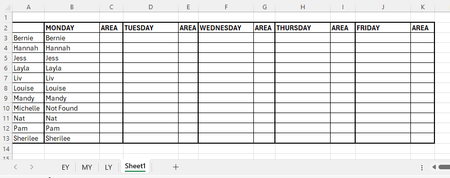
I am trying to get data from each of our areas of the school staff timetables EY MY LY and summaries what days each staff member works where to another sheet, as staff move around. I would appreciate some help please. This is how far I got: =IFERROR(VLOOKUP(A10,EY!$C$3:$G$33, 2, FALSE), IFERROR(VLOOKUP(A10,MY!$C$3:$G$33, 2, FALSE), "Not Found")) This just returns; I tried to add in the same formula for LY but it is saying too many arguments, this is why Michelle is Not Found. Will I also be able to return the area they are in on each of the days ? Any assistance would be very much appreciated.481Views0likes14CommentsBigSpill: A 90‑Function Excel LAMBDA Library for Dynamic Arrays
What is BigSpill? BigSpill is an Excel LAMBDA library containing 90 functions across 10 categories, built from extensive experimentation with dynamic arrays. The goal is to provide elegant, efficient tools that make sheet‑level formulas easier to read, more modular, and more dynamic. The library includes a mix of: quality‑of‑life helpers essential primitives mid‑level operators developer‑level tools a few functions you might not expect to see in Excel Who is it for? Everyone. BigSpill aims to make complex operations more approachable and expressive. A few examples from the library: Pairwiseλ Staircaseλ Grainλ PolarGridλ Convolveλ Foldλ Tessellateλ Revealλ Knapsackλ Magnifyλ Traverseλ The repository includes full documentation and 11 sample workbooks so you can explore the functions without setup. If you’re interested in experimenting with dynamic arrays, or LAMBDA workflows, feel free to take a look. Feedback and suggestions are always welcome. I've attached 1 onboarding workbook. There are 10 more at the link below. GitHub: BigSpill87Views3likes2CommentsBenutzerdefinierte Listen gelöscht/lässt sich nicht öffnen
Hallo, ich habe ein Problem mit dem automatischen Ausfüllen von Monaten, Wochentagen, Zahlen etc. Meine Systemeinstellung für den PC war in Englisch eingestellt, dabei ging das automatische ausfüllen nur mit den englischen Begriffen. Nach Umstellung der Systemsprache auf Deutsch hat Excel gar keine benutzerdefinierten Listen mehr. Wenn mein auf Optionen -> Erweitert -> benutzerdefinierte Listen bearbeiten klickt, dann wird auch das Fenster nicht geöffnet. Wenn ich die Systemsprache wieder auf Englisch zurückstelle, dann funktioniert es wieder (nur in Englisch). Warum ist das so? Was kann ich machen, damit es wieder klappt?717Views1like2Comments
Insert Rows command missing on my right click menu after I copy cells
Before the latest update of excel in Office 365, I could copy a range of cells, and then right click on my mouse and it would give me an option to insert copied cells or insert rows. I could insert rows, and then paste my information. Now this is missing. When I copy now, I only get the insert copied cells option. And if I try to insert rows, it empties the clipboard. This was a really nice command for me. Does anyone know why this has been removed?4.2KViews2likes6Comments