office 365
20624 Topics
Formatting issues in Word Microsoft 365 Copilot online.
I am experiencing formatting issues in Word (Microsoft 365 Copilot online). I am a student, and I have a problem formatting my thesis in M365 Copilot after previously working on this file on an older device with an older version of Word. I recently purchased a new laptop, where I no longer have access to that same version of Word. My only option now is to use Word in the browser. However, the file that formatted correctly on the old device is now not formatting properly. The automatic table of contents is breaking. After clicking “Update,” Word assigns random page numbers, most often all entries show as page “8,” or, for example, the “Introduction,” which is actually on page 3 (I manually set page numbering in the old version), suddenly appears as page 5 in the table of contents. Every chapter and subchapter is shown as being on the same page, usually page 8. The formatting options and capabilities also seem worse compared to the interface of the older version. The same issue occurs on my student account. Please help, I am currently writing my thesis.42Views0likes2Comments
MISSING FUNCTIONS THAT I PREVIOUSLY HAD ACCESS TO
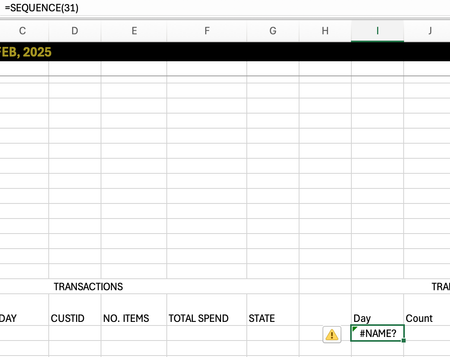
I just switched macbooks and opened my excel to discover I had a few missing functions: MAXIFS, SEQUENCE. This is not a problem regarding the software as mine is MICROSOFT365 and I used the same account previously. Is there any way I can gain these functions back! Thank you!104Views0likes2CommentsTransfer MS Office 365 Business ownership from MSP to own MS Business account
Hello Everybody I need to transfer my clients MS Office 365 Business from current MSP to their own MS Business account. Current MSP very bad service. So, at the end they want to manage their Emails\Licenses on MS Admin Center. What are the steps on doing this?54Views0likes1Comment
OneDrive “Share” window stuck loading from File Explorer (works on web)
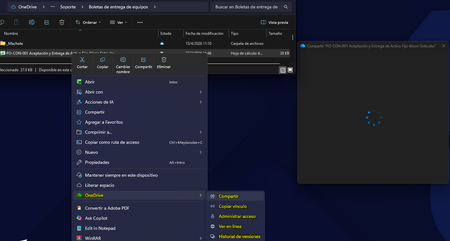
Description: Hi all, I'm experiencing an issue with OneDrive where the "Share" option from Windows File Explorer gets stuck indefinitely loading (blank window with spinner). Details: The issue occurs only when using right-click → Share from File Explorer Sharing works correctly from OneDrive web interface Issue is affecting multiple users in the same environment OneDrive sync itself is working normally Troubleshooting already performed: Reinstalled OneDrive completely (clean install) Cleared local cache and removed residual folders Reinstalled Microsoft Edge WebView2 Runtime (Evergreen x64) Cleared Windows Credential Manager entries Reconnected Work/School account (WAM reset) Tested on different networks (including mobile hotspot) Windows fully updated Environment: Windows 11 (corporate environment) Microsoft 365 / OneDrive for Business Observation: The issue seems isolated to the File Explorer integration (possibly WebView2 or WAM-related), since web sharing works fine. Has anyone experienced this behavior recently or is there any known issue with the OneDrive Explorer integration? Thanks in advance.354Views0likes3CommentsAnnouncing the 2026 Microsoft 365 Community Conference Keynotes
The Microsoft 365 Community Conference returns to Orlando this April, bringing together thousands of builders, innovators, creators, communicators, admins, architects, MVPs, and product makers for three unforgettable days of learning and community. This year’s theme, “A Beacon for Builders, Innovators & Icons of Intelligent Work,” celebrates the people shaping the AI‑powered future — and the keynote lineup reflects exactly that. These leaders will set the tone for our biggest, boldest M365 Community Conference. Below is your first look at the official 2026 keynote order and what to expect from each session. Opening Keynote Jeff Teper — President, Microsoft 365 Collaborative Apps & Platforms Building for the future: Microsoft 365, Agents and AI, what's new and what's next Join Jeff Teper, to discover how AI-powered innovation across Copilot, Teams, and SharePoint is reshaping how people communicate, create, and work together. This session highlights what’s new, what’s fundamentally different, and why thoughtful design continues to matter. See the latest advances in AI and agents, gain insight into where collaboration is headed, and learn why Microsoft is the company to continue to bet on when it comes to building what’s next. Expect: New breakthroughs in collaboration powered by AI and agents Fresh innovations across Teams, Copilot, and SharePoint Practical guidance on how design continues to shape effective teamwork Real world demos that show how AI is transforming communication and content Insight into what is new, what is changing, and what is coming next Business Apps & Agents Keynote Ryan Cunningham — Corporate Vice President, Power Platform In this keynote, Ryan Cunningham will share how Microsoft 365 Copilot, Copilot Studio, Power Apps, and Agent 365 come together to help makers build powerful agents and help IT teams deploy and govern them at scale. We’ll share how organizations can design, extend, and govern a new model for the intelligent workplace – connecting data, workflows, and systems into intelligent agents that move work forward. Copilot, apps, and agents: the next platform shift for Microsoft 365 Microsoft 365 Copilot has changed how we interact with software. Now AI agents are changing how work gets done – moving from responding to prompts to taking action, across the tools and data your organization already relies on. Expect: A clear explanation of how to leverage and build with Copilot and agents How agents access data, use tools, and complete multi-step work A deeper look at the latest capabilities across Microsoft 365 Copilot, Copilot Studio, and Power Apps End-to-end demos of agents in action Security, Trust & Responsible AI Keynote Vasu Jakkal — Corporate Vice President, Microsoft Security & Rohan Kumar — Corporate Vice President, Microsoft Security, Purview & Trust In our third keynote, Vasu Jakkal and Rohan Kumar join forces to address one of the most urgent topics of the AI era: trust and security at scale. As organizations accelerate into AI‑powered work, safeguarding identities, data, compliance, and governance is mission‑critical. Securing AI: Building Trust in the Era of AI Join Vasu Jakkal and Rohan Kumar as they unveil Microsoft’s vision for securing the new frontier of AI—showing how frontier firms are protecting their data, identities, and models amid rapid AI adoption. This session highlights how Microsoft is embedding security and governance into every layer of our AI platforms and unifying Purview, Defender, Entra, and Security Copilot to defend against threats like prompt injection, model tampering, and shadow AI. You’ll see how built-in protections across Microsoft 365 enable responsible, compliant AI innovation, and gain practical guidance to strengthen your own security posture as AI transforms the way everyone works. Expect: Microsoft's unified approach to secure AI transformation Forward‑looking insights across Security, Purview & Trust Guidance for building safe, responsible AI environments How to protect innovation without slowing momentum Future of Work Fireside Keynote Dr. Jaime Teevan — Chief Scientist & Technical Fellow, Microsoft Dr. Jaime Teevan, one of the foremost thought leaders on AI, productivity, and how work is evolving. In this intimate fireside‑style session, she’ll share research, real‑world insights, and Microsoft’s learnings from being both the maker and the first customer of the AI‑powered workplace. Expect: Insights from decades of workplace research The human side of AI transformation Practical guidance for leaders, creators, and practitioners Why collaboration is essential to unlock the true potential of AI. Community Closer Keynote Karuana Gatimu - Director, Microsoft Customer Advocacy Group & Heather Cook - Principal PM, MIcrosoft Customer Advocacy Group From Momentum to Movement: Where Community Goes Next As the final moments of Microsoft 365 Community Conference come to a close, Heather Cook and Karuana Gatimu invite the community to pause, reflect, and look forward together. This Community Closer keynote connects the breakthroughs, conversations, and shared experiences of the week into a bigger story—one about people, purpose, and progress. Together, they’ll explore how community transforms technology into impact, how advocates and builders shape what’s next across Microsoft 365, and why this moment matters more than ever. More than a recap, this session is a call to action—challenging attendees to take the energy of the conference back to their teams, regions, and communities, and turn inspiration into sustained momentum. You’ll leave not just with ideas, but with clarity, confidence, and a renewed sense of belonging—because community doesn’t end when the conference does. It’s where the real work begins. More Than Keynotes: Why You’ll Want to Be in Orlando The M365 Community Conference brings together: 200+ sessions and breakouts 21 hands‑on workshops 200+ Microsoft engineers and product leaders onsite The Microsoft Innovation Hub Ask the Experts, Meet & Greets, and Community Studio Women in Tech & Allies Luncheon SharePoint’s 25th Anniversary Celebration And an epic attendee party at Universal’s Islands of Adventure Whether you create, deploy, secure, govern, design, or lead with Microsoft 365 — this is your community, and this is your moment. Join Us for the Microsoft 365 Community Conference April 21–23, 2026 Loews Sapphire Falls & Loews Royal Pacific 👉 Register now: https://aka.ms/M365Con26 Use the SAVE150 code for $150USD off current pricing Come be part of the global community building the future of intelligent work.3.5KViews3likes2Comments
Will Microsoft ever provide a viable email client again?
I'm a long time user of Outlook - from long before it became Classic. It was a perfectly viable email client - not perfect but useable. I tried New Outlook when it was first promoted, and quickly switched back because it was functional deficient at the time. Since then, Microsoft have introduced issues into Classic Outlook - specifically: It can't maintain a set Office theme. I can set a theme (the Microsoft default system setting) but it corrupts and highlights in black (for example) after a short while. (I believe after the PC switches off the screen or the PC sleeps) It 'corrupts' while composing longer emails meaning that I cannot send or save the draft but must start again from scratch. I tried new Outlook again - it's not as bad as it was - but: It still doesn't allow me to present my email accounts in the order that I want to see them. It doesn't manage Contacts and Contact Lists correctly - while Classic Outlook does. So I now have my PC set-up to use both Classic and New Outlook and have to switch between them depending on what I need to do ... 🤷♂️😠 My requirements aren't trivial, but they are not that complicated: I need to manage multiple email accounts - around 10 in all. I want to be able to present them in my 'most used' order - i.e. I want the ability to sort the order of accounts. I have a Microsoft account that I use to log-in to my PC etc. My default email account is Gmail My default calendar account is Microsoft I want a single default set of Contacts and Contacts lists that I can use in conjunction with any of my ten email accounts I want my email client to be stable Is that too much to ask? And why, oh why, can't Microsoft deliver such a solution?50Views0likes1Comment
Conditional Formatting to New Outlook Calendar
Please bring Conditional Formatting to the New Outlook Calendar. This is a feature we have in Classic Outlook and something I use regularly to help maintain my organization. I've programmed it to color Work Time separate from Travel Time and various meeting categories so that visually I know a lot about the appointment just by the color.35Views0likes1Comment
Mailbox for Service Account (exchange online)
Hi Our organisation isn't ready to move to Exchange Online yet, though we have Office 365 e3 licencing. I need to create a service account that can send emails via Outlook 365 for use In Power Automate. The documentation I have seen for adding a mailbox to an existing AAD user requires assigning an exchange licence to the account via the licence portal. I can't see any such licences though we do have e3 licencing which are visible that I assume covers this? Unfortunately the admin who did the original configuration has moved on and I don't have a global admin role so have to go through a support team that can't help me with my lack of knowledge in the area! Any advice would be very much appreciated as what ( i think) should be a simple task has taken a lot of time to try and get to the bottom of! Thanks, Dale.37KViews0likes3Comments