microsoft teams
17427 TopicsMicrosoft Teams events: A new unified experience makes it easier to discover, create, and manage events
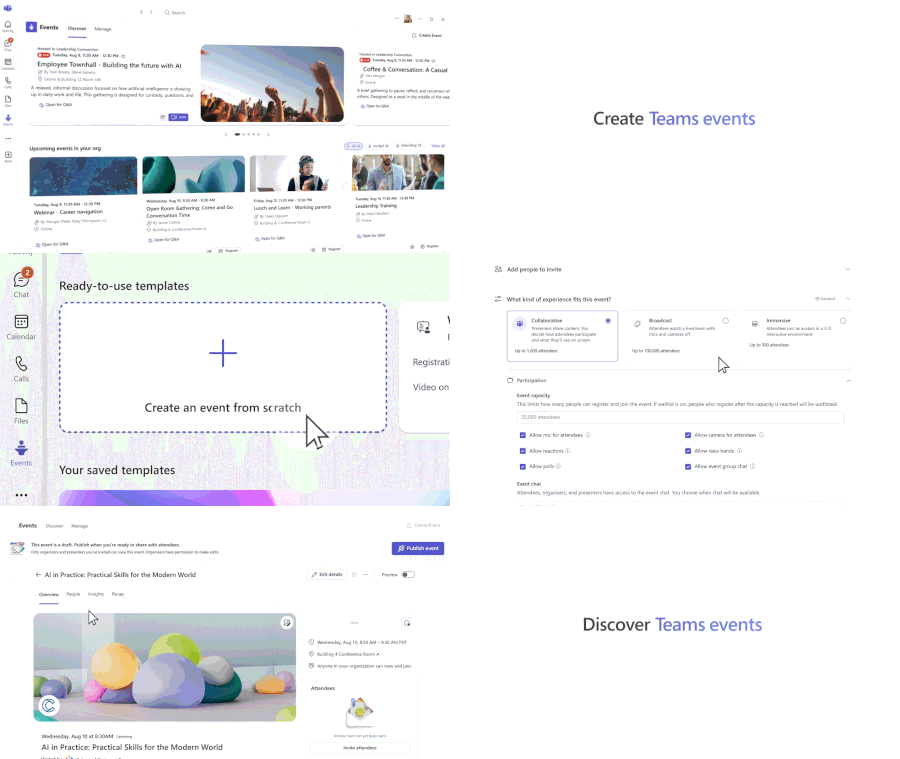
Today’s organizational challenges and growing complexity can make it difficult to create meaningful connections with audiences, whether engaging employees or reaching a dispersed customer base. Having the right tools to navigate the demands of large-scale communication for digital and hybrid events is critical to achieving business objectives. We are excited to introduce the new Teams events experience designed to simplify how events are discovered, created, and managed. Now in public preview, Teams events represents the next step in delivering professional, high-quality events, featuring flexible customization options to empower event organizers and better engage the audiences that matter most. Unified event creation flow At the heart of this Teams events update is greater choice and control for organizers. The Meet app becomes the dedicated home for events in Teams, featuring a new event creation flow that gives organizers more flexibility and control when setting up their events. Organizers can customize experiences such as audience interaction (attendee camera feeds, raise hands, polls, etc.), registration control, and event scale. The new event creation experience no longer constrains individual features to a particular event type, replaced by a dynamic scheduling flow that gives organizers increased flexibility to tailor the event experience to specific audiences and goals. Centralized event discovery and tracking Busy schedules make it impractical, and sometimes impossible, for people to be aware of important events an organization hosts. The new Discover tab in the Meet app helps organizers promote events and drive interest by making them easier for audiences to find and access. The Discover tab is where organizers and attendees can find and track events, without relying solely on calendar invitations. Users can view events they’re registered for, find and register for new events, and catch up on recordings of past events. The Discover tab gives organizers, registrants, and attendees a single place to stay connected to their events. Simplified event management Managing events in Teams is easier than ever with the new Manage tab. No more searching through calendars or hidden menus to update presenter bios, adjust sharing functions, or track registrations. Teams events brings everything into one place for streamlined management. Event pages are created automatically when an event is saved, and serve as the central location for settings, customization, and branding. After an event concludes, Teams events makes it easy to send attendees follow-up emails and recording notifications. Event organizers also have a single place to access registration data and recap tools designed for insights and continued engagement. New capabilities give event organizers more control and flexibility In addition to the new unified experience, Teams events is adding capabilities to streamline setup and drive attendance: New delegate and shared mailbox support enables authorized users to schedule and manage events on behalf of the principal organizer. This helps teams collaborate more naturally when coordinating large or recurring events. Dedicated event details pages make it easy for organizers to view all elements related to the event, including built-in Q&A, and the ability to save customizations as templates for future use. Support for custom domains for event emails improves deliverability and helps invitations and reminders avoid spam filters, while offering additional event branding. Enhanced co-organizer editing and management controls make it easier to share responsibilities throughout the event lifecycle, ensuring a consistent management experience even as teams grow and roles evolve. Expanded access to events with new licensing Starting April 1 st , 2026, Teams events capabilities such as town hall and webinar, including advanced features, are available to all users licensed for Teams Enterprise and no longer require Teams Premium. This expanded access to Teams events enables more people in your organization to create high-quality, professional events. Along with these licensing changes, we also announced Attendee Capacity Pack licenses would be available to scale digital and hybrid events up to 100,000. For more information, please read our recent licensing announcement. Teams live events retirement Teams events will continue to be the experience where we invest in bringing new features and capabilities to support high-quality, professional digital and hybrid events at scale. With this launch, we will be retiring Teams live events fully on June 30, 2026. Users with events already scheduled through February 28, 2027, will be able to carry out these instances as planned through that date to avoid disruption. For more information, please refer to our recent retirement announcement. Create events that connect It’s never been more important to make meaningful connections with the audiences that matter to your organization, and your ability to deliver highly engaging events can play a critical role. The new Teams events experience streamlines your events, from discovering what’s happening across your organization, to creating tailored formats, to managing professional engagements at scale, all in one place. This new chapter brings greater simplicity, flexibility, and power to every event organizer, manager, presenter, and attendee. With expanded access through licensing updates, Teams events provide the foundation to deliver memorable, high-quality experiences, and enables even more people across your organization to confidently bring their events to life.9.3KViews4likes14CommentsAnnouncing the 2026 Microsoft 365 Community Conference Keynotes
The Microsoft 365 Community Conference returns to Orlando this April, bringing together thousands of builders, innovators, creators, communicators, admins, architects, MVPs, and product makers for three unforgettable days of learning and community. This year’s theme, “A Beacon for Builders, Innovators & Icons of Intelligent Work,” celebrates the people shaping the AI‑powered future — and the keynote lineup reflects exactly that. These leaders will set the tone for our biggest, boldest M365 Community Conference. Below is your first look at the official 2026 keynote order and what to expect from each session. Opening Keynote Jeff Teper — President, Microsoft 365 Collaborative Apps & Platforms Building for the future: Microsoft 365, Agents and AI, what's new and what's next Join Jeff Teper, to discover how AI-powered innovation across Copilot, Teams, and SharePoint is reshaping how people communicate, create, and work together. This session highlights what’s new, what’s fundamentally different, and why thoughtful design continues to matter. See the latest advances in AI and agents, gain insight into where collaboration is headed, and learn why Microsoft is the company to continue to bet on when it comes to building what’s next. Expect: New breakthroughs in collaboration powered by AI and agents Fresh innovations across Teams, Copilot, and SharePoint Practical guidance on how design continues to shape effective teamwork Real world demos that show how AI is transforming communication and content Insight into what is new, what is changing, and what is coming next Business Apps & Agents Keynote Ryan Cunningham — Corporate Vice President, Power Platform In this keynote, Ryan Cunningham will share how Microsoft 365 Copilot, Copilot Studio, Power Apps, and Agent 365 come together to help makers build powerful agents and help IT teams deploy and govern them at scale. We’ll share how organizations can design, extend, and govern a new model for the intelligent workplace – connecting data, workflows, and systems into intelligent agents that move work forward. Copilot, apps, and agents: the next platform shift for Microsoft 365 Microsoft 365 Copilot has changed how we interact with software. Now AI agents are changing how work gets done – moving from responding to prompts to taking action, across the tools and data your organization already relies on. Expect: A clear explanation of how to leverage and build with Copilot and agents How agents access data, use tools, and complete multi-step work A deeper look at the latest capabilities across Microsoft 365 Copilot, Copilot Studio, and Power Apps End-to-end demos of agents in action Security, Trust & Responsible AI Keynote Vasu Jakkal — Corporate Vice President, Microsoft Security & Rohan Kumar — Corporate Vice President, Microsoft Security, Purview & Trust In our third keynote, Vasu Jakkal and Rohan Kumar join forces to address one of the most urgent topics of the AI era: trust and security at scale. As organizations accelerate into AI‑powered work, safeguarding identities, data, compliance, and governance is mission‑critical. Securing AI: Building Trust in the Era of AI Join Vasu Jakkal and Rohan Kumar as they unveil Microsoft’s vision for securing the new frontier of AI—showing how frontier firms are protecting their data, identities, and models amid rapid AI adoption. This session highlights how Microsoft is embedding security and governance into every layer of our AI platforms and unifying Purview, Defender, Entra, and Security Copilot to defend against threats like prompt injection, model tampering, and shadow AI. You’ll see how built-in protections across Microsoft 365 enable responsible, compliant AI innovation, and gain practical guidance to strengthen your own security posture as AI transforms the way everyone works. Expect: Microsoft's unified approach to secure AI transformation Forward‑looking insights across Security, Purview & Trust Guidance for building safe, responsible AI environments How to protect innovation without slowing momentum Future of Work Fireside Keynote Dr. Jaime Teevan — Chief Scientist & Technical Fellow, Microsoft Dr. Jaime Teevan, one of the foremost thought leaders on AI, productivity, and how work is evolving. In this intimate fireside‑style session, she’ll share research, real‑world insights, and Microsoft’s learnings from being both the maker and the first customer of the AI‑powered workplace. Expect: Insights from decades of workplace research The human side of AI transformation Practical guidance for leaders, creators, and practitioners Why collaboration is essential to unlock the true potential of AI. Community Closer Keynote Karuana Gatimu - Director, Microsoft Customer Advocacy Group & Heather Cook - Principal PM, MIcrosoft Customer Advocacy Group From Momentum to Movement: Where Community Goes Next As the final moments of Microsoft 365 Community Conference come to a close, Heather Cook and Karuana Gatimu invite the community to pause, reflect, and look forward together. This Community Closer keynote connects the breakthroughs, conversations, and shared experiences of the week into a bigger story—one about people, purpose, and progress. Together, they’ll explore how community transforms technology into impact, how advocates and builders shape what’s next across Microsoft 365, and why this moment matters more than ever. More than a recap, this session is a call to action—challenging attendees to take the energy of the conference back to their teams, regions, and communities, and turn inspiration into sustained momentum. You’ll leave not just with ideas, but with clarity, confidence, and a renewed sense of belonging—because community doesn’t end when the conference does. It’s where the real work begins. More Than Keynotes: Why You’ll Want to Be in Orlando The M365 Community Conference brings together: 200+ sessions and breakouts 21 hands‑on workshops 200+ Microsoft engineers and product leaders onsite The Microsoft Innovation Hub Ask the Experts, Meet & Greets, and Community Studio Women in Tech & Allies Luncheon SharePoint’s 25th Anniversary Celebration And an epic attendee party at Universal’s Islands of Adventure Whether you create, deploy, secure, govern, design, or lead with Microsoft 365 — this is your community, and this is your moment. Join Us for the Microsoft 365 Community Conference April 21–23, 2026 Loews Sapphire Falls & Loews Royal Pacific 👉 Register now: https://aka.ms/M365Con26 Use the SAVE150 code for $150USD off current pricing Come be part of the global community building the future of intelligent work.3.5KViews3likes2CommentsYour guide to the Microsoft 365 Community Conference
Register now and save your spot for the chance to ask questions and share feedback with hundreds of Microsoft executives, engineers, and product leaders. By making your voice heard, your feedback will help shape the technologies that you and countless others use every day. Plus, you’ll hear from icons of Intelligent Work during inspiring keynotes, sessions, and AMAs, including: Jeff Teper, President, Microsoft 365 Collaborative Apps & Platforms, Microsoft Ryan Cunningham, Corporate Vice President, Power Platform Vasu Jakkal, Corporate Vice President, Microsoft Security Dr. Jaime Teevan, Chief Scientist & Technical Fellow, Microsoft View full speaker list > What: Microsoft 365 Community Conference 2025 Register today | Note: Use the SAVE150 discount code to save $150 USD. Content snapshot: 5 Microsoft keynotes + 1 Ask Microsoft Anything (AMA) | 200+ overall sessions Microsoft-led sessions | 21 full-day workshops (pre-day and post) Microsoft is sending over 150+ product makers to present and engage. Review all sessions, workshops, and speakers. When & where: April 21-23, 2026 In-person: Loews Sapphire Falls and Loews Royal Pacific Resorts in Orlando, Florida Pre-day workshops on Sunday, April 19 and Monday, April 20. Details: Twitter & hashtag: @M365CONF | #M365Con Follow us on LinkedIn: M365Community Conference LinkedIn Company Page Cost: $1,850- full conference (Includes 3 continental breakfasts, 3 lunches, a T-shirt, and backpack (additional costs for full-day workshops). Please visit the M365 Community Conference for full pricing. Microsoft Customer Discount: Use CODE: SAVE150 for $150 USD off registration. Why attend? Stay Ahead of Innovation: Gain exclusive insights into the latest advancements in AI and Microsoft’s Product Roadmap. Empowering you to drive transformation within your organization and stay at the forefront of technology. Hands-On Learning: Participate in practical sessions and workshops that provide actionable strategies and skills to optimize workflows, enhance productivity, and achieve business success. Connect with Experts: Build invaluable connections with Microsoft product makers, MVPs, industry leaders, and a global community of like-minded professionals who share your passion for technology. Transform Your Impact: Leave with a deeper understanding of Microsoft tools, clear strategies for leveraging AI in your work, and a roadmap for achieving your goals and enhancing your team's success. Build Community: Build community by connecting with others, sharing experiences, and forming meaningful relationships. Check out Jeff Teper's awesome statement on The ultimate Microsoft 365 community event is back| Microsoft 365 Blog. FUN: Join us in our community lounge for networking, hanging out, meet and greets with Microsoft and Community All-Stars, surprise and delight treats, stickers and raffles to win grand prizes! Are you in? Register today! Don't miss your chance to join the largest M365 focused conference of the year. Ways to save: Use CODE: SAVE150 for $150 USD off registration. M365CON26 Grant Program (For Non-profits & Small Business) See if you qualify for a deep discount or free pass for Microsoft 365 Community Conference. Small Businesses & Non-profits are eligible to apply for a free pass grant (government organizations do not quality). Read on for more details about what to expect, and we hope to see you there! High-level conference schedule *subject to change – check back for updates Sunday, April 19, 2026 – Workshop Day 9:00 AM- 4:00 PM Workshops Monday, April 20, 2026 – Workshop Day 9:00 AM- 4:00 PM Workshops Tuesday, April 21, 2026 –Conference Session Day 7:00 AM- 8:15 AM Continental Breakfast 8:30 AM- 5:00 PM Keynotes and Sessions 5:00 PM- 6:30 PM Conference Opening Recep7on Wednesday, April 22, 2026 – Conference Session Day 7:00 AM- 8:00 AM Continental Breakfast 8:00 AM - 5:00 PM Keynotes and Sessions 5:00 PM - 6:15 PM Networking and T-shirt pick up in Expo Hall 8:00 PM - 10:00 PM Attendee Party Universal Islands of Adventure Thursday April 23, 2026 – Conference Session Day 7:30 AM– 8:45 AM Continental Breakfast 9:00 AM – 4:30 PM Keynotes and Sessions Friday April 24, 2026 – Workshop Day 8:00 AM - 3:00 PM Workshops Check out the keynotes and speakers Catch the speakers and sessions that matter most to you, and your customers. Keynote: Building for the Future: Microsoft 365, Agents and AI, What's New and What's Next Jeff Teper, President, Collaborative Apps and Platforms, Microsoft Tuesday, April 21, 8:30-9:30 AM Keynote: Business Apps and Agents Ryan Cunningham, Corporate Vice President, Microsoft Tuesday, April 21, 9:30-10:20 AM Keynote: Securing AI: Building Trust in the Era of AI Vasu Jakkal, Corporate Vice President, Microsoft Security Business Wednesday, April 22, 8:00-9:15 AM Keynote: The Future of Work Fireside Keynote Jamie Teevan, Ph.D., Chief Scientist and Technical Fellow, Microsoft Thursday, April 23, 2:15-3:15 PM Keynote: From Momentum to Movement: Where Community Goes Next Karuana Gatimu, Director of Customer Advocacy, AI and Collaboration, Microsoft Heather Cook, Principal PM Manager, Global Community Evangelism and Events Customer Advocacy Group, Microsoft 365 Thursday, April 23, 3:15-4:15 PM Full session list 200+ sessions and workshops If you’re interested in learning how Microsoft is shaping the future of work—there’s a session for you. Join Microsoft experts, MVPs, and community leaders as you find out about the latest product innovations and AI-powered tools. Discover what’s new with Microsoft 365 Copilot, Teams, SharePoint, OneDrive, Copilot Studio, and much more. Check out the full catalog > Explore sessions by day: Tuesday, April 21, 2026 – Conference Session Day 10:55 AM - 11:15 AM | Building AI Agents for Communities: How Viva Engage + Copilot Supercharge Organizational Insight Speaker: Spencer Perry and Ramya Rajasekhar 11:30 AM - 12:15 PM | Featured Session: Your Guide What’s New in Teams: Collaboration, Communication, and Copilot Speaker: Chandra Chivukula and Ilya Bukshteyn 11:30 AM - 12:15 PM | Breaking In, Leveling Up: Navigating Tech Careers with Community Speaker: Heather Cook and Nisaini Rexach (CELA) 11:30 AM - 12:15 PM | OneDrive: Your Hub for Productivity and Collaboration Excellence Speaker: Carter Green and Arvind Mishra 11:30 AM - 12:15 PM | From Chaos to AI-Ready in 30 Days: Meet the SharePoint Admin Agent Speaker: Dieter Jansen and Dave Minasyan 11:30 AM - 12:15 PM | Leveraging SQL database in Fabric to implement RAG patterns using Vector search Speaker: Sukhwant Kaur 11:30 AM - 12:15 PM | How Microsoft Actually Builds Copilot Agents Speaker: Kristina Marko and Clint Williams 11:30 AM - 12:15 PM | Copilot Studio Governance for Public Sector Speaker: William McLendon and Richie Wallace 11:30 AM - 12:15 PM | AI-Powered Collaboration: Unlocking Your Employee Knowledge Base in Engage Speaker: Allison Michels and Ramya Rajasekhar 11:30 AM - 12:15 PM | From Data to Decisions: How Copilot in VS Code Empowers Research and Enterprise Teams Speaker: Semir Sarajlic and Olesya Sarajlic, PhD 1:40 PM - 2:00 PM | Deep dive into Agent insights and content governance across SharePoint and Microsoft 365 Speaker: Nikita Bandyopadhyay 1:45 PM - 2:30 PM | Agent Lifecycle Management and Governance leveraging FastTrack Speaker: Pratik Bhusal and Azharullah Meer 1:45 PM - 2:30 PM | Evolving channels to be the hub for collaboration in M365 Speakers: Roshin Lal Ramesan and Derek Snook 1:45 PM - 2:30 PM | Employee Voice Reinvented: Gathering Insights with Next-Gen Feedback Agents Speaker: Caribay Garcia and Alisa Liddle 1:45 PM - 2:30 PM | Fireside Chat: Being an Effective Leader with AI Speaker: Karuana Gatimu 1:45 PM - 2:30 PM | Inside Microsoft: Reclaiming Engineering Time with AI in Azure DevOps Speaker: Apoorv Gupta and Gopal Panigrahy 1:45 PM - 2:30 PM | Featured Session: OneDrive in Action: Transforming Industries, Empowering Success Speaker: Vishal Lodha, Arwa Tyebkhan, and Jason Moore 1:45 PM - 2:30 PM | Demystifying Copilot and AI experiences on Windows Speaker: Anupam Pattnaik 1:45 PM - 2:30 PM | Work IQ fundamentals Speaker: Ben Summers 1:45 PM - 2:30 PM | Copilot "Employee Agents" Speaker: Kyle Von Haden 2:30 PM - 2:50 PM | FastTrack your M365 Deployment Speaker: Pratik Bhusal and Jeffrey Manning 2:45 PM - 3:30 PM | Protect and govern agents with Microsoft Purview Speaker: Nishan DeSilva and Shilpa Ranganathan 2:45 PM - 3:30 PM | Mission Readiness - Cybersecurity and Copilot in the Public Sector Speaker: Karuana Gatimu 2:45 PM - 3:30 PM | A New Way of Building! Child Agents, Instructions, and Descriptions Speaker: Dewain Robinson and Grant Gieszler 2:45 PM - 3:30 PM | Start your adoption journey with adoption.microsoft.com Speaker: Jessie Hwang 2:45 PM - 3:30 PM | Copilot readiness & resiliency with M365 Backup & Archive Speaker: Sree Lakshmi and Eshita Priyadarshini 2:45 PM - 3:30 PM | Protection in Teams as Modern Threats Evolve Speaker: Srisudha Mahadevan and Harshal Gautam 2:45 PM - 3:30 PM | Meet AI in SharePoint Speaker: Cory Newton-Smith and Julie Seto 2:45 PM - 3:30 PM | Featured Session: Engage everywhere: communities, events, and storylines in Teams, powered by AI Speaker: Jeanette Vikbacka Castaing, Jason Mayans, Steve Nguyen, and Murali Sitaram 3:30 PM - 3:50 PM | From Slack to Teams: What’s New and How We Make the Move Easy Speaker: Roshin Lal Ramesan and Arun Das 3:55 PM - 4:15 PM | How Microsoft Digital adopted Baseline Security Mode to improve Microsoft's security posture Speaker: Adriana Wood 4:15 PM - 5:00 PM | Featured Session: Agent 365: The control plane for all Agents Speaker: Nikita Bandyopadhyay and Sesha Mani 4:15 PM - 5:00 PM | Customer/Partner spotlight: Microsoft 365 Backup Speaker: Saumitra Bhide and Brad Gussin 4:15 PM - 5:00 PM | Demystifying Multiagent (Child / Connected) and Component Collection Speaker: Bobby Chang and Dewain Robinson 4:15 PM - 5:00 PM | Turning AI Potential into High-Impact AI Business Cases and ROI Speaker: April Delsing and Olga Gordon 4:15 PM - 5:00 PM | Leading Workforce Transformation: The Art and Science of Skilling Your People Speaker: Karuana Gatimu 4:15 PM - 5:00 PM | Seamless External Collaboration for all customer engagements Speaker: Nitesh Golchha 4:15 PM - 5:00 PM | Leading Workforce Transformation: The Art and Science of Skilling Your People Speaker: Jessie Hwang 4:15 PM - 5:00 PM | Community in the Age of AI—Humans at the Center of Copilot Adoption Speaker: Sarah Lundy, Allison Michels, and Alex Snyder 4:15 PM - 5:00 PM | What's new with Copilot and Office: Word, Excel, Power Point Agent Mode and Agents Speakers: Trevor O'Brien and Dan Parish 4:15 PM - 5:00 PM | Understanding Work IQ API Speaker: Paolo Pialorsi Wednesday, April 22, 2026 – Conference Session Day 8:30 AM - 9:30 AM | Building for the future: Microsoft 365, Agents and AI, what's new and what's next Speaker: Jeff Teper 9:30 AM - 10:30 AM | Business Apps & Agents Keynote Speaker: Ryan Cunningham 10:15 AM - 11:00 AM | Empowering Community Builders: Join MGCI & CommunityDays.org Speaker: Heather Cook, Bryan Hart and Emily Hove 10:15 AM - 11:00 AM | The Communicator’s Guide to Viva Engage: Making Comms Relevant in Your AI Transformation Speaker: Najla Dadmand, Sarah Lundy, and Dan Mulcahey 10:15 AM - 11:00 AM | Top Wins - Copilot and Agents for Non Profit Speaker: Karuana Gatimu 10:15 AM - 11:00 AM | Empowering Community Builders: Join MGCI & CommunityDays.org Speaker: Heather Cook, Bryan Hart and Emily Hove 10:15 AM - 11:00 AM | The Communicator’s Guide to Viva Engage: Making Comms Relevant in Your AI Transformation Speaker: Najla Dadmand, Sarah Lundy, and Dan Mulcahey 10:15 AM - 11:00 AM | From Chaos to Clarity: Hyper automation That Actually Works Speaker: Danielle Moon 10:15 AM - 11:00 AM | The Communicator’s Guide to Viva Engage: Making Comms Relevant in Your AI Transformation Speaker: Najla Dadmand, Sarah Lundy, and Dan Mulcahey 10:15 AM - 11:00 AM | Supercharge Your Agents with Computer Use in Copilot Studio Speaker: Sravani Seethi and Phi-Lay Nguyen 10:55 AM - 11:15 AM | Building AI Agents for Communities: How Viva Engage + Copilot Supercharge Organizational Insight Speaker: Spencer Perry and Ramya Rajasekhar 11:30 AM - 12:15 PM | Featured Session: Your Guide What’s New in Teams: Collaboration, Communication, and Copilot Speaker: Chandra Chivukula and Ilya Bukshteyn 11:30 AM - 12:15 PM | Breaking In, Leveling Up: Navigating Tech Careers with Community Speaker: Heather Cook and Nisaini Rexach (CELA) 11:30 AM - 12:15 PM | OneDrive: Your Hub for Productivity and Collaboration Excellence Speaker: Carter Green and Arvind Mishra 11:30 AM - 12:15 PM | From Chaos to AI-Ready in 30 Days: Meet the SharePoint Admin Agent Speaker: Dieter Jansen and Dave Minasyan 11:30 AM - 12:15 PM | Leveraging SQL database in Fabric to implement RAG patterns using Vector search Speaker: Sukhwant Kaur 11:30 AM - 12:15 PM | How Microsoft Actually Builds Copilot Agents Speaker: Kristina Marko and Clint Williams 11:30 AM - 12:15 PM | Copilot Studio Governance for Public Sector Speaker: William McLendon and Richie Wallace 11:30 AM - 12:15 PM | AI-Powered Collaboration: Unlocking Your Employee Knowledge Base in Engage Speaker: Ramya Rajasekhar and Allison Michels 11:30 AM - 12:15 PM | From Chaos to AI-Ready in 30 Days: Meet the SharePoint Admin Agent Speaker: Dieter Jansen and Dave Minasyan 11:30 AM - 12:15 PM | AI-Powered Collaboration: Unlocking Your Employee Knowledge Base in Engage Speaker: Ramya Rajasekhar and Allison Michels 11:30 AM - 12:15 PM | From Data to Decisions: How Copilot in VS Code Empowers Research and Enterprise Teams Speaker: Semir Sarajlic and Olesya Sarajlic, PhD 11:30 AM - 12:15 PM | How Microsoft Actually Builds Copilot Agents Speaker: Kristina Marko and Clint Williams 1:30 PM - 2:15 PM | An AI Powered Communication and Operational Efficiency Blueprint for Frontline Teams Speaker: Vishal Anil and Amarjit Prasad 1:30 PM - 2:15 PM | Connected Collaboration: The Future of Sharing in M365 Speaker: Miceile Barrett and Phaneendra Sai Sristi 1:30 PM - 2:15 PM | Use data, insights, and employee listening to build your comms strategy Speaker: Amy Morris, Paula Wellings, and John Cirone 1:30 PM - 2:15 PM | The Power Apps Builder’s Guide for Choosing the Right Path Speaker: April Dunnam 1:30 PM - 2:15 PM | What's new in the Microsoft 365 Copilot app: Your starting place for AI at work Speaker: Andrea Lum and Constance Gervais 1:30 PM - 2:15 PM | The Future of SharePoint Extensibility: What's New, What's Next Speaker: Alex Terentiev and Vesa Juvonen 1:30 PM - 2:15 PM | Using SharePoint AI to solve Business Processes Speaker: Kristen Kamath, Nate Tennant, and Alexander Spitsyn 1:30 PM - 2:15 PM | The Future of SharePoint: AI ready to discover, publish and build. Speaker: Kripal Kavi and Sarah Mathurin 1:30 PM - 2:15 PM | Secure and Govern Microsoft 365 Copilot - What Every IT Pro Needs to Know Speaker: Sophie Ke 1:30 PM - 2:15 PM | What's new in the Microsoft 365 Copilot app: Your starting place for AI at work Speaker: Andrea Lum and Constance Gervais 1:30 PM - 2:15 PM | An AI Powered Communication and Operational Efficiency Blueprint for Frontline Teams Speaker: Vishal Anil and Amarjit Prasad 1:30 PM - 2:15 PM | The Future of SharePoint Extensibility: What's New, What's Next Speaker: Alex Terentiev and Vesa Juvonen 1:35 PM - 1:55 PM | Modernizing Federal Security for the AI Era: Deploying Copilot in GCC High and DoW Speaker: William McLendon and Richie Wallace 1:40 PM - 2:00 PM | Deep dive into Agent insights and content governance across SharePoint and Microsoft 365 Speaker: Nikita Bandyopadhyay 1:45 PM - 2:30 PM | Agent Lifecycle Management and Governance leveraging FastTrack Speaker: Pratik Bhusal and Azharullah Meer 1:45 PM - 2:30 PM | Evolving channels to be the hub for collaboration in M365 Speaker: Chandra Chivukula, Roshin Lal Ramesan, and Chandrika Duggirala 1:45 PM - 2:30 PM | Employee Voice Reinvented: Gathering Insights with Next-Gen Feedback Agents Speaker: Caribay Garcia and Alisa Liddle 1:45 PM - 2:30 PM | Fireside Chat: Being an Effective Leader with AI Speaker: Karuana Gatimu 1:45 PM - 2:30 PM | Inside Microsoft: Reclaiming Engineering Time with AI in Azure DevOps Speaker: Apoorv Gupta and Gopal Panigrahy 1:45 PM - 2:30 PM | Featured Session: OneDrive in Action: Transforming Industries, Empowering Success Speaker: Vishal Lodha, Jason Moore, and Arwa Tyebkhan 1:45 PM - 2:30 PM | Work IQ fundamentals Speaker: Ben Summers 1:45 PM - 2:30 PM | Copilot "Employee Agents" Speaker: Kyle Von Haden 2:30 PM - 2:50 PM | FastTrack your M365 Deployment Speaker: Pratik Bhusal and Jeffrey Manning 2:45 PM - 3:30 PM | Protect and govern agents with Microsoft Purview Speaker: Nishan DeSilva, Shilpa Ranganathan 2:45 PM - 3:30 PM | Mission Readiness - Cybersecurity and Copilot in the Public Sector Speaker: Karuana Gatimu 2:45 PM - 3:30 PM | A New Way of Building! Child Agents, Instructions, and Descriptions Speaker: Dewain Robinson and Grant Gieszler 2:45 PM - 3:30 PM | Start your adoption journey with adoption.microsoft.com Speaker: Jessie Hwang 2:45 PM - 3:30 PM | Copilot readiness & resiliency with M365 Backup & Archive Speaker: Sree Lakshmi and Eshita Priyadarshini 2:45 PM - 3:30 PM | Protection in Teams as Modern Threats Evolve Speaker: Srisudha Mahadevan and Harshal Hautam 2:45 PM - 3:30 PM | Featured Session: Engage everywhere: communities, events, and storylines in Teams, powered by AI Speaker: Jeanette Vikbacka Castaing, Jason Mayans, Steve Nguyen, and Murali Sitaram 2:45 PM - 3:30 PM | Meet AI in SharePoint Speaker: Cory Newton-Smith and Julie Seto 3:30 PM - 3:50 PM | From Slack to Teams: What’s New and How We Make the Move Easy Speaker: R Roshin Lal Ramesan and Arun Das 3:55 PM - 4:15 PM | How Microsoft Digital adopted Baseline Security Mode to improve Microsoft's security posture Speaker: Adriana Wood 4:15 PM - 5:00 PM | Featured Session: Agent 365: The control plane for all Agents Speaker: Nikita Bandyopadhyay and Sesha Mani 4:15 PM - 5:00 PM | Demystifying Multiagent (Child / Connected) and Component Collection Speaker: Bobby Chang and Dewain Robinson 4:15 PM - 5:00 PM | Turning AI Potential into High-Impact AI Business Cases and ROI Speaker: April Delsing and Olga Gordon 4:15 PM - 5:00 PM | Leading Workforce Transformation: The Art and Science of Skilling Your People Speaker: Karuana Gatimu 4:15 PM - 5:00 PM | Seamless External Collaboration for all customer engagements Speaker: Nitesh Golchha 4:15 PM - 5:00 PM | Customer/Partner spotlight: Microsoft 365 Backup Speaker: Brad Gussin and Saumitra Bhide 4:15 PM - 5:00 PM | Leading Workforce Transformation: The Art and Science of Skilling Your People Speaker: Jessie Hwang 4:15 PM - 5:00 PM | Community in the Age of AI—Humans at the Center of Copilot Adoption Speaker: Sarah Lundy, Allison Michels, and Alex Snyder 4:15 PM - 5:00 PM | What's new with Copilot and Office: Word, Excel, Power Point Agent Mode and Agents Speaker: Trevor O'Brien and Dan Parish 4:15 PM - 5:00 PM | Understanding Work IQ API Speaker: Paolo Pialorsi Thursday April 23, 2026 – Conference Session Day 9:00 AM - 9:45 AM | Microsoft Lists Speaker: Mitalee Mulpuru and Arjun Tomar 10:55 AM - 11:15 AM | Building AI Agents for Communities: How Viva Engage + Copilot Supercharge Organizational Insight Speakers: Spencer Perry and Ramya Rajasekhar 11:30 AM - 12:15 PM | Featured Session: Your Guide What’s New in Teams: Collaboration, Communication, and Copilot Speakers: Ilya Bukshteyn and Chandra Chivukula 11:30 AM - 12:15 PM | Breaking In, Leveling Up: Navigating Tech Careers with Community Speaker: Heather Cook 11:30 AM - 12:15 PM | OneDrive: Your Hub for Productivity and Collaboration Excellence Speaker: Carter Green and Arvind Mishra 11:30 AM - 12:15 PM | From Chaos to AI-Ready in 30 Days: Meet the SharePoint Admin Agent Speaker: Dieter Jansen and Dave Minasyan 11:30 AM - 12:15 PM | Leveraging SQL database in Fabric to implement RAG patterns using Vector search Speaker: Sukhwant Kaur 11:30 AM - 12:15 PM | How Microsoft Actually Builds Copilot Agents Speaker: Kristina Marko and Clint Williams 11:30 AM - 12:15 PM | AI-Powered Collaboration: Unlocking Your Employee Knowledge Base in Engage Speaker: Ramya Rajasekhar and Allison Michels 11:30 AM - 12:15 PM | From Chaos to AI-Ready in 30 Days: Meet the SharePoint Admin Agent Speaker: Dieter Jansen and Dave Minasyan 11:30 AM - 12:15 PM | From Data to Decisions: How Copilot in VS Code Empowers Research and Enterprise Teams Speaker: Semir Sarajlic and Olesya Sarajlic, PhD 11:30 AM - 12:15 PM | Copilot Studio Governance for Public Sector Speaker: William McLendon and Richie Wallace 1:40 PM - 2:00 PM | Deep dive into Agent insights and content governance across SharePoint and Microsoft 365 Speaker: Nikita Bandyopadhyay 1:45 PM - 2:30 PM | Agent Lifecycle Management and Governance leveraging FastTrack Speaker: Pratik Bhusal and Azharullah Meer 1:45 PM - 2:30 PM | Evolving channels to be the hub for collaboration in M365 Speakers: Roshin Lal Ramesan and Derek Snook 1:45 PM - 2:30 PM | Employee Voice Reinvented: Gathering Insights with Next-Gen Feedback Agents Speaker: Caribay Garcia and Alisa Liddle 1:45 PM - 2:30 PM | Fireside Chat: Being an Effective Leader with AI Speaker: Karuana Gatimu 1:45 PM - 2:30 PM | Inside Microsoft: Reclaiming Engineering Time with AI in Azure DevOps Speaker: Apoorv Gupta and Gopal Panigrahy 1:45 PM - 2:30 PM | Featured Session: OneDrive in Action: Transforming Industries, Empowering Success Speaker: Vishal Lodha, Jason Moore, and Arwa Tyebkhan 1:45 PM - 2:30 PM | Work IQ fundamentals Speaker: Ben Summers 1:45 PM - 2:30 PM | Copilot "Employee Agents" Speaker: Kyle Von Haden 2:30 PM - 2:50 PM | FastTrack your M365 Deployment Speaker: Pratik Bhusal and Jeffrey Manning 2:45 PM - 3:30 PM | Protect and govern agents with Microsoft Purview Speaker: Nishan DeSilva and Shilpa Ranganathan 2:45 PM - 3:30 PM | Mission Readiness - Cybersecurity and Copilot in the Public Sector Speaker: Karuana Gatimu 2:45 PM - 3:30 PM | A New Way of Building! Child Agents, Instructions, and Descriptions Speaker: Dewain Robinson and Grant Gieszler 2:45 PM - 3:30 PM | Start your adoption journey with adoption.microsoft.com Speaker: Jessie Hwang 2:45 PM - 3:30 PM | Copilot readiness & resiliency with M365 Backup & Archive Speaker: Sree Lakshmi and Eshita Priyadarshini 2:45 PM - 3:30 PM | Protection in Teams as Modern Threats Evolve Speaker: Srisudha Mahadevan and Harshal Gautam 2:45 PM - 3:30 PM | Meet AI in SharePoint Speaker: Cory Newton-Smith and Julie Seto 2:45 PM - 3:30 PM | Featured Session: Engage everywhere: communities, events, and storylines in Teams, powered by AI Speaker: Jeanette Vikbacka Castaing, Jason Mayans, Steve Nguyen, and Murali Sitaram 3:30 PM - 4:15 PM | Keynote: From Momentum to Movement: Where Community Goes Next Speakers: Heather Cook and Karuana Gatimu Friday, April 24, 2026 – Workshop Day 9:00 AM - 9:45 AM | Deepening customer connections for your SMB through Teams Speakers: Angela Chin and Prem Mathiyalagan 9:00 AM - 9:45 AM | Cultivating Trust and Leadership Excellence: Strategies for Respect and Empathy in the Workplace Speaker: Heather Cook 9:00 AM - 9:45 AM | Planner, Copilot and Agents: AI Assisted Projects with Work IQ Speakers: Howard Crow and Robyn Guarriello 9:00 AM - 9:45 AM | Microsoft 365 Mergers & Acquisitions Speaker: Vaibhav Gaddam and Subham Dang 9:00 AM - 9:45 AM | Top Wins - Copilot and Agents for Retail Speaker: Karuana Gatimu 9:00 AM - 9:45 AM | Agents are joining the team - build collaborative agents for Microsoft Teams Speaker: Carter Gilliam and Saira Shariff 9:00 AM - 9:45 AM | Prompt to Profit: How Finance Teams Win with M365 Copilot & AI Agents Speaker: Melanie Mayo 9:00 AM - 9:45 AM | Top Wins - Copilot and Agents for Retail Speaker: Danielle Moon and Karuana Gatimu 9:00 AM - 9:45 AM | Microsoft Purview: AI‑-Powered Data Security for Microsoft 365 Speaker: Aashish Ramdas Level up your AI skills and shape the future of your business with Featured Sessions Develop the skills needed to thrive as a Frontier Firm through sessions led by innovators, builders, designers, Microsoft product teams, and MVPs shaping collaboration. Featured Session: Engage everywhere: communities, events, and storylines in Teams, powered by AI with Murali Sitaram, Steve Nguyen, Jason Mayans, and Jeanette Vikbacka Castaing Featured Session: Your Guide What’s New in Teams: Collaboration, Communication, and Copilot with Ilya Bukshteyn and Chandra Chivukula Planner, Copilot and Agents: AI Assisted Projects with WorkIQ with Howard Crow and Robyn Guarriello Lightning Talks: Lightning Talks are fast‑paced, 15‑minute sessions happening live at the Microsoft Booth that are designed to deliver practical insights, real‑world tips, and quick wins you can take back to your team right away. Stop by throughout the day to learn something new, get inspired, and catch a few surprises along the way. You can check the event agenda for session details. Onsite experiences Demo Stations: Visit the demo stations in the Microsoft Booth for guided, live walkthroughs led by Microsoft experts who can answer your questions in real time. Each station is designed to support scenario‑based conversations and hands‑on exploration, so you can dive deeper into the tools and solutions that matter most to your organization. The Microsoft Booth will be open anytime the expo hall is open. Mini LEGO figurines: Build a mini-LEGO figurine as a takeaway after walking through a demo scenario. It is a quick hands-on moment that adds some play and personality to your conference experience and lets you take some fun swag home. Celebrate 25 years of SharePoint Tuesday, April 21, 12:30PM – 1:30PM Celebrate the SharePoint community with the premiere of a new documentary short film at the conference, complete with a true movie‑premiere experience. Designed to honor the impact of SharePoint and Microsoft 365, this special event brings the community together to capture and celebrate the moment in person. Tuesday, April 21, 5PM – 6:30PM Microsoft Booth Join a live panel celebrating 25 years of SharePoint and what is next for the platform and community. Expect reflections, stories, and forward-looking conversations tied to the broader SharePoint at 25 celebration. Surface + Global Skilling Bar: Get hands on with Surface devices while exploring skilling resources designed to help you level up. This activation is being built to connect Surface experiences with AI skilling guidance, including the AI Skills Navigator. Attendees can experience this hands-on learning in the Microsoft booth during expo hall hours. Surface giveaways from raffle: Enter the raffle for a chance to win Surface giveaways and other prizes during the event. Winners are selected as part of the community giveaway experience, so check posted instructions onsite and make sure you enter. Each raffle will take place at the close of expo hall hours at the Microsoft Booth Bring your spirit wear game! We’re bringing the fun to the show floor with themed Costume Spirit Days all week long! Come by the booth in your best look, show off your costume, and score an extra raffle ticket for our daily prize drawing. Product Roundtable Discussions Microsoft wants to hear from you! The Microsoft User Experience Research team is hosting a series of interactive sessions focused on AI-powered experiences across Microsoft Teams, OneDrive, SharePoint, Planner, and Viva Engage. We invite you to join us to share your perspectives, explore emerging ideas, and influence what’s next. Customer feedback is at the heart of our innovation process. Your participation helps ensure that the experiences we are building are useful, intuitive, and grounded in real organizational needs. “At Microsoft, learning from our customers is a privilege and a vital part of our customer-driven innovation process. By sharing your perspectives, you enable us to create solutions that truly meet your needs and enhance your overall experience with Microsoft products.” – Marcella Silva, Partner Director of User Experience Research What you can expect: Interactive Sessions: Participate in hands-on activities and guided discussions with the Microsoft User Experience Research and Product teams. Expert Insights: Learn directly from the teams shaping the experiences you use every day. Exclusive Previews: Get early visibility into current explorations and future directions. Meaningful Connections: Engage with peers and Microsoft teams in a collaborative environment. Community meetups Community meetups are informal, connection‑first gatherings where attendees can meet others who share a role, interest, or identity. Whether you're looking to exchange ideas, grow your network, or find your people within the Microsoft 365 community, these sessions create space for meaningful conversations and authentic connection beyond the conference sessions. How to sign up: Please use this signup sheet to reserve a social meetup with your community. Women in Tech and Allies Lunch Discussion Grab your lunch and network with peers, discuss progress, and focus on how we can continue to make the Microsoft ecosystem the best in the world for supporting women. All individuals are welcome regardless of gender for an open and compassionate conversation on allyship and inclusiveness. The discussion will be hosted by Heather Cook, Principal Customer Experience PM and distinguished panelists including: Vasu Jakkal, Corporate Vice President, Microsoft Security Business Jaime Teevan, Chief Scientist & Technical Fellow Lan Ye, Corporate Vice President, Microsoft Teams Sumi Singh, Corporate Vice President, Microsoft Teams Karuana Gatimu, Director, Customer Advocacy - AI & Collaboration, Microsoft Kate Faaland, Program Manager of Data and AI, AvePoint Reservable podcast room Microsoft FTEs, MVPs, and community leaders can reserve time in the on-site Podcast Room at Microsoft 365 Community Conference to record interviews, podcast episodes, or social content. The space will be equipped with branded backdrops along with professional video and audio equipment to support high quality content creation. Complete the reservation form to request a time slot. Calendar invites will be sent once confirmed. Questions can be directed to Jonathan Jones. Celebrity Meet-n-greet Stop by the Microsoft Community News Desk on Tuesday from 2pm-4pm for a special photo meet and greet. Meet surprise celebrity guests and snap a photo with them at our on site photobooth Get the MVP experience—and don’t forget the photo op! Microsoft MVPs will be on hand throughout the event to share their real-world experience and practitioner insight directly to you. During sessions, our MVPs will share thoughts and brainstorm solutions to challenges as they share practical, scenario‑driven guidance drawn from hands‑on work with Microsoft 365. And of course, the program isn’t over without the annual MVP photo! This will take place at the Innovation Hub (Microsoft Booth) on Tuesday, April 21, at 5:00 PM. Register Today! You’ll find all this and more at Microsoft 365 Community Conference, April 21–23 in Orlando. Register today and don't miss your chance for the largest M365 focused conference of the year. and don't miss your chance for the largest M365 focused conference of the year. Ways to save: Use CODE: SAVE150 for $150 USD off registration. M365CON26 Grant Program (For Non-profits & Small Business) See if you qualify for a deep discount or free pass for Microsoft 365 Community Conference. Small Businesses & Non-profits are eligible to apply for a free pass grant at www.change3e.com/grants (government organizations do not quality). Learn more Visit M365Conf.com and follow the action on: X/Twitter: @M365Conf / #M365Con, @Microsoft365, @MSFTCopilot, @SharePoint, @OneDrive, @MicrosoftTeams, @MSPowerPlat, @Microsoft365Dev, and @MSFTAdoption. And on our Microsoft Community LinkedIn and Learning YouTube channel. Want more information? Check out our library of blogs on topics, speakers, community activities and more: The ultimate Microsoft 365 community event returns with Jeff Teper 5 reasons to attend this year’s event What’s new in Microsoft Teams What to expect from the Copilot & AI sessions MVP experiences Get your company engagement up with Viva Engage Women in Tech at M365 Community Conference Level up your data security Keynotes highlight We hope you will join us in Orlando for an unforgettable week of innovation, inspiration, and community! Get ready to dive into the action with passionate MVPs, Microsoft product leaders, and an incredible lineup of tools like Microsoft 365 Copilot, Teams, SharePoint, OneDrive, Copilot Studio, Power Platform, Planner, and so much more. Let us make memories and shape the future together!862Views0likes1Comment
Display Teams chat message with date stamp rather than relative day
Is there a way to force Teams Chat messages to display the date of a message rather than "yesterday" or "today"? e.g. display "27/08/2024" instead of displaying "yesterday 2:12 pm". (I'm creating this post on 28/08.) We use screenshots of Teams messages in our processes, and having to wait for the actual date to displayed invariably means taking the screenshot is forgotten. Immersive reader always shows the actual date, but not the recipient of the message. No help there.7.4KViews16likes15CommentsIntroducing a refreshed design, task chat, and more in Microsoft Planner
We’re excited to announce that a modernized user interface and new features are now rolling out to basic plans in both Planner in Teams and Planner for the web. The updated design offers enhanced navigation, responsive layouts, a new goals view for setting objectives and priorities, and task chat—one of your most requested features—to enable real-time collaboration and @ mentioning team members. This release aims to make planning easier for everyday users while preparing for future AI-powered capabilities. Our goal is to streamline planning by making it more intelligent and connected, so teams can concentrate on achieving results rather than managing tasks. What's new in Planner A refreshed design: With this rollout, users will be able to manage their plans in a cleaner, more modern interface that brings a more consistent planning experience across work. Planner’s new look was designed to feel simpler, allowing users to find what they need. It reduces visual clutter, improves layout and spacing, and creates a more focused workspace. Task chat with @ mentions: A new task chat is coming to basic plans, bringing real-time, threaded conversations directly into tasks, including @ mentions, rich formatting, emojis, and notifications to help keep decisions tied to the specific task at hand. Plan members who are @ mentioned in a task will receive a notification in their Teams Activity feed and via email and can select the notification which takes them directly to the task card for additional context. Note that previously, users received notifications for every task comment, but as a result of customer feedback, we now only send notifications to mentioned users. The ability to @ mention team members directly in a task has been a top request, and we’re excited to roll this out in a familiar, chat-based experience. Please note, premium plans will continue to utilize the existing task conversation experience. This will converge into the new experience at a later point in time. Goals view: Basic plans will now include a dedicated Goals view, allowing teams to set clear, well-defined objectives to help prioritize work. By connecting tasks to shared goals, teams achieve greater alignment, gain clarity on priorities, and track progress and outcomes—driving the plan forward together. Access to Goals view in basic plans requires either a Planner premium license or a Microsoft 365 Copilot license. Notes on availability Please note that not all users will see the new Planner interface at the same time. This refreshed interface, along with Task chat and Goals view, begins rolling out to basic plans today and will continue to roll out over the coming weeks. This is only the beginning This redesign lays the groundwork for many more improvements coming to Planner in the next few weeks and months, including: Project Manager agent in basic plans – to help with task execution and the creation of status reports. Custom templates. Planner in Outlook. Stay tuned for announcements regarding these updates and more aligned to our long-term vision for integrated work management. Feature availability, naming, and timelines are subject to change. Please refer to the Microsoft 365 Roadmap for the latest status. Addressing your feedback We heard your feedback about inconsistencies between basic and premium plans. This refresh starts closing those gaps, so features appear consistently across plans based on your license. For example, users with a Planner premium license will now see Goals in basic plans, and users with a Microsoft 365 Copilot license will soon have access to Project Manager Agent in basic plans as well. Tell us what you think about the new Planner interface, Task chat, and Goals view by selecting More (circled question mark icon) in the top right corner of the app, then selecting Feedback from the dropdown menu. We also encourage you to share any feature requests by adding your ideas to the Planner Feedback Portal. Your feedback helps inform our feature updates, and we look forward to hearing from you. Learn more Visit planner.cloud.microsoft to access Planner directly from your browser. Sign up to receive future communication about Planner. Learn more about Planner in our Frequently asked questions. Check out the Planner adoption page and Planner help & learning page to learn more about Planner. Visit the Microsoft 365 roadmap for feature descriptions and estimated release dates for Planner. Walk through the interactive demos for Project Manager Agent in Planner and Project Manager Agent skills in Teams meetings.26KViews8likes57Comments
Web Notifications API from Personal Tab app doesn't work
I have a client-side web application that we're trying to get to run as a Teams personal tab app. I have the app working as a teams app, as long as we "open in new window" so that the app doesn't get put to sleep as it needs a permanently up session with something else. Our app uses Web Notifications API (https://developer.mozilla.org/en-US/docs/Web/API/Notification) to create desktop notificiations, but this does not seem to work when running as a Teams tab app popped out into a new window. No notifications are displayed. Permissions have been requested correctly and given and Windows is set to allow notifications, but these web notifications never make it out of teams to the desktop. There are no errors in the browser console to say the web notifications are not supported in Teams. Is this not supported as a teams app? The inbuilt activity feed is useless for our purpose (for a few reasons), so please don't suggest I use graph to make use of that instead.36Views0likes2Comments
Planner task comments no longer send email notifications – critical regression
This change removed a previously existing core functionality without providing an adequate replacement. With the new Planner experience, task comments no longer trigger automatic email notifications to assigned users. This breaks a critical communication mechanism that many teams relied on for reliable task coordination. As a result, assigned users are no longer consistently informed about updates, introducing a high risk of missed information and operational issues in day-to-day work. There is currently no supported or enforceable alternative to ensure users are notified. Previous behavior: Task comments triggered automatic email notifications Assigned users were reliably informed Communication was traceable and consistent Current behavior: No automatic email notifications No configuration to restore this @mentions required (manual, error-prone, not enforceable) Microsoft Support has confirmed that this is by design and cannot be reverted. From an enterprise perspective, this is not just a design change, but a regression of critical functionality without an equivalent replacement. Request: Please restore automatic email notifications for task discussions or provide a reliable, enforceable alternative for notifying assigned users. Question to the community: How are you handling this change in real-world scenarios? Switching tools? Enforcing @mentions? Moving communication out of Planner? Would appreciate hearing how others are dealing with this.18Views1like0CommentsWhat’s New in Microsoft Teams Feature Spotlight – Pop out shared content in separate window
Hey Teams Community, We’re discussing a new feature each week mentioned in the monthly What’s New in Microsoft Teams and this week we’re looking at the ability to pop out shared content into a separate window. The pop out feature in Teams makes it really easy to keep multiple things open at the same time while collaborating. Previously, users could streamline their workflows by popping out individual chat conversations, meetings, and calling experiences into a separate window. Now, users can pop out shared meeting content into a separate window. This allows users to focus on shared content while still being able to see the meeting participants. I regularly pop out chats to review content between different colleagues and I can absolutely see myself using the pop out feature for shared content in meetings when others are presenting, especially when I’m using multiple monitors. How often do you pop out chats or meetings into a separate window? Do you think this new ability to pop out shared content will help keep the flow of meetings?Solved3.7KViews1like3Comments
Inaccessible colour contrast for high text in Microsoft Teams in Dark mode on desktop
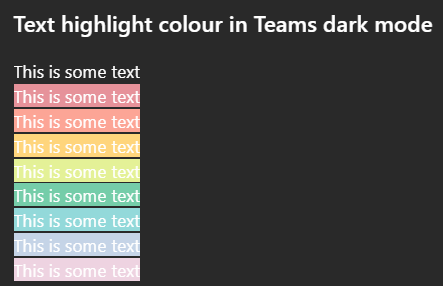
Issue: All highlighted text in Teams has poor colour contrast when in Dark mode on desktop. While some may be readable, none of the highlight colour options meet WCAG colour contrast minimums. How to reproduce Go to MS teams app on Win 11 and set appearance to dark mode. Create any default coloured text (this is white in dark mode) and apply any text highlight colour The result is inaccessible: it does not meet WCAG colour contrast thresholds and is very hard to read. Notes on behaviour On mobile (android MS Teams app) - the text colour changes to black which does meet the colour contrast minimum. This behaviour (illegible white text) on light backgrounds is also found on high contrast mode. This is different behaviour from MS word, which meets colour contrast minimum in a different way. Here highlight colours in dark mode are adjusted (e.g. the background highlight ffff00 --> is shifted to 393900 when dark mode is selected), and the text colour remains unchanged so there is enough contrast between the highlight and the white text colour. What happens next This needs a fix in make this accessible to users in dark mode so content can be read if another user has highlighted text. I'm not sure if this is the right place to post this but I was unable to register my MS account on the https://learn.microsoft.com/en-gb/answers/22Views0likes0Commentsattach file option not visible with bot joined call
I have created bot using azure and recall.ai When bot joins adhoc or schedule team meetings, it is appearing as an external user. While we have created bot email as well in azure AD. And I think due to this we are not able to see attach file option in teams chat when bot gets invited into the adhoc or schedule meeting9Views0likes0Comments