azure functions
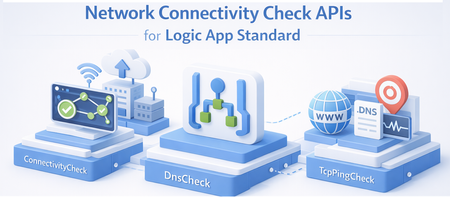
374 TopicsNetwork Connectivity Check APIs for Logic App Standard
Introduction When your Logic App Standard is integrated with a Virtual Network (VNET), you can use these APIs to troubleshoot connectivity issues to downstream resources like SQL databases, Storage Accounts, Service Bus, Key Vault, and more. The checks run directly from the worker hosting your Logic App, so the results reflect the actual network path your workflows use. API Overview API HTTP Method Route Suffix Purpose ConnectivityCheck POST /connectivityCheck Validates end-to-end connectivity to an Azure resource (SQL, Key Vault, Storage, Service Bus, etc.) DnsCheck POST /dnsCheck Performs DNS resolution for a hostname TcpPingCheck POST /tcpPingCheck Performs a TCP ping to a host and port How to Call Using Azure API Playground Sign in with your Azure account. https://portal.azure.com/#view/Microsoft_Azure_Resources/ArmPlayground.ReactView Use POST method with the URLs below. Instead of API playground you can also use PowerShell or Az Rest URL Pattern Production slot: POST https://management.azure.com/subscriptions/{subscriptionId}/resourceGroups/{resourceGroupName}/providers/Microsoft.Web/sites/{logicAppName}/connectivityCheck?api-version=2026-03-01-preview Deployment slot: POST https://management.azure.com/subscriptions/{subscriptionId}/resourceGroups/{resourceGroupName}/providers/Microsoft.Web/sites/{logicAppName}/slots/{slotName}/connectivityCheck?api-version=2026-03-01-preview Replace connectivityCheck with dnsCheck or tcpPingCheck as needed. all the requests should be Json 1. ConnectivityCheck Tests end-to-end connectivity from your Logic App to an Azure resource. This validates DNS, TCP, and authentication in a single call. Supported Provider Types ProviderType Use For KeyVault Azure Key Vault SQL Azure SQL Database / SQL Server ServiceBus Azure Service Bus EventHubs Azure Event Hubs BlobStorage Azure Blob Storage FileShare Azure File Share (see Port 445 limitation) only tese 443 QueueStorage Azure Queue Storage TableStorage Azure Table Storage Web Any HTTP/HTTPS endpoint Credential Types CredentialType When to Use ConnectionString You have a connection string to provide directly Authentication You have an endpoint URL with username and password CredentialReference You want to reference an existing connection string or app setting by name AppSetting You want to reference an app setting configured on the Logic App ManagedIdentity Your Logic App uses Managed Identity to authenticate Sample Request — Connection String (SQL Database) POST https://management.azure.com/subscriptions/{subId}/resourceGroups/{rg}/providers/Microsoft.Web/sites/{logicAppName}/connectivityCheck?api-version=2026-03-01-preview Content-Type: application/json { "properties": { "providerType": "SQL", "credentials": { "credentialType": "ConnectionString", "connectionString": "Server=tcp:myserver.database.windows.net,1433;Database=mydb;User ID=myuser;Password=mypassword;Encrypt=True;TrustServerCertificate=False;" }, "resourceMetadata": { "entityName": "" } } } Sample Request — App Setting Reference (Service Bus) Use this when your connection string is stored in an app setting on the Logic App (e.g., ServiceBusConnection). { "properties": { "providerType": "ServiceBus", "credentials": { "credentialType": "AppSetting", "appSetting": "ServiceBusConnection" }, "resourceMetadata": { "entityName": "myqueue" } } } Sample Request — Managed Identity (Blob Storage) Use this when your Logic App authenticates using Managed Identity. { "properties": { "providerType": "BlobStorage", "credentials": { "credentialType": "ManagedIdentity", "managedIdentity": { "targetResourceUrl": "https://mystorageaccount.blob.core.windows.net", "clientId": "" } }, "resourceMetadata": { "entityName": "" } } } Tip: Leave clientId empty to use the system-assigned managed identity. Provide a client ID to use a specific user-assigned managed identity. 2. DnsCheck Tests whether a hostname can be resolved from your Logic App's worker. This is useful for verifying private DNS zones and private endpoints are configured correctly. Sample Request POST https://management.azure.com/subscriptions/{subId}/resourceGroups/{rg}/providers/Microsoft.Web/sites/{logicAppName}/dnsCheck?api-version=2026-03-01-preview Content-Type: application/json { "properties": { "dnsName": "myserver.database.windows.net" } } 3. TcpPingCheck Tests whether a TCP connection can be established from your Logic App to a specific host and port. This is useful for checking if a port is open and reachable through your VNET. Sample Request POST https://management.azure.com/subscriptions/{subId}/resourceGroups/{rg}/providers/Microsoft.Web/sites/{logicAppName}/tcpPingCheck?api-version=2026-03-01-preview Content-Type: application/json { "properties": { "host": "myserver.database.windows.net", "port": "1433" } } Port 445 (SMB / Azure File Share) — Known Limitation Port 445 cannot be reliably tested using TcpPingCheck or ConnectivityCheck with the FileShare provider type. Restricted Outgoing Ports Regardless of address, applications cannot connect to anywhere using ports 445, 137, 138, and 139. In other words, even if connecting to a non-private IP address or the address of a virtual network, connections to ports 445, 137, 138, and 139 are not permitted.Using an AI Agent to Troubleshoot and Fix Azure Function App Issues
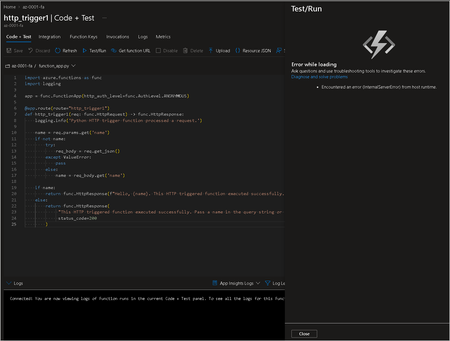
TOC Preparation Troubleshooting Workflow Conclusion Preparation Topic: Required tools AI agent: for example, Copilot CLI / OpenCode / Hermes / OpenClaw, etc. In this example, we use Copilot CLI. Model access: for example, Anthropic Claude Opus. Relevant skills: this example does not use skills, but using relevant skills can speed up troubleshooting. Topic: Compliant with your organization Enterprise-level projects are sensitive, so you must confirm with the appropriate stakeholders before using them. Enterprise environments may also have strict standards for AI agent usage. Topic: Network limitations If the process involves restarting the Function App container or restarting related settings, communication between the user and the agent may be interrupted, and you will need to use /resume. If the agent needs internet access for investigation, the app must have outbound connectivity. If the Kudu container cannot be used because of network issues, this type of investigation cannot be carried out. Topic: Permission limitations If you are using Azure blessed images, according to the official documentation, the containers use the fixed password Docker!. However, if you are using a custom container, you will need to provide an additional login method. For resources the agent does not already have permission to investigate, you will need to enable SAMI and assign the appropriate RBAC roles. Troubleshooting Workflow Let’s use a classic case where an HTTP trigger cannot be tested from the Azure Portal. As you can see, when clicking Test/Run in the Azure Portal, an error message appears. At the same time, however, the home page does not show any abnormal status. At this point, we first obtain the Function App’s SAMI and assign it the Owner role for the entire resource group. This is only for demonstration purposes. In practice, you should follow the principle of least privilege and scope permissions down to only the specific resources and operations that are actually required. Next, go to the Kudu container, which is the always-on maintenance container dedicated to the app. Install and enable Copilot CLI. Then we can describe the problem we are encountering. After the agent processes the issue and interacts with you further, it can generate a reasonable investigation report. In this example, it appears that the Function App’s Storage Account access key had been rotated previously, but the Function App had not updated the corresponding environment variable. Once we understand the issue, we could perform the follow-up actions ourselves. However, to demonstrate the agent’s capabilities, you can also allow it to fix the problem directly, provided that you have granted the corresponding permissions through SAMI. During the process, the container restart will disconnect the session, so you will need to return to the Kudu container and resume the previous session so it can continue. Finally, it will inform you that the issue has been fixed, and then you can validate the result. This is the validation result, and it looks like the repair was successful. Conclusion After each repair, we can even extract the experience from that case into a skill and store it in a Storage Account for future reuse. In this way, we can not only reduce the agent’s initial investigation time for similar issues, but also save tokens. This makes both time and cost management more efficient.190Views3likes0CommentsAzure Functions Ignite 2025 Update
Azure Functions is redefining event-driven applications and high-scale APIs in 2025, accelerating innovation for developers building the next generation of intelligent, resilient, and scalable workloads. This year, our focus has been on empowering AI and agentic scenarios: remote MCP server hosting, bulletproofing agents with Durable Functions, and first-class support for critical technologies like OpenTelemetry, .NET 10 and Aspire. With major advances in serverless Flex Consumption, enhanced performance, security, and deployment fundamentals across Elastic Premium and Flex, Azure Functions is the platform of choice for building modern, enterprise-grade solutions. Remote MCP Model Context Protocol (MCP) has taken the world by storm, offering an agent a mechanism to discover and work deeply with the capabilities and context of tools. When you want to expose MCP/tools to your enterprise or the world securely, we recommend you think deeply about building remote MCP servers that are designed to run securely at scale. Azure Functions is uniquely optimized to run your MCP servers at scale, offering serverless and highly scalable features of Flex Consumption plan, plus two flexible programming model options discussed below. All come together using the hardened Functions service plus new authentication modes for Entra and OAuth using Built-in authentication. Remote MCP Triggers and Bindings Extension GA Back in April, we shared a new extension that allows you to author MCP servers using functions with the MCP tool trigger. That MCP extension is now generally available, with support for C#(.NET), Java, JavaScript (Node.js), Python, and Typescript (Node.js). The MCP tool trigger allows you to focus on what matters most: the logic of the tool you want to expose to agents. Functions will take care of all the protocol and server logistics, with the ability to scale out to support as many sessions as you want to throw at it. [Function(nameof(GetSnippet))] public object GetSnippet( [McpToolTrigger(GetSnippetToolName, GetSnippetToolDescription)] ToolInvocationContext context, [BlobInput(BlobPath)] string snippetContent ) { return snippetContent; } New: Self-hosted MCP Server (Preview) If you’ve built servers with official MCP SDKs and want to run them as remote cloud‑scale servers without re‑writing any code, this public preview is for you. You can now self‑host your MCP server on Azure Functions—keep your existing Python, TypeScript, .NET, or Java code and get rapid 0 to N scaling, built-in server authentication and authorization, consumption-based billing, and more from the underlying Azure Functions service. This feature complements the Azure Functions MCP extension for building MCP servers using the Functions programming model (triggers & bindings). Pick the path that fits your scenario—build with the extension or standard MCP SDKs. Either way you benefit from the same scalable, secure, and serverless platform. Use the official MCP SDKs: # MCP.tool() async def get_alerts(state: str) -> str: """Get weather alerts for a US state. Args: state: Two-letter US state code (e.g. CA, NY) """ url = f"{NWS_API_BASE}/alerts/active/area/{state}" data = await make_nws_request(url) if not data or "features" not in data: return "Unable to fetch alerts or no alerts found." if not data["features"]: return "No active alerts for this state." alerts = [format_alert(feature) for feature in data["features"]] return "\n---\n".join(alerts) Use Azure Functions Flex Consumption Plan's serverless compute using Custom Handlers in host.json: { "version": "2.0", "configurationProfile": "mcp-custom-handler", "customHandler": { "description": { "defaultExecutablePath": "python", "arguments": ["weather.py"] }, "http": { "DefaultAuthorizationLevel": "anonymous" }, "port": "8000" } } Learn more about MCPTrigger and self-hosted MCP servers at https://aka.ms/remote-mcp Built-in MCP server authorization (Preview) The built-in authentication and authorization feature can now be used for MCP server authorization, using a new preview option. You can quickly define identity-based access control for your MCP servers with Microsoft Entra ID or other OpenID Connect providers. Learn more at https://aka.ms/functions-mcp-server-authorization. Better together with Foundry agents Microsoft Foundry is the starting point for building intelligent agents, and Azure Functions is the natural next step for extending those agents with remote MCP tools. Running your tools on Functions gives you clean separation of concerns, reuse across multiple agents, and strong security isolation. And with built-in authorization, Functions enables enterprise-ready authentication patterns, from calling downstream services with the agent’s identity to operating on behalf of end users with their delegated permissions. Build your first remote MCP server and connect it to your Foundry agent at https://aka.ms/foundry-functions-mcp-tutorial. Agents Microsoft Agent Framework 2.0 (Public Preview Refresh) We’re excited about the preview refresh 2.0 release of Microsoft Agent Framework that builds on battle hardened work from Semantic Kernel and AutoGen. Agent Framework is an outstanding solution for building multi-agent orchestrations that are both simple and powerful. Azure Functions is a strong fit to host Agent Framework with the service’s extreme scale, serverless billing, and enterprise grade features like VNET networking and built-in auth. Durable Task Extension for Microsoft Agent Framework (Preview) The durable task extension for Microsoft Agent Framework transforms how you build production-ready, resilient and scalable AI agents by bringing the proven durable execution (survives crashes and restarts) and distributed execution (runs across multiple instances) capabilities of Azure Durable Functions directly into the Microsoft Agent Framework. Combined with Azure Functions for hosting and event-driven execution, you can now deploy stateful, resilient AI agents that automatically handle session management, failure recovery, and scaling, freeing you to focus entirely on your agent logic. Key features of the durable task extension include: Serverless Hosting: Deploy agents on Azure Functions with auto-scaling from thousands of instances to zero, while retaining full control in a serverless architecture. Automatic Session Management: Agents maintain persistent sessions with full conversation context that survives process crashes, restarts, and distributed execution across instances Deterministic Multi-Agent Orchestrations: Coordinate specialized durable agents with predictable, repeatable, code-driven execution patterns Human-in-the-Loop with Serverless Cost Savings: Pause for human input without consuming compute resources or incurring costs Built-in Observability with Durable Task Scheduler: Deep visibility into agent operations and orchestrations through the Durable Task Scheduler UI dashboard Create a durable agent: endpoint = os.getenv("AZURE_OPENAI_ENDPOINT") deployment_name = os.getenv("AZURE_OPENAI_DEPLOYMENT_NAME", "gpt-4o-mini") # Create an AI agent following the standard Microsoft Agent Framework pattern agent = AzureOpenAIChatClient( endpoint=endpoint, deployment_name=deployment_name, credential=AzureCliCredential() ).create_agent( instructions="""You are a professional content writer who creates engaging, well-structured documents for any given topic. When given a topic, you will: 1. Research the topic using the web search tool 2. Generate an outline for the document 3. Write a compelling document with proper formatting 4. Include relevant examples and citations""", name="DocumentPublisher", tools=[ AIFunctionFactory.Create(search_web), AIFunctionFactory.Create(generate_outline) ] ) # Configure the function app to host the agent with durable session management app = AgentFunctionApp(agents=[agent]) app.run() Durable Task Scheduler dashboard for agent and agent workflow observability and debugging For more information on the durable task extension for Agent Framework, see the announcement: https://aka.ms/durable-extension-for-af-blog. Flex Consumption Updates As you know, Flex Consumption means serverless without compromise. It combines elastic scale and pay‑for‑what‑you‑use pricing with the controls you expect: per‑instance concurrency, longer executions, VNet/private networking, and Always Ready instances to minimize cold starts. Since launching GA at Ignite 2024 last year, Flex Consumption has had tremendous growth with over 1.5 billion function executions per day and nearly 40 thousand apps. Here’s what’s new for Ignite 2025: 512 MB instance size (GA). Right‑size lighter workloads, scale farther within default quota. Availability Zones (GA). Distribute instances across zones. Rolling updates (Public Preview). Unlock zero-downtime deployments of code or config by setting a single configuration. See below for more information. Even more improvements including: new diagnostic settingsto route logs/metrics, use Key Vault App Config references, new regions, and Custom Handler support. To get started, review Flex Consumption samples, or dive into the documentation to see how Flex can support your workloads. Migrating to Azure Functions Flex Consumption Migrating to Flex Consumption is simple with our step-by-step guides and agentic tools. Move your Azure Functions apps or AWS Lambda workloads, update your code and configuration, and take advantage of new automation tools. With Linux Consumption retiring, now is the time to switch. For more information, see: Migrate Consumption plan apps to the Flex Consumption plan Migrate AWS Lambda workloads to Azure Functions Durable Functions Durable Functions introduces powerful new features to help you build resilient, production-ready workflows: Distributed Tracing: lets you track requests across components and systems, giving you deep visibility into orchestration and activities with support for App Insights and OpenTelemetry. Extended Sessions support in .NET isolated: improves performance by caching orchestrations in memory, ideal for fast sequential activities and large fan-out/fan-in patterns. Orchestration versioning (public preview): enables zero-downtime deployments and backward compatibility, so you can safely roll out changes without disrupting in-flight workflows Durable Task Scheduler Updates Durable Task Scheduler Dedicated SKU (GA): Now generally available, the Dedicated SKU offers advanced orchestration for complex workflows and intelligent apps. It provides predictable pricing for steady workloads, automatic checkpointing, state protection, and advanced monitoring for resilient, reliable execution. Durable Task Scheduler Consumption SKU (Public Preview): The new Consumption SKU brings serverless, pay-as-you-go orchestration to dynamic and variable workloads. It delivers the same orchestration capabilities with flexible billing, making it easy to scale intelligent applications as needed. For more information see: https://aka.ms/dts-ga-blog OpenTelemetry support in GA Azure Functions OpenTelemetry is now generally available, bringing unified, production-ready observability to serverless applications. Developers can now export logs, traces, and metrics using open standards—enabling consistent monitoring and troubleshooting across every workload. Key capabilities include: Unified observability: Standardize logs, traces, and metrics across all your serverless workloads for consistent monitoring and troubleshooting. Vendor-neutral telemetry: Integrate seamlessly with Azure Monitor or any OpenTelemetry-compliant backend, ensuring flexibility and choice. Broad language support: Works with .NET (isolated), Java, JavaScript, Python, PowerShell, and TypeScript. Start using OpenTelemetry in Azure Functions today to unlock standards-based observability for your apps. For step-by-step guidance on enabling OpenTelemetry and configuring exporters for your preferred backend, see the documentation. Deployment with Rolling Updates (Preview) Achieving zero-downtime deployments has never been easier. The Flex Consumption plan now offers rolling updates as a site update strategy. Set a single property, and all future code deployments and configuration changes will be released with zero-downtime. Instead of restarting all instances at once, the platform now drains existing instances in batches while scaling out the latest version to match real-time demand. This ensures uninterrupted in-flight executions and resilient throughput across your HTTP, non-HTTP, and Durable workloads – even during intensive scale-out scenarios. Rolling updates are now in public preview. Learn more at https://aka.ms/functions/rolling-updates. Secure Identity and Networking Everywhere By Design Security and trust are paramount. Azure Functions incorporates proven best practices by design, with full support for managed identity—eliminating secrets and simplifying secure authentication and authorization. Flex Consumption and other plans offer enterprise-grade networking features like VNETs, private endpoints, and NAT gateways for deep protection. The Azure Portal streamlines secure function creation, and updated scenarios and samples showcase these identity and networking capabilities in action. Built-in authentication (discussed above) enables inbound client traffic to use identity as well. Check out our updated Functions Scenarios page with quickstarts or our secure samples gallery to see these identity and networking best practices in action. .NET 10 Azure Functions now supports .NET 10, bringing in a great suite of new features and performance benefits for your code. .NET 10 is supported on the isolated worker model, and it’s available for all plan types except Linux Consumption. As a reminder, support ends for the legacy in-process model on November 10, 2026, and the in-process model is not being updated with .NET 10. To stay supported and take advantage of the latest features, migrate to the isolated worker model. Aspire Aspire is an opinionated stack that simplifies development of distributed applications in the cloud. The Azure Functions integration for Aspire enables you to develop, debug, and orchestrate an Azure Functions .NET project as part of an Aspire solution. Aspire publish directly deploys to your functions to Azure Functions on Azure Container Apps. Aspire 13 includes an updated preview version of the Functions integration that acts as a release candidate with go-live support. The package will be moved to GA quality with Aspire 13.1. Java 25, Node.js 24 Azure Functions now supports Java 25 and Node.js 24 in preview. You can now develop functions using these versions locally and deploy them to Azure Functions plans. Learn how to upgrade your apps to these versions here In Summary Ready to build what’s next? Update your Azure Functions Core Tools today and explore the latest samples and quickstarts to unlock new capabilities for your scenarios. The guided quickstarts run and deploy in under 5 minutes, and incorporate best practices—from architecture to security to deployment. We’ve made it easier than ever to scaffold, deploy, and scale real-world solutions with confidence. The future of intelligent, scalable, and secure applications starts now—jump in and see what you can create!3.5KViews0likes2CommentsAnnouncing General Availability: Azure Logic Apps Standard Custom Code with .NET 8
We’re excited to announce the General Availability (GA) of Custom Code support in Azure Logic Apps Standard with .NET 8. This release marks a significant step forward in enabling developers to build more powerful, flexible, and maintainable integration workflows using familiar .NET tools and practices. With this capability, developers can now embed custom .NET 8 code directly within their Logic Apps Standard workflows. This unlocks advanced logic scenarios, promotes code reuse, and allows seamless integration with existing .NET libraries and services—making it easier than ever to build enterprise-grade solutions on Azure. What’s New in GA This GA release introduces several key enhancements that improve the development experience and expand the capabilities of custom code in Logic Apps: Bring Your Own Packages Developers can now include and manage their own NuGet packages within custom code projects without having to resolve conflicts with the dependencies used by the language worker host. The update includes the ability to load the assembly dependencies of the custom code project into a separate Assembly context allowing you to bring any NET8 compatible dependent assembly versions that your project need. There are only three exceptions to this rule: Microsoft.Extensions.Logging.Abstractions Microsoft.Extensions.DependencyInjection.Abstractions Microsoft.Azure.Functions.Extensions.Workflows.Abstractions Dependency Injection Native Support Custom code now supports native Dependency Injection (DI), enabling better separation of concerns and more testable, maintainable code. This aligns with modern .NET development patterns and simplifies service management within your custom logic. To enable Dependency Injection, developers will need to provide a StartupConfiguration class, defining the list of dependencies: using Microsoft.Azure.Functions.Extensions.Workflows; using Microsoft.Extensions.DependencyInjection; public class StartupConfiguration : IConfigureStartup { /// <summary> /// Configures services for the Azure Functions application. /// </summary> /// <param name="services">The service collection to configure.</param> public void Configure(IServiceCollection services) { // Register the routing service with dependency injection services.AddSingleton<IRoutingService, OrderRoutingService>(); services.AddSingleton<IDiscountService, DiscountService>(); } } You will also need to initialize those register those services during your custom code class constructor: public class MySampleFunction { private readonly ILogger<MySampleFunction> logger; private readonly IRoutingService routingService; private readonly IDiscountService discountService; public MySampleFunction(ILoggerFactory loggerFactory, IRoutingService routingService, IDiscountService discountService) { this.logger = loggerFactory.CreateLogger<MySampleFunction>(); this.routingService = routingService; this.discountService = discountService; } // your function logic here } Improved Authoring Experience The development experience has been significantly enhanced with improved tooling and templates. Whether you're using Visual Studio or Visual Studio Code, you’ll benefit from streamlined scaffolding, local debugging, and deployment workflows that make building and managing custom code faster and more intuitive. The following user experience improvements were added: Local functions metadata are kept between VS Code sessions, so you don't receive validation errors when editing workflows that depend on the local functions. Projects are also built when designer starts, so you don't have to manually update references. New context menu gestures, allowing you to create new local functions or build your functions project directly from the explorer area Unified debugging experience, making it easer for you to debug. We have now a single task for debugging custom code and logic apps, which makes starting a new debug session as easy as pressing F5. Learn More To get started with custom code in Azure Logic Apps Standard, visit the official Microsoft Learn documentation: Create and run custom code in Azure Logic Apps Standard You can also find example code for Dependency injection wsilveiranz/CustomCode-Dependency-InjectionGive your Foundry Agent Custom Tools with MCP Servers on Azure Functions
This blog post is for developers who have an MCP server deployed to Azure Functions and want to connect it to Microsoft Foundry agents. It walks through why you'd want to do this, the different authentication options available, and how to get your agent calling your MCP tools. Connect your MCP server on Azure Functions to Foundry Agent If you've been following along with this blog series, you know that Azure Functions is a great place to host remote MCP servers. You get scalable infrastructure, built-in auth, and serverless billing. All the good stuff. But hosting an MCP server is only half the picture. The real value comes when something actually uses those tools. Microsoft Foundry lets you build AI agents that can reason, plan, and take actions. By connecting your MCP server to an agent, you're giving it access to your custom tools, whether that's querying a database, calling an API, or running some business logic. The agent discovers your tools, decides when to call them, and uses the results to respond to the user. Why connect MCP servers to Foundry agents? You might already have an MCP server that works great with VS Code, VS, Cursor, or other MCP clients. Connecting that same server to a Foundry agent means you can reuse those tools in a completely different context, i.e. in an enterprise AI agent that your team or customers interact with. No need to rebuild anything. Your MCP server stays the same; you're just adding another consumer. Prerequisites Before proceeding, make sure you have the following: 1. An MCP server deployed to Azure Functions. If you don't have one yet, you can deploy one quickly by following one of the samples: Python TypeScript .NET 2. A Foundry project with a deployed model and a Foundry agent Authentication options Depending on where you are in development, you can pick what makes sense and upgrade later. Here's a summary: Method Description When to use Key-based (default) Agent authenticates by passing a shared function access key in the request header. This method is the default authentication for HTTP endpoints in Functions. Development, or when Entra auth isn't required. Microsoft Entra Agent authenticates using either its own identity (agent identity) or the shared identity of the Foundry project (project managed identity). Use agent identity for production scenarios, but limit shared identity to development. OAuth identity passthrough Agent prompts users to sign in and authorize access, using the provided token to authenticate. Production, when each user must authenticate individually. Unauthenticated Agent makes unauthenticated calls. Development only, or tools that access only public information. Connect your MCP server to your Foundry agent If your server uses key-based auth or is unauthenticated, it should be relatively straightforward to set up the connection from a Foundry agent. The Microsoft Entra and OAuth identity passthrough are options that require extra steps to set up. Check out detailed step-by-step instructions for each authentication method. At a high level, the process looks like this: Enable built-in MCP authentication : When you deploy a server to Azure Functions, key-based auth is the default. You'll need to disable that and enable built-in MCP auth instead. If you deployed one of the sample servers in the Prerequisite section, this step is already done for you. Get your MCP server endpoint URL: For MCP extension-based servers, it's https://<FUNCTION_APP_NAME>.azurewebsites.net/runtime/webhooks/mcp Get your credentials based on your chosen auth method: a managed identity configuration, OAuth credentials Add the MCP server as a tool in the Foundry portal by navigating to your agent, adding a new MCP tool, and providing the endpoint and credentials. Microsoft Entra connection required fields OAuth Identity required fields Once the server is configured as a tool, test it in the Agent Builder playground by sending a prompt that triggers one of your MCP tools. Closing thoughts What I find exciting about this is the composability. You build your MCP server once and it works everywhere: VS Code, VS, Cursor, ChatGPT, and now Foundry agents. The MCP protocol is becoming the universal interface for tool use in AI, and Azure Functions makes it easy to host these servers at scale and with security. Are you building agents with Foundry? Have you connected your MCP servers to other clients? I'd love to hear what tools you're exposing and how you're using them. Share with us your thoughts! What's next In the next blog post, we'll go deeper into other MCP topics and cover new MCP features and developments in Azure Functions. Stay tuned!433Views0likes0CommentsMCP Apps on Azure Functions: Quick Start with TypeScript
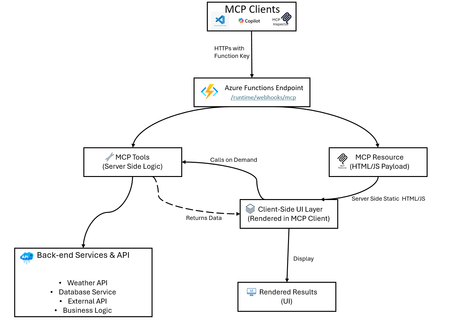
Azure Functions makes hosting MCP apps simple: build locally, create a secure endpoint, and deploy fast with Azure Developer CLI (azd). This guide shows you how using a weather app example. What Are MCP Apps? MCP Apps let MCP servers return interactive HTML interfaces such as data visualizations, forms, dashboards that render directly inside MCP-compatible hosts (Visual Studio Code Copilot, Claude, ChatGPT, etc.). Learn more about MCP Apps in the official documentation. Having an interactive UI removes many restrictions that plain texts have, such as if your scenario has: Interactive Data: Replacing lists with clickable maps or charts for deep exploration. Complex Setup: Use one-page forms instead of long, back-and-forth questioning. Rich Media: Embed native viewers to pan, zoom, or rotate 3D models and documents. Live Updates: Maintain real-time dashboards that refresh without new prompts. Workflow Management: Handle multi-step tasks like approvals with navigation buttons and persistent state. MCP App Hosting as a Feature Azure Functions provides an easy abstraction to help you build MCP servers without having to learn the nitty-gritty of the MCP protocol. When hosting your MCP App on Functions, you get: MCP tools (server logic): Handle client requests, call backend services, return structured data - Azure Functions manages the MCP protocol details for you MCP resources (UI payloads such as app widgets): Serve interactive HTML, JSON documents, or formatted content - just focus on your UI logic Secure HTTPS access: Built-in authentication using Azure Functions keys, plus built-in MCP authentication with OAuth support for enterprise-grade security Easy deployment with Bicep and azd: Infrastructure as Code for reliable deployments Local development: Test and debug locally before deploying Auto-scaling: Azure Functions handles scaling, retries, and monitoring automatically The weather app in this repo is an example of this feature, not the only use case. Architecture Overview Example: The classic Weather App The sample implementation includes: A GetWeather MCP tool that fetches weather by location (calls Open-Meteo geocoding and forecast APIs) A Weather Widget MCP resource that serves interactive HTML/JS code (runs in the client; fetches data via GetWeather tool) A TypeScript service layer that abstracts API calls and data transformation (runs on the server) Bidirectional communication: client-side UI calls server-side tools, receives data, renders locally Local and remote testing flow for MCP clients (via MCP Inspector, VS Code, or custom clients) How UI Rendering Works in MCP Apps In the Weather App example: Azure Functions serves getWeatherWidget as a resource → returns weather-app.ts compiled to HTML/JS Client renders the Weather Widget UI User interacts with the widget or requests are made internally The widget calls the getWeather tool → server processes and returns weather data The widget renders the weather data on the client side This architecture keeps the UI responsive locally while using server-side logic and data on demand. Quick Start Checkout repository: https://github.com/Azure-Samples/remote-mcp-functions-typescript Run locally: npm install npm run build func start Local endpoint: http://0.0.0.0:7071/runtime/webhooks/mcp Deploy to Azure: azd provision azd deploy Remote endpoint: https://.azurewebsites.net/runtime/webhooks/mcp TypeScript MCP Tools Snippet (Get Weather service) In Azure Functions, you define MCP tools using app.mcpTool(). The toolName and description tell clients what this tool does, toolProperties defines the input arguments (like location as a string), and handler points to your function that processes the request. app.mcpTool("getWeather", { toolName: "GetWeather", description: "Returns current weather for a location via Open-Meteo.", toolProperties: { location: arg.string().describe("City name to check weather for") }, handler: getWeather, }); Resource Trigger Snippet (Weather App Hook) MCP resources are defined using app.mcpResource(). The uri is how clients reference this resource, resourceName and description provide metadata, mimeType tells clients what type of content to expect, and handler is your function that returns the actual content (like HTML for a widget). app.mcpResource("getWeatherWidget", { uri: "ui://weather/index.html", resourceName: "Weather Widget", description: "Interactive weather display for MCP Apps", mimeType: "text/html;profile=mcp-app", handler: getWeatherWidget, }); Sample repos and references Complete sample repository with TypeScript implementation: https://github.com/Azure-Samples/remote-mcp-functions-typescript Official MCP extension documentation: https://learn.microsoft.com/azure/azure-functions/functions-bindings-mcp?pivots=programming-language-typescript Java sample: https://github.com/Azure-Samples/remote-mcp-functions-java .NET sample: https://github.com/Azure-Samples/remote-mcp-functions-dotnet Python sample: https://github.com/Azure-Samples/remote-mcp-functions-python MCP Inspector: https://github.com/modelcontextprotocol/inspector Final Takeaway MCP Apps are just MCP servers but they represent a paradigm shift by transforming the AI from a text-based chatbot into a functional interface. Instead of forcing users to navigate complex tasks through back-and-forth conversations, these apps embed interactive UIs and tools directly into the chat, significantly improving the user experience and the usefulness of MCP servers. Azure Functions allows developers to quickly build and host an MCP app by providing an easy abstraction and deployment experience. The platform also provides built-in features to secure and scale your MCP apps, plus a serverless pricing model so you can just focus on the business logic.371Views1like0CommentsAnnouncing a flexible, predictable billing model for Azure SRE Agent
Billing for Azure SRE Agent will start on September 1, 2025. Announced at Microsoft Build 2025, Azure SRE Agent is a pre-built AI agent for root cause analysis, uptime improvement, and operational cost reduction. Learn more about the billing model and example scenarios.4.2KViews1like1CommentThe Durable Task Scheduler Consumption SKU is now Generally Available
Today, we're excited to announce that the Durable Task Scheduler Consumption SKU has reached General Availability. Developers can now run durable workflows and agents on Azure with pay-per-use pricing, no storage to manage, no capacity to plan, and no idle costs. Just create a scheduler, connect your app, and start orchestrating. Whether you're coordinating AI agent workflows, processing event-driven pipelines, or running background jobs, the Consumption SKU is ready to go. GET STARTED WITH THE DURABLE TASK SCHEDULER CONSUMPTION SKU Since launching the Consumption SKU in public preview last November, we've seen incredible adoption and have incorporated feedback from developers around the world to ensure the GA release is truly production ready. “The Durable Task Scheduler has become a foundational piece of what we call ‘workflows’. It gives us the reliability guarantees we need for processing financial documents and sensitive workflows, while keeping the programming model straightforward. The combination of durable execution, external event correlation, deterministic idempotency, and the local emulator experience has made it a natural fit for our event-driven architecture. We have been delighted with the consumption SKUs cost model for our lower environments.”– Emily Lewis, CarMax What is the Durable Task Scheduler? If you're new to the Durable Task Scheduler, we recommend checking out our previous blog posts for a detailed background: Announcing Limited Early Access of the Durable Task Scheduler Announcing Workflow in Azure Container Apps with the Durable Task Scheduler Announcing Dedicated SKU GA & Consumption SKU Public Preview In brief, the Durable Task Scheduler is a fully managed orchestration backend for durable execution on Azure, meaning your workflows and agent sessions can reliably resume and run to completion, even through process failures, restarts, and scaling events. Whether you’re running workflows or orchestrating durable agents, it handles task scheduling, state persistence, fault tolerance, and built-in monitoring, freeing developers from the operational overhead of managing their own execution engines and storage backends. The Durable Task Scheduler works across Azure compute environments: Azure Functions: Using the Durable Functions extension across all Function App SKUs, including Flex Consumption. Azure Container Apps: Using the Durable Functions or Durable Task SDKs with built-in workflow support and auto-scaling. Any compute: Azure Kubernetes Service, Azure App Service, or any environment where you can run the Durable Task SDKs (.NET, Python, Java, JavaScript). Why choose the Consumption SKU? With the Consumption SKU you’re charged only for actions dispatched, with no minimum commitments or idle costs. There’s no capacity to size or throughput to reserve. Create a scheduler, connect your app, and you’re running. The Consumption SKU is a natural fit for workloads with unpredictable or bursty usage patterns: AI agent orchestration: Multi-step agent workflows that call LLMs, retrieve data, and take actions. Users trigger these on demand, so volume is spiky and pay-per-use avoids idle costs between bursts. Event-driven pipelines: Processing events from queues, webhooks, or streams with reliable orchestration and automatic checkpointing, where volumes spike and dip unpredictably. API-triggered workflows: User signups, form submissions, payment flows, and other request-driven processing where volume varies throughout the day. Distributed transactions: Retries and compensation logic across microservices with durable sagas that survive failures and restarts. What's included in the Consumption SKU at GA The Consumption SKU has been hardened based on feedback and real-world usage during the public preview. Here's what's included at GA: Performance Up to 500 actions per second: Sufficient throughput for a wide range of workloads, with the option to move to the Dedicated SKU for higher-scale scenarios. Up to 30 days of data retention: View and manage orchestration history, debug failures, and audit execution data for up to 30 days. Built-in monitoring dashboard Filter orchestrations by status, drill into execution history, view visual Gantt and sequence charts, and manage orchestrations (pause, resume, terminate, or raise events), all from the dashboard, secured with Role-Based Access Control (RBAC). Identity-based security The Consumption SKU uses Entra ID for authentication and RBAC for authorization. No SAS tokens or access keys to manage, just assign the appropriate role and connect. Get started with the Durable Task Scheduler today The Consumption SKU is available now Generally Available. Provision a scheduler in the Azure portal, connect your app, and start orchestrating. You only pay for what you use. Documentation Getting started Samples Pricing Consumption SKU docs We'd love to hear your feedback. Reach out to us by filing an issue on our GitHub repository447Views0likes0Comments
Introducing Skills in Azure API Center
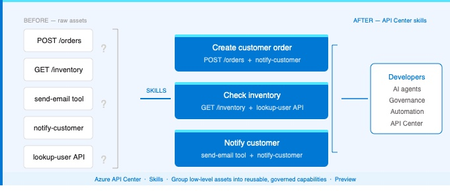
The problem Modern applications depend on more than APIs. A single AI workflow might call an LLM, invoke an MCP tool, integrate a third-party service, and reference a business capability spanning dozens of endpoints. Without a central inventory, these assets become impossible to discover, easy to duplicate, and painful to govern. Azure API Center — part of the Azure API Management platform — already catalogs models, agents, and MCP servers alongside traditional APIs. Skills extend that foundation to cover reusable AI capabilities. What is a Skill? As AI agents become more capable, organizations need a way to define and govern what those agents can actually do. Skills are the answer. A Skill in Azure API Center is a reusable, registered capability that AI agents can discover and consume to extend their functionality. Each skill is backed by source code — typically hosted in a Git repository — and describes what it does, what APIs or MCP servers it can access, and who owns it. Think of skills as the building blocks of AI agent behavior, promoted into a governed inventory alongside your APIs, MCP servers, models, and agents. Example: A "Code Review Skill" performs automated code reviews using static analysis. It is registered in API Center with a Source URL pointing to its GitHub repo, allowed to access your code analysis API, and discoverable by any AI agent in your organization. How Skills work in API Center Skills can be added to your inventory in two ways: registered manually through the Azure portal, or synchronized automatically from a connected Git repository. Both approaches end up in the same governed catalog, discoverable through the API Center portal. Option 1: Register a Skill manually Use the Azure portal to register a skill directly. Navigate to Inventory > Assets in your API center, select + Register an asset > Skill, and fill in the registration form. Figure 2: Register a skill form in the Azure portal. The form captures everything needed to make a skill discoverable and governable: Field Description Title Display name for the skill (e.g. Code Review Skill). Identification Auto-generated URL slug based on the title. Editable. Summary One-line description of what the skill does. Description Full detail on capabilities, use cases, and expected behavior. Lifecycle stage Current state: Design, Preview, Production, or Deprecated. Source URL Git repository URL for the skill source code. Allowed tools The APIs or MCP servers from your inventory this skill is permitted to access. Enforces governance at the capability level. License Licensing terms: MIT, Apache 2.0, Proprietary, etc. Contact information Owner or support contact for the skill. Governance note: The Allowed tools field is key for AI governance. It explicitly defines which APIs and MCP servers a skill can invoke — preventing uncontrolled access and making security review straightforward. Option 2: Sync Skills from a Git repository For teams managing skills in source control, API Center can integrate directly with a Git repository and synchronize skill information automatically. This is the recommended approach for teams practicing GitOps or managing many skills at scale. Figure 3: Integrating a Git repository to sync skills automatically into API Center. When you configure a Git integration, API Center: Creates an Environment representing the repository as a source of skills Scans for files matching the configured pattern (default: **/skill.md) Syncs matching skills into your inventory and keeps them current as the repo changes For private repositories, a Personal Access Token (PAT) stored in Azure Key Vault is used for authentication. API Center's managed identity retrieves the PAT securely — no credentials are stored in the service itself. Tip: Use the Automatically configure managed identity and assign permissions option when setting up the integration if you haven't pre-configured a managed identity. API Center handles the Key Vault permissions automatically. Discovering Skills in your catalog Once registered — manually or via Git — skills appear in the Inventory > Assets page alongside all other asset types. Linked skills (synced from Git) are visually identified with a link icon, so teams can see at a glance which skills are source-controlled. From the API Center portal, developers and other stakeholders can browse the full skill catalog, filter by lifecycle stage or type, and view detailed information about each skill — including its source URL, allowed tools, and contact information. Figure 4: Skills catalog in API Center portal, showing registered skills and the details related to the skill. Developer experience: The API Center portal gives teams a self-service way to discover approved skills without needing to ask around or search GitHub. The catalog becomes the authoritative source of what's available and what's allowed. Why this matters for AI development teams Skills close a critical gap in AI governance. As organizations deploy AI agents, they need to know — and control — what those agents can do. Without a governed skill registry, capability discovery is ad hoc, reuse is low, and security review is difficult. By bringing skills into Azure API Center alongside APIs, MCP servers, models, and agents, teams get: A single inventory for all the assets AI agents depend on Explicit governance over which resources each skill can access via Allowed tools Automated, source-controlled skill registration via Git integration Discoverability for developers and AI systems through the API Center portal Consistent lifecycle management — Design through Production to Deprecated API Center, as part of the Azure API Management platform and the broader AI Gateway vision, is evolving into the system of record for AI-ready development. Skills are the latest step in that direction. Available now Skills are available today in Azure API Center (preview). To register your first skill: Sign in to the Azure portal and navigate to your API Center instance In the sidebar, select Inventory > Assets Select + Register an asset > Skill Fill in the registration form and select Create → Register and discover skills in Azure API Center (docs) → Set up your API Center portal → Explore the Azure API Management platform1.6KViews0likes2CommentsBuilding the agentic future together at JDConf 2026
JDConf 2026 is just weeks away, and I’m excited to welcome Java developers, architects, and engineering leaders from around the world for two days of learning and connection. Now in its sixth year, JDConf has become a place where the Java community compares notes on their real-world production experience: patterns, tooling, and hard-earned lessons you can take back to your team, while we keep moving the Java systems that run businesses and services forward in the AI era. This year’s program lines up with a shift many of us are seeing first-hand: delivery is getting more intelligent, more automated, and more tightly coupled to the systems and data we already own. Agentic approaches are moving from demos to backlog items, and that raises practical questions: what’s the right architecture, where do you draw trust boundaries, how do you keep secrets safe, and how do you ship without trading reliability for novelty? JDConf is for and by the people who build and manage the mission-critical apps powering organizations worldwide. Across three regional livestreams, you’ll hear from open source and enterprise practitioners who are making the same tradeoffs you are—velocity vs. safety, modernization vs. continuity, experimentation vs. operational excellence. Expect sessions that go beyond “what” and get into “how”: design choices, integration patterns, migration steps, and the guardrails that make AI features safe to run in production. You’ll find several practical themes for shipping Java in the AI era: connecting agents to enterprise systems with clear governance; frameworks and runtimes adapting to AI-native workloads; and how testing and delivery pipelines evolve as automation gets more capable. To make this more concrete, a sampling of sessions would include topics like Secrets of Agentic Memory Management (patterns for short- and long-term memory and safe retrieval), Modernizing a Java App with GitHub Copilot (end-to-end upgrade and migration with AI-powered technologies), and Docker Sandboxes for AI Agents (guardrails for running agent workflows without risking your filesystem or secrets). The goal is to help you adopt what’s new while hardening your long lived codebases. JDConf is built for community learning—free to attend, accessible worldwide, and designed for an interactive live experience in three time zones. You’ll not only get 23 practitioner-led sessions with production-ready guidance but also free on-demand access after the event to re-watch with your whole team. Pro tip: join live and get more value by discussing practical implications and ideas with your peers in the chat. This is where the “how” details and tradeoffs become clearer. JDConf 2026 Keynote Building the Agentic Future Together Rod Johnson, Embabel | Bruno Borges, Microsoft | Ayan Gupta, Microsoft The JDConf 2026 keynote features Rod Johnson, creator of the Spring Framework and founder of Embabel, joined by Bruno Borges and Ayan Gupta to explore where the Java ecosystem is headed in the agentic era. Expect a practitioner-level discussion on how frameworks like Spring continue to evolve, how MCP is changing the way agents interact with enterprise systems, and what Java developers should be paying attention to right now. Register. Attend. Earn. Register for JDConf 2026 to earn Microsoft Rewards points, which you can use for gift cards, sweepstakes entries, and more. Earn 1,000 points simply by signing up. When you register for any regional JDConf 2026 event with your Microsoft account, you'll automatically receive these points. Get 5,000 additional points for attending live (limited to the first 300 attendees per stream). On the day of your regional event, check in through the Reactor page or your email confirmation link to qualify. Disclaimer: Points are added to your Microsoft account within 60 days after the event. Must register with a Microsoft account email. Up to 10,000 developers eligible. Points will be applied upon registration and attendance and will not be counted multiple times for registering or attending at different events. Terms | Privacy JDConf 2026 Regional Live Streams Americas – April 8, 8:30 AM – 12:30 PM PDT (UTC -7) Bruno Borges hosts the Americas stream, discussing practical agentic Java topics like memory management, multi-agent system design, LLM integration, modernization with AI, and dependency security. Experts from Redis, IBM, Hammerspace, HeroDevs, AI Collective, Tekskills, and Microsoft share their insights. Register for Americas → Asia-Pacific – April 9, 10:00 AM – 2:00 PM SGT (UTC +8) Brian Benz and Ayan Gupta co-host the APAC stream, highlighting Java frameworks and practices for agentic delivery. Topics include Spring AI, multi-agent orchestration, spec-driven development, scalable DevOps, and legacy modernization, with speakers from Broadcom, Alibaba, CERN, MHP (A Porsche Company), and Microsoft. Register for Asia-Pacific → Europe, Middle East and Africa – April 9, 9:00 AM – 12:30 PM GMT (UTC +0) The EMEA stream, hosted by Sandra Ahlgrimm, will address the implementation of agentic Java in production environments. Topics include self-improving systems utilizing Spring AI, Docker sandboxes for agent workflow management, Retrieval-Augmented Generation (RAG) pipelines, modernization initiatives from a national tax authority, and AI-driven CI/CD enhancements. Presentations will feature experts from Broadcom, Docker, Elastic, Azul Systems, IBM, Team Rockstars IT, and Microsoft. Register for EMEA → Make It Interactive: Join Live Come prepared with an actual challenge you’re facing, whether you’re modernizing a legacy application, connecting agents to internal APIs, or refining CI/CD processes. Test your strategies by participating in live chats and Q&As with presenters and fellow professionals. If you’re attending with your team, schedule a debrief after the live stream to discuss how to quickly use key takeaways and insights in your pilots and projects. Learning Resources Java and AI for Beginners Video Series: Practical, episode-based walkthroughs on MCP, GenAI integration, and building AI-powered apps from scratch. Modernize Java Apps Guide: Step-by-step guide using GitHub Copilot agent mode for legacy Java project upgrades, automated fixes, and cloud-ready migrations. AI Agents for Java Webinar: Embedding AI Agent capabilities into Java applications using Microsoft Foundry, from project setup to production deployment. Java Practitioner’s Guide: Learning plan for deploying, managing, and optimizing Java applications on Azure using modern cloud-native approaches. Register Now JDConf 2026 is a free global event for Java teams. Join live to ask questions, connect, and gain practical patterns. All 23 sessions will be available on-demand. Register now to earn Microsoft Rewards points for attending. Register at JDConf.com187Views0likes0Comments