intune
4370 Topics
AD Minimization: How ready are organizations for the journey?
Microsoft's direction around Active Directory minimization is an interesting and important part of the broader cloud transformation journey. Moving more identity and device management toward Microsoft Entra ID can help organizations gradually reduce their dependency on traditional on-premises Active Directory and move towards a more cloud-first environment. What I particularly like about Microsoft's approach is that this is positioned as a journey rather than something that needs to happen overnight. For many organizations, Active Directory has been part of the environment for 20+ years. Over that time, a lot of dependencies may have been built around it, such as: Legacy applications, Group Policies, Domain-joined Windows devices, LDAP, Kerberos or NTLM dependencies, File servers and other infrastructure, Scripts and operational processes linked to AD. Moving new users, applications and devices towards a cloud-first approach is one part of the journey. The more interesting challenge is how organizations modernize the existing environment while minimizing disruption to users and day-to-day operations. This is where I think Microsoft's phased approach makes a lot of sense. Organizations can gradually identify and reduce AD dependencies while continuing to modernize identity, endpoint management and applications at a pace that works for their environment. I would be interested to hear from others who are already working towards AD minimization. Where is your organization in this journey today? Are you already actively reducing your dependency on on-premises AD? And what has been the biggest area to address so far, legacy applications, Group Policy, existing Windows devices, authentication dependencies, or something else? It would also be interesting to hear which Microsoft technologies or approaches have helped you most during this transition.60Views0likes1Comment
Problems identifying managed iOS devices when using APP
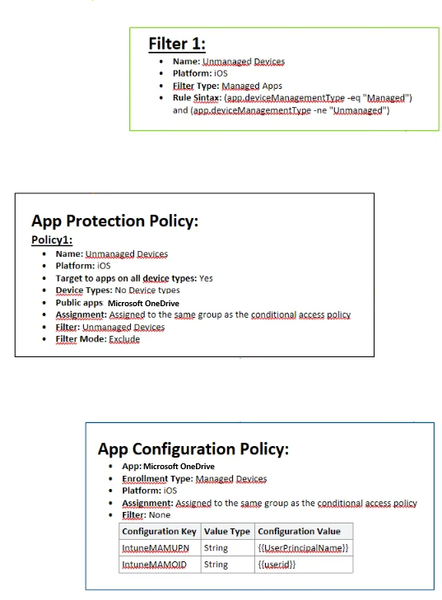
Hello, As the title says i am having a hard time getting this to work. We have been using APP for a long time, but it has not been necessary for us to have different policies for managed (we only use iOS) and unmanaged devices (all mobile device types). Now i want to remove APP from managed devices all together, and only enforce this on unmanaged devices (BYOD) Please see attached image of how it is configured today. I also have an CA policy which requires APP when using MS apps, where i have added and "Filter for devices" exclude with following syntax: device.enrollmentProfileName -contains "iOS standard profile" (which cover our enrollment profiles, both are fully managed) When enrolling a managed device, APP still is enforced. Does anyone have any tips? I wanted to try here before submitting a ticket to MS. As far as i have found out , the app.devicemanagmenttype is the only rule that can be used to filter managed devices when used with APP.49Views0likes1Comment
Intune Graph API deviceStatuses missing device shown in portal
Hello, I am retrieving device status for an Intune configuration profile using Microsoft Graph API. API request: GET https://graph.microsoft.com/beta/deviceManagement/deviceConfigurations/{policyId}/deviceStatuses Issue: In the Intune portal, a device shows Success status for the configuration profile under: Devices → Configuration profiles → Device status However, when retrieving the same data using the Graph API endpoint above, that device does not appear in the API response. Observations: In the Intune portal, the policy shows one device with Success status. But the Graph API response returns different devices and does not include the device visible in the portal. Example response (sanitized): deviceDisplayName: Device-A status: unknown deviceDisplayName: Device-B status: unknown Questions: Why would a device appear in the Intune portal device status but not in the Graph API deviceStatuses response? Is there a delay in data synchronization between the Intune portal and Graph API? Is there another Graph endpoint recommended for retrieving all device configuration status results? Additional details: Graph API version: beta Permission used: DeviceManagementConfiguration.Read.All Tested using Graph Explorer Any insights would be appreciated.191Views0likes2Comments
Intune App inventory Graph
Hi All, I've enabled the configuration profile to receive app inventory data in Intune. In the GUI the data I can view the data just fine, but I would like to use Graph to automate this data and create custom reports. When I use the following https://graph.microsoft.com/beta/deviceManagement/managedDevices/[device-id]/deviceInventories('ApplicationProperties') I get an error: "Forbidden - 403 - 199 ms Either the signed-in user does not have sufficient privileges, or you need to consent to one of the permissions on the Modify permissions tab" even though the docs I can find about permissions are OK.397Views1like4CommentsCompliance Policies - Device Health Attestation failing (Syncml 404 / 0x87d10194)
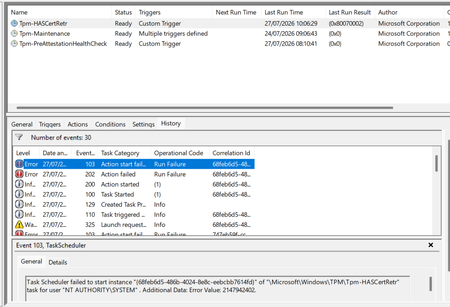
Windows 11 devices are non compliant in Intune against BitLocker, Secure Boot and Code Integrity, all three returning the Syncml 404 error. The settings are genuinely enabled. The real cause is the device can't retrieve a Device Health Attestation certificate, so the health cert status sits at 65535 and the retrieval task fails. What I've found: the TPM is healthy (present, ready, attestation capable, firmware not vulnerable), and the endorsement key cert is valid, chaining to Nuvoton TPM Root CA 2111. But the EK chain check comes back invalid with zero intermediate certificates, because the Nuvoton key is signed straight off the root with no intermediate for the chain walk. A Hyper-V VM on the same build and tenant works fine, but only because it has no manufacturer EK cert, so it skips that chain check entirely. What I've tried: patching TPM firmware (ruled out the older ADV190024 issue), refreshing the local trusted TPM certificate store, and rerunning the retrieval task. None fixed it. This matches Rudy Ooms' well known call4cloud writeup, where he concluded it's a service side trust problem that can't be fixed from the device. It's now appearing on brand new Dell hardware too, so I can't just exclude the old kit and move on. Is this a known issue with the Nuvoton root chain, and is there a supported fix or position from Microsoft? Screenshots below showing the compliance errors and the failure.586Views2likes6CommentsIntune and PSADT v4.x
I have a reboot package PSADT and the first dialog give the user the choice to defer the install, and a Scheduled Task is created to run an hour later. I am returning a 1618 (retry) and inside the PSADT, If Intune runs the app again, it will check my reg key for the defer and check that the task is active and hasn't run, and will exit without any interaction to the user and exit with another 1618. I am not an Intune admin and wondered if there are some downsides to trying this type of package in Intune. The defer time is the unknown for me and I am not sure how many times Intune will try to reinstall the reboot package within the deferred hour, and what Intune will do after the 3rd try...which I think is the max retries it might attempt in an hour? Any suggestions for a change in the exit codes or script interaction with Intune? Thanks.40Views0likes2Comments
Intune partner compliance onboarding
Hello, We develop a MDM solution and we would like to become device compliance partner to offer our customers conditionnal access functionality. After filling twice (the first time almost two month ago) the form "Intune partner compliance onboarding request" whose link is available on this page https://learn.microsoft.com/en-us/intune/device-security/compliance/third-party-partners, we didn't get any reply to our request. Would you know if there is any other way to integrate this partnership ? Any contact or anything to get some news about our request ? Thank you for your help. Best regards,54Views0likes1CommentEntra Shared Mode - Force App Stop
Hi All I hope you are well. Anyway, I was asked this yesterday and think I already might know the answer, but here goes. We had an instance of Microsoft Excel stuck in "getting things ready" on an Android Entra Shared Mode Device. Technical Support wondered if there was a way to Force Stop Excel or clear the app data. We had a look in Exit Kiosk Mode, Android Settings, and the Force Stop of Excel said "Action not allowed" and the clear the app data said "Unable to delete data for app" So, my question(s) would be, is going into Exit Kiosk Mode and even trying to force stop / clear data on apps even a valid option, or is this by design? Would adding Excel to this setting help? Any help or confirmation would be greatly appreciated. Stuart288Views0likes3CommentsINTUNE: Problems with the Google address (Managed Google Play)
Hello everyone, Ever since we added our email address under “Managed Google Play” (in the Intune Admin Center), we can no longer use that address to sign in to Google, Google Docs, Google Drive, or similar services... Is this normal? - If not, what settings do I need to adjust, and where, to get it working again? The error message looks something like this: "Error message: We’re sorry, but you don’t have access to Google Docs. Please log in to your Admin Console to enable it" Thanks and best regards Chris60Views0likes2CommentsPlatform SSO + Secure Enclave: True Passwordless macOS Sign-in with Entra ID?
Hi all, I'm testing macOS DEP/ADE + Intune + Platform SSO with Microsoft Entra ID. I have the Mac successfully enrolling through ADE, becoming Entra joined, and users can authenticate against Entra ID. With Platform SSO configured for Password authentication, users can sign in using their Entra password and everything works as expected. What I'm trying to achieve is a passwordless experience using Secure Enclave, similar to Windows Hello for Business: User enrolls the Mac via ADE Device joins Entra ID Platform SSO is registered Authentication uses Secure Enclave / biometrics (Touch ID) User is no longer prompted for their Entra password during normal sign-in/unlock scenarios Has anyone successfully implemented this with Intune and Platform SSO? Specifically: Is a true Windows Hello-like passwordless experience currently supported on macOS with Entra ID + Platform SSO? If yes, what authentication method and Platform SSO configuration are required? Are there any known limitations where Entra authentication still requires the cloud password even when Secure Enclave is configured? I'm interested in real-world deployments and lessons learned. Thanks!140Views0likes3Comments