excel
43918 TopicsBraille Translator Challenge
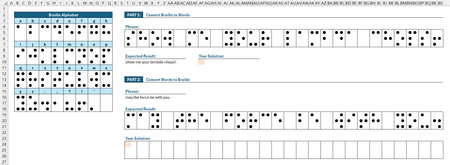
Using the Braille Alphabet lookup table provided: Part 1 - convert the given phrase from Braille to words. Part 2 - convert the given phrase from words to Braille. ✅ Solutions should be in the form of a single-cell formula. ✅ Generalized Lambda functions are welcome, provided the function definitions are included with your solution. ✅ Keep in mind, the "best" solution is not necessarily the shortest... Strive for conciseness, if you wish; just don't let your solutions be ordinary. 😉 Good luck and have fun!255Views0likes15Comments
No clustering in clustered bar chart when secondary axis is added
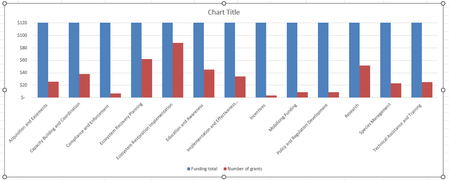
Hi there, I've got a clustered bar chart with two data series, one of which needs a much smaller scale than the other. It looks fine as long as I don't add the secondary axis (see pic). Note that here I've made the y-axis range so small that you can see the second series. Displaying the full range of the first series results in the second series being invisible. Here you can't see the full range of the first series, so this won't work for my purposes. When I add the secondary axis, I get this (see pic) and I don't see any way to avoid it. It seems like it might be a bug. Adjusting the overlap or the gap width doesn't help. Anyone have any suggestions? Thank you!!Solved406Views0likes3Comments
Missing Stock Jio Financial Services in Excel Stocks Data Type
Hi! The stock Jio Financial Services Limited listed on Mon 25-Aug-23 (NSE symbol: JIOFIN). But this is missing in Excel. When I enter JIOFIN.XNSE and try to convert to a Stocks Data type, it says not found. Kindly update your Stocks database. VS3.5KViews1like14Comments
Using tables, lists, and dropdowns and not sure how to make this work…
Hi! I have an Excel workbook with several worksheets that need to be filled in by the user. The first worksheet (Sheet A) has fields for employee names/addresses/id#s, their work classification, their tax filing status, their gross pay, the various taxes that come out, etc. There is also a worksheet titled "Data Sheet" with a table ("Table A") that has the employee names/addresses/id#'s. When filling in "Sheet A", the user can select from a dropdown list of those employee names/address/id#'s (the list comes from "Data Sheet - Table A") and the employee's info fills into that field. These are the steps I followed to set up the "Data Sheet" and the dropdown list on "Sheet A". 1. Added a worksheet to the end and named it Data Sheet. 2. To add a table, made a list of employee names with a header name and then selected an item in the list and Insert>Table, named the table (no spaces) in the Table Name box, and made sure that the header row is checked. 3. Next, I defined the list. Clicked on an item in the list, then under Formulas, selected Define Name. 4. Gave the list a name different than the table name or head name. In the reference section, highlighted all the items, but not the header. This allows the list to be added to without having to change the range. 5. On "Sheet A", I selected the cells I want to use the drop-down for. Selected Data Validation on the Data tab. Selected allow “list”, then in the source box hit F3 so that the lists I've made would pop up and selected the correct one. 6. Made sure that the column where users will input their info is unprotected. I've since set up a second table ("Table B") on "Data Sheet" and defined the list, etc., to be the employee fica rate. On “Sheet A” the fica withheld from the employee's paycheck goes into the field next to the employee name/address/id# field. When the user selects an employee name/address/id# from the dropdown list on “Sheet A”, is it possible to make the corresponding fica field auto-calculate from “Data Sheet” at the same time? The list/table (“Data Sheet – Table B”) would need to be the percentages that each employee pays and then “Sheet A” would need to pull the corresponding percentage from “Data Sheet – Table B” and multiply it with the wages the user has entered and the result of that calculation would land in the “fica” field. Thank you so much!! Diane6.3KViews1like38CommentsUsing Formulas (IFERROR?)
I am trying to figure out a way to use the same formula (or combined formulas we can use in each) that will return the % of change as either -100% if column B is 0 or 100% if column A is 0 but B is not. The formula we are using right now is IFERROR((-(E152-F152)/E152),"0.0"%) This returns any columns with errors as 0, but it also is returning the column that should be 100% as a 0. Is there another formula I can combine or a better one to use that will do this? 2026 Budgeted 2027 Proposed % of Change 6,565,464 - -100.0% - 140,388 0.0% - 50 0.0%84Views0likes3Comments
Sum of data across multiple columns & rows based on Criteria
I have a data set that ranges across multiple rows and columns. I am building a formula and looking to sum based on multiple criteria. I tried sumifs, however, that does not work. Below is my example using a hypothetical sumifs (keeping in mind, this does not work). Any suggestions on how to return my expected result would be greatly appreciated. =SUMIFS('Query Budget'!$C$10:$HV$1000,'Query Budget'!$A$10:$A$1000,F$1,'Query Budget'!$A$5:$HV$5,$D5)172Views1like8Comments
"Getting Name" bug on my worksheet
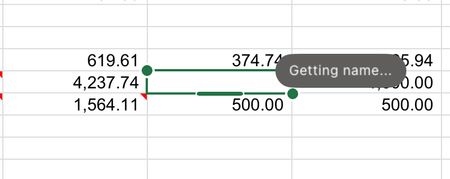
One of the cells in my worksheet has a "Getting Name" bug on my worksheet - I have no idea what this is referring to - I've never seen this in my 40-years of using Excel - there are no Range Names nor Links in this workbook. What is it and how do I get rid of it?1.8KViews1like14Comments
How to look up specific text in a specific column, multiple columns involved
Hello, I am trying to implement a search field for a vertically oriented list, lets name it #1 for reference, looking for the number of results of the desired text within a range in a specific column in separate ranged list, #2, which is horizontally oriented. Neither list are Excel tables. Values in List 1 are automatically obtained and sorted from List 2 via dynamic functions which spill over underneath. For better reference, I have implemented a simple sanitized example as an attachment, both in Workbook screenshot format. Is it possible for this to be implemented, and how could I go about to do so? Thanks in advanceSolved93Views0likes2Comments
"In-Review" status on my replies.
Hello, I started contributing to this forum a few years ago, but lately I've noticed that every reply I make is placed in the "In-Review" status. This status lasts approximately 24 hours and is then removed. What does this status mean? Why does it happen? Does the same situation happen to other contributors or just me? Thanks in advance to anyone who answers me. IlirUSolved125Views0likes10Comments