Recent Discussions

Unable to use a certificate from my Windows CA
I am trying to use my own certificate signed by my CA, instead of the self-signed SSL certificate it offers by default. In fact, with the self-signed SSL certificate, WAC runs on HTTPS: However, when I switch to the certificate I have generated in my CA: When I try to access the link, it returns me: So if I switch back to self-signed SSL certificate: The WAC console is working properly again: What I doing wrong when I generate that certificate?19Views0likes0CommentsUnable installing extensions from a different feed
I added a new feed from a path, and WAC is telling me it can't read the feed or update the corresponding catalog. I followed the instructions in this link: "https://learn.microsoft.com/en-us/windows-server/manage/windows-admin-center/configure/using-extensions#installing-extensions-from-a-different-feed". In fact, since my network isn't connected to the internet, I also followed the instructions in this other link: "https://learn.microsoft.com/en-us/windows-server/manage/windows-admin-center/configure/using-extensions#installing-extensions-on-a-computer-without-internet-connectivity". Regarding adding a file share as a source, it must meet the criteria outlined in this link: "https://learn.microsoft.com/en-us/windows-server/manage/windows-admin-center/configure/using-extensions#installing-extensions-from-a-different-feed". However, I'm getting these error messages and therefore don't have any extensions available to add:43Views0likes1Comment
Windows Server Datacenter: Azure Edition preview build 26534 now available in Azure
Hello Windows Server Insiders! We welcome you to try Windows Server vNext Datacenter: Azure Edition preview build 26534 in both Desktop experience and Core version on the Microsoft Server Operating Systems Preview offer in Azure. Azure Edition is optimized for operation in the Azure environment. For additional information, see Preview: Windows Server VNext Datacenter (Azure Edition) for Azure Automanage on Microsoft Docs. For more information about this build, see Announcing Windows Server vNext Preview Build 26534 | Microsoft Community Hub. This is our last preview for 2025. Please join us in January 2026 for new features and new content!45Views0likes0Comments
NUMA Problems after In-Place Upgrade 2022 to 2025
We have updated several Hyper-V hosts with AMD Milan processors from Windows 2022 to Windows 2025 using the in-place update method. We are encountering an issue where, after starting about half of the virtual machines, the remaining ones fail to start due to a resource shortage error. The host's RAM is about 70% free. We can only get them to start by enabling the "Allow Spanning" configuration, but this reduces performance, and with so many free resources, this shouldn't be happening. Has anyone else experienced something similar? What has changed in 2025 to cause this issue? The error is: Virtual machine 'R*****2' cannot be started on this server. The virtual machine NUMA topology requirements cannot be satisfied by the server NUMA topology. Try to use the server NUMA topology, or enable NUMA spanning. (Virtual machine ID CA*****3-ED0E-4***4-A****C-E01F*********C4). Event ID: 10002 <EventRecordID>41</EventRecordID> <Correlation /> <Execution ProcessID="5524" ThreadID="8744" /> <Channel>Microsoft-Windows-Hyper-V-Compute-Admin</Channel> <Computer>HOST-JLL</Computer>420Views0likes4CommentsVM Load balance is not working
Hi All, I have 4 node cluster in which VMs are manually distributed and now when i enabled the load balance feature via Windows Admin Center it not load balancing the VMs i double checked the load feature via PowerShell and it shows true. kindly suggest form where i should start the troubleshooting.97Views1like4Comments26063 deduplication data corruption is still there.
From Server 2022 up to this newest 26063 build, they all have the same problem, as described here: https://techcommunity.microsoft.com/t5/windows-server-insiders/server-vnext-26040-and-server-2022-deduplication-data-corruption/m-p/4047321 I am out of energy for today and give up for today. It seems to be impossible to get Microsoft to care for actual OS bugs instead of marketing.4.8KViews1like26Comments
Hyper V Server 2019 VM Paused-Critical Disk(s) encountered critical IO errors
I am running Hyper V server 2019 and running 2 windows 10 VM (only OS running) and 1 Windows server essentials 2019. It worked fine for 6 months just running basic AD tasks. a management software was installed and we had issues since. The 2 windows 10 VM can't start up. An error occurred while attempting to start the selected virtual machines 'Windows 10 VM' failed to change state When I starte the windows server 2019 essentials a Paused-Critical shows on STATE and Status is 'Disk(s) encountered critical IO errors. there's plenty of available storage space in the VM Can anyone help? thank you
Windows 11 automatically restarting after install security Update — With GPO and WSUS.
Hi everyone, I’m facing a strange behavior with Windows 11 devices that receive updates through WSUS and are fully managed via Group Policy. Here’s the scenario: We have a GPO configured as follows: -Configure Automatic Updates → 4 (Auto download and schedule the install) -Scheduled installation every day at 10:00 -Install during automatic maintenance → disabled -Active Hours configured -Turn off auto-restart for updates during active hours → Enabled -Update deadlines set to 0 (to avoid any forced restart) -No other restart-related policies set in the domain Even with this configuration, after updates are installed, Windows 11 shows the following message: “Your organization manages update settings. We will restart and install this update at X minutes.” And then the device automatically restarts, even when: -a user is logged in -it is outside Active Hours -deadlines are disabled -no-auto-restart is enabled This behavior does not happen on Windows 10 — only on Windows 11.192Views0likes1Comment
Windows Admin Center 2410 not updating Server 2025
Hi, I have 3 new 2025 servers all updated and on the domain. Windows Admin center is working fine with all other servers (2012, 2016, 2019, and 2022). For these 3 new servers, I can connect and login through Adm Center and when I choose the "updates" tab the circle in the middle of the screen spins indefinitely. It never even shows if updates are available or not, it just spins. If I log onto the servers locally, I can see and install updates manually. But when I go back and connect through ADM Center, I just get the spinning circle. I currently only have 3 2025 servers, so for me it appears to be an issue with how they talk to ADM Center concerning updates. (and this makes me hesitate to update other servers) I've tried RDP, registry, Powershell, etc (all through ADM Center). It ALL works, but updates never do. Additionally the 2025 servers are able to communicate just fine to report update status to our WSUS server. If I click the "update history" tab on the updates page in Admin Center, I then see an error, but not sure what would be denying anything, when the connection already seems to be made: "Message We couldn't check update history. Error: (1) RemoteException: Access is denied. (Exception from HRESULT: 0x80070005 (E_ACCESSDENIED)) (2) RemoteException: The property 'ServerSelection' cannot be found on this object. Verify that the property exists and can be set. (3) RemoteException: You cannot call a method on a null-valued expression. (4) RemoteException: You cannot call a method on a null-valued expression." I tried to temporarily disable the firewall with no change in behavior. The account I'm using is a domain admin account and also added to the local admin group for testing.215Views1like2Comments
Windows Admin Center Preview - 2511 English [MSI Corrupt]
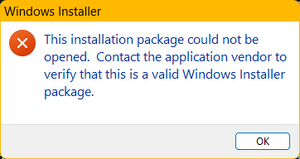
When attempting to launch the WindowsAdminCenterPreview_2511.msi, I received an error message (See Below). In addition, when I test the MSI using 7zip, the archive fails to validate. This occurred downloading the installer package twice over a two-day period. My system info is below.101Views1like2CommentsAnnouncing Windows Server vNext Preview Build 26534
Hello Windows Server Insiders! Today we are pleased to release a new build of the next Windows Server Long-Term Servicing Channel (LTSC) Preview that contains both the Desktop Experience and Server Core installation options for Datacenter and Standard editions, Annual Channel for Container Host and Azure Edition (for VM evaluation only). Branding remains, Windows Server 2025, in this preview - when reporting issues please refer to Windows Server vNext preview. If you signed up for Server Flighting, you should receive this new build automatically. This is our last preview for 2025. Please join us in January 2026 for new features and new content! What's New Windows Server Flighting is here!! If you signed up for Server Flighting, you should receive this new build automatically later today. For more information, see Welcome to Windows Insider flighting on Windows Server - Microsoft Community Hub Feedback Hub app is now available for Server Desktop users! The app should automatically update with the latest version, but if it does not, simply Check for updates in the app’s settings tab. Known Issues SMBDirect - Live Migration Users may experience performance issues during live migration of cluster nodes resulting in timeouts triggering failures across the stack. Network traffic is not flowing in through RDMA among cluster nodes resulting in a fallback to TCP/IP and reduced performance of up to 5x Live Migration times causing timeout-related failures. This will be addressed in a future preview release. Download Windows Server Insider Preview (microsoft.com) Flighting: The label for this flight may incorrectly reference Windows 11. However, when selected, the package installed is the Windows Server update. Please ignore the label and proceed with installing your flight. This issue will be addressed in a future release. Available Downloads Downloads to certain countries may not be available. See Microsoft suspends new sales in Russia - Microsoft On the Issues. Windows Server Long-Term Servicing Channel Preview in ISO format in 18 languages, and in VHDX format in English only. Windows Server Datacenter Azure Edition Preview in ISO and VHDX format, English only. Microsoft Server Languages and Optional Features Preview Keys: Keys are valid for preview builds only Server Standard: MFY9F-XBN2F-TYFMP-CCV49-RMYVH Datacenter: 2KNJJ-33Y9H-2GXGX-KMQWH-G6H67 Azure Edition does not accept a key. Symbols: Available on the public symbol server – see Using the Microsoft Symbol Server. Expiration: This Windows Server Preview will expire September 15, 2026. How to Download Registered Insiders may navigate directly to the Windows Server Insider Preview download page. If you have not yet registered as an Insider, see GETTING STARTED WITH SERVER on the Windows Insiders for Business portal. We value your feedback! The most important part of the release cycle is to hear what's working and what needs to be improved, so your feedback is extremely valued. Please use the new Feedback Hub app for Windows Server if you are running a Desktop version of Server. If you are using a Core edition, or if you are unable to use the Feedback Hub app, you can use your registered Windows 10 or Windows 11 Insider device and use the Feedback Hub application. In the app, choose the Windows Server category and then the appropriate subcategory for your feedback. In the title of the Feedback, please indicate the build number you are providing feedback on as shown below to ensure that your issue is attributed to the right version: [Server #####] Title of my feedback See Give Feedback on Windows Server via Feedback Hub for specifics. The Windows Server Insiders space on the Microsoft Tech Communities supports preview builds of the next version of Windows Server. Use the forum to collaborate, share and learn from experts. For versions that have been released to general availability in market, try the Windows Server for IT Pro forum or contact Support for Business. Diagnostic and Usage Information Microsoft collects this information over the internet to help keep Windows secure and up to date, troubleshoot problems, and make product improvements. Microsoft server operating systems can be configured to turn diagnostic data off, send Required diagnostic data, or send Optional diagnostic data. During previews, Microsoft asks that you change the default setting to Optional to provide the best automatic feedback and help us improve the final product. Administrators can change the level of information collection through Settings. For details, see http://aka.ms/winserverdata. Also see the Microsoft Privacy Statement. Terms of Use This is pre-release software - it is provided for use "as-is" and is not supported in production environments. Users are responsible for installing any updates that may be made available from Windows Update. All pre-release software made available to you via the Windows Server Insider program is governed by the Insider Terms of Use.492Views2likes0CommentsAnnouncing Windows Server vNext Preview Build 26525
Hello Windows Server Insiders! Today we are pleased to release a new build of the next Windows Server Long-Term Servicing Channel (LTSC) Preview that contains both the Desktop Experience and Server Core installation options for Datacenter and Standard editions, Annual Channel for Container Host and Azure Edition (for VM evaluation only). Branding remains, Windows Server 2025, in this preview - when reporting issues please refer to Windows Server vNext preview. If you signed up for Server Flighting, you should receive this new build automatically. What's New Windows Server Flighting is here!! If you signed up for Server Flighting, you should receive this new build automatically later today. For more information, see Welcome to Windows Insider flighting on Windows Server - Microsoft Community Hub Feedback Hub app is now available for Server Desktop users! The app should automatically update with the latest version, but if it does not, simply Check for updates in the app’s settings tab. Known Issues SMBDirect - Live Migration Users may experience performance issues during live migration of cluster nodes resulting in timeouts triggering failures across the stack. Network traffic is not flowing in through RDMA among cluster nodes resulting in a fallback to TCP/IP and reduced performance of up to 5x Live Migration times causing timeout-related failures. This will be addressed in a future preview release. Download Windows Server Insider Preview (microsoft.com) Flighting: The label for this flight may incorrectly reference Windows 11. However, when selected, the package installed is the Windows Server update. Please ignore the label and proceed with installing your flight. This issue will be addressed in a future release. Available Downloads Downloads to certain countries may not be available. See Microsoft suspends new sales in Russia - Microsoft On the Issues. Windows Server Long-Term Servicing Channel Preview in ISO format in 18 languages, and in VHDX format in English only. Windows Server Datacenter Azure Edition Preview in ISO and VHDX format, English only. Microsoft Server Languages and Optional Features Preview Keys: Keys are valid for preview builds only. Server Standard: MFY9F-XBN2F-TYFMP-CCV49-RMYVH Datacenter: 2KNJJ-33Y9H-2GXGX-KMQWH-G6H67 Azure Edition does not accept a key. Symbols: Available on the public symbol server – see Using the Microsoft Symbol Server. Expiration: This Windows Server Preview will expire September 15, 2026. How to Download Registered Insiders may navigate directly to the Windows Server Insider Preview download page. If you have not yet registered as an Insider, see GETTING STARTED WITH SERVER on the Windows Insiders for Business portal. We value your feedback! The most important part of the release cycle is to hear what's working and what needs to be improved, so your feedback is extremely valued. Please use the new Feedback Hub app for Windows Server if you are running a Desktop version of Server. If you are using a Core edition, or if you are unable to use the Feedback Hub app, you can use your registered Windows 10 or Windows 11 Insider device and use the Feedback Hub application. In the app, choose the Windows Server category and then the appropriate subcategory for your feedback. In the title of the Feedback, please indicate the build number you are providing feedback on as shown below to ensure that your issue is attributed to the right version: [Server #####] Title of my feedback See Give Feedback on Windows Server via Feedback Hub for specifics. The Windows Server Insiders space on the Microsoft Tech Communities supports preview builds of the next version of Windows Server. Use the forum to collaborate, share and learn from experts. For versions that have been released to general availability in market, try the Windows Server for IT Pro forum or contact Support for Business. Diagnostic and Usage Information Microsoft collects this information over the internet to help keep Windows secure and up to date, troubleshoot problems, and make product improvements. Microsoft server operating systems can be configured to turn diagnostic data off, send Required diagnostic data, or send Optional diagnostic data. During previews, Microsoft asks that you change the default setting to Optional to provide the best automatic feedback and help us improve the final product. Administrators can change the level of information collection through Settings. For details, see http://aka.ms/winserverdata. Also see the Microsoft Privacy Statement. Terms of Use This is pre-release software - it is provided for use "as-is" and is not supported in production environments. Users are responsible for installing any updates that may be made available from Windows Update. All pre-release software made available to you via the Windows Server Insider program is governed by the Insider Terms of Use.2025-10 Cumulative Update for Windows Server 2019 (KB5066586) Undoes Update on Reboot
We have a Windows Server 2019 Standard which will not install the 2025-10 Cumulative Update for Windows Server 2019 (KB5066586) update. The installation part goes fine, but when the server is rebooted to finalize the update, it goes into "Undoing changes". Then it reboots again, and I am back where I started. The error code is 0x8007000d. I have done the following to debug this: Ran System File Checker sfc /scannow. No errors found. DISM /Online /Cleanup-Image /ScanHealth. No errors found. Ran Windows Update Troubleshooter. No errors found. Shut down Windows Update services. Renamed SoftwareDistribution and Catroot2 folders. Restarted services. No change. Ran ScanDisk. No errors found. Disabled antivirus. No change. Ran Disk Cleanup and manually deleted additional temp files. No change. Checked Event Viewer. Only error is Event 20 which is a failure of the Windows Update Agent. I am out of ideas. If anyone has some, I would much appreciate the help. I am out of ideas.1.2KViews0likes9Comments
SystemSettings. exe on Windows server 2025 crashes after installing Xbox game
I installed the Microsoft App Store on Windows Server and installed Minecraft. However, entering the system>display>graphics tab in the settings will cause the settings to crash.I tested both Bedrock and Java and found this issue. I think any Xbox game in the Microsoft Store should be able to reproduce this issue. + System - Provider [ Name] Application Error [ Guid] {a0e9b465-b939-57d7-b27d-95d8e925ff57} EventID 1000 Version 0 Level 2 Task 100 Opcode 0 Keywords 0x8000000000000000 - TimeCreated [ SystemTime] 2025-12-04T08:55:23.2042032Z EventRecordID 27146 Correlation - Execution [ ProcessID] 10988 [ ThreadID] 20000 Channel Application Computer WIN-JSD290TH0EL - Security [ UserID] S-1-5-21-868965638-952098041-1598110278-1002 - EventData AppName SystemSettings.exe AppVersion 10.0.26100.7019 AppTimeStamp f88449de ModuleName Windows.Gaming.Preview.dll ModuleVersion 10.0.26100.7019 ModuleTimeStamp 8e7f4dfa ExceptionCode c0000005 FaultingOffset 000000000003aadd ProcessId 0x1230 ProcessCreationTime 0x1dc64fbb631455a AppPath C:\Windows\ImmersiveControlPanel\SystemSettings.exe ModulePath C:\Windows\System32\Windows.Gaming.Preview.dll IntegratorReportId f2340132-82be-40d6-9c76-ec8fcbb9d19e PackageFullName windows.immersivecontrolpanel_10.0.8.1000_neutral_neutral_cw5n1h2txyewy PackageRelativeAppId microsoft.windows.immersivecontrolpanel21Views0likes0CommentsAdmin Center choosing the wrong certificate
Windows Admin Center version 2410, build 2.4.2.1. We're encountering an issue following the instructions outlined https://learn.microsoft.com/en-us/windows-server/manage/windows-admin-center/configure/update-certificate?tabs=powershell when replacing the WAC certificate. We've installed a certificate from a third-party CA in the local machine store. The common name matches the DNS FQDN and hostname of the server. Despite specifying the thumbprint of the 3rd party CA cert with the "Set-WACCertificateSubjectName" cmdlet, WAC binds to a different certificate issued by our internal CA for WinRM. The WinRM cert shares the same common name, but it has a later expiration date. I suspect WAC is picking the certificate with the latest expiration date. This also happens when using the GUI, even when we specify the 3rd party cert during customization. We've confirmed that the NETWORK SERVICE account has rights to the private key on the cert as well. I tried deleting the binding using netsh and rebinding to the updated thumbprint. While this is successful, and the output from "netsh http show sslcert" shows the 3rd party CA cert on the port 443 binding, the browser still presents the Internal-CA cert on 443 even after restarting the WinRM and Windows Admin Center services (and rebooting). It seems like there is an issue when multiple valid certificates exist with the same common name in the machine store. Additionally, the "Set-WACCertificateAcl" seems to fail in this case. The Configuration log contains the error below whenever it is run. Set-WACCertificateAcl: Unable to find machine key path for certificate. Skipping setting access control list. We'd prefer to use the 3rd party cert for the HTTPS port and the internal CA cert for WinRM. Is this possible?Solved74Views0likes1CommentAllow VMs attached to internal switch on hyper-V win2k19 access Internet
Hi, I have 4 VMs attached to an internal switch with IPs 10.10.0.*, assigned 10.10.0.1 to the switch. One of the NICs on the host has the 192.168.1.70 which I shared its connection with the internal switch but I am not able to browse internet from the VMs. What can be missing? Thanks15Views0likes0CommentsWINGET is not recognized as a commandlet on win 2k19 server fresh setup
I have setup a new win2k19, I followed the instructions Install-PackageProvider -Name NuGet -Force | Out-Null Install-Module -Name Microsoft.WinGet.Client -Force -Repository PSGallery | Out-Null Repair-WinGetPackageManager When I try anu winget command I get winget is not recognized as a commandlet19Views0likes0CommentsAllow VMS on hyper-V host on win2k19 attached to internal network interface
Hi, how can allow VMs accssinternet on host Hyper-V on 2019? I have hyper-v on 192.168.0.* and my 4 VMs are 10.10.0.*. I assigned 10.10.0.1 to the virtual switch, on VMs I assigned default gateway to this switch15Views0likes0Comments
Question About MAK Windows Activation
Hello everyone. The question is the following. We have a customer with a subscription for Windows Server 2025 Standard - 8 Core License Pack 1 Year quantity 3 (from partner portal). From the servers that the key have been assign i see that the key is on MAK channel. The question is, if i remove the key with dism i will get back a activation? I mean at this time we have 0 activation remaining, if i remove the key the remaining activation number will increase to 1 from 0? I cant found a solid answer on the web so please help. Thanks. Best Regards SG57Views0likes1CommentWindows server 2022 Time (can not change)
Hi I have got windows server 2022 standard - AD Domain controler and I cant change time. when i want to change i see "some of these settings are hidden or managed by your organization" I checked gpo i dint find anything. Do You know where to find ? I really want change time manuwallySolved53KViews1like7Comments

Events
Recent Blogs
- Great news for IT pros managing the next generation of Windows devices! Windows Admin Center now supports Arm-based Copilot+ PCs, bringing the powerful, browser-based management experience you rely o...Dec 12, 2025189Views0likes0Comments
- Applies to: Windows Server 2025 Failover Clustering with the 2025-12 Security Update (KB5072033) (26100.7462) applied on each Failover Cluster node. First, I need to THANK the Microsoft MVPs - exte...Dec 11, 2025463Views3likes7Comments