
Forum Widgets
Latest Discussions

How to upgrade from Windows 10 to 11 with a clean install of Windows 11?
Hi, I have a Windows 10 PC that has the requirements to be upgraded to Windows 11. I would like to do a complete clean install of Windows 11 and then reinstall all my software. If I understand this correctly, I will in this case have my Windows 10 registration key at hand to be able to make a clean Windows 11 installation on the same computer. I do have a registration key for Windows 10, which I think belongs to this computer. Is there any way that I can verify that this registration key actually belongs to this computer? Or can I do a clean installation of Windows 11 on this computer anyway (without first verifying that the Windows 10 belongs to this computer)?DAWODec 09, 2025Copper Contributor11Views0likes0Comments
Windows 10 11 Enterprise Restrict access to MS Store via group policy
Issue presented: Multiple users are downloading and installing Remote Access tools that are deemed not supported as well as other applications in the environment. We want to restrict access to the MS Store to Administrators or a specific AD group without using AppLocker or InTune. I have seen various threads in multiple sources that are conflicting about disabling the store or setting to the Company Portal for Windows 10/11. If you set the MS Store to Company Portal, in Windows 11 it disables the store. Turn off the Store application GPO: Denies or allows access to the Store application. If you enable this setting, access to the Store application is denied. Access to the Store is required for installing app updates. Other threads as well as the gpo verbiage itself indicate that if you disable the store, all installed applications will no longer update. There are some threads that state the opposite. https://learn.microsoft.com/en-us/windows/configuration/store/?tabs=gpo Has anyone configured a way to restrict users or a specific group of users from using the MS Store while allowing existing applications the ability to update?LesPhotog1Dec 08, 2025Copper Contributor20Views0likes0Comments[On demand] AMA: Windows backup and restore
Now through Friday (12/5) at 12:00 p.m. PST: Get expert tips on backing up Windows 10 settings so you can transition users to Windows 11 seamlessly. Visit https://aka.ms/AMA/BackupRestore to explore Windows Backup for Organizations, now generally available—and to post your questions.Heather_PoulsenDec 03, 2025Community Manager18Views0likes0Comments
Prune list of
I'm a bit of a hobbyist and often advise people on managing systems, so I frequently install and reinstall Windows on multiple systems. When I install a Windows 11 system and log in with my Microsoft account, I'm presented with a LONG list of past Windows installations from which I can import settings. The vast number of these are just trials I'd rather delete. Is there any way I can prune that list? If there's a way to access the list from my account on the Microsoft website, I don't know it.NJDaveDec 02, 2025Copper Contributor29Views0likes1Comment
Backing up to an external hard disk drive.
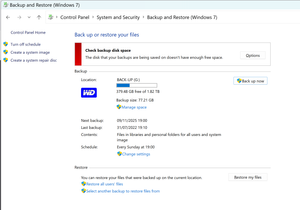
Backing up to an external hard disk drive. Windows backup tells me that my target drive has 379.48GB free space: It tells me that my back-up this time will occupy 77.21GB. Yet it tells me that the backup cannot be run because my target disk does not have enough space. What is going on here? Have I misunderstood the measures of size/capacity?phillroNov 23, 2025Copper Contributor14Views0likes0Comments
Does the CDN for Microsoft Windows Update seem to be malfunctioning?
I purchased a code signing certificate, but strangely, Windows did not automatically download the missing root certificate. When I tried to manually download the root certificate according to the manual, I found that the CDN seemed to return the wrong certificate and I was unable to establish a secure connection with the website. (At least in Chinese Mainland) https://ctldl.windowsupdate.com/msdownload/update/v3/static/trustedr/en/test/authrootstl.cab Can other regions be accessed normally?NishizakiHayatoNov 15, 2025Copper Contributor24Views0likes0Comments
Password reset and recovery fail
Hi there, good morning. First i appreciate any ones assistance here, its been a little frustrating. My regular windows account, for purchases, family content etc is "email address removed for privacy reasons". I cant sign in to that one any more. it is under 2fa with a code generator (I have that and the code is fine etc), it has a phone number (i have that!), and email account of course. I tried to enter the password to login to microsoft account - account.microsoft.com - and it gives the error "there have been too many failed login attempts". So i go through the password reset and works fine and i have a new password. I try again straight away and it fails with the same error. I try again for password reset... see above.. So i try for account recovery and go through the form - but i get an email saying because i have 2fa this is ignored and done automatically. However the automatic process does not seem to work - as indicated above. I tried to find a microsoft chat to have a live session, but it says i need to login... so i have logged in with a secondary account. I cant find the live chat sessions though. So i am posting here for any help - if i have the wrong forum i apologize - it was confusing to me about where i should actually make a post... this is making me feel old...lol... thanks DangeekdanoNov 11, 2025Copper Contributor42Views0likes0CommentsToo many restarts... why?
Dear fellow users, can anyone tell me why Windows needs to restart twice in a row allmost every two weeks? (Dell precision 5490, Windows 11 Education). My employer forced me to accept a Windows machine after my former laptop (Macbook) got out of order. Updating of the Mac was never a problem, allways succesfull updates in the background. With Windows it's quite the opposite. A simple switch between external screens seems to be prohibited before updating. Quite anoying when in class!Johan1Nov 05, 2025Copper Contributor95Views0likes3CommentsCreate a hardware inventory with the Microsoft Assessment Planning Toolkit (often underestimated)!
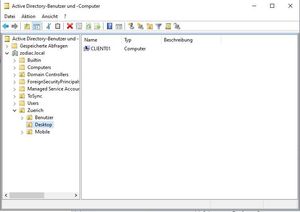
Dear Microsoft/Windows friends, In this article I want to show you a way how to create a hardware inventory with the Microsoft Assessment and Planning Toolkit (MAP)! Boah, boring! No, absolutely not. Here is the situation I encountered: A new customer needed to inventory all their systems (all members of an Active Directory). Sure, there are many great products that can do this (some are not free though). But would you have thought that the Microsoft Assessment and Planning Toolkit could do this as well? And the tool is free of charge! Rock n' Roll! The MAP tool uses WMI for Windows investigation and SSH for Linux. Since there were only Windows systems at the customer, I focus on WMI (I think you can adapt this to SSH very easily). Fortunately, Windows Server (2012 and later) already has WinRM turned on. This is not the case with the Windows client systems, so we first create a GPO before we start with the MAP tool. Navigate to a domain controller and please launch the Active Directory Users and Computers tool. Locate the organizational unit with the client systems. (Unfortunately I can only show you german screenshots here, Sorry) So we know where to link the group policy object. Then start the group policy management. Create a new GPO with the name for example "WinRM Settings". In this GPO I have made the following settings (in the open GPO navigate to the computerconfiguration => Windows-Components). Let's move to the next settings: If your systems are in a workgroup you can use the following in PowerShell (with admin privileges): Set-WSManQuickConfig -Force Now you just need to link the GPO to the correct organizational unit. In order for the GPO to be processed by all systems, I recommend that you wait a day or two. This way there is a chance that all systems have processed the GPO. If your environment is not that big you can use gpupdate /force in a CMD (with admin rights). Now it's time to install the MAP Toolkit (I used a Windows client system which is a member of the domain). You can find the tool via the following link: https://www.microsoft.com/en-us/download/details.aspx?id=7826 Navigate to the folder where you downloaded the tool. Double click on the .exe file and simply click through. When you start MAP for the first time, you must specify a name for the database that will be created. Now navigate to "Environment" on the left side and click on "collect inventory data". It starts the wizard and in the following screeshots I show you what I configured. Of course you can adjust all settings for your needs. Very important are the credentials you can specify in the wizard. Make sure that you have enough rights so that the tool can actually collect the information. My point in this example is to give you an idea. Now the assessment starts and afterwards we receive our report. Click "Inventory Result" when the scan is complete. Navigate to the right side and click on "Generate...." and an Excel file will be created. Open this file and you will have a great inventory to work with. Here is a compact (not complete) excerpt from my inventory, which is available as an Excel file. Hope you are as happy with the result as I was? Thank you for taking the time to read this article. I hope this article was useful. Best regards, Tom Wechsler17KViews2likes2CommentsUnable to install Windows 10 ESU due to unknown MDM
I have been trying to get the Windows 10 ESU program enrollment done, but an unable to. It appears that I am connected to some MDM, but I have never to my knowledge done so. Also, there are no options listed in "Accounts-> Work or School." I ran the following in Powershell and got outputs 0 True 0 2, indicating the MDM registration. $t = [AppDomain]::CurrentDomain.DefineDynamicAssembly((Get-Random), 1).DefineDynamicModule((Get-Random), $False).DefineType((Get-Random)) $t.DefinePInvokeMethod('IsDeviceRegisteredWithManagement', 'mdmregistration.dll', 22, 1, [Int32], @([Boolean].MakeByRefType(), [IntPtr], [IntPtr]), 1, 3).SetImplementationFlags(128) $t.DefinePInvokeMethod('NetGetJoinInformation', 'wkscli.dll', 22, 1, [Int32], @([IntPtr], [IntPtr].MakeByRefType(), [UInt32].MakeByRefType()), 1, 3).SetImplementationFlags(128) $Win32 = $t.CreateType() $JoinedMDM = $False; $Win32::IsDeviceRegisteredWithManagement([ref]$JoinedMDM, 0, 0); $JoinedMDM $JoinedDomain = 0; $Buf = 0; $Win32::NetGetJoinInformation(0, [ref]$Buf, [ref]$JoinedDomain); $JoinedDomain Thanks for any ideas, TomTomD22Oct 06, 2025Copper Contributor38Views0likes0Comments


Resources
Tags
- windows 1015 Topics
- windows 117 Topics
- Windows Update5 Topics
- Intune4 Topics
- gpo4 Topics
- BitLocker3 Topics
- microsoft intune3 Topics
- Driver2 Topics
- printer2 Topics
- Autopilot2 Topics