
Forum Widgets
Latest Discussions
There is an edition of Windows 11 that is still supported on older hardware
Why YSK: On October 14, 2025, Windows 10 support will officially end, meaning PCs still running it will no longer receive security updates, putting users at risk. However, upgrading to Windows 11 isn't an option for many people due to strict hardware requirements, leaving thousands of perfectly functional PCs without official support. Many tools let you bypass hardware checks to install Windows 11 and get monthly updates, but yearly feature updates will fail. What many don't know is that Microsoft released Windows 11 IoT Enterprise in 2024, a version that has relaxed system requirements compared to standard Windows 11. This means: It can run on older hardware that doesn't meet TPM 2.0 or CPU restrictions It still gets security and feature updates It functions just like regular Windows 11, without unnecessary upgrade barriersDakotaWolfDec 18, 2025Iron Contributor6Views0likes0Comments
People whose hardware is too old to update to Windows 11, What's your plan come October?
I'm currently running an i7-4770 paired with a GTX 970. As much as I would love to, replacing it with modern hardware would be financially irresponsible. Luckily I love to make life difficult for myself so I'm planning to remove windows and switch to Ubuntu (or mint). What is everyone else planning to do come October?AlabamaCypressDec 18, 2025Iron Contributor20Views0likes1Comment
Media Streaming on Windows 11
Hello! I'm trying to stream media from my Win11 PC to my Philips Android Smart TV, never had a problem with Win 10 It says "media streaming is turned off", so I click turn on "media Streaming" and I get a window saying "Windows Media Player Network Sharing Service or a service it depends on failed to start". If I try and manually start the "Windows Media Player Network Sharing Service" I get a message saying "Windows could not start Windows Media Player Network Sharing Service on local computer", "Error 1068 a dependancy service or group failed to start." which is great but which service or goup it doesn't say. The latest version on Media Player is so different to the previous version, It doesn't show a picture library and there does seem to be way of turning streaming on from media player as there was in the past. So I am at a loss, I've asked Copilot, but none of the suggested solutions appear to work. Any ideas would be helpful, please?Enfield250Dec 18, 2025Copper Contributor13Views0likes1CommentI accidently uninstalled the IE Mode Option and I need to install it, but I can't find it
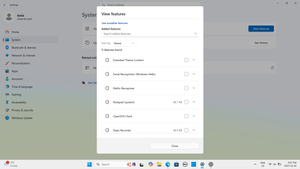
I was trying to Install Another Feature on Window 11, when I accidentally uninstalled the IE Mode Feature. Now, when I try to Install It, I can't see it anymore. I spoke to ChatGPT about this and it gave me this Command, but when I ran it, I got this Error: C:\Windows\System32>DISM /Online /Add-Capability /CapabilityName:Browser.InternetExplorer~~~~0.0.11.0 Deployment Image Servicing and Management tool Version: 10.0.26100.5074 Image Version: 10.0.26200.7462 [==========================100.0%==========================] Error: 0x8000ffff DISM failed. No operation was performed. For more information, review the log file. The DISM log file can be found at C:\WINDOWS\Logs\DISM\dism.log Can you please tell me how to add it back: https://chatgpt.com/share/69420ff4-d7c4-8000-a448-17006bf16a9e9Views0likes1Comment
Microsoft Edge weirdness
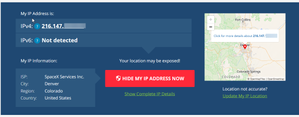
Good morning, I am running Windows 11: Edition Windows 11 Pro Version 25H2 Installed on 12/11/2024 OS build 26200.7462 Experience Windows Feature Experience Pack 1000.26100.275.0 Device name MSI Processor 11th Gen Intel(R) Core(TM) i9-11900H @ 2.50GHz (2.50 GHz) Installed RAM 32.0 GB (31.7 GB usable) Device ID Product ID System type 64-bit operating system, x64-based processor Pen and touch No pen or touch input is available for this display For the most part I use Firefox or Google Chrome. But I am noticing some strange issues when using Microsoft Edge. This first starting when I would use Edge to sign into web sites I visited regularly. I started seeing messages that the website was detecting a sign in from another location, Canada. This started happening regularly. So I understand that IP traffic can be routed in weird ways, and looked at 'What is my IP address' website. This is were it gets weird. Here is a screen shot using Firefox: I have blurred the last two of the subnet for security. This is correct, as I am using Starlink. Microsoft edge shows: I am not using a VPN server. Previously this was reported as Canada, now it shows my IP address in Romania. I use Bitdefender for anti virus, and high complexity passwords on all my sites. I cannot figure out why Edge reports my IP address incorrectly and using VPN services. Is there someone that can help explain why this is happening? Regards, Mikemichaels2408Dec 18, 2025Occasional Reader10Views0likes1CommentVous avez besoin d'un convertisseur YouTube MP3 fiable et à jour ?
Salut la communauté ! Je galère à trouver un convertisseur youtube mp3 qui fonctionne vraiment en 2026. La plupart des sites que je teste plantent, affichent des pubs intrusives ou ne téléchargent rien du tout. Je préfère utiliser un outil simple, rapide et sûr, sans inscription ni logiciels louches. Si vous utilisez un convertisseur YouTube vers MP3 récent et fiable pour extraire des fichiers audio YouTube de bonne qualité au format MP3, pouvez-vous nous indiquer lequel et pourquoi il vous convient ? Je suis intéressé par les outils en ligne et les applications de bureau. Merci beaucoup pour vos recommandations et votre aide !IndigoRiverDec 18, 2025Iron Contributor44Views0likes8CommentsWhat useful applications do you consider having installed on Windows PC?
I'm referring to those applications that you know you will always install every time you buy a new PC because you know they are very useful and you will use them daily or at crucial moments, either for your professional work or particular activities that you do daily not related to work.RakkxunsuopDec 18, 2025Iron Contributor8Views0likes0CommentsPC Manager is one of the best and most reliable products Microsoft has developed
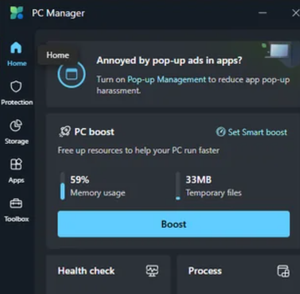
Just wanted to shout out PC Manager – hands down one of Microsoft's best and most straightforward tools! It’s lightweight, user-friendly, and does exactly what it promises: optimizes your PC without bloat or gimmicks. From cleaning up junk files to managing startup apps, it’s a rare gem from MS that feels honest and effective. Anyone else loving this app?ZachariahhDec 18, 2025Iron Contributor10Views0likes0CommentsWindows 11 secondhand laptop displays unfamiliar account name
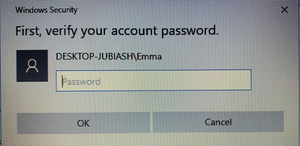
Hello everyone, I purchased a used laptop and when attempting to change the login method from password to PIN, the system displayed an unfamiliar account name: DESKTOP-JUBIASH. Even after performing a factory reset, this name persists. Does this mean someone else could still access the device? How can I completely remove any potential permissions?14Views0likes1CommentIs the security system of Windows 11 and ntoskrnl functioning normally in Task Manager?
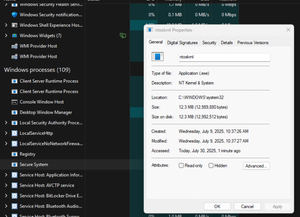
There is a Secure System process in Task Manager. When I click on it, it shows ntoskrnl, and it is classified as WINDOWS in all capital letters (others are usually in lowercase). Is this normal? I don't know if I'm overthinking it.YarisyoyoDec 18, 2025Bronze Contributor34Views0likes2Comments




Resources
Tags
- Features1,797 Topics
- configuration1,776 Topics
- device management1,148 Topics
- Update management932 Topics
- Application Management826 Topics
- security685 Topics
- deployment488 Topics
- community342 Topics
- accessibility242 Topics
- licensing202 Topics