
Forum Widgets
Latest Discussions

What's the safest and best YouTube video downloader these days?
Alright, I know this topic comes up a lot, but the landscape seems to change constantly. I need to download a few lectures for offline study, but I'm wary of sketchy sites and hidden malware. What's the current community favorite for reliability and safety? I'm on a Windows 11 laptop, and I'd strongly prefer a simple, clean youtube video downloader tool without a bunch of bloat. Free is ideal, but I'll consider a trustworthy paid option if it's significantly better. What are you all using in 2026?ElliottHayesDec 17, 2025Iron Contributor11Views1like0CommentsSolved How can I shutdown a newly installed Windows 11 without a Microsoft Account ?
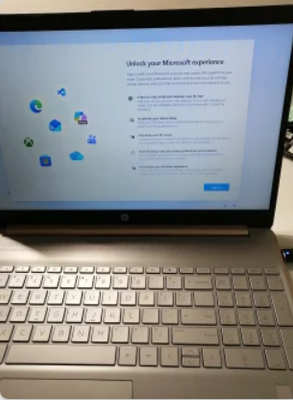
I bought a used Windows 10 laptop with an enclosure that has an exterior coloured in rose gold. The installation is encrypted with BitLocker. I was not given a BitLocker key. This unit is an HP 15dy0702ds. I removed the SSD and installed a bigger SSD and installed Windows 11. I know a child that likes rose gold. I want to send this computer from Canada to Florida, U.S.A.. On a clean installation of Windows 11 is the Microsoft Account sign in screen as shown. As far as I know it is unavoidable. I prefer to let the child in Florida sign in. My problem is that there does not seem to be a way to shutdown Windows 11 at this point. When the unit is sent via courier, I would prefer Windows 11 be completely shutdown. When I press the power button, the screen goes black and the power light is blinking. The user guide says the blinking power light indicates the sleep state (a power-saving state). As in the title ... How can I shutdown a newly installed Windows 11 without a Microsoft Account ? I believe powering the unit off while in UEFI setup would cause a shutdown. Strangely, I cannot get a prompt to access the UEFI setup. My usual means of entering UEFI setup is to power on while repeatedly hitting the ESC key. It does not go to UEFI setup and instead it shows the same Windows screen for the Microsoft Account sign in. The HP user guide says power on and hit F10 is the way to get into UEFI setup but that does not work either. This unit does not have an easily removable battery.MaineLobsterDec 17, 2025Iron Contributor30Views0likes1CommentSharing a Folder Issue
I have 4 computers and all share a folder off one of the machines. Recently power went out for a few hours and 2 of the coimputers stopped sharing the folder and kept popping up to enter the password. I did this to no avail. I have gone so far as to remove all passwords and tell the networking to allow people to access the shared folder without a password. Again it still pops up asking for a password. Here is what I have done Rebooted Removed all Passwords Made sure everything was on a private server Used CMD Prompt to make sure the account was unlocked Tried to share a completely different folder (same results) Rebooted the modem Made sure everything was updated. Tried resetting passwords to ones I know Checked Credentials and there was nothing there. Any help?nathanarhDec 17, 2025Copper Contributor21Views0likes1Comment
UNEXPECTED_STORE_EXCEPTION bsod
Hi, I have a new Win11 computer built by Acer. I've had a few crashes during normal operations - playing a game, sometimes just using Firefox. I only managed to capture one minidump after getting that turned on, and I'm trying to figure out if it's a hardware or software issue. I have attempted the following sfc /scannow DISM.exe /Online /Cleanup-image /Restorehealth Checking for updates in the system settings tool Updating my graphics drivers (NVidia) Running a memory diagnostic via Windows Memory Diagnostic Ensuring I have most of the bloatware installed with the computer removed (McAfee, Acer stuff) The last several frames of my minidump look like this [0x0] nt!KeBugCheckEx 0xfffffb0f4148bb38 0xfffff80490201d36 [0x1] nt!SMKM_STORE<SM_TRAITS>::SmStUnhandledExceptionFilter+0x7e 0xfffffb0f4148bb40 0xfffff804902c2303 [0x2] nt!`SMKM_STORE<SM_TRAITS>::SmStDirectReadIssue'::`1'::filt$0+0x22 0xfffffb0f4148bb90 0xfffff804900fb15f [0x3] nt!_C_specific_handler+0x9f 0xfffffb0f4148bbc0 0xfffff804902ab692 [0x4] nt!RtlpExecuteHandlerForException+0x12 0xfffffb0f4148bc30 0xfffff8048fea45c2 [0x5] nt!RtlDispatchException+0x2d2 0xfffffb0f4148bc60 0xfffff8048ffdb9af [0x6] nt!KiDispatchException+0x35f 0xfffffb0f4148c3c0 0xfffff804902b6145 [0x7] nt!KiExceptionDispatch+0x145 0xfffffb0f4148cab0 0xfffff804902b1282 [0x8] nt!KiPageFault+0x442 0xfffffb0f4148cc90 0xfffff8048ffb2968 [0x9] nt!RtlDecompressBufferLz4+0xd8 0xfffffb0f4148ce20 0xfffff8048feee141 [0xa] nt!SmStoreDecompressBuffer+0x99 0xfffffb0f4148ce70 0xfffff8048feed0dc [0xb] nt!ST_STORE<SM_TRAITS>::StDmSinglePageCopy+0x128 0xfffffb0f4148cf70 0xfffff8048feec909 [0xc] nt!ST_STORE<SM_TRAITS>::StDmpSinglePageRetrieve+0x479 0xfffffb0f4148d010 0xfffff8048feec27a [0xd] nt!ST_STORE<SM_TRAITS>::StDmPageRetrieve+0x13a 0xfffffb0f4148d080 0xfffff8048fea3a2d [0xe] nt!SMKM_STORE<SM_TRAITS>::SmStDirectReadIssue+0xed 0xfffffb0f4148d140 0xfffff8048fea488b [0xf] nt!SMKM_STORE<SM_TRAITS>::SmStDirectReadCallout+0x2b 0xfffffb0f4148d1e0 0xfffff8048fea5987 [0x10] nt!KeExpandKernelStackAndCalloutInternal+0xb7 0xfffffb0f4148d210 0xfffff8048fea58bd [0x11] nt!KeExpandKernelStackAndCalloutEx+0x1d 0xfffffb0f4148d280 0xfffff8048ff8377f [0x12] nt!SMKM_STORE<SM_TRAITS>::SmStDirectRead+0xcf 0xfffffb0f4148d2c0 0xfffff8048ff8453f And running !analyze -v in WinDbg, I see this as part of the output CUSTOMER_CRASH_COUNT: 1 PROCESS_NAME: MemCompression ERROR_CODE: (NTSTATUS) 0xc0000006 - The instruction at 0x%p referenced memory at 0x%p. The required data was not placed into memory because of an I/O error status of 0x%x. EXCEPTION_CODE_STR: c0000006 EXCEPTION_PARAMETER3: 00000000c000000ealex1415151Dec 17, 2025Occasional Reader10Views0likes1Comment
How do I record my screen on Windows 11 with sound
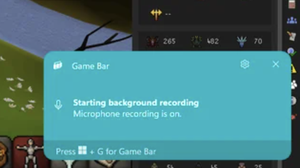
I've recently upgraded to Windows 11 and I'm encountering some difficulties with a task that I think many of you might have experience with. Specifically, I'm trying to figure out how to record my screen on Windows 11 with sound. While I've found the built-in screen recording tool in Windows 11 to be quite straightforward for capturing video, I'm struggling to include audio in my recordings. I've done some basic troubleshooting like checking my microphone and system sound settings, but I haven't had much luck so far. It's crucial for my work to create high-quality screen recordings that include both the screen activity and the accompanying audio, so any advice, tips, or recommendations from this community would be greatly appreciated.SmithchowDec 17, 2025Copper Contributor726KViews0likes15Comments
Network & OneDrive block
I have a problem with networking my Desktop PC (Windows 11 Home v.10.0.26200) and my Laptop (Windows 11 Professional , also v10.0.26200). They are connected by a 2m ethernet cable and have connection lights flashing at both ends. 1. On the Desktop, Explorer will show folders from the Laptop under <Network>. However any attempt to open one of the displayed folders results in the message “Windows Cannot access \\*. You do not have permission to access \\*. Contact your network administrator to request Access” While drives and folders on the Laptop that HAVE been set to Share do NOT show up 2. On the Laptop, when I open the <Network> in Explorer it ONLY shows a drive named <Music>. Any attempt to open this folder results in a Windows Security window asking for Username and Password. I believe this folder is a left over from a much earlier attempt to link the two computers in Windows 10 which was aborted, and I suspect it is causing a ‘block’ on the network, as there are no drives or folders named <Music> on my Desktop machine. 3. I have run OneDrive on the Laptop and have created an account in the cloud and added folders. However it has proved impossible to get OneDrive to run on the Desktop. Every attempt (including uninstalling One Drive using Revo uninstaller – which also removes all ‘left-overs’ - and then installing the latest downloaded copy of OneDrive) produces an icon in the apps list, but when I attempt to run it (double click) nothing happens. I have traced the .exe file to "C:\Program Files\Microsoft OneDrive\OneDrive.exe" but attempting to run it from there, even as an Administrator, fails to produce any reaction from the PC. My problem obviously resides with the Desktop PC and is effecting both the ability to network, and run OneDrive. I suspect the non-existent <Music> may be the culprit, but how to remove it? If I right click the icon on the Laptop I get a window showing the location as being on the \\ Desktop and size as being 0 bytes – but nothing more. Selecting the <Network> tab in the window produces an error message “You do not have the appropriate access rights for this server. For more information, contact your network administrator” Attempts to delete the phantom drive, even using Revo Uninstaller have proved unsuccessful while attempting to run <Remote Desktop Connection> from the Laptop have proved to be equally futile (“Remote Desktop can’t connect to the remote computer for one of these reasons. 1,2,3 etc.). How can I get rid of the phantom <Music> drive? and if this has nothing to do with my problem, what else might be the cause that prevents OneDrive from running on the Desktop and the failure to network with the Laptop?fotofundiDec 16, 2025Copper Contributor48Views0likes2CommentsSharing folders
Hello Can someone save me pease from going mad! I was able to share my folder between my old and new computers for few days after installing W11 and having trouble sharing. Now it suddenly stopped for no reason. I have not changed or played with anything. I went through all the advice available in Communities/videos/ microsoft support.... from ensuring internet the same, discovery on, advance sharing, permission.......etc. I did that several times in vain . For work reasons I need to work on different laptops in different rooms (same internet). I have a deadline and I need help please! Thank you MohgaKY"gmail.comMohgaDec 16, 2025Copper Contributor15Views0likes1Comment




Resources
Tags
- Features1,795 Topics
- configuration1,772 Topics
- device management1,145 Topics
- Update management930 Topics
- Application Management821 Topics
- security680 Topics
- deployment485 Topics
- community340 Topics
- accessibility241 Topics
- licensing200 Topics