Forum Widgets
Latest Discussions
Wie kann ich Windows 7 auf Windows 10 aktualisieren – funktioniert das noch kostenlos?
ich nutze noch einen älteren PC mit Windows 7 und überlege, ob es heute noch möglich ist, Windows 7 auf Windows 10 aktualisieren zu können, ohne eine neue Lizenz zu kaufen. Im Internet liest man unterschiedliche Meinungen dazu, deshalb wollte ich hier im Forum nach aktuellen Erfahrungen fragen. Mich interessiert vor allem, ob das Upgrade mit dem offiziellen Media Creation Tool von Microsoft noch klappt und ob dabei Programme und Dateien erhalten bleiben. Hat jemand kürzlich versucht, Windows 7 auf Windows 10 aktualisieren durchzuführen, und kann berichten, ob die Aktivierung danach automatisch funktioniert? Über Tipps oder Hinweise zu möglichen Problemen wäre ich sehr dankbar.TheoDaltonDec 18, 2025Iron Contributor15Views0likes3CommentsFlickering issue in Windows 10 File Explorer
Windows 10 flickers on file explorer and Excel. It happens on random and last anywhere between 10-30 seconds. I think is not limited to just these apps, but possibly any programs I opened. This is a fresh install from a bootable usb drive. Any suggestions to further troubleshoot??DoreinezDec 17, 2025Iron Contributor752Views17likes2Comments
You're Not Up To Date
Hello, I've just re-installed Windows 10. I applied Windows Update a few times. I applied Optional Updates I enrolled in Extended Windows Security Update. But I still get "Your device is missing important security and quality fixes" after clicking "Check for updates". Any help would be greatly appreciated.Thomas77030Dec 16, 2025Copper Contributor5Views0likes1Comment
2025-12 Cumulative Update for Windows 10 Version 22H2 for x64-based Systems (KB5071546)
I get Extended security updates This update will not install i just get the following message There were some problems installing updates, but we'll try again later. If you keep seeing this and want to search the web or contact support for information, this may help: (0x800f0831) KB 5071546 came alone but with cumalative updates i usually get net /net framework and security updates but not in this case could this be the problem i ran sfs scannow no integrity violations found ran dism restore health get message that says source missing cannot repair ran trouble shooter got message trouble shooter could not identify problem was going to try system restore but the kb deleted earlier restore points I am concerned that if this update is not installed my system uill not be secure any one else had this problem can you give me instructions how i can install this update i am not computer savvy so i need an idiots guideSolvedx15Dec 16, 2025Copper Contributor623Views0likes3CommentsIexpress startup error
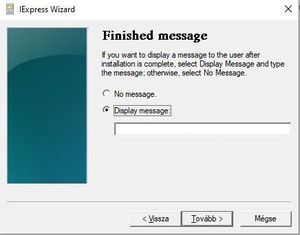
Hi Masters! I created an automated script using Powershell and I want to run it with iexpress software. Here is the startup code (AppLaunched): powershell.exe -NoProfile -ExecutionPolicy Bypass -Command "start-process PowerShell -ArgumentList '-ExecutionPolicy Bypass','-File ikev2-ipsec-vpn-settings.ps1' -Verb RunAs" Observation: If I enter text at "Finished message", the script runs, it works correctly. BUT if I don't enter text in "Finished message" (say "No message"), the powershell window just flashes and then disappears, i.e. nothing happens. Has anyone else had this kind of error? Thank you! Regards: DrCybergDrCybergDec 16, 2025Copper Contributor573Views0likes1Comment
Can Window 10 still be in use after oct 2025
Hi, I use window 10 and don't want to update to window 11. Can i still use window 10 even after update stop and what are the down side and can i still use it safely and What are need to be use safely like is there any antivirus software or anything other software i should install? I use dell laptops.EzraOakDec 16, 2025Iron Contributor19Views0likes2CommentsRandom files not opening in fresh Windows 10 Enterprise installation
Hi folks, been a long time since I visited here, I hope everyone is doing well and has happy holidays this year. So I have a Windows 10 enterprise, installation and: 1 I turned off a lot of analytics in this install, all before I turned on the internet access. 2) Now when I click on some random files (but not every file), I get a quick small blank popup for a fraction of a second, and the file doesn't open. (this was happening before I turned the internet on, and is still happening afterwards). 3) One of the files that was blinking out was throwing a Microsoft popup from the right side of the screen and when I clicked on it, it said Windows was not allowing it to run, so I click on that window and turned that one off. Well the random files keep shutting down anyway. Anyone here have a fix or at least an explanation for what might be happening?QuincosDec 16, 2025Iron Contributor30Views0likes2Comments
Smartphone-Link Pictures
Hey everyone, I set up the windows-built in "Smartphone-Link" with my Smartphone, to have a convenient access to my Pictures-Gallery. I can go through my Smartphone-Gallery, nice, but the pictures just show in reduced quality. I.E. Original on my phone: 3072x4080 pixels, and on the windows-app: 1611 x 2139 pixels. WHY?! okay to reduced traffic, kind of thumbnail, I get it, but there is not a single function to syncronise the original Pictures through this app. very very poor and not professional! Microsoft please fix! Greetings Infinityinfinity_94Dec 16, 2025Copper Contributor268Views0likes1Comment






Resources
Tags
- windows 10150 Topics
- community41 Topics
- Windows1024 Topics
- Microsoft13 Topics
- win1011 Topics
- suggestion10 Topics
- VPN10 Topics
- accessibility9 Topics
- file explorer8 Topics
- Hyper-V8 Topics