Recent Discussions
I am getting an error about the secure boot
I recently started getting this,should I be worried about this: Secure Boot certificates have been updated but are not yet applied to the device firmware. Review the published guidance to complete the update and ensure full protection. This device signature information is included here. When the check the msi download page,the latest bios version is E17T2IMS.110 and this is the version I currently have installed.5Views0likes1Comment
Windows Defender is blocking true performance of my AMD Ryzen 5950x unacceptable.
I was using PBO Tuner to fine tune my processor yesterday and now Windows Defender blocked it for no reason and its not letting me restore the file.If anybody can help me with this i would appreciate it.91Views1like1Comment
Upload inexistant avec KB5066835 (26100.6899)
Bonjour. depuis l'update KB5065789 (26100.6725) et, donc, aussi avec la suivante, mon débit montant (upload) en ethernet est nul (environ 0,2Mb/s). J'ai essayé toutes les astuces que j'ai pu trouver sur Internet sans succès. Le seul moyen de revenir à la normale est de désinstaller ces mises à jour. Comment régler ce problème ?32Views0likes1Comment
Windows travando após atualizar para 25H2
Atualizei para a versão: Edição Windows 11 Home Single Language Versão 25H2 Instalado em 08/11/2025 Compilação do SO 26200.7019 Experiência Pacote de Experiência de Recursos do Windows 1000.26100.265.0 E durante jogos meu notebook passou a travar por alguns segundos. Isso acontecia algumas vezes. Depois passou a ser frequente. Atualizei todos os drivers, formatei mantendo meus arquivos, mas não resolveu. Formatei completamente, mas depois disso passou a travar até no navegador. Nos jogos, a GPU não estava usando 100% como de costume, mesmo o FPS estando alto como sempre. Meu notebook é um Dell G15.63Views2likes1CommentExternal SSD not detected in Windows 11 every now and again?
I have a quite a few 2.5 inch SSD drives, when needed I connect them via a usb-sata cable. Every now and again Windows 11 does not recognise the drives. It shows up in "This Pc" but no drive letter, it also shows in device manager. When I click on it nothing happens. If I connect it to a VM with Ubuntu, I can see all the files, so what I end up doing is copying them from there to a new drive. Then format the original and that becomes useable again, this is very time consuming and frustrating. I always make sure that the device is not being written to or accessed when I disconnect it. Can anyone please let me know what the root cause might be? I would also appreciate if anyone has an easier fix? rather than loading it into Linux every time?3Views0likes0CommentsHow to stop windows 11 from trying to install problematic update automatically.
I'm subscribed to Windows Insider Program Beta. Since Feb, I have had issues trying to install the 'ge_release_upr' updates as I get a error after going through the install process only to get error page near the end. So I gave up and just ignored the update. Up to a week ago, windows stopped giving me an option to pick which update to install and now it just downloads every update automatically. Now I am stuck with windows forcing to restart to install which ends up in error. How do I stop windows from trying to install the ge_release_upr updates? I tried installing this troubleshoot show or hide tool. But it didn't stop from downloading the update. At the moment, I have paused all updates but I still want all of the other updates.347Views0likes1CommentHow to delete temporary files
After canceling a Windows update, I discovered this large file, which initially was 33.3 GB. I deleted the update files in the C:\Windows\SoftwareDistribution\Download folder according to the instructions on the Internet, but there are still 8 GB left and I don't know where they are... I have a bit of data OCD and want to solve this problem completely, so please help me, thank you.21Views0likes1CommentProject Diamond Windows 12 Vision
Project Diamond is a proposal for what Windows 12 should become: a fast, clean, and modern operating system that finally unleashes the full potential of today’s hardware. The goal is to bring back the speed of Windows 8, the practicality of Windows 7, and add modern features—without the bloat that slowed down Windows 10 and 11. Core Pillars of Project Diamond 1. Speed like Windows 8 • True instant boot in ~2 seconds, without relying on BIOS/UEFI Fast Boot tricks. • Only essential services load at startup—no unnecessary background tasks. • Hardware performance (SSD, NVMe, modern CPUs) fully utilized. Clean UX/UI • A consistent environment—no more mixing old Control Panels with new Settings. • A Start menu that blends the practicality of Windows 7/8.1 with modern features (search, pinned apps, AI suggestions). • Minimal animations—snappy response first, eye candy second. • Tablet mode as an option, not a forced default. AI—integrated but safe • Copilot and other AI features run in a sandboxed environment, isolated from the OS core. • Prevents viruses or manipulation from spreading through AI processes. • AI acts as a helpful assistant, not a system bottleneck. Graphics and DirectX • Optimized DirectX API with less overhead and better GPU utilization. • Reduced UI animations to free resources for apps and games. • Flexibility for developers to leverage DirectX 12 or Vulkan where appropriate. Stability and Security • System apps sandboxed—one crash should never bring down the OS. • Virtualization-Based Security (VBS) enabled by default, but optimized to avoid performance loss. • Modular updates—fix or update parts of the OS without requiring a full reboot. Summary Project Diamond envisions Windows 12 as the system Windows 8 was meant to be: • Fast ⚡ • Clean 🧼 • Modern 🌐 • Stable 🛡️ A true rebirth of Windows speed and clarity—this time without the mistakes of the past. If you like this vision and want to support it, you can upvote it here: https://aka.ms/AAycfv4 https://aka.ms/AAycfva67Views0likes1CommentBesoin d’un bon convertisseur youtube en mp3 fiable
Bonjour, je cherche une solution simple et fiable pour convertir des vidéos YouTube en fichiers MP3 sur mon PC afin de les écouter hors ligne. Il existe beaucoup d’outils (logiciels, services en ligne, lignes de commande), mais je ne sais pas lesquels sont vraiment sûrs et faciles à utiliser. Si vous avez des recommandations ou des retours d’expérience pour une méthode pratique, sans logiciels douteux et avec une bonne qualité audio, je suis preneur. Merci d’avance pour votre aide !44Views0likes9CommentsHow do I change background color of image easily?
Okay, I feel like I'm taking crazy pills here. I have a simple image (just a product photo on a white background) and I need to make the background a different color. Every tutorial I google is either for Photoshop wizards or involves 15 steps with layers and masks. There's gotta be a simpler way, right? I'm not doing anything fancy—no hair, no complex edges. Just a clean, solid background swap. What's the most straightforward method to change background color of image for a total non-designer? Any help would be massively appreciated. My attempts so far just make the whole image look like I used a bucket tool in MS Paint (disaster). Point me to the simplest tool or step-by-step you know!15Views0likes3CommentsSolved How can I shutdown a newly installed Windows 11 without a Microsoft Account ?
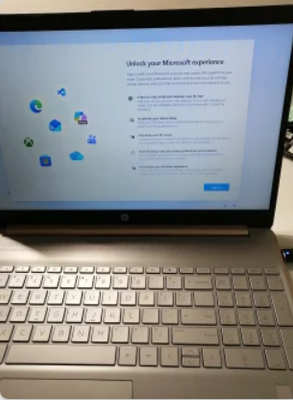
I bought a used Windows 10 laptop with an enclosure that has an exterior coloured in rose gold. The installation is encrypted with BitLocker. I was not given a BitLocker key. This unit is an HP 15dy0702ds. I removed the SSD and installed a bigger SSD and installed Windows 11. I know a child that likes rose gold. I want to send this computer from Canada to Florida, U.S.A.. On a clean installation of Windows 11 is the Microsoft Account sign in screen as shown. As far as I know it is unavoidable. I prefer to let the child in Florida sign in. My problem is that there does not seem to be a way to shutdown Windows 11 at this point. When the unit is sent via courier, I would prefer Windows 11 be completely shutdown. When I press the power button, the screen goes black and the power light is blinking. The user guide says the blinking power light indicates the sleep state (a power-saving state). As in the title ... How can I shutdown a newly installed Windows 11 without a Microsoft Account ? I believe powering the unit off while in UEFI setup would cause a shutdown. Strangely, I cannot get a prompt to access the UEFI setup. My usual means of entering UEFI setup is to power on while repeatedly hitting the ESC key. It does not go to UEFI setup and instead it shows the same Windows screen for the Microsoft Account sign in. The HP user guide says power on and hit F10 is the way to get into UEFI setup but that does not work either. This unit does not have an easily removable battery.5Views0likes0Comments
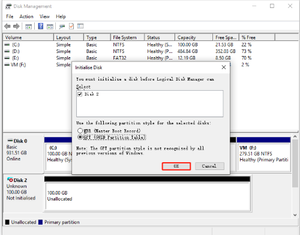
How to clone Windows 10 HDD to SSD free without software?
I have a backup PC running Windows 10 and it becomes very slowly when editing videos. I doubt it is the issue with the internal hard drive. So I bought a new compatible SSD and want to move all staff to the new SSD. Does anyone know an easy way to clone Windows 10 HDD to SSD for free without software? I hope all personal data and apps will be copied to the new SSD so I don't do any additional settings and installation once the migration process is done. Appreciated if you could shed some light on this issue.Solved103KViews0likes11CommentsSomething happened and your PIN isn’t available. Click to set up your pin again.
Firstly I am sure this problem has been addressed many times before, so my apologies in advance. Win 11 Home Premium – Safe Mode I recently acquired a Dell Vostro 15 3000 Core i5 10th Gen. Prior to accessing the www for the first time I went to sys.config & clicked on safe mode. After the standard re-start I had this message "Something happened and your PIN isn’t available. Click to set up your pin again." However, after clicking the onscreen link nothing happened, this was repeated in a number of occasions with the same result. I did a restart using F2 to get to the BIOS setup but was unsure of the options available to remedy the problem, has anyone had a similar problem which they managed to resolve? Any help would be appreciated. Regards.25Views0likes1Comment
W11 25h2 2fa prompt not showing
W11 24h2 2fa prompt not showing in Woolworths online website & NAB > settings > privacy & security > site settings >additional content settings > on device site data > delete data sites .... Close browser after each session of chrome or NAB (deletes cookies) Select pc Settings > privacy & security > delete browser data > select cookies & other site data (All time) If 2fa prompt stops working, then > open task manager & end task for chrome (closes all sessions of chrome) What finally fixed the issue - I stopped using Google Gmai Reset PC - fixed the issue20Views0likes1CommentWindows 11 Title Bar Inconsistencies
In title bars I noticed a number of inconsistencies. I use dark mode. The setting in Personalization > Colors have both "Show accent color on Start and taskbar" and "Show accent color on title bars and windows borders". Most apps show my selected color in title bars. When I open File Explorer, Settings, Microsoft Store, Notepad, Office, and probably other MS related apps, only the border of the window may show my selected color. A handful of third party apps show the same thing. I know that a few updates ago, MS swapped the positions of the tool bar and address bar and added tabs for File Explorer. I don't know if that messed anything up. Are there different types of title bars?425Views0likes3CommentsMicrosoft Photos automatic window size?
There should be an option in the settings to automatically resize the window to match the image size. Currently, the only available options are “Show at actual size” and “Zoom to fit window,” but what I’m looking for is an option like “Resize window to the image’s actual size.” At the moment, the lack of such an option results in a huge window (for example, 2564×1015 px) displaying a very small image (349×309 px). If there is a way to configure this behavior in some non-standard or workaround manner, please let me know, and thank you in advance for your help.17Views0likes1Comment
Windows 11 - Can't Change The Order Of Taskbar Icons
The title pretty much explains it all. I recently updated to Windows 11, and as I expected, I regret it, for numerous reasons. My biggest issue currently though is with my taskbar. I do tons of stuff with my PC on various apps, and I like to have those apps organized in a very specific way on my taskbar so they're easy to find. Well, ever since I upgraded, I can't move my taskbar icons. I'm tech savvy, so yea, I did all the common sense things. I tried right-clicking an empty space on the taskbar to make sure it's unlocked. The only two items that pop up when I right click it are "Task Manager" and "Taskbar Settings". So after that, I went into taskbar settings, figuring the lock feature must've been moved into there. I went through every single item on my taskbar personalization settings at least eight times now. Opened all the drop-downs, even went to other places in settings to try and find it. There is no "unlock taskbar" option in my taskbar settings either. I scanned everything on the drive with both "DISM.exe /Online /Cleanup-image /Restorehealth" and "sfc /scannow". Neither found any issues. Can someone take a screenshot of where the "lock taskbar" option is supposed to be found in "personalization > taskbar" now? I am curious as to where it's supposed to be, and if anything else is missing too. But most importantly, can someone give me a suggestion to fix it? I hate to do system restores, as any time I did it in the past, it messed up multiple files of mine. Oh, and before you ask, this was an upgrade, not a fresh install. I don't have enough hours in the day as it is for extremely important things, let alone spend hours and hours completely reinstalling my OS, all apps, configuring it the way I want, etc. It'd easily take me half a day, which I do not have anytime soon. So, any suggestions where I don't have to spend hours and hours or jack up my hard drive to fix this would be greatly appreciated. Thanks for you time.1.1KViews1like7CommentsQuelle est la meilleure façon de telecharger video youtube facilement?
Bonjour à tous, je cherche une solution fiable pour sauvegarder des vidéos YouTube afin de les regarder hors ligne pendant mes déplacements. J’ai vu beaucoup de sites et de logiciels différents, mais je ne sais pas vraiment lequel est sûr et efficace sur le long terme. Pour telecharger video youtube, j’hésite entre un outil en ligne, un logiciel à installer sur PC/Mac ou même une solution en ligne de commande. Certains services semblent simples, mais j’ai peur des publicités, des fichiers de mauvaise qualité ou des risques pour la sécurité. Si vous avez des recommandations ou des méthodes que vous utilisez régulièrement, je serais très intéressé par vos retours d’expérience. Merci d’avance pour votre aide !38Views0likes8Comments








Events
Get answers to your questions about adopting Windows 11 and managing Windows devices across your organization. Find out how to proactively implement and monitor Zero Trust practices. Get tips on keep...
Thursday, Dec 18, 2025, 08:00 AM PSTOnline
1like
10Attendees
5Comments
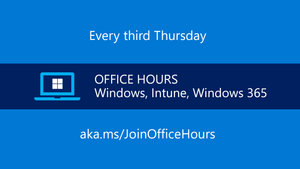
Get answers to your questions about adopting Windows 11 and managing Windows devices across your organization. Find out how to proactively implement and monitor Zero Trust practices. Get tips on keep...
Thursday, Jan 15, 2026, 08:00 AM PSTOnline
0likes
3Attendees
0Comments
Recent Blogs
- Get started with productivity and accessibility AI features on Copilot+ PCsDec 11, 2025278Views1like0Comments
- 3 MIN READMicrosoft Entra ID authentication experiences on Windows are now powered by WebView2, the Chromium-based web control.Dec 09, 20254.2KViews3likes0Comments