User Profile

MaxSmile8
Copper Contributor
Joined 5 years ago


User Widgets
Recent Discussions
Re: Any way to add comments or notes to an item in Quarantine?
Thank you very much. This audit tool will help us find the released messages from Quarantine. (satisfies one part of our requirement). The only challenge I see here is matching the "Item ID" from the audit result to the actual email released. Challenge #2 Our business blocks repeated spammers even from the Quarantine, we do this using mail flow rules (block emails, domains, keywords etc) and connection filter to block IPs. Is there a way to also audit connection filter and mail flow rules?1.4KViews0likes1CommentHow admins can access "rules" sub-option available in "auto replies" option in Outlook desktop app?
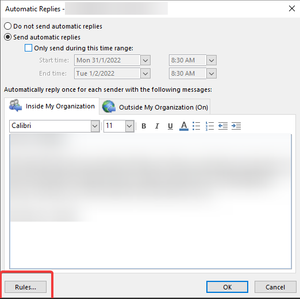
Hello All, I would like to learn how admins can access "rules" sub-option available in "auto replies" option in Outlook desktop app? A member of our organization who I assume had setup a mail forwarding rule from "auto replies" option and not using inbox rules (checked - no rules in his inbox rules option) in Outlook desktop app. The member probably had also setup "Forwarding" from Outlook for web. Now because of this setup, the recipient is receiving two copies of the same email. I want to stop the second copy sent by the "automatic replies" rule. (I assume this forwarding is done by the "rules" option in "automatic replies" on Outlook desktop after testing it using my own account) I am unable to access this rule from the Outlook web of the user account too. How can I access this rule option from admin GUI or PowerShell? Highlighted the rules button present in the auto replies window, in the screenshot below. Screenshot from message trace. Here you can see two copies of the same email received by one account. The email with "FW:.." is triggered by the forwarding rule set up in "Automatic replies" in Outlook app. The other email is triggered by the "Forwarding" option enabled in Outlook for web.1.1KViews1like4CommentsAny way to add comments or notes to an item in Quarantine?
Hi, We have multiple Quarantine admins in our organization. The admins work across different time zones and act on the Quarantined emails. Currently we don't know if an email was already attended by another admin. I would like to know if there is a facility to add comments/notes for each item in the Quarantine, so that if one of the admins worked on a particular item he/she can add a simple note to it.Why connection filter is not rejecting an email even when the IP is in the IP block-list?
Hi All, I added a blacklisted IP in the IP block list of the connection filter a few months ago. But the spammer can still send Malware from that IP. The IP is a Connecting IP Address according to Message Header Analyzer. While the anti-Malware policy quarantines the email, I am unable to understand why the IP block list in the connection filter is not applied and the mail was not rejected primarily. Microsoft has https://docs.microsoft.com/en-us/microsoft-365/security/office-365-security/secure-by-default?view=o365-worldwide that tenant overrides (IP Allow list in connection filter) are not applied for Malware. Does it also mean IP Block list is also not applied?Re: Why connection filter is not rejecting an email even when the IP is in the IP block-list?
I think I am getting to understand why something like this is happening: This is my hypothesis: The rules/policies and settings created using old Microsoft admin portal were not properly migrated by Microsoft when new security and protection portals were created. What I mean is the older values in the IP Block-list for some reason are not read by the new connection-filter engine. --- I also encountered another issue with editing the ASF settings of an anti-spam policy created few years ago. For one of the old anti-spam policies and the default policy, I was unable to edit the Bulk email threshold (BCL) value . A slider to increase and decrease the BCL score was not present for these policies. I created a new policy to test if I could see the BCL slider, unsurprisingly I could see the slider. This means Microsoft had probably made some mistakes when migrating the policy settings/values from the old admin portal to the new ones. Only Microsoft Security team can confirm this.1.1KViews0likes0Comments
Recent Blog Articles
No content to show