User Profile

SamSpronk
Copper Contributor
Joined 5 years ago


User Widgets
Recent Discussions
Re: Public Preview - Azure AD & Intune join for AVD - Session host unavailable
DO you have more details on this statement? Summary - Enabled Validation environment, Disabled MFA, CAPs, RDP setting changes at hostpool level. Understand the Validation environment, understand Disabled MFA What are you referring to when you mention CAPs and what RDP Setting changes at hostpool level did you make?5.6KViews0likes1CommentRe: Unsupported document-format: application/pdf.
Rani_Abdellatif Thanks for that. I am wondering how anyone is able to use the new Universal Print in Business Central? If reports generated from Business Central are in PDF format and Universal Print only supports oxps, or am I missing something? Dynamics 365 BC 2021 Wave 1 - just released - has added support for Azure Universal Print but I don't see how it is possible to leverage that?5.8KViews0likes4CommentsUnsupported document-format: application/pdf.
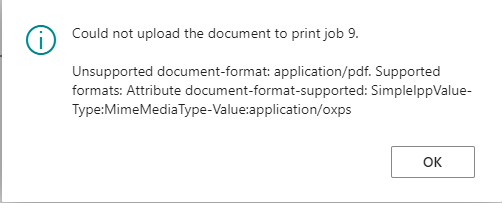
Hi Everyone We have commissioned a Business Central v18.0 environment and added a Azure Universal Printer to it, which works outside of Business Central. When printing a report from Business Central via the Azure Universal Printer we get this error: Could not upload the document to print job 9. Unsupported document-format: application/pdf. Supported formats: Attribute document-format-supported: SimpleIppValue-Type:MimeMediaType-Value:application/oxps I get the same error when attempting this from the mobile app on iOS as well. In Universal Print Portal in Azure the jobs show up with a status of Paused. If it makes a difference we are using a ConnectorSolved6.2KViews1like7CommentsRe: Error registering connector StatusCode: 500, ReasonPhrase: 'Internal Server Error
Update: I have been retrying to register the connector a few times since I made this post with no luck, however just a few minutes ago I retried and it has progressed and completed the registration step. I can now see the connecter in the Azure Universal Print Portal.4.9KViews0likes1CommentError registering connector StatusCode: 500, ReasonPhrase: 'Internal Server Error
Installed latest stable build and also latest canary build and get same issue UniversalPrintConnectorInstaller.1.34.7683.23623.exe UniversalPrintConnectorInstaller.1.37.7724.37269.exe Had a few issues installing connector (due to msi files not being signed but fixed that). Install completes, services on the local machine have started, have logged in using a Global Admin, have Microsoft 365 E3 License assigned to the same user. Registering the connector fails: Error from Event Viewer: Register connector start: UPADE Sending connector registration request... Done Checking Registration status... StatusCode: 500, ReasonPhrase: 'Internal Server Error', Version: 1.1, Content: System.Net.Http.StreamContent, Headers: { Transfer-Encoding: chunked X-Content-Type-Options: nosniff X-MSEdge-Ref: Ref A: 9AFDC5C5BCEE460D9FBE7E8C0124018A Ref B: SYD03EDGE0807 Ref C: 2021-03-03T09:38:42Z Cache-Control: no-store, must-revalidate, no-cache, max-age=0 Date: Wed, 03 Mar 2021 09:38:42 GMT Content-Type: application/json; charset=utf-8 }4.9KViews0likes3CommentsIs there any plan to sign the .MSI files that are extracted during the install process
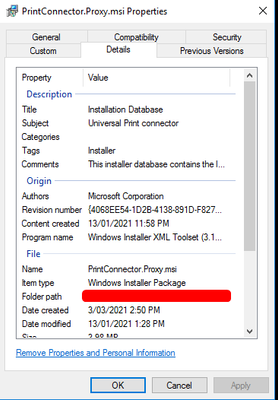
We run applocker and have allowed msi / exe files that are signed but have had to add file hash / path rules for multiple msi files to get this installed. I am referring to the connector here1.2KViews0likes4Comments
Recent Blog Articles
No content to show