User Profile

virtual-tech
Brass Contributor
Joined 9 years ago


User Widgets
Recent Discussions
Re: O365 SSPR require users to register when signing in
VasilMichevIf enabled SSPR registration that impacts every service below right? Example if I have SSO application in Azure and that's what launch first thing logging in their computer, it will prompt for SSPR registration? Microsoft 365 Microsoft Entra admin center Access Panel Federated applications Custom applications using Microsoft Entra ID We have warehouse people that access SSO application registered in Azure and they were being prompted for SSPR registration. Turning SSO registration off seem to help and prompt went away.315Views0likes1CommentO365 SSPR require users to register when signing in
Hi Everyone Can someone please shed some light on this. In Azure SSPR under password reset>registration> require users to register when signing in Yes or No. Below is MS website explanation. Does that mean if I set it to Yes, if users go to office.com they are prompted to register in SSPR? What are the down side of choosing no, https://learn.microsoft.com/en-us/entra/identity/authentication/concept-sspr-howitworks#require-users-to-register-when-they-sign-in if they use modern authentication or web browser to sign in to any applications using Microsoft Entra ID. This workflow includes the following applications: Microsoft 365 Microsoft Entra admin center Access Panel Federated applications Custom applications using Microsoft Entra ID When you don't require registration, users aren't prompted during sign-in, but they can manually registerSelf Service Reset password (SSPR)
Hi I have an odd situation with random users. When SSPR is enabled for them, they cannot login email on their iPhone corporate Intune device, is pushing the login to conditional access trusted locations blocked. Email works just fine with SSPR disabled. Anyone experience something similar.Force change password at next login on-premise and MS online
Hi Currently, I have a hybrid environment with AD on-premise, Azure AD sync (with password hash & SSPR), and Exchange Online. My goal is to force change the password at the next login from on-premise AD to MS online and vice versa. It's working. When I change the password on-premise AD, MS Online prompts me to change the password. It is not working when I set the account from the Admin center to force the password change at the next login; it does not sync to on-premise AD. The domain computer will not prompt to change password. Thanks in advance MS recommend to try this Install-Module -Name Microsoft.Graph Connect-MgGraph -Scopes "OnPremDirectorySynchronization.ReadWrite.All" Then run this command. $OnPremSync = Get-MgDirectoryOnPremiseSynchronization $OnPremSync.Features.UserForcePasswordChangeOnLogonEnabled = $true Update-MgDirectoryOnPremiseSynchronization -OnPremisesDirectorySynchronizationId $OnPremSync.Id -Features $OnPremSync.FeaturesForcePasswordChangeOnLogOn
Hi, I have a Hybrid environment, AD on-premises, Azure AD connect and Exchange Online. Currently using SSPR. Are there any risks enabling ForcePasswordChangeOnLogOn? This won't impact the current accounts to change password? get-adsyncaadcompanyfeature PasswordHashSync : True ForcePasswordChangeOnLogOn : False UserWriteback : False DeviceWriteback : False UnifiedGroupWriteback : False GroupWritebackV2 : FalseSSPR at the windows sign-in screen by creating a device policy in Intune
Hi We are gradually deploying SSPR at the windows sign-in screen by creating a device policy in Intune. Option B mentioned in this https://learn.microsoft.com/en-us/entra/identity/authentication/howto-sspr-windows is to deploy a registry. My question is, does the registry get deployed with the Intune device policy? Because I have the registry below and I did not add it. HKEY_LOCAL_MACHINE\SOFTWARE\Policies\Microsoft\AzureADAccount "AllowPasswordReset"=dword:00000001Azure write back number of security sign in questions.
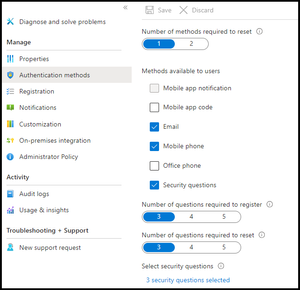
Hi I enabled SSPR 24 hours ago and checked the box security questions an hour ago. In my test accounts, I don't get prompt for any security questions. I only get prompted for i forgot password and verification steps. Do the security questions policy take a couple hours to apply?277Views0likes2CommentsAzure write back
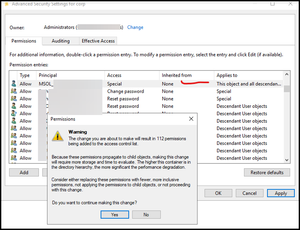
Hi I just started the process to Configure account permissions for Microsoft Entra Connect usinghttps://learn.microsoft.com/en-us/entra/identity/authentication/tutorial-enable-sspr-writeback#configure-account-permissions-for-microsoft-entra-connect. After steps 12-14, The popup warning permissions appeared. Is this normal? any concerns I should be aware of? In the Applies to drop-down list, select This object and all descendant objects Under Permissions, select the box for the following option: Unexpire Password When ready, select Apply / OK to apply the changes and exit any open dialog boxes.Solved511Views0likes2CommentsDefender Tenant allow/block list
Hi Could someone please she some light on the questions below. Thank you! I need to fully understand what exactly the Tenant Allow/Block lists does is for the two features below. My understanding. domains and addresses are basically, domains I have manually tagged as allowed or block in the quarantine page. Spoofed servers: allow external senders to send as your domain. But why not just add them to the SPF record.1.1KViews0likes2CommentsBlocked by organization policy : Antimalware policy block by file type
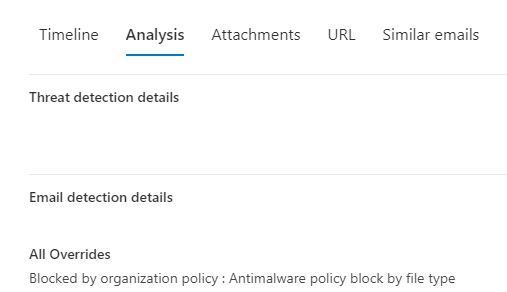
Hi Can someone please shed some light on this. I am trying to identify if a DLP or Anti-malware policy is blocking an email. The real-time detection has this: Primary Override : Source Blocked by organization policy : Antimalware policy block by file type Would this be one of the policies in policies & rules>threat policies> anti-malware ? I was hoping there would be a setting that can pin-point the policy name or rule. Please adviseemail quarantine and reason "high confidence phish"
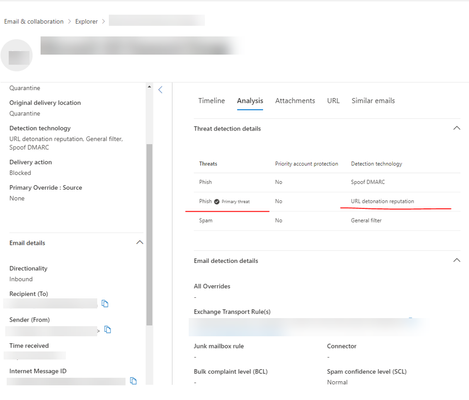
Hi I started testing a phishing email campaign from an external vendor KnowBe4. The emails keep going to quarantine reason "high confidence phish" What is the best way to fix this? I tried excluded the URL from Safe Links and added their sender IPs to O365 Tenant allow/block list. Thank you in advanced.email forwarding failed in DMARC
My primary office Corp is using Exchange online and we acquired another company with exchange online as well. In the new company tenant, the mailboxes were converted to shared mailboxes with email forwarding to CORP. Some of the emails fail to be delivered because of DMARC.The error is 550 5.7.509 DMARC verification fails. In CORP we have v=DMARC1; p=quarantine; pct=100; Does anyone have any suggestion?Office 2016 - Your Privacy Option Popup
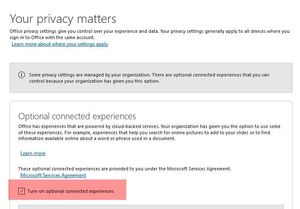
Hi Globally we are using local Office 2016 Enterprise. I would like to do Uncheck/grey-out the option "turn on optional connected experiences." See visual below. From my search this can only be done by GPO. Option 1 below. This can also be configured in the Office2016 / 2019 / 365 ADMX Group Policy files. User > Policies > Admin Templates > Microsoft Office 2016 > Privacy > Trust Centre 1. Allow the use of additional optional connected experiences in Office 2. Allow the use of connected experiences in Office 3. Allow the use of connected experiences in Office that analyze ContentRe: email quarantine and reason "high confidence phish"
I figured out the problem on the vendor website. I needed to add their IP and sender address to the Phishing Sumulation page. Email & Collaboration section, navigate to Policies & Rules > Threat policies > Advanced delivery.On the Advanced delivery page, select the Phishing Simulation89KViews1like1Comment
Recent Blog Articles
No content to show