User Profile

__AlexXx__
Brass Contributor
Joined 5 years ago


User Widgets
Recent Discussions
Copilot Edge Icon in Looping
Hi All, I have configured two tenants for Copilot EDR. I can open copilot via edge icon (upper right) then log in with an Azure User with no issues, for tenant 01, and the shield icon for EDR is there as expected. For tenant 02, when I try to log in the copilot using edge icon, it enters in a loooping, I log then return to the same page asking for login, I log again, return to same page again, etc. For this same tenant, we have no issues when using copilot.cloud.microsoft, it only happens if we try the edge icon. Any tips? Thanks in advancePin Copilot Chat - Admin Center
My dear friends, I pinned the Copilot Chat to the navigation bar through "Admin Center > Copilot > Settings > Pin Copilot Chat > Mark checkbox Pin Copilot Chat to the navigation bar (recommended)" This was performed about 72hr ago and I still can not see any copilot pinned to the Teams, Outlook etc. As per my understanding, this configuration should pin Copilot to the left side of Teams, correct? Our licenses are Microsoft 365 E3 + Defender. Any tips in why this is not working? Thanks in advanceWho can bypass the lobby
Hi all, In my Teams Admin Center I have the option "Who can bypass the lobby" configured as "People in my org, trusted orgs, and guests", and this is exactly what I want. But I could see that there is the same option when an organizer is scheduling a metting and he can change it for "Everyone", and this seems to overlaps and has precedence over the configuration performed in Admin Center, because Anonymous can bypass the lobby if organizer did the mentioned configuration. Is this expected? Shouldn't admin center config takes precedence? If this is expected, there is any way to lock this option for organizer? Thanks in advanceSolved258Views0likes1CommentSMTP Issue - Exchange 2019
Hi All, I have an hybrid exchange environment (365 + 2019), and the onprem server is used for smtp relay only. An internal app uses this relay and send email as "email address removed for privacy reasons", and all works well except by an specific message-subject. This application can send all the emails with any subject, but if the subject is "Purchace Order to be approved" the relay fails. Checking logs, I could see that when the message has this mentioned subject then the field "sender-address" is always empty (return-path is ok). And, of course, SPF/DKIM fails and message is quarantined. All other message subjects contain the address in "sender-address". This could be an issue with my application or something related to smtp config? Source for fields analyzing: https://learn.microsoft.com/pt-br/exchange/mail-flow/transport-logs/message-tracking?view=exchserver-2019 Thanks and happy new year to all of you.342Views0likes3CommentsRe: Exchange Hybrid to Exchange Online - AD Sync enabled
Just for others that could be looking to the same scenario, We can demote the last Exchange Server, keeping a vm only with EMT to manage the users using powershell. Source: https://learn.microsoft.com/en-us/exchange/manage-hybrid-exchange-recipients-with-management-tools693Views2likes0CommentsRe: Send-MailMessage : Mailbox unavailable. The server response was: 5.7.60 SMTP
alavd Hi alavd, sorry for delay in responde. I could fix the issue using the command Add-ADPermission, as I have an hybrid environment. Something like: Add-ADPermission -Identity "Terry Adams" -User AaronPainter -AccessRights ExtendedRight -ExtendedRights "Send As" This example grants Send As permissions for Aaron Painter to Terry Adams's mailbox. Source: https://learn.microsoft.com/en-us/powershell/module/exchange/add-adpermission?view=exchange-ps2KViews0likes0CommentsAllow specific internal/external address to send to a DL - Exchange Online
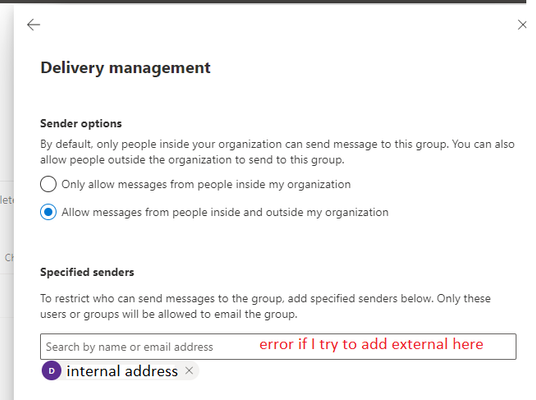
Hi all, I need to grant access to one specific internal address and another specific external address to send email to a Distribution List in O365. I tried to tick the checkbox "allow messages from people inside and outside my organization" then insert both address (the inside and the external) in "Specified senders" but it seems that I cannot insert an external address in "Specified senders" Doing some researches in the google, I could figureout that I can create transport rules for this case, but thinking about it, if I need to do the same in the future for others DL's I would have a lot of transport rules, that is not good in a management perspective. So, there is a simple way to proceed allowing only specific internal and external address to send email to a DL? Thanks in advanceSolved511Views0likes1CommentEmail Retention Compliance Policy
Hi All, I created a new Retention Policy under Data Lifecycle Management > Retention Policies then applied only to my mailbox for testing purposes. The policy was created about 10 days ago, that means the policy should be already inplace today. The case is that, I am able to delete items from my inbox, then delete from deleted items then delete from recoverable items. For the last step (recoverable items), as per I checked in MS documentation (screenshot bellow) I think I should be unable to delete, isnit? Cause if deleting from Recoverable Items is an expected behavior, from where I can recovery retained emails ? Thanks in advanceSolved625Views0likes3CommentsExchange Hybrid to Exchange Online - AD Sync enabled
Hi All, I have a scenario with two redudants exchanges 2019 onprem and Office 365. All mailboxes are hosted in cloud and we are using no smtp in onprem server. Is there a known process to proceed with decomm of onprem server? Does the Microsoft cover this process? Just did some researches and AD Sync could be a issue to proceed with this migration. Thanks in advanceSolved1.5KViews0likes2CommentsSend-MailMessage : Mailbox unavailable. The server response was: 5.7.60 SMTP
Hi all, This forum really is my last option, cause I checked in the internet for a solution and was not able to find. I have a hybrid exchange scenario - Exchange2019 + O365 - all the mailboxes are remote mailboxes (hosted in Office365) and we use Exchange2019 only to manage the features and SMTP Relay. The point is that I am trying to send email from an specific mailbox using smtp relay and I am facing the issue below: Send-MailMessage : Mailbox unavailable. The server response was: 5.7.60 SMTP; Client does not have permissions to send as this sender The .ps1 script that I'm using is below: [Net.ServicePointManager]::SecurityProtocol = [Net.SecurityProtocolType]::Tls12 $sendMailParams = @{ From = "donotreply @ mydomain.com" To = "myname @ mydomain.com" Subject = "Test mail from $env:Computername" Body = "<p> *email sent for tests purposes* </p>" SMTPServer = "smtp.mydomain.com" Port = 587 Encoding = "UTF8" } Send-MailMessage @sendMailParams -BodyAsHtml -Credential $credential -UseSsl After running the script, obviously I need to insert the credential then get the mentioned error. Other details regarding my tests: User inserted into '-Credential $credential' part is something like "test@ mydomain.com" The receive conector is allowing the IP source The receive connector is configured to listen port 587 The receive connector is configured for SSL, Authentication and Exchange Users as well The relay must be done using SSL and Authentication (I can not use Anonymous) The user test@ mydomain.com is already added as SEND AS into donotreply@ mydomain.commailto:email address removed for privacy reasons Any ideia what I should do to allow the test@ mydomain.com to send emails as donotreply@ mydomain.com using smtp relay? Thanks in advance.Solved2.5KViews1like3CommentsExchange 2019 - The remote certificate is invalid according to the validation procedure
Hi guys, I`m starting with Exchange and already facing an issue regarding SMTP Service. I have an app that needs to relay SMTP through my Exhange 2019. A receive connector has been created, the app IP was allowed into this receive connector, port 587 configured, FQDN mail.domain.com configured as well. I have this domain.com zone in my internal DNS and of course, an A record pointing MAIL entry to the Exchange Server. I will paste the script that I`m using to try the SMTP relay at the end of this post. So, sometimes the relay works and sometimes fails and returns: Send-MailMessage : The remote certificate is invalid according to the validation procedure. At C:\Users\MYuser\Desktop\smtptest.ps1:15 char:9 + Send-MailMessage @sendMailParams -BodyAsHtml -Credential $cre ... + ~~~~~~~~~~~~~~~~~~~~~~~~~~~~~~~~~~~~~~~~~~~~~~~~~~~~~~~~~~~~~ + CategoryInfo : InvalidOperation: (System.Net.Mail.SmtpClient:SmtpClient) [Send-MailMessage], AuthenticationException + FullyQualifiedErrorId : AuthenticationException,Microsoft.PowerShell.Commands.SendMailMessage I have two certificates installed in this Exchange Server, one is issued by internal CA and the other one by a public CA. The second one is a wildcert for *domain.com. My point is, what am I missing? It seems a little weird for me that sometimes work and sometimes dont. This is the ps1 script that I`m using to try the smtp relay: [Net.ServicePointManager]::SecurityProtocol = [Net.SecurityProtocolType]::Tls12 $sendMailParams = @{ From = email address removed for privacy reasons To = email address removed for privacy reasons Subject = "Test SMTP Relay" Body = "Email sent for tests purposes" SMTPServer = "mail.domain.com" Port = 587 Encoding = "UTF8" } Send-MailMessage @sendMailParams -BodyAsHtml -Credential $credential -UseSsl Of course, the certificate is valid, is assigned to SMTP Service in Exchange Server and is TLS1.2. The mail.domain.com resolves for Exchange Server IP and the Application can reach the server using internal IP and mentioned port. Anonymous user is allowed for now in receive connector. Thanks in advance6.8KViews0likes1CommentRe: Due to admin policy, you can't add external people to the channel
Chris_OConnor Hi Chris, Yeap, my org has some Labels configured and if them do not allow external sharing we can't proceed, even with b2b configured. So I went through Compliance Center > Information Protection > Labels > Select the label > Edit label > Go next till Groups & Sites > Mark checkbox Let M365 Group Owners and people outside... Do not know if this will help in your case but was the solution in mine3.9KViews0likes0CommentsRe: Due to admin policy, you can't add external people to the channel
The other organization is saying yes, they already configured as well, but thats the point: Supposing my tenant settings are ok and their tenant settings are not ok, this error message should appears as well? Cause for my understading, this error message is only regarding my tenant policies.4.2KViews0likes0CommentsDue to admin policy, you can't add external people to the channel
Hi all, I have configured B2B Connect between my own tenant and another one, but when Im trying to add a external contact from the other tenant in a shared channel in teams, I get this message: Due to admin policy, you can't add external people to the channel In B2B Configs, I already allowed all users/O365App from my and other tenant on both inbound and outbound settings. My teams policy is enabled to Create Shared Channels | Invite External Users to Shared Channels | Join External Shared Channels. I have only this teams policy, and of course, its applied for all users in my tenant. So, Im missing something? I believe if the settings are missing in other tenant, would be another error message instead of Due to admin policy, correct? Thanks in advanceSolved4.7KViews0likes7CommentsUsers Submissions
Hi, I'm starting with O365 defender, so maybe this is a dumb question, sorry. Some users report the e-mails as phishing and I can see this submissions in O365 defender, no problem so far. When I analyze one of this submissions and choose "Mark and notify as Phishing", for example. The sender is automatic blocked to reach any other user through e-mail in my organization or my action only apply for the user who reported, or not even that and applies only for the specific analyzed message? Thanks in advance.

Recent Blog Articles
No content to show