User Profile

KurtisM1990
Copper Contributor
Joined 5 years ago


User Widgets
Recent Discussions
Custom Attributes for Dynamic Distribution Groups
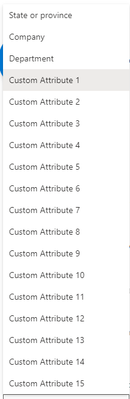
Hi there, I have a new request for office based distribution group. Inside of AD on prem which replicates to O365 we have an attribute that is within general and then office. Within O365 Exchange centre I can only see State or Province/Company and Department. Does anyone know how I can match these attributes so that I wouldn't ever have to update these office based dynamic distribution groups manually? We have near 400 users here and it would be a manual process.Block Unmanged Outlook Access
We're wanting to block end users from logging into the standard unmanaged Outlook application downloaded directly from the App Store or the Play Store for iOS or Android. How do we set it so that an end user can only login to their corporate mail via Outlook if that particular device is within InTune? Is it a compliance policy or conditional access? Best practice appreciated.4KViews0likes2CommentsPrivate Google Play App - Intune
Hi there, I've got a new tenant and I've got a privately built APK, we're android based and when going to upload the APK to the new store, using the google play store it states "Can't publish app. Try again in a few minutes." I've opened a developer account but I'm still getting this error, the APK is fine as it's working and is uploaded this way in another tenant. We're also created new APK versions too and we're still getting the error. Anyone know a work around for this?2KViews0likes0CommentsSharepoint List and Excel Integration
Morning all, I'm wanting to create a sharepoint list where our remote teams send in their times via using PowerApps. That side is created. One of the columns needs to be linked to a database, where they can only select items from that database or excel spreadsheet to stop them from putting any information in. Currently the list column is just text, so when we export the excel document, the "Project Name and Project Number" allows for human error, where as if they could only select from one list. There wouldn't be. There's too many Projects to just create them as individual choices. Any ideas would be great1KViews0likes0CommentsAndroid APK Deployment
Morning We have a custom app being built for us as an APK which I have successfully deployed previously. I've added it to our private google store and then deployed via a group. Worked absolutely fine. The recent update and the most important one as it's the go live APK for the new system we're working on, I cannot get to work at all and I'm into my 5th version of the APK from the vendor and I've tried every way I know. I'm new to Android I've only ever worked with Apple and it's seemless deploying APPs with Apple. Android is a nightmare. I've followed the following process; 1) All Apps 2) Add 3) Managed Google Play app 4) I've added two here a test app and the actual deployment. 5) Now once uploaded I press sync, the test app which has been used the entire time shows up. The go live app doesn't. In Attachment 1, it has the logo. And the app doesn't sync into the app library. I try changing the APK of the test version and I get every error under the sun. Default name is incorrect. Unable to change this APK. Login to the Admin Google store - Which then gives me another error to say that this doesn't exist. The other way of doing it is by 1) Add app 2) Line of business App 3) I then add the APK, I add the scope and I add the exact same group as I've deployed all of the test devices. I even add it to all users, everything possible. And does the app deploy to the phone? It doesn't. I've changed the deployment type from required to available for enrolled devices to available with or without enrolment. It can't be seen in the store. It doesn't show any statistics at all. That's allowing ANY user to download and install this app. I've spent the best part of 10 hours on this and I can't find any decent tutorials to see if I am going wrong. I've deployed and set up iOS MDM on InTune deploying hundreds of apps and never had this before. Maybe I am missing something simple.6.3KViews1like4CommentsRemove email access to non corporate devices
Hi there, I've started to migrate all of our devices into InTune and naturally there are users out in the business against an MDM on their device. With no view of assets I was wondering if it's possible to remove access to O365 from their device but create an exempt group for our Directors who have their own devices but require access?Solved3.3KViews0likes3CommentsOutlook pin policy
Hi all, I'm looking for how to disable or turn off pin access when accessing Outlook on users InTune managed devices? Makes no sense to me that a user uses a pin to access his phone and then also has to have entered his O365 credentials to get onto his emails to then have a further pin to access his Outlook. If someone could point me in the right direction that would be good.Solved2.5KViews0likes2Comments
Recent Blog Articles
No content to show