User Profile

DanNewton
Copper Contributor
Joined 5 years ago


User Widgets
Recent Discussions
Re: Microsoft Sales Co-pilot promotional emails being sent to all users
Hi YashLundia It seems newly created users in my environment are receiving an email with the subject “Microsoft Sales Copilot is installed and ready to use”. These users go through onboarding and one of the first things they see in their mailbox is a promotional email from Microsoft Sales Copilot. We have no setting to control if sales copilot is installed for users or not, and these users are not in a sales function or role. Please can you investigate internally why users are still receiving emails like this? No other Microsoft product groups are sending such emails to users.Re: Microsoft Sales Co-pilot promotional emails being sent to all users
YashLundia Hi, the main setting I am referring to is below which is switched off in our tenant but users still received the emails. Sales Copilot settings: In regards to the type of email "promotional" vs "transactional" - Microsoft Support described the email as "promotional". I think frankly as an admin with the above setting turned off, I simply don't want any emails being sent to end users by Microsoft regardless of their type - in this instance it created confusion and unnecessary support requests. My understanding is Sales Copilot is installed for all users in Outlook with no way to uninstall so when you say "we're sending to users that have the Sales Copilot app installed in Outlook" that is essentially every user in a tenant, regardless of their role or intention to use this feature or not.1.7KViews0likes3CommentsMicrosoft Sales Co-pilot promotional emails being sent to all users
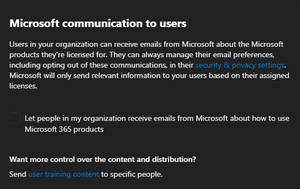
Since yesterday, all users in my environment are getting an email from mailto:email address removed for privacy reasons with the subject "Start selling better, faster, and more intelligently with Microsoft Sales Co-pilot". We only have a very small number of users who work with "sales" type activities. We have Microsoft communications to end users disabled in MAC and have switched off Microsoft Sales Co-pilot as much as we can via MAC. We setup an exchange rule to block the subject "Start selling better, faster, and more intelligently with Microsoft Sales Co-pilot" and it seems some are still getting through as Microsoft alternate the spelling of the word "co-pilot" to "copilot"! Is anyone else experiencing this? I raised a ticket with MS Support who could not help "Kindly understand that my support scope doesn't give me access to know why such promotional email are sent after settings are turned off." Why are the Sales Co-Pilot team delivering emails to my end users ignoring communication preferences in MAC?Re: Users in multiple call queues - simultaneous ringing, not very practical?
Kristin_BelangerI'm afraid not, we ultimately invested in a Teams certified contact centre solution to handle call routing properly with users in multiple queues. It's a real shame the native functionality can't handle this very basic scenario.5.2KViews1like0CommentsRe: Users in multiple call queues - simultaneous ringing, not very practical?
Andy_J_R Thanks definitely not the answer I hoped for! - oddly we are using MS calling plans for our testing (without direct routing) and still experience this issue. Microsoft told us it was because each call queue acts independently from the other which I imagine means when a user attached to multiple queues goes "available" each call queue is seeing a green light to send a call through hence the multiple ringing scenario. Back to the drawing board!6.8KViews0likes2CommentsRe: Users in multiple call queues - simultaneous ringing, not very practical?
Andy_J_R Hi Andy, its only been a short space of time but I was wondering if you managed to find a solution or workaround? We are picking up the conversation around this again but the multiple calls ringing at the same time scenario is coming up as a hurdle as there's a solid requirement to have agents in multiple busy call queues - I am curious how others are dealing with this.6.8KViews0likes4CommentsRe: Users in multiple call queues - simultaneous ringing, not very practical?
Andy_J_R Andy, Your scenario and reason for using CQ's sounds identical to ours, I'm afraid the below was the final update from Microsoft on this: Thank you for the feedback. I've with our our Subject matter expert that the it is a normal behavior for the call queue, The options that you can see from the Teams Admin Center are the only once we can use and those settings are set in each call queue and behaves independently which there is a tendency that he process flow runs simultaneously. Teams is not yet built with complex call routing features we can find in a PABX, and other VOIP telephony system. This is disappointing because I don't feel like this is a particularly groundbreaking request or even "complex call routing" - most solutions out of the box won't offer an agent multiple calls at the same time. I ended up raising a user voice request at https://microsoftteams.uservoice.com/forums/555103-public/suggestions/42728477-synchronised-routing-across-multiple-call-queues which I'm afraid dosen't have much traction.6.9KViews0likes6CommentsUsers in multiple call queues - simultaneous ringing, not very practical?
Hi All, We have discovered in the scenario of adding users to multiple call queues that if those queues have calls waiting, the users will receive simultaneous calls from each queue once they become "available" (using presence based routing with round robin and/or longest idle). From the users perspective this seems impractical - especially if they are attached to several busy call queues and therefore are being offered simultaneous calls repeatedly upon entering "available" status. The simultaneous calls also continue to ring briefly after the user has answered a call and therefore create some difficulty hearing the call they answered. I haven't encountered another telephony solution that behaves in this way by default (or at least without an option to customise this) and can't imagine this would be desirable for most use cases. Typically a user would only ever be presented with a single call at any given time. Is anyone aware of a solution or way to mitigate this? We have tried busy on busy etc but this only works after the call has been answered, not before. I also have a ticket open with Microsoft Support to discuss although they are indicating this is "expected behavior".7.5KViews2likes8Comments
Recent Blog Articles
No content to show