User Profile

meggerz
Copper Contributor
Joined 5 years ago


User Widgets
Recent Discussions
Re: Conditional access, guests & all users
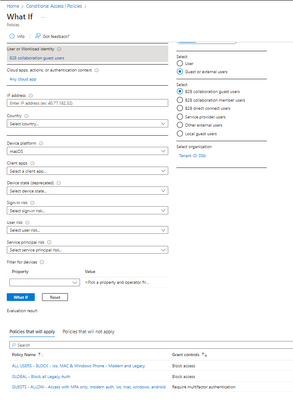
VasilMichev Sometimes, you stare at something for some time, and you have to walk away. Then you look back a day or two later and see what you foolishly did wrong 🙂 I had the "Guests" excluded from my all block. So "What if" is wrong. Lesson learnt, don't rely on that tool.655Views0likes0CommentsConditional access, guests & all users
It's my understanding that all B2B guests in your tenant are technically classified as all users. I have a policy that blocks from macos for All Users. I also have a policy that allows guest users access from macos with MFA. In theory, the block should override. What If suggests this is the case. Upon actual evaluation (there are not in report only mode), it says the user does not match. What am I missing?817Views0likes2CommentsRe: "More information required" in partner tenant?
I should have mentioned the second screen it brings us to.... See attached. I wanted to run through it further today but got a new error - we were flat out denied. I'm wondering if it is conditional access on their end. Regardless, I'd like to understand how using SSPR is really applicable to this? Is it that they may be requiring a password reset via conditional access to their tenant upon first access? I read it can also be that default security settings are not enabled. I do not have them on my tenant, but is it possible they are enabled on the client tenant? I'm super hesitant to turn on SSPR and default security settings.1.8KViews0likes1CommentRe: MFA is being discontinued?
luvsql I'm sure there is a solution. Calendar and contact syncing to your native apps can be heavily controlled by your MDM, so that could be interfering. If you do not use an MDM I would suggest Enabling and enforcing MFA for an account. Blow away all of your active sync profiles (Outlook contacts, calendar - these are all 3 separate entities by the sounds of it), and then reconfigure your profile with Modern authentication. You should be able to sync your calendar and contacts through to the native apps - there is an option in the Outlook profile that you need to enable for it. That being said, I am using InTune and Android Enterprise with the corporate owned devices and work profiles (COPE) on our Samsung devices. We are seeing a lot of weird behaviour\bugs with the native calendar and contacts being used when the mail profile is configured through Outlook. Including things like the options to sync the calendar is not there if we setup the Outlook profile the first time we launch the app. If we open the app, close it, and then open it again and set up the Outlook profile the contacts and calendars sync properly. Don't forget to look to ensure the sync calendar and sync contacts is an option within the profile, as it isn't on by default. Again, a lot of these bugs are likely due to the MDM, not Outlook itself. We're still trying to sort it out ourselves. I still stress that conditional access is also really important to look into that if you license allows.6.1KViews0likes1Comment"More information required" in partner tenant?
I'm getting the dreaded more information required when our users sign into partner tenants. Note, this is a client tenant so I'm hesitant to ask them what is going on....seems odd. We have MFA enforced, and conditional access policies, but when we sign into resources in their tenant it is requiring MFA? I don't understand why we can't use the original MFA setup. Note, we do not use default security policies in our tenant, do not allow password changes via OWA, etc. either.1.9KViews0likes4CommentsRe: MFA is being discontinued?
luvsql MFA is not being discontinued, legacy authentication is being killed off. And it was a silent thing in my opinion as well, as my tenant is much older than 2017 but we don't use much M365 stuff, mostly just for office. Most apps use modern authentication anyways, and yes, you need some form of MFA for it. To see your sign in details for sign-ins using legacy authentication use the reporting under the Azure sign in. I have premium licenses so I can use Conditional Access to block my legacy auth and ensure modern auth. I'm sure there is another way but conditional access is also really beneficial to help protect from phishing of passwords and token theft. Read more here: https://docs.microsoft.com/en-us/azure/active-directory/fundamentals/concept-fundamentals-block-legacy-authentication6.2KViews0likes3Comments
Recent Blog Articles
No content to show