User Profile

fkh090
Copper Contributor
Joined 5 years ago


User Widgets
Recent Discussions
If you have multiple DCs, install a separate sensor on each one???
Is the following description correct? What are the best practices for installing the MDI Agent on more than 100 domain controllers in a large environment? When deploying Microsoft Defender for Identity sensors on your domain controllers (DCs), you should install a sensor on each DC, including read-only domain controllers (RODCs). If you have multiple DCs, install a separate sensor on each one. You cannot use the same downloaded sensor and key file for all your DC servers.?!! Deleted527Views0likes1CommentCan I turn on MaiTips without breaking digitally signed mail?
Hello dear Community, I have one customer who has 3rd party E-Mail Digital Sign Service. Then the customer wants to turn on the MailTips. Microsoft does not have any official Info about It. Does anyone have experience maybe? I have found the following link on Reddit. https://www.reddit.com/r/exchangeserver/comments/jbxbe4/breaking_digitally_signed_smime_emails_with/ RegardsAzure AD Topologies (Ideas)
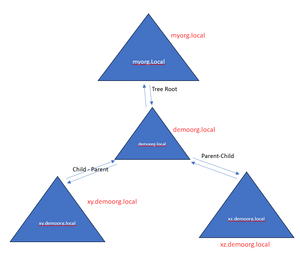
Dear Community. I want to do some brainstorming and get your Ideas. I have an AD Forest as in the following picture Tree Root (Forest) connected to Azure Cloud Tenant and all users and devices from the Trees. demoorg.local and subdomains synced to the Azure Cloud Tenant. Users from xy.demoorg.local & xz.demoorg.local is using the same upn (domain name to log in to E-Mail, Teams. All devices are Hybrid joined. (Conditional Access is not in use) Pass Hash Authentication is activated. E-Mail server is Exchange but the on-prem and e-mail server uses only users from xy.demoorg.local & xz.demoorg.local There is no Cloud app or other cloud resources using the xy.demoorg.local & xz.demoorg.local All Devices from xy.demoorg.local & xz.demoorg.local managed from local GPO. All users use only a password and username for a Windows Sign-In (There is no Windows Hello or Pin or Security Key in use) Task: I want to create a new Azure Tenant (only one tenant) and connect all users and devices from my xy.demoorg.local & xz.demoorg.local (demoorg.local tree) to the new Tenant and disconnect the tree from the Tenant which is already connected now. As I know first I need to delete all synced devices and unregister my domain name (used for Teams and Outlook Sign-in) from the old tenant and register my domain in the new Tenant. Then I want to sync all devices and users to the new Tenant. Question: Is It possible? If yes, which scenarios are available there, and which scenario do you prefer? If there will be downtime during the migration? Which other questions should I answer? Or maybe I should separate my own tree from the forest and then connect it to the new TenantOn-Prem Azure Ad Password Protection doesn't work
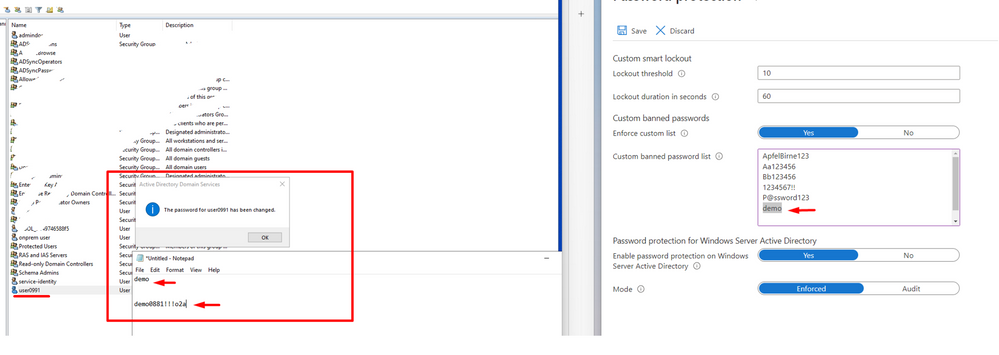
Even if a user's password contains a banned password, the password change has been accepted. I have configured on Customer Tenant an On-premises Azure Active Directory Password Protection. But even if a user's password contains a banned password, the server accepts the banned password. It says It is compliant! Troubleshooting shows that all are right. VerifyProxyConnectivity VerifyAzureConnectivityViaSpecificProxy Test-AzureADPasswordProtectionDCAgentHealth -VerifyProxyConnectivity domain.com Test-AzureADPasswordProtectionDCAgentHealth -VerifyAzureConnectivityViaSpecificProxy domain.com Troubleshooting DC AGent DC agent health tests Test-AzureADPasswordProtectionDCAgentHealth -VerifyPasswordFilterDll Test-AzureADPasswordProtectionDCAgentHealth -TestAll Troubelshooting Proxy Proxy verification of all tests Test-AzureADPasswordProtectionProxyHealth -TestAll DC Agent version is the last version. https://protect-de.mimecast.com/s/HnQLCPjnK3UqvkRmfBp06n?domain=1.2.177.1 Do you have Ideas why It is not working? Microsoft says that even if the user's password contains a banned word, the password change will be accepted if it is compliant with password policy complexity 🙂 - Does anyone have the experience? Thanks In Advance! Farhad FKH9001.3KViews0likes2CommentsAzure Monitor Agent & Log Analytics Agent. I am confused
Dear Community. I have the following Questions. Please help to explain. Questions: 1. The Log Analytics agent is on a deprecation path and won't be supported after August 31, 2024. If you use the Log Analytics agent to ingest data to Azure Monitor, https://learn.microsoft.com/en-us/azure/azure-monitor/agents/azure-monitor-agent-migration prior to that date. Does Microsoft recommend migrating to Azure Monitor Agent as soon as possible? 2. You might also see the Log Analytics agent referred to as Microsoft Monitoring Agent (MMA). Does It mean, Log Analytics agent = Microsoft Monitoring Agent (MMA)? 3. Windows client installer of the Azure Monitor Agent supports latest Windows machines only that are Azure AD joined or hybrid Azure AD joined. So It can not access Log Analytics Agent directly as Log Analytics agent if we have non-Azure Windows Vms or Physical Windows Clients. Because: The Data Collection rules can only target the Azure AD tenant scope, i.e. all DCRs associated to the tenant (via Monitored Object) will apply to all Windows client machines within that tenant with the agent installed using this client installer. Granular targeting using DCRs is not supported for Windows client devices yet. Does It mean that Azure Monitor Object is still not a good idea for a non-Azure Windows Client environment? (ACR excluded) Does It mean that the logs exported from Windows Client to Log Analytics Workspaces using DCRs - don't use direct Internet access? Is Azure Monitor Agent will work if it runs on my Azure AD Hybrid Joined Windows PCs which don't have a direct Internet connection? 4. The Log Analytics gateway supports: Windows computers on which either the https://learn.microsoft.com/en-us/azure/azure-monitor/agents/azure-monitor-agent-overview or the legacy Microsoft Monitoring Agent is directly connected to a Log Analytics workspace in Azure Monitor. Both the source and the gateway server must be running the same agent. --- "You can't stream events from a server running Azure Monitor agent through a server running the gateway with the Log Analytics agent." --- I don't understand It. Does It mean that Log Analytics Gateway can run only on ACR-enabled servers If there is no installed Log Analytics Agent? Or Log Analytics Gateway can stream the Logs only from Log Analytics Agents Installed Windows Pcs? If yes why then there is a Guide that explains "Configure the Azure Monitor agent to communicate using Log Analytics gateway"? 4.1. Configure the Azure Monitor agent to communicate using Log Analytics gateway Add the configuration endpoint URL to fetch data collection rules to the allowlist for the gateway Add-OMSGatewayAllowedHost -Host global.handler.control.monitor.azure.com Add-OMSGatewayAllowedHost -Host <gateway-server-region-name>.handler.control.monitor.azure.com (If using private links on the agent, you must also add the https://learn.microsoft.com/en-us/azure/azure-monitor/essentials/data-collection-endpoint-overview#components-of-a-data-collection-endpoint) Add the data ingestion endpoint URL to the allowlist for the gateway Add-OMSGatewayAllowedHost -Host <log-analytics-workspace-id>.ods.opinsights.azure.com Restart the OMS Gateway service to apply the changes Stop-Service -Name <gateway-name> Start-Service -Name <gateway-name> Should I run the upper commands on Gateway Server? Bing Chat Says that: https://learn.microsoft.com/en-us/azure/azure-monitor/agents/agents-overview. Azure Monitor Agent collects monitoring data from the guest operating system of Azure and hybrid virtual machines and delivers it to Azure Monitor for use by features, insights, and other services, such as Microsoft Sentinel and Microsoft Defender for Cloud. Azure Monitor Agent replaces all of Azure Monitor’s legacy monitoring agentshttps://learn.microsoft.com/en-us/azure/azure-monitor/agents/azure-monitor-agent-migration.3KViews0likes1CommentRe: Log Analytics Gateway
After 2 Years, I have one more Question 🙂 Log Analytics Legacy Agent will be deprecated on August 2024 and in part: 2. Configure Agents with Proxy set to the Gateway name and its port UI: "If the computer needs to communicate through a proxy server to the Log Analytics service, click Advanced and provide the URL and port number of the proxy server. " - So It means that I need Log Analytics Legacy Agent on Windows in all situations. - AMA does not support Log Analytics Gateway connection?! Thanks in Advance!4.2KViews0likes1CommentRe: Ninja Cat Giveaway: Episode 8 | Get to know Defender Vulnerability Management Premium
Hello there, One of the most valuable premium capabilities of Microsoft Defender Vulnerability Management is its ability to block vulnerable applications. I love this feature cause, it helps to reduce risk by preventing the use of outdated or vulnerable applications. By preventing the use of outdated or vulnerable applications, organizations can proactively reduce risk and strengthen their security posture. Greetings Farhad2.6KViews1like0CommentsUse OTP Hardware token as a 2nd Authentication method
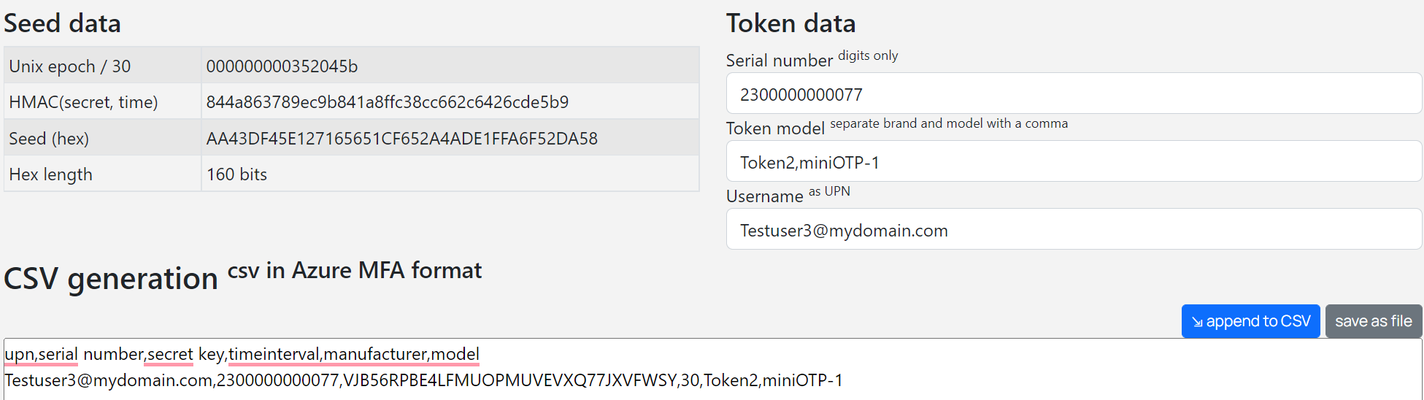
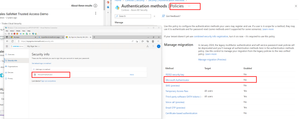
Dear Reader, In this post, I wrote about setting up a hardware OTP token if you don't currently have any of those tokens. I hope this helps you decide whether to migrate to this solution or not, in your production environment. An OTP hardware token is a physical device that is used to generate one-time password (OTP) codes for authenticating users to Azure services. These tokens are often used in combination with Azure Active Directory, which is a cloud-based identity and access management service. When a user attempts to log in to an Azure service, they will enter their username and password, and then use the hardware token to generate an OTP code. This code is then entered into the login screen to complete the authentication process. The process for activating an OTP hardware token may vary depending on the specific token and the system in which it will be used. Here is a general outline of the steps that may be involved: Install the hardware token: Follow the manufacturer's instructions to install the hardware token on your device. Register the hardware token: To use the hardware token, you will need to register it with the system or service that you will be using it with. This may involve creating an account or linking the hardware token to an existing account. Activate the hardware token: Once the hardware token is installed and registered, you will need to activate it. This may involve entering a code that was provided with the hardware token or completing some other activation process. Set up your hardware token: After the hardware token is activated, you may need to set up additional security measures, such as a PIN code, to use the hardware token. Use the hardware token: Once the hardware token is set up and activated, you can use it to generate OTPs when logging in to your account or accessing sensitive information. Again, the exact steps for activating an OTP hardware token may vary depending on the specific token and system you are using. Be sure to follow the manufacturer's instructions carefully to ensure that the hardware token is properly activated. In my situation, I'm going to use the TOTP Toolset from https://www.token2.com/ to emulate the Hardware Token. It is suitable for practicing the whole process before buying or configuring OTP hardware tokens in productive Infrastructure. About "Seed in base32" (We are generating this file to activate our OTP Hardware Token before using it) In the context of OTP hardware tokens, a seed in base32 is a string of characters that is used to generate one-time passwords (OTPs). The seed is typically provided by the manufacturer of the hardware token and is used to initialize the token's internal state. Base32 is a notation for encoding arbitrary byte data using a restricted set of symbols that can be conveniently used by humans and processed by computers. It is often used to represent data, such as seeds, in a compact and easy-to-read format. To generate an OTP using a seed in base32, the hardware token uses an algorithm to generate a unique password based on the current time and the seed. The OTP is typically valid for a short period, after which a new OTP must be generated. To use a seed in base32 with a hardware token, you will typically need to enter the seed into the token or provide it to the system or service that you are using the token with. The exact process for doing this will depend on the specific hardware token and system you are using. Seed in base32 format looks like: upn,serial number,secret key,timeinterval,manufacturer,model email address removed for privacy reasons,2300000000002,ABXYZ_VALUE_IN_BASE32,30,Token2,miniOTP-1 After generating the file in ".csv" format we should upload it to Azure Active Directory. Upload the ".csv" file to Azure Active Directory. After uploading we need to activate Hardware OTP Token. It is time to write the OTP on the Hardware Token. In our Situation, it is a TOTP Toolset-generated Code. After successfully activating you will get the notification. IMPORTANT!!! In Microsoft Azure Active Directory (Azure AD), legacy multifactor authentication (MFA) and self-service password reset (SSPR) policies are being deprecated and replaced with modern alternatives. Legacy MFA policies refer to older methods of implementing multifactor authentication in Azure AD, such as phone calls, SMS, and mobile app verification. These methods are being replaced with Azure MFA, which provides a more secure and scalable solution for implementing multifactor authentication. Legacy SSPR policies refer to older methods of allowing users to reset their passwords in Azure AD, such as using security questions or requiring the assistance of an administrator. These methods are being replaced with Azure AD Passwordless, which allows users to reset their passwords using techniques such as email, phone, or the Microsoft Authenticator app. Azure AD is deprecating these legacy policies to provide users with more secure and convenient authentication and password management solutions. It is recommended to migrate to the modern alternatives as soon as possible to ensure your Azure AD environment's continued security and functionality. Please check which authentication method you are using for users in your Tenant.?! The next step is to create a Conditional Access Policy: Checking the end user for authentication. After typing the username and password it will need a one-time OTP as a 2nd authentication method. Remember! We can use a Hardware OTP only for a 2nd authentication method. It doesn't support passwordless. As before mentioned we are typing here the TOTP Toolset-generated Code. Limitations Please also read the full documentation provided by the OTP hardware token vendor and from Microsoft before going to the configuration steps. I'm excited to publish this post and can't wait to hear what you think. I'd love to hear your feedback Farhad Khankishiyev MA/MCP/MCA/ISO27001 Auditor Azure Active Directory (AAD) Microsoft Authenticator Microsoft 365 Conditional Access15KViews1like1CommentMicrosoft Defender for CLoud Basic Technical Concept
Hi all, I'm currently writing the basic technical concept for Microsoft Defender for the cloud. It should include scoping, infrastructure inventory, and configuration based on Microsoft recommendations. I would like to ask if anyone knows a good documentation library. Pernille-Eskebo our1.1KViews0likes1CommentRe: MDI Sensor service terminated unexpectedly Problem is gMSA Account
Hi Martin_Schvartzman, Thank you for your response. I have checked also the Logon as a Service rights. Unfortunately, it doesn't help. I also checked the all steps were written in this post. https://docs.microsoft.com/en-us/answers/questions/758863/azure-atp-doesn39t-start-in-dc-with-gmsa-account.html Doesn't help 😞 Regards, Farhad2.4KViews0likes1CommentMDI Sensor service terminated unexpectedly Problem is gMSA Account
Hello, I want to Install the MDI Sensors on Domain Controllers: DC01 "objectVersion 87" Server 2016 Datacenter - DC02 "objectVersion 87" Server 2016 Datacenter - When I use a regular user with credentials. MDI services work without problems on both Servers. When I use gMSA account for MDI sensor on DC02. MDI Sensor is not starting. Error 1067 The Problem is MDI Sensor with gMSA Account works on DC01. But on DC02 it is not starting. Powershell script I used for gMSA Account: New-ADServiceAccount -Name username -DNSHostName username.domain.local –KerberosEncryptionType AES256 –ManagedPasswordIntervalInDays 60 –SamAccountName username -PrincipalsAllowedToRetrieveManagedPassword DC01, DC02 I have checked: Test-ADServiceAccount -Identity username PS C:\Windows\system32> Test-ADServiceAccount -Identity username True Event Viewer on DC01: The Open Procedure for service ".NETFramework" in DLL "C:\Windows\system32\mscoree.dll" failed. Performance data for this service will not be available. The first four bytes (DWORD) of the Data section contains the error code. The Open Procedure for service "WmiApRpl" in DLL "C:\Windows\system32\wbem\wmiaprpl.dll" failed. Performance data for this service will not be available. The first four bytes (DWORD) of the Data section contains the error code. The Same Errors I have seen also in DC02. But It works without Problem. I don't know if these errors related to MDI issue?! Any Idea? Regards, Farhad2.6KViews0likes3Comments
Recent Blog Articles
No content to show