User Profile

CoasterKaty
MVP
Joined 5 years ago


User Widgets
Recent Discussions
Hyper-V Cluster issues
I had Windows Admin Center set up and working fine with a 2 node Server 2019 Hyper-V cluster, then back in July I upgraded the hosts to 2022 and had issues. I've had another go at getting this working but come stuck again. I've tried re-installing Windows Admin Center on a fresh 2022 host but it made no difference. The issue: Dashboard shows 0 of 100% for the CPU usage (NaN% total) for the cluster, and for the memory usage just shows "of 0 B". If I go into the "Virtual machines" page there are no results, but if I go into the VM summary page it shows me the graphs with total VMs, VM status, CPU, RAM etc fine. I am able to create a VM from the Virtual Machines page (confirmed by checking Failover Cluster Manager snap-in), but the list of VMs remains empty. If I go into the Roles page, I can see all the VMs. If I go into the Servers page, then Inventory, I see both hosts but uptime shows as 0 minutes, CPU usage "unknown" and Memory usage "unknown". Spent most of the day trying to find anything useful online to no avail. It can obviously communicate with the cluster as it's able to create a VM, and see all the disk details, network traffic, and some of the host CPU/Memory details. Both hosts running 2022 Datacenter on the latest updates.122Views0likes0CommentsError showing "Share by you" page in ODfB
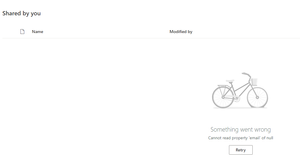
Hiya, I have a user at work who has this error when trying to view the files they have shared with others - "Cannot read property Email of null". Presumably this is due to a missing attribute or similar on the list of people they have shared with although not sure how I'd look into that. Has anyone else seen this/found a fix/could MS raise it as a bug report? Any ideas besides "raise a support ticket" (my next step)?1.6KViews1like5CommentsRe: Error on the link to the MVP Nomination form for filling in community activities
That's odd, as it should be mvp.microsoft.com - although I noticed it change to that azurewebsites domain for a while the other day (but then change back). Hopefully MVPGA will get back to you soon, I don't think it's an issue isolated to just you as I know quite a few MVPs are getting problems with the 500 error this week.1.7KViews1like2CommentsRe: How do I manage user permissions?
filipd1 To manage pupil permissions you're probably best using policy packages, which are in the Teams admin centre Policy packages - Microsoft Teams admin center There should already be some Education policy packages listed there which you can edit and assign to pupils. To assign them, click on Group package assignment, pick the package (e.g. Education (Primary school student), then pick the group you want to give the permissions to. While there's no specific option to prevent people creating Teams, you can stop people from creating Office 365 Groups (which are required for Teams to function). If a user does not have permission to create groups, the "Create Team" pages also disappear from their view. This is a bit more involved and requires PowerShell. - details of how to do this can be found here: https://docs.microsoft.com/en-gb/microsoft-365/solutions/manage-creation-of-groups1.2KViews0likes0CommentsRe: Error on the link to the MVP Nomination form for filling in community activities
I occasionally get that error in the MVP site but clicking the menu to open the page again seems to work for me. So perhaps once it's logged in and got to that 500 error, paste the nomination form link into the address bar again and see if that works?1.7KViews0likes4CommentsRe: UNIVERSAL PRINT CLIENT USERS
Client devices need to be Windows 10 1903 or later (which itself is over 2 years old now), the device running the connector needs to be Windows 10 Pro/Enterprise 1809 or later, or Windows Server 2016 or later. So basically, yes you will need to be running Windows 10 1903 or later to add the UP printer to your system and send a print job.780Views1like0CommentsRe: IT staff headcount for O365 management?
Natalie_H Another "it depends" here - how many users? What parts of 365 are they wanting to use? Do they need any specific internal SLAs etc? At work we have 2 of us looking after it, although I do most of it, and it doesn't take up a lot of our time. That's about 120 staff, 700 pupils, using Exchange, OneDrive, SharePoint and Teams. If they're used to Exchange on-premise then once the migration is completed I'd say it will need a lot less of their time and attention as Exchange did (at least in my experience).1.6KViews1like1CommentRe: emails are getting Held because the DMARC Result Fails
Allinilla So this sounds like DMARC/SPF/DKIM might not be set up properly. operate.dk has a DMARC policy of quarantine (see _dmarc.operate.dk TXT record) SPF record is "v=spf1 include:spf.mailjet.com include:spf.protection.outlook.com include:cmail1.com include:spf.emailsignatures365.com -all" DMARC requires SPF and DKIM to be valid so I can only assume that DKIM is not set up correctly as I see no reason why that SPF record would cause Out of Office replies from 365 to fail. You will need whoever looks after the admin side of operate.dk 365 tenancy to configure DKIM as per How to use DKIM for email in your custom domain - Office 365 | Microsoft Docs5.1KViews0likes0CommentsRe: How to add all files to OneDrive cloud and delete files on my hard drive storage?
sincesonatina OneDrive will save copies of items that you've opened on the local drive, so this is normal and expected. If you have got Storage Sense turned on it should automatically free up space when your disk gets a bit full, otherwise you can right click on any item in OneDrive (or the entire OneDrive folder itself) and select Free up Space - this will make sure it's synced and then delete the local copy. The icons in Explorer will tell you where each file is: e.g. the green tick denotes that the file is stored locally on your computer as well as in the cloud, the blue cloud means it's only in the cloud (so opening it will cause OneDrive to download the file), there's a blue "sync" icon not shown above which means it's currently updating. Alternatively if you open Settings and search for Storage Sense it will show you what is using your disk space and you should be able to find OneDrive in the list and click to free up the space.710Views0likes0CommentsRe: Windows Store for Business not available in Intune
Andrew_Gua You need to link Intune to the Business store: Go to Tenant administration > Connectors and tokens > Microsoft Store for Business. Click on Enable and then open the business store and sign in with your global admin account, or an account with the appropriate permissions. You’ll now need to go to Manage > Settings > Distribute in the Store, at the bottom of the screen you should see a row for Microsoft Intune which you can click to Activate. Switch back to Intune and after a short while the Sync button should go blue – click it. It usually takes about 10 minutes to sync – you can check back on the status by refreshing the page and your last sync date should change from 1970 to something current. Back on the Apps > All apps screen you should now see your synced store apps. To deploy one simply click on it, then go Properties and edit Assignments. As before you can then select a group of users or devices. (Taken from my blog post, which includes some screenshots: https://katystech.blog/2021/01/intune-part-2-autopilot-win10-applications/)9.4KViews0likes0CommentsRe: Question about Intune for Education (does it include standard Intune - yes/no?)
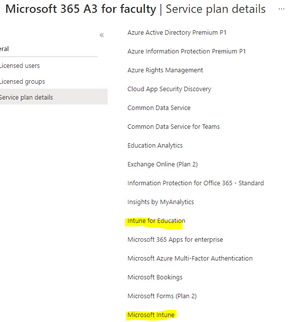
JeremyTBradshaw Yes, I agree the docs could do with being clearer and official confirmation would be nice. I've just had a look at the service plan details for M365 A3 for faculty and it lists both Intune for Education and MS Intune:5.8KViews1like1CommentRe: Question about Intune for Education (does it include standard Intune - yes/no?)
It looks like it includes both - I've been using Intune for a while on my tenancy (Edu A3 licences) and didn't even know there was a special Edu version! I've got access to both intuneeducation.portal.azure.com and the main endpoint.microsoft.com admin consoles.5.7KViews0likes3CommentsRe: foreach loop, self creating variables
Schulzi You'd just need to use an array and populate that within the foreach loop: $selected_Users = $selected_Output -split "," $AllMail = @() foreach($User in $selected_Users) { $selected_email = "$User@mail.com" $AllMail += ,$selected_email } $AllMail which would leave you with $AllMail as an array containing all the e-mail addresses. If you wanted a single variable rather than an array, with a comma separated list, you'd do this at the end: $EmailList = $AllMail -join ","566Views2likes0CommentsRe: Do i need to purchase window again if i have changed hard disk drive
Manojkhedar No you don't need to buy another licence. It depends how the system is licensed: - Firmware embedded key (most modern computers from large companies such as HP, Lenovo, Dell etc) - it should just re-activate when you've re-installed Windows - Subscription or other digital key: It should just re-activate when you add your licensed account to Windows - Product key: You'll need to enter your product key to re-activate, this is most likely on a sticker on the case.1.1KViews0likes0CommentsRe: Want to archive teams in bulk
parveenprajapati You could do something like: Get-Team | Where {$_.DisplayName -like "*2020*" | Set-TeamArchivedState -Archived:$true although if you're using Teams for school classes I'd recommend looking at School Data Sync for next year as it handles the creation/update/archival of teams for you.6.4KViews0likes1CommentRe: Want to archive teams in bulk
parveenprajapati Set-TeamArchivedState's -Archived parameter expects a boolean value, so would need to be called as "-Archived:$true" (or $false). The easiest way round this is to just put the teams you want to archive in the CSV. You've also got an error in the foreach where data never gets anything assigned to it. I'd have thought the below would work: $csv = Import-Csv C:\Users\parveen.kumar\Desktop\a.csv foreach ($team in $csv) { Set-TeamArchivedState -GroupId $team.id -Archived:$true }6.4KViews0likes3Comments



Recent Blog Articles
No content to show