User Profile

PGraham
Brass Contributor
Joined 10 years ago


User Widgets
Recent Discussions
Using Multi-Geo to distribute API calls to avoid throttling
If we enable Multi-Geo on our tenant will that allow us to distribute our SharePoint API calls to avoid being throttled as noted https://docs.microsoft.com/en-us/sharepoint/dev/general-development/how-to-avoid-getting-throttled-or-blocked-in-sharepoint-online?redirectedfrom=MSDN ?564Views0likes0CommentsGuest Access to Conversations Clarification
I've seen the other posting about guests not having access to conversations and understand the reasons. However this article by MS contradicts the position that guest can NOT participate in conversations. https://support.office.com/en-us/article/adding-guests-to-office-365-groups-bfc7a840-868f-4fd6-a390-f347bf51aff6?ui=en-US&rs=en-US&ad=US I think it is likely the article is misleading in that these functions are achieved thru email and not directly in the conversation view in the web portal. We've tested and experienced what everyone else has seen with guests not having access to conversations but seeking confirmation in light of this confusing article.707Views0likes1CommentRe: End User Experience Testing - Inconsistent Warning Messages
I agree with you on that point and sorry for the confusion, but I was referring to the two original warning messages in my scenario (non-existent vs non-allowed domain). If they are not meant to be the same, then they should be more descriptive to the reason why it is failing maybe?6.2KViews0likes1CommentRe: End User Experience Testing - Inconsistent Warning Messages
In my mind, these scenarios should return a similar error message if we are talking about end user experience. A message indicating that this email address is not allowed to be shared with or something to that effect.6.3KViews0likes5CommentsEnd User Experience Testing - Inconsistent Warning Messages
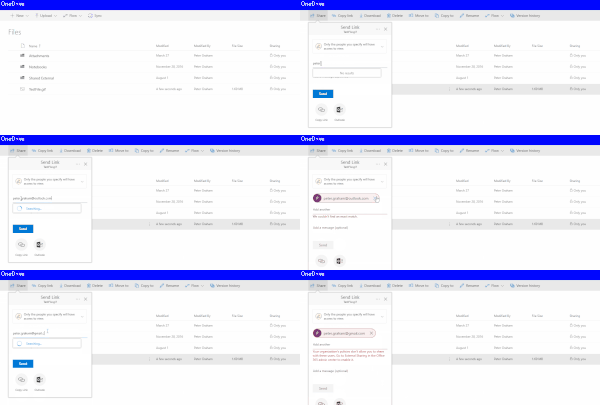
We've been doing some user experience testing before enabling OfB for our users and came across what we think is an odd behaviour. Our tenant has the following settings for sharing: - Only existing external users (sign-in required) - Allow or block sharing with people on select domains For testing purposes, we've limited the allowed external sharing domains to "gmail.com" When sharing a file in OneDrive to a "outlook.com" email address, the warning message returned is... "We couldn't find an exact match." - Not the most helpful message When sharing the same file to a "gmail.com" email address, but the account does NOT exist in the AAD, the following warning message is returned... "Your organization's policies don't allow you to share with these users. Go to External Sharing in the Office 365 admin center to enable it" - Even less helpful if you are an end user. Just wanting to confirm this is the experience we should have in this use case and whether or not anyone thinks this could be done a little better?6.5KViews0likes13CommentsExternal Sharing with SSO Enabled
We are trying to confirm the experience we are seeing is to be expected. We are using ADFS to authenticate our users and provide a SSO experience which works fine. As soon as we enable the ability to provide external sharing to SPO, our users get directed to the AAD account login screen where the user needs to select their username and then allowed to enter O365. Turn off external sharing and the user experience goes back too SSO. We took this up with Premiere and they indicated that this is expected because of our use of ADFS for SSO. Was just wondering if this is in fact the experience we should be seeing?2.1KViews0likes2CommentsRe: Cortana not searching Office 365 emails
I'm struggling with the same topic. I found this which seems to indicate it is possible, but have had no luck. https://wpoffice365.com/outlook-mail/how-to-search-your-outlook-email-with-cortana/ I found mention that you need to have Windows Mail configured for your O365 account to make it work, but that hasn't helped either.2.1KViews1like2Comments
Recent Blog Articles
No content to show