User Profile

m365123
Brass Contributor
Joined 6 years ago


User Widgets
Recent Discussions
PowerPoint Stuck on Saving (OneDrive File collaboration)
Hi everyone, Maybe someone can help me with my issue. I have Microsoft Office 365 Pro Plus edition. When I am using PowerPoint (old or new file) I am getting stuck at saving state. The issue is that when you close the PowerPoint, it will just load and will not respond. Even if the file is just small. I do not encounter this if I am using MS Word or MS Excel. It only happens in PowerPoint. But when I turn off OneDrive File collaboration, the issue is fixed. Any reasons why? They are just using the same add-ins. I do not know why is this happening only in PowerPoint.22KViews1like4CommentsOneDrive for Business not opening
Hi Everyone, Can somebody help me regarding with this issue? When a user run ODFB, nothing happen. No cloud icon on the Taskbar. No error message too. Here is what I checked already: 1. Reinstalled OneDrive from Microsoft website 2. Run OneDrive in safe mode 3. Run OneDrive as Admin 4. Checked the Event Viewer but cannot find related info for OneDrive 5. Checked the registry editor for FileSyncNGSC but it is not existing 6. Checked local group policy but all settings related to OneDrive is set to “Not Configured”4.8KViews1like1CommentOneDrive synchronization error
Hi Everyone, May I kindly ask for your input on this scenario for OneDrive. I have a user that are using 2 devices (workstation and Windows tablet). The user is saying that the files on the tablet is not the latest one as the date modified is different compared to the workstation. When I checked, the workstation's OneDrive is not running so I fixed it. OneDrive is now run on the workstation and beginning to sync. The issue is that after the sync, the latest data from files are missing. We can only see modified date of May 2021 and as per the user, it should be July. As per user, it seems that the old files synced to the latest file on the workstation. As per my knowledge, the latest changed from a file should be uploaded and merged on the file existing on the OneDrive already. What is your thought on this? I tried to look at the version history but did not find any. Tried checking also on the OneDrive recycle bin but did not find any aso.705Views1like0CommentsOpening specific email make Outlook not responding
Do you know what is the maximum file size for an email itself? (Not the attachment) I have user that received an email with a body content of super long table. When trying to view that specific email, the Outlook will just not respond. Even after waiting, the email will not load. Also tried opening the email using OWA. It will take some time to load from OWA but the email can be viewed. Is there a way to open it in Outlook app.819Views0likes0CommentsCannot see own calendar details in scheduling assistant
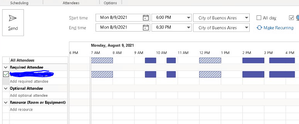
Hi everyone, I have a user that cannot see his own calendar details when selecting the scheduling assistant. The show calendar details is already checked. These are what we did so far: 1. Created a new Outlook profile - this resolved the issue but after few hours, the issue went back again 2. Installed the latest version of Office 365 16.0.13801.20772 (64-bit) from portal.office.com 3. Rename the Outlook folder in %appdata%/Microsoft to recreate the folder and settings - still same issue The issue is only fix when creating a new profile. But after few minutes or hours, the issue is coming back. Is this a calendar issue on the mailbox? I think not as when we are scheduling in OWA, we can see the calendar details in scheduling assistant. Can I try to create a new windows profile for the user and test?2.8KViews1like3CommentsCannot accept meeting invites as attachment
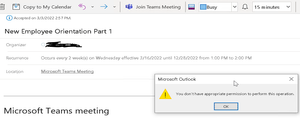
Hi All, So my colleagues sent a meeting invite as an attachment via email (internal only). When I opened the meeting invite and click Copy to My Calendar > Accept meeting I am having this error message below: You don't have appropriate permission to perform this operation1.9KViews1like2CommentsCannot view free/busy
Have you encountered an issue where a single user's free/busy cannot be retrieved in Outlook and webmail? Per checking, the Default permission for Calendar is set to availability already. I am still searching on what else needs to be checked for this user.1KViews0likes1CommentHide email address beside the name from External sender
Hello! Would just like to confirm first if it is normal in Outlook to show the email address beside the name if the email was from external sender? If yes, does Microsoft has a documentation of it? For example: Microsoft Azure <Email address removed> If email is coming within our environment, there is no email address showing. Just the name of the sender. Now, we have a users that is using a 3rd party app to send email using our relay. The account they are using to send email is a user in our environment. But since they are using a relay to send email, the emails are becoming external. Do we have a way to remove the email address for example below to just show the name only? Default from external: Microsoft Azure <Email address removed> User would like it to be: Microsoft Azure Thank you.Solved3.8KViews0likes4CommentsUser cannot view quarantined message in protection.office.com (shared mailbox)
Good day everyone, I am researching this issue for a while now and it seems that if a user was given a Full Access permission to a shared mailbox, the user with Full Access should be able to view the quarantined emails and release them. I have this scenario that the user has already full access permission but when clicking the "view" button from the quarantine notification, the user is redirected to protection.office.com/quarantine and received an error message: "The operation couldn't be performed because the user does not have the authorization" May I kindly confirm if the user should be able to view and release it? It is a shared mailbox without a password setup. I have also this same scenario (using shared mailbox also with full access permission) and the user can review and release the emails from protection.office.com/quarantine Should I try to re-assign the Full Access permission to the user? Thank you very much.7.6KViews1like3CommentsMailboxFolder permission vs Full Access and Send As
Hi All, I just want to clarify something regarding delegating shared mailbox and giving Full access and Send as in EAC. I have a user that delegate the shared mailbox inbox and giving the user an Owner rights for the Inbox. If this is the case, do the user that is delegated can send an email to the mailbox? If not, am I right that the user can just open emails under the Inbox folder? For Full Access, am I right that the user that will be assigned a Full Access can access everything not only the Inbox but also the Calendar, etc. I understand that the Full Access can just give view access rights and the user cannot send email unless Send As or Send on Behalf rights is given.\ If this is true, then when do you user mailbox folder delegation and full access on EAC. Thank you very much for the clarification.9KViews0likes1Comment- 1.5KViews0likes0Comments
Inbox Delegation
Hi Team, I would just like to confirm on something regarding giving delegation from inbox to a user. I have a user that gave delegation to his Inbox to a user but the user failed to open the Inbox with an error message "Cannot expand the folder". What I did was to refresh the delegation permission thru PowerShell: Add-MailboxFolderPermission -Identity UserOwner@domain.com:\Inbox -User user1@domain.com -AccessRights Editor Based on Microsoft's documentation, when giving an Editor's access rights, it includes the ff: Editor: CreateItems, DeleteAllItems, DeleteOwnedItems, EditAllItems, EditOwnedItems, FolderVisible, ReadItems But upon checking, the user still cannot access the user's inbox with the following message: "Cannot display the folder. Microsoft Outlook cannot access the specified folder location. The operation failed. An object cannot be found" I am searching and most of the cause of this error message is that the folder visible is not enable on the user's mailbox. But based on Microsoft, what I understand is that the FolderVisible is already included in the Editor rights. Any thoughts regarding this one? Is my way of giving permission not enough? Or is it a problem in the user's profile in Outlook?Solved1.6KViews0likes3CommentsMailbox Confusion
Hi Everyone, Can you enlighten me with these conditions of mailbox as this will be a great help for me. I have here 2 conditions. Condition A There is a user mailbox that has no license and this is use as "shared mailbox". Meaning, they delegate (Full Access and Send As) to different users (it acts like shared mailbox) Questions: 1. Can you login the account directly in Outlook? 2. Can I open this user mailbox in OWA (open another mailbox) 3. Will auto mapping works with the delegated full access users? If yes, can they open the mailbox? if no, can the user add this user mailbox by going to Account Settings > Add mailboxes Condition B The user mailbox has F3 license. Same case, it is also used as "shared mailbox" Questions: 1. Can you login the account directly in Outlook? 2. Can I open this user mailbox in OWA (open another mailbox) 3. Will auto mapping works with the delegated full access users? If yes, can they open the mailbox? if no, can the user add this user mailbox by going to Account Settings > Add mailboxes This is a great help. Thank you.833Views1like0Comments


Recent Blog Articles
No content to show