User Profile

RobMac14
Copper Contributor
Joined 6 years ago


User Widgets
Recent Discussions
VLOOKUP, INDEX and MATCH - can't get them to work
Hi, I'm trying to set up an automatic query that when a code is entered a data dump of information is searched to find the risk ratings for that code in 3 different counties. The data dump will be refreshed regularly so I don't want to spend a lot of time sorting the data dump out before I can run the query to look up the risk ratings. The code is a four digit code in the format XX.XX ranging from 1.00 to 99.99. The data dump contains a large amount of information, but all I need to pull out is the risk rating for each of the counties. I've set up an example of this in the attached spreadsheet, which I hope will illustrate the issue. I can get VLOOKUP, INDEX and MATCH formulae to return a risk rating for a code but can't seem to figure out how to introduce the county name into them as a third variable to get the three, sometimes different, results. The code is a four digit code in the format XX.XX ranging from 1.00 to 99.99 I've spent a few hours trying to figure this out. If anyone can help me or point me in the direct of another function in Excel that will do this for me I'd be very grateful. Thanks in advance, RobSolved4.2KViews0likes8CommentsExtracting the latest data
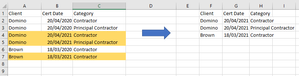
Hi I need to construct a data set from a data dump out of an database that will be loaded onto a webportal. At the moment, I have to do it manually, which is time consuming and I'm hoping that there are formulae within Excel that can help me speed this up. In picture below is a sample data set on the left and what I need to extract is the latest entry for a client, their role in column C and present it a a new table/dataset. The latest data is highlighted in gold and that's what I need extracting. I'm aware that I could use the MAX function to select the latest date, but that only produces the date and not the name and category. If anyone can offer some assistance on this I'd be grateful.Solved5.8KViews0likes9CommentsOneDrive not synch'g folders - about to give up!
Hi, I work in a small, new company and I recently bought our first Microsoft 365 account for the 3 of us. We're all working from home and Teams has been great to connect work together. I've been testing OneDrive for business as we need all access to a series of folders. Previously, we have all used DropBox and have our own DropBox accounts but we wanted to start afresh with central folders for our new company. So we started testing with OneDrive and, quite frankly, it is doing my head in! Despite us all being logged into our 365 accounts, one member can't synchronise anything and another hasn't had a synchronise since 11 November and hence has not changes or additions to the folder structure that I've been working on - yet OneDrive says it's up to date! I'm either missing somehting really simple or OneDrive just isn't up to the job and we'd be better buying a new DropBox account for all of us and ditching it. So as a last ditch attempt to oversome this, I thought I'd post about my experience with it so far in the hoep that someone may be able to point me in the right direction for a fix to this issue. Thanks for reading my post and thinking about how you may be able to help us.1.2KViews0likes1Comment
Recent Blog Articles
No content to show