User Profile

BoxOfFrogs
Brass Contributor
Joined 9 years ago


User Widgets
Recent Discussions
Cannot remove a meeting from a resource room
I have a user (365 Essentials) that created a meeting and added a room to it (Line 3). Somehow this user deleted the meeting from his calendar, did not cancel it, deleted it. He was the organizer so I have no idea how he did this. Then of course nobody was notified. Now this can be solved by sending an email to them all and having them remove the meeting from their calendars (they are internal and external) But I cannot figure out how to remove the meeting from the room mailbox. When I try I get: You do not have sufficient permission to respond to this item. I can open the meeting on the Line 3 mailbox and close it. But I cannot modify or delete it. Now, this meeting is locking up that time slot for that room and nobody can book it. I am the admin. I tried recovering the meeting from the organizers deleted folder to the calendar (where, by the way, he could not see it on the Line 3 calendar like everybody else could) but this did nothing at all. How can I get rid of this meeting in Line 3 and free up the resource.32KViews0likes3CommentsHow to add external contacts to a 365 or distribution group?
I have tried all of https://tinyurl.com/yysqx8of I never see the contacts I added via the users interface on the "add members" list of the group interface. I do see some other external contacts however, which makes it more mysterious. I see no difference between the ones I do see and the ones I don't see. The contacts were added weeks ago so it's not a propagation issue. The "bad" contacts do appear in the Outlook client Global Address Book. These contacts are all similar in that they have only a name and an email address. The email address' are all for their individual Mobil numbers in order to email text messages to them in the event of a downtime issue. Eg: mailto:Email address removed or whatever their provider uses. I did create a distribution list for just this bunch of contacts. But now I want to also add them to another 365 group and they aren't there. What would make them not show up but other contacts I created do show up? I am the admin, and again, I have checked all the points in the document linked at the top of this posting.1.4KViews0likes1CommentAdmin rights that does NOT include reading others mail.
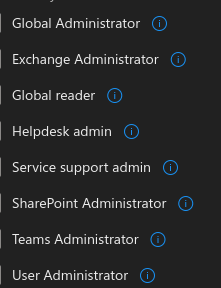
I want to assign limited admin rights to a user. However I don't want this user to be able to open another mailbox and read mail. There is sensitive information sent between a few users that only they should see. This is pretty much the main thing I want restricted. So which of these should I choose?Strange Shared OneDrive behavior.
We have some shared folders on OneDrive that are used by both Mac users and PC (Win10) users. If a Mac user deletes one of these files on their local drive it goes both to their trash on the Mac, and to the trash on OneDrive. But if a PC user deletes the file, it is just gone. No wastebasket, nothing in the OneDrive online trash. We want the PC's to behave the same way as the Mac's. I'm the admin on the 365 install, is there a setting I'm missing?Solved4.9KViews0likes9CommentsOneNote and One Drive sync issues
Mix of 365 Business Essentials and E3. This is due to having hired somebody with a silver partner license and he gets 25 E3 licenses. One of the users has a OneNote that she uses and it is located in her OneDrive for Business folder. However, when she goes to share it it says she needs to save it to OneDrive and prompts her for a login. She tries to login using her 365 account and it tells her this is the wrong type of account, like it wants a personal account. I uninstalled the client and reinstalled it from the 365 web site. Rebooted. Same thing. I cannot figure where the issue is. She can see the OneNote files on the web as well as her local drive. But she always has an exclamation point in the name within the application that says it isn't syncing. I'm a big believer/user of OneNote and have not seen this before. I find it is starting to go in all directions, there is an app from the store installed, an app from Office, and the online version. I don't think this has any bearing on my issue, but it makes it difficult for users. Same with OneDirive. There is a personal one and a business one that coexist on the same machine. Anyway, I digress, has anybody seen this and solved it?784Views0likes0CommentsHow to recover files of an employee that has left?
An employee left the company about 6 months ago. I removed his account giving his manager rights to it and forwarding his email to her. She is asked me if I can recover his OneDrive files now. Is that possible, and if so, what would the process be?Solved6.6KViews0likes3CommentsUser has license issue that I can't resolve
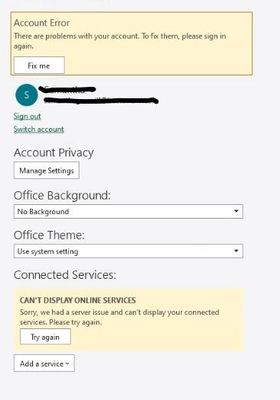
I have one user out of forty that, as of today, cannot sync apps with the server and constantly gets various messages about a problem with her account. For example, if she starts Excel her account screen looks like this: If I click "Try again" at the bottom, nothing happens. If I select "Fix Me" above it will clear the error but her name in the upper status bar still shows an exclamation point next to her name. If I leave the account screen and go back in it is back. The application will not allow her to sync up to the servers. Outlook works fine. I can get on her system remotely and work. Her internet and WiFi connections are fine. She is a long-time user and this just started happening this morning. Windows 10. I have uninstalled and reinstalled Office. I have removed her license (it was an E3) and assigned her a new standard license, uninstalling and reinstalling in between. She can log into the Office portal fine. But no matter what I do, as soon as she launches any app other than Outlook, she cannot sync and has the same error. I want to delete her account entirely and create a new one, but I'm not sure of the repercussions of this to Email, OneDrive, server-based files, etc. Turned off her anti-virus (Norton) entirely. Any help appreciated No other users have reported issues.2.8KViews0likes5CommentsRe: Owners in a Microsoft 365 group cannot edit the calendar
ADoolittle_Zume well, sort of. Turns out that they're was a group, and a room with the same name. All the user had to do was add the room to his list. Then I opened the Room From Outlook calendar, went to properties and gave him edit rights. I never really did solve the problem of why it wasn't showing up as a group in Outlook for him. I'll probably visit that problem another day, just to learn how it works. But the room thing solved the immediate issue. Personally, I find the room, group thing in 365 exchange to be very confusing.8.6KViews0likes0CommentsRe: Owners in a Microsoft 365 group cannot edit the calendar
Thanks Vasil. Here are some new things I have discovered: I noticed that Accounting was not listed as a group in the users online Outlook. I removed the user from Accounting I created a new Group, Test Group. I added the same user as a member. Almost instantly the group showed up in the Online Outlook. I didn't do anything at this point with the Calendar. I then added the user back into Accounting as a member. Again, that group never showed up in Online Outlook. I'm not sure how this group originated and can't seem to see any differences in the settings between the two. I am the Global Admin for the tenant. I am also an Owner of both groups. My point is I think I need to fix this issue before I move on to calendars. How do you feel about this?8.7KViews0likes2CommentsRe: Owners in a Microsoft 365 group cannot edit the calendar
I'm sorry, I should have been clear on that. Yes, it just showed up in Outlook. But all he can do is see it. You mean to say there is now way to add/change an event directly on the calendar? I am in the same group, the calendar showed up in my Outlook client, I can do everything directly on the calendar. Now, I am the tenant admin, and I did create the group. But both he and I are owners. I find it very odd that an owner can't just create a meeting or event directly on the calendar. To that point, there are events on this calendar. I have never added any events myself, so one of the other owners/users must have done it. Are you saying they did it via email?9.5KViews0likes4CommentsOwners in a Microsoft 365 group cannot edit the calendar
We have an Office 365 Small business tenant. There is a group that has been created, well call it "Accounting". It has 7 members. One of them, who is also an owner, told me if they try and move a meeting on the calendar they get a permissions error. They cannot create one either, it is essentially read only. Working on this I have become more and more confused about things in general. So this group was created a long time ago. It has a SharePoint site and and email address. The user in question added the calendar as a shared calendar. As I said, he is an "owner" in the group. When this group was created, was the calendar also created? Are there different permissions that can be assigned to the calendar like other shared calendars (Reviewer, editor, etc.)? If so, where would I find those? Is this something I can only do via Powershell, or is it available in the GUI? I guess my logic that if he is an "owner" of the group he should be able to anything with the Calendar is flawed.10KViews0likes6CommentsRe: How to setup email to a private domain from a 365 personal account?
Thank you! Now, while I seem to have the new email address in there, and while I can send it email and receive it, I cannot see how I make it my default "From" address. The address it sends email from is still the address of my account in 365. If I click on "From" the "me@mydomain.com" is not there. I have waited 24 hours for propagation, but still nothing.1.5KViews0likes0CommentsHow to setup email to a private domain from a 365 personal account?
I currently have an Office 365 personal account, but really haven't used it yet.. I just registered a domain name, call it "mydomain.com" with GoDaddy and want to use that as an email address (mailto:me@mydomain.com) using my Office 365 personal copy of Outlook. Do I need to setup the email on GoDaddy first? Or can I just use my 365 account (mailto:me@outlook.com) to host my new domain and email? I am experienced with Small Business 365, but never used the personal version. I guess I'm looking for a KB article or some documentation on how to go about this. Can you "add a domain" to the Personal version? Do I need to set up (and pay for) email hosting in GoDaddy" then point the MX records to 365? Anyway, I need a brief tutorial that lays this all out. Thanks.1.7KViews0likes2CommentsHow to add access to a OneNote for a SharePoint Group
I have a OneNote on our SharePoint site (365). I want to enable access to it from a group I have. When I open the OneNote and select "Share", I can't get the group to pull up, it doesn't know about it. If I go to "Manage Access" I have the links for edit and view, and a list of "Direct Access" below it. The Direct Access list does not have any method I can find to access it. I am the 365 administrator, so I assume I am also the SharePoint admin. Thank you616Views0likes0CommentsHow to add external contacts to a 365 or distribution group?
I have tried all of https://tinyurl.com/yysqx8of I never see the contacts I added via the users interface on the "add members" list of the group interface. I do see some other external contacts however, which makes it more mysterious. I see no difference between the ones I do see and the ones I don't see. The contacts were added weeks ago so it's not a propagation issue. The "bad" contacts do appear in the Outlook client Global Address Book. These contacts are all similar in that they have only a name and an email address. The email address' are all for their individual Mobil numbers in order to email text messages to them in the event of a downtime issue. Eg: https://mail.google.com/mail/?view=cm&fs=1&tf=1&to=Email%20address%20removed or whatever their provider uses. I did create a distribution list for just this bunch of contacts. But now I want to also add them to another 365 group and they aren't there. What would make them not show up but other contacts I created do show up? I am the admin, and again, I have checked all the points in the document linked at the top of this posting.797Views0likes0CommentsMigrate 400 Gb file share from Server 2012 to SharePoint questions
This looks to be very straightforward using the migration tool in terms of getting the data into SharePoint. But I have a couple of questions. How does one preserve the Active Directory rights to the files? For example, we have a Payroll folder on the server that only 3 people have access to, do the AD rights move with this folder or does every folder need to be set up individually? Is there a way to keep everything in sync while the migration is going on? I would imagine moving this much data will take some time and people will be working on files while it is going on. I guess my fantasy is I kick off the migration and and over time all the files get pushed to the SharePoint document library I created. While this is going on the files are being used on on the local server and SharePoint is syncing with it. Eventually, all the files are in SP and I start having subsets of users (small company, about 40 users) start accessing files on SP and not on the file server. In the end all users use just the SharePoint site and I can use the file server as a sort of backup until I retire it. This is a 10 year old server, I would really like to move people away from it and into SP as opposed to building an entire new one and continuing in what I feel is an out of date model. It is also a DC, but that is another story. There are segments of the company that have embraced SP for their file sharing and others that are very reluctant.1.5KViews2likes2CommentsWindows Server 2019 for development IIS question
Built a new stand alone server for use in web development. Got IIS running. Migrated all our sites from our live server on the internet to this one. At this point I am lost. We can create a test site with a default web page and reach it on the LAN using the IP address of the server. However, if we shut that site down and start one of the ones from the migration we cannot get to that site. Our expectation was that we would get the same page as we see on the live site. But nothing. It seems pretty obvious that what we did is not the correct way to go about it but we really don't know where to go from here. How does one copy a live web site to a standalone server on the LAN and get it to work? I realize I am demonstrating just how out of my wheelhouse I am here, but be gentle. I do have a LOT of server/network experience, but really none around IIS other then getting it to run. Thanks
Recent Blog Articles
No content to show