User Profile

Chad_V_Kealey
Iron Contributor
Joined 9 years ago


User Widgets
Recent Discussions
Re: Usage data for Personal Bookings/Bookings with me
When a user enables Bookings with me, is there some indication on their mailbox? For example, a property like "PersonalBookingsEnabled" that gets set to "true"? If so, would it be possible to query for mailboxes where that property is equal to true? I'm a SharePoint admin, not Exchange, so not really up to speed on working in the Exchange module in Powershell.140Views0likes0CommentsUsage data for Personal Bookings/Bookings with me
Is there a way (powershell cmdlet or graph call) to get a count of how many users in a tenant have created/enabled Personal Bookings? I'm not talking about shared Bookings calendars, but people who have turned on the "Bookings with me" feature. The reason I'm looking for this data is that right now we have some departments who are using other similar services, in some cases they are costing the org quite a bit of money. If we can demonstrate that a significant percentage of users are making use of this feature that we're already paying for, we have leverage to recoup some operating costs.200Views1like2CommentsRe: Microsoft Sway embeds no longer work since URL change
I dug through the roadmap and message center and found nothing on this, either. I've also checked newly-created SP sites and found that the new domain still isn't included. I'm kind of surprised there isn't a "Sway" web part and that the only way to add one to a page is with the embed code.1.3KViews0likes0CommentsMicrosoft Sway embeds no longer work since URL change
Apparently, the URL for Sway recently changed from "sway.microsoft.com" to "sway.cloud.microsoft.com". The Sway team must not have looped in (no pun intended) the SharePoint Online team to add the new URL to the HTML field security list. Obviously, a site admin can add it manually, but making that change for all of the sites in our tenant where someone may want to embed a Sway isn't feasible.1.7KViews1like2CommentsFalse error importing term set into site level term store
I have a CSV file that I'm using to create a term set in a site (NOT in the tenant, just a site). The file has 122 rows, including the header row. Upon importing the file, I get this error message: Not all terms were imported successfully. Please see the server log for more information. According to this page: https://learn.microsoft.com/en-us/sharepoint/troubleshoot/search/troubleshoot-error-when-importing-a-term-set, this error occurs when importing more than 5,000 terms. However, the file I'm using doesn't have nearly that many. Also, looking through the imported terms, there don't seem to be any missing. I've also opened the CSV in a plain text editor (Notepad++) to ensure it didn't have a bunch of empty rows that may have been seen as part of the import. Is this just a bug when importing at the site level? Incidentally, I ran an import with about half of the terms (as a "proof of concept" and to be sure I had the hierarchy right) yesterday and did not get the same error.565Views0likes0CommentsBlock or prevent joyful animations when sending messages
Is there any way (via some kind of html header or tag) to block or prevent Outlook's "Joyful Animations"? I know that each user can adjust their settings to turn it off, but our powers that be (ie: c-level executives) want to be able to use the work "congratulations" in a mass email without users seeing it highlighted and the animated confetti. Apparently, it's unprofessional or unbusinesslike or something.888Views1like0CommentsRe: extremely strange behavior of date/time columns in modern experience
marrodgo I've seen an uptick in similar issues recently. Not exactly the same, but similar. For example, one particular user could access a list and create items, but one column (a lookup) wouldn't save the selected value, and these items never made it to the cloud. Only they could see them on their machine and others couldn't see them at all. Turning off syncing also "fixed" this. There are so many other variables it's hard to know the exact cause, but at least there's an easy way to avoid the problem. I just wish syncing were off by default. There are very few cases where I think it provides a benefit, but clearly it can cause issues.1.3KViews0likes0CommentsChange to Forms home page linked from Office.com
About a month ago, I noticed that when I go to the M365 Portal (https://office.com) and click the Forms tile, it started directing me to https://www.office.com/launch/forms?auth=2. Previously, it would take me to https://forms.microsoft.com/Pages/DesignPage.aspx. I am an "Office Insider", so I suspected that the new page I was seeing was the "New" Forms home page, so didn't think too much of it. I was able to find the controls I needed, so it was all OK. Until I needed to move a personal Form to a group and found that there was no way to do that. Just for my own clarity, is https://www.office.com/launch/forms?auth=2 going to replace https://forms.microsoft.com/Pages/DesignPage.aspx for all users at some point? If so, I hope that the ability to move a form from Personal to Group will be incorporated into the new interface somehow. Ideally, adding it to the existing Options (three dot) menu would make the most sense.736Views1like0CommentsCollect form responses from "specific people in my organization" question
This recently-added functionality has huge implications for our University. We have a fair number of forms which should only be available to "faculty" or "students", and we have Active Directory (local server, synced to AAD) groups for those audiences. However, it doesn't appear that we can share a form to an AD or AAD security group. Individual users and M365 groups resolve, but not AD/AAD groups. Is this by design, or an unintentional limitation? I know - in general - Microsoft seems to be pushing organizations toward using M365 groups in place of AD groups, it's just not a viable option for many of us.3.1KViews0likes9CommentsPopulating personal pronouns from another system
The option to enable "personal pronouns" for Teams/Outlook profile cards is rolling out now. From all of the documentation I've been able to find, this seems to be a standalone feature that stores the pronoun data "in the user's Exchange mailbox" (I presume it's a property of the mailbox, but can't be sure). I've checked a user mailbox in my developer tenant (where the feature is enabled) and cannot see where that value is stored. I work for a private university and we've implemented "personal pronouns" as a custom field in our SIS (student information system). We would like to use the information from that custom field to populate the pronoun data in M365. Has anyone else been able to do this? I mean, we could create a custom attribute in our local AD for it and connect the SIS data to that. This would at least get the data into the users' AAD profiles via sync. However, connecting that to the control that displays on the profile card is a whole other matter.- 1.6KViews0likes3Comments
Accessibility issue with Forms web part
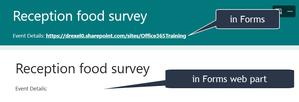
There seems to be a bug in the Forms web part in SharePoint Online. When a hyperlink is included in the "Description" field of the form and that form is presented in the web part, the hyperlink appears as white text on a white background. Hyperlinks in other places (e.g.: in a section title or description or a question title or subtitle) appear normally; it's only a problem when they're in the description field for the form itself. The link is there, and is still clickable, but invisible, even when hovering over it.1.9KViews0likes8CommentsOne-time passcode authentication question
We've had a few users report that guests they've invited to groups, teams or sites were prompted for a code to sign in (as described here: One-time passcode authentication for B2B guest users - Azure AD - Microsoft Entra | Microsoft Learn In the past, guests needed a Microsoft account of some kind to authenticate. Some complained about this, but at least it was a known quantity and the behavior was predictable. Now, it seems that if there is an MSA (M365, Live.com, Outlook.com, etc.) associated with the email address used to invite them, they are prompted to sign in with that account. If there is not an MSA connected to that email, then sometimes they are prompted for a code, but sometimes they are prompted to create an MSA. There doesn't seem to be any rhyme or reason, but we haven't tested very extensively. So, the question is: is this normal? I understand that we could disable the one-time passcode authentication, but there are absolutely some valid use cases for it, so we'd rather not. I just want to understand what the expected behavior is so we know how to handle questions or issues that users report.2.7KViews0likes1CommentWhat happened to "Pinned" group in the Office portal??
Until a month or two ago, when you'd go to https://office.com , there was a "Pinned" heading in the panel/section below the filmstrip in "Recommended". When you go there now, the headings are "All", "My recent", "Shared" and "Favorites". It seems like maybe "Favorites" replaced "Pinned", but there are two problems with this: None of the files I had Pinned in the past were transferred to Favorites. If Feature B is replacing Feature A as a means of identifying important files, than any files flagged by Feature A should transition to Feature B. The "Pinned" term is still used in the Office desktop apps. For two years, I've been training folks to "Pin" their important files to make it easier to get to them from either the Office portal or the app that created them. As I saw it, this feature was a valuable way to manage the inevitable sprawl that came with Microsoft 365. Users end up with files stored in OneDrive, SharePoint, dozens of different Teams, etc. and Pinning was a way to get back to them easily. You might not remember where you saved that PowerPoint you were working on, but you knew it was a PowerPoint. So, once you pin it, you can easily get back to it via the Pinned section in PowerPoint's backstage. So, is "Pinning" documents a concept that's gone from the Office portal and Office web apps? Will it also disappear from the desktop apps at some point? And if so, will it be replaced by "Favorites" (which actually match up to the Favorites you set in the portal)? These kinds of unexplained disappearances or changes are a HUGE issue when it comes to user adoption and trust. I get that M365 is "constantly evolving", but there's a responsible way to communicate and manage that evolution that doesn't include pulling the rug out from under users.763Views0likes0Comments"Best Practices" for co-authoring?
I end up attending a lot of "meetings" with departments at our institution that end up as more of a gripe session about how things don't work as expected in Office 365. In many cases, the end users just have incorrect expectations, and once I explain how those things are supposed to work, they're satisfied (not "happy", but at least they understand). One common theme that's come up over and over relates to real-time co-authoring. "It doesn't work!" "I can't see what other people are typing!" "It saved HER changes, but not MINE!", etc. I explain that there are recommendations on the number of co-authors (10) as well as limits (99) on the same. I tell them that it's important to have up-to-date versions of the apps (which often leads to another line of griping on how IT doesn't keep the user's devices updated) and also recommend that they use the web-based apps (rather than desktop apps) because - in my experience - it's more of a "real-time" experience. There's less latency/lag because it's basically a web page refreshing vs. a desktop app posting/getting data through HTTP calls. This brings me to my question: does Microsoft have any sort of "official" Best Practices for co-authoring? I've found several pages explaining how to use it, how to troubleshoot it (if there is a specific message involved) and even in great detail how it actually works (locks and tokens and all that). But there's nothing that says "for best results, users should ... ". Whenever specific versions of apps are mentioned, it basically says "Office 2013 or newer". And I get that Microsoft is pushing the idea of "any app on any device", which sounds great for marketing, but is terrible when end users take that 100% literally.6.7KViews2likes4CommentsVisible indicator of a team's privacy setting?
We've had a rash of cases recently where users uploaded partially sensitive content to public Teams, no knowing that they were public. I seem to recall there used to be an icon or text label visible in the "tab bar" of a team that indicated whether it was "private" or "public". If that did exist in the past, it doesn't now in any of the tenants to which I have access. The only ways to know if a team is public from the Teams app are Option 1 - go to the Manage teams screen (which the vast majority of users don't even know exists) Option 2 - [if you're an owner] edit the team At a minimum, it seems like this information should be clearly visible from the Files tab and also in the "Information" panel for the team.Re: Ratings feature weirdness and inconsistency (My Lists vs. SharePoint lists)
That's great, but doesn't explain the inconsistent behavior of this feature between My Lists and SharePoint lists. Also, it's a solution that - even though easy to implement - is something very few end users will actually try. In other words, it's wonderful that this workaround exists, but I think MS needs to invest some dev resources into this functionality to eliminate the need for a workaround.2.3KViews0likes1Comment
Recent Blog Articles
No content to show