User Profile

MiSum83
Brass Contributor
Joined 6 years ago


User Widgets
Recent Discussions
Re: Restrict users from deleting emails in Shared Mailbox
try with the new one... without adding members.... if doesnt work, add members and then run the script so that you will modify their permissions... as I can see members/delegations for the users that have Reviewer access... Did it few months ago last time so I may be wrong with "not adding users as members" in EAC ... 😉 Good luck 😉5.2KViews0likes4CommentsRe: Restrict users from deleting emails in Shared Mailbox
yes... you need to run those commands for every user you want to add... About "shared folder".... are you talking about Outlook Web? If so, I'm not sure as I do not use it... But I would say you do not need to add any members etc... as you will specify the members via powershell... But again - not sure as have not used it.... Test it and let us know... I'm quite curious if it will work 🙂18KViews0likes2CommentsRe: Restrict users from deleting emails in Shared Mailbox
Hi Josipakd .... will share my story with you 😉 I could not achieve what I needed using EAC and Outlook to specify Reviewer for users - not sure what I was doing wrong but it was driving me crazy for several days.... So I gave up and eventually, I decided to try that "powershell way" and was really easy and works nicely... Have no problem with adding users to shared mailboxes and restrict "delete" for them... The only annoying thing is that you need to specify all folders you want to set the restrictions for See my template that I use: Add-MailboxPermission -Identity YourSharedMailboxEmail -User 'YourUserEmail' -AccessRights ReadPermission Add-MailboxFolderPermission -Identity MailboxName:\ -User YourUserEmail -AccessRights Reviewer Add-MailboxFolderPermission -Identity MailboxName:\Inbox -User YourUserEmail -AccessRights Reviewer Add-MailboxFolderPermission -Identity MailboxName:\Outbox -User YourUserEmail -AccessRights Reviewer Add-MailboxFolderPermission -Identity MailboxName:\'Sent Items'-User YourUserEmail -AccessRights Reviewer Add-MailboxFolderPermission -Identity MailboxName:\'Junk Email' -User YourUserEmail -AccessRights Reviewer "YourSharedMailboxEmail" will be email address of your shared mailbox (e.g. ITstuff_at_domain.com) "MailboxName" will be the name of yout shared mailbox (e.g. "ITStuff") Once done the above, you will then manually add the shared mailbox for required users: in Outlook, go to Account -> open user account -> More Settings -> Advanced -> add your shared mailbox into the Mailboxes field. This way, the user will see ONLY the folders mentioned above and will not be able to delete emails etc...19KViews0likes5CommentsRe: "Mailbox Import Export" role issue
the powershell worked. 1stly - it reported an error mentioning that I'm not allowed to make changes in roles.... So I have removed the global admin account I was using, created new one again... After connecting via powershell, the command ran with no issues and the role has been assigned. Thanks!10KViews0likes0Comments"Mailbox Import Export" role issue
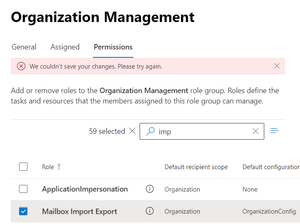
Hello, I'll be doing emails migration soon and would need to import PST files. Would like to use the Import tool available in MS Purview.... However, to be able to use Import feature, I need to add "Mailbox Import Export" role in Exchange Online.... I was trying to add that role but getting the error below... I've been trying to do it for 2 days already and still no luck.... The error doesn't give me any idea of what could be wrong... I have a "global admin" group in "Assigned" tab and I'm logged as an admin that is included in that group. Any idea what I'm doing wrong here?SolvedSome OneDrive options missing in file explorer
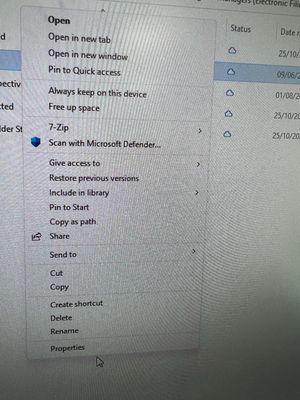
Hi all, I have a user that is missing some handy options for OneDrive when using file explorer.. Options like "view online", "copy link", etc.. I've followed the steps in below but didnt help: https://support.microsoft.com/en-gb/office/how-to-change-the-user-account-control-policies-to-allow-onedrive-context-menus-1f957672-848d-48bb-bfe8-5af828613211 identified it as not elevated - modifying the local policy - didnt help uninstalled existing onedrive and installed new one (downloaded from Users Office 365 portal) with "/allusers" - didnt help what can be done here to get those options back?3.3KViews0likes1CommentRe: Connection was denied because the user account is not authorised for remote log in
Hi... I've checked those... and the user is part of "Remote Desktop Users" and also the that group is included in "Allow log on through Remote Desktop Services".... I've re-added it but didn't help... Looks like the issue is not with this part.... but the issue is that the users disappears from "User Accounts" almost every 30mins-1hr.... Only when I am connected to the VM as that user, it stays there.... but after I disconnect, it will disappear after a while UPDATE: so it disappear even when I'm connected to VM.... but I can still be logged in... After I disconnect, I need to add the user back to "User Accounts". Also, when I add the user as "User", I get the same error message... If I add it as "Administrator", I can connect.229KViews0likes1CommentConnection was denied because the user account is not authorised for remote log in
Hi experts, ... there was a restart of the server that is running as VM in azure... and since then, I've been experiencing some issues that are seriously affecting the company. When I want to RDP with a required account (lets call it "azvmuser") to the server, I get the message that I'm not authorized. With Administrator account, I can connect with no issues... The only way I could fix it was by adding the "azvmuser" via "User Accounts" -> "Give other users access to this computer" .... This works for a while however at some point the issue returns and when I check the Users Accounts again, the "azvmuser" is missing there again and have to add it again... There is a task created in "Task Scheduler" that runs for that user and due to the issue above, the task is failing... When I add the user to "Give other users access...", the Task runs fine... Any idea how to fix it? ... for now, I just manually check the VM and add the user "azvmuser" when I get the error message... It is happening for a business critical VM..... other 3 VMs we have in Azure are working fine 😕M365 Apps for Thin Clients connecting to Windows Server 2012
Hello, I have come across some ppl who use thin clients and are connecting to Windows Server 2012.... They have quite old set up and currently using Office 2010! 😕 Now, I would like to know whether there can be any issue when getting M365 Business Premium plan to use Office Apps (word, excel, outlook, teams, OneDrive,)? I've never had to deal with think clients... so not sure whether there is something that I should be aware of.... Or I simply install M365 Business plan on Win 2012 server and users could use it with no issues... Anyone has some experience with this please?1.6KViews0likes1CommentAdding tenants to O365
Hello team, I'm trying to add a client's tennat to our company tenant in O365 and no luck. I've found info about how it should work, but I'm struggling to get it worked here.... Scenario: I'm taking care of few client's with their own tenants, and would like to add them to our company's o365 one. I can see the "All tenant" option and also can click on switching the tenant, but can't see any additional in the list when trying that. What I've done: in client's AZ AD, I've invited myself as a guest user with a Role: Global Administraotr. (I have an admin access to the client's tenant so I could do it by myself) I've accepted that invitation when I check our tennant, the client is not visible there... the list is empty (All tenants, or when trying to switch tenant) I'm not sure if I'm missing something. Already had a look at ms docs. FYI - both tenants are using Azure AD for Office 365. Not sure whether upgrade to Premium is required in order to use B2B. Or maybe I just don't understand the purpose of that properly? 🙂OneDrive Storage Space for O365 E3 1-5TB
I just want to clarify on the OneDrive storage space for O365 E3 subscriptions.... As I've found, I can increase storage per users up to 5TB.... The default is set to 1TB. When I'm checking MS sites, for O365 E3 it mention OneDrive 1-5TB. Is there any extra cost when increasing to 5TB for a user with the existing subscription? I assume it is not, but cannot find any clear mention about it. We have 56 O365 E3 licences and I need to increase to 5TB for one user.Solved42KViews0likes5CommentsUsing Security Group to grand access to Folder in SharePoint
Hello... I'm trying to figure out what is wrong with my setting... I have a SharePoint site where I created few folders in Documents. Now, I've created security group for each folder that contains users that can access those folders. Now, I right click on a folder -> Manage Access -> and under Direct Access I've added that security group. I thought that's it and users from that security group would be able to access that folder with no issue. However, when testing it, I can see that users are going through - You need permission...... "Request Access" process. Why users are getting that "Request Access" process if they are already added to Direct Access within Security Group? What I am missing here? Also, I've declined one of those requests by mistake... and the user is getting "access denied" every time he tries to access the folder. How can I take that back so that he can eventually. request access again? I've managed to find history of access requests, but there is no option to modify that declined request.... Thanks... I've been trying to deal with it last several hrs....do research online etc... and just getting more and more confused 🙂 What is the best way for using security groups to grant access on Folder level? and not to entire SharePoint site? Thanks7.8KViews0likes1CommentChanging the main email address for an account (Active Directory / O365 / AZ AD)
Hello, I've been trying to find a way to change an email address in O365 for a "shared" user account, lets call it support. The email assigned for that account is showing, lets say "mike@xxxxx". Howeverm the only thing I could change was the "Alternate email".... What I've tried: Found the user in O365 -> My account -> Personal Info - the email is visible there but I cant change it. Also see link to "Why can’t I edit?" ...well, I guess it's because it is synced from on-prem Found user in Azure AD -> Profile -> Edit, but again, I can eddit only "Alternate email" found the user in on-prem AD. There doesnt seem to be that email assigned anywhere. Email field is empty - see the attached picture The on-prem AD is synced with O365/Azure via Azure AD Connect - so I would expect it takes info from on-prem AD. In the O365, when I click on the user and check MAIL tab, there is no email assigned to it. I'm lost here.... how.. or where could I change it please? There is a possibility that the user account was called "mike" originally and was renamed at some point to "support", but not sure.... all ppl working on that are not with the company anymore...Solved50KViews0likes6CommentsGW to O365 migration - O365 users from Okta
Hi, I'm migrating emails from GW to O365 soon and not sure about one step. I've done migrations before with no problem, but this time the users in O365 are taken from Okta...(I'm not Okta experienced) so I'm not sure about the two below: Could there be any problem in this scenario? Do I have to deal with Okta anyhow? Also, in the past when I did migrations, there was a step to set some "temp" password for all mailboxes as during migration project, it was asking for password for each mailbox. However, in the official MS migration guides, I do not see this step anymore.... Is this not required anymore? anyone has experience with this? Want to be ready as best as I can to avoid any issues during migration 🙂785Views0likes0CommentsMess in Permissions for folders in SharePoint
Hello all, I'm getting really frustrated about how SharePoint assign permissions to users... I am migrating 2 Shared Google Drives to SharePoint and I'm confused what is going on with permissions. I have set permissions to main folders as below - Direct Access: Folder 1 - owners, members have access Folder 2 - owners have access, I've deleted Memebers and added only specific users from Member list with access to Folder 2. However, when I check ADVANCED settings for subfolders in Folder 2, I see a message that "There are limited access users on this site. Users may have limited access if an item or document under the site has been shared with them". When I click "Show users", I see that MEMBERS group is there and when I check for permission for a user that is part of MEMBERS but should not have access as I removed MEMBERS from parent folder, it shows that that user has a limited access... I just dont understand what is going on.... I do not want to go through 2000 folders and check permissions manually for each 😕 I also see lots of "Delete unique permission" option in Advanced.... Not sure why it is creating unique permissions... and also why it adds MEMBERS group as OWNER to many folders. A question - when I add user via "Direct Access", is it required that that user is part of that site MEMBERS group? Or could be any user within O365662Views0likes0CommentsEnroll Sophos FW to Defender for Endpoint
Hello, I'm trying to enroll some network devices to Defender... I've had no issues enrolling Cisco or Aruba devices using Community String.... However, I just can't figure out how to enroll Sophs XG Firewall. When I want to configure SNMP on Sophos, I have to provide an IP address of the snmp collector... I went back to SOPHOS tech support to check whether they have any "snmp community strings"... but looks they do not.... Can defender be used in this cases? I've tried to configure an IP of the host on LAN that is running network scan for defender... but didn't help. So SOPHOS is asking me if: can the IP of the device that has network scan installed be used? does MS provide any public IP for Defender?851Views0likes0CommentsRe: OneDrive Storage Space for O365 E3 1-5TB
Thanks for clarification, Swati we have 56x E3 so good here. I can also update/increase from 1 to 5 for a user.... so fine here as well.... Was just not 100% whether there is anything behind it (extra fees, extra subscription, etc..)38KViews0likes1Comment

Recent Blog Articles
No content to show