User Profile

ARH92
Copper Contributor
Joined 6 years ago


User Widgets
Recent Discussions
Exchange on-prem send connector not recognised in hybrid setup
Hi there, I'm not sure if anybody has experienced this issue before, but has started since running the hybrid configuration wizard to add new 2019 Exchange Servers to our hybrid setup. I have a on-prem send connector that routes some emails from a specific sender to a on-prem SharePoint library. The recipient address is set up as a contact on Exchange on-prem, the connector is scoped, and the source server is set to a Exchange 2016 server. Our hybrid setup is configured with centralised mail transport, and consists of 3 Exchange servers (2 2019 and 1 2016 used as a source server in the send connector to SharePoint). When sending to this email domain Exchange insists of routing it to Exchange Online resulting in a undeliverable because the domain is non existent - " Your message couldn't be delivered. The Domain Name System (DNS) reported that the recipient's domain does not exist." and is not routing the email to SharePoint. This connector worked fine before we added the 2 new Exchange servers to the hybrid setup, not sure what to check. Any suggestions? Thanks. "866Views0likes0CommentsGroup Policy Blocked Teams Webinar Settings
Hi there, One of our users has raised this issue with me when setting up a webinar. Once the webinar is scheduled, they click into the webinar and click "Go to Meeting options to allow presenters to share content. Change Options". Another small Teams Window pops up to change the options. On this menu the user gets a "Cannot login with Microsoft Account. This program is blocked by group policy. For more information, contact your system administrator error. What group policy would be blocking this? Images attached. Also when I myself try this on my machine, It will not allow me to sign in with my work account. I've searched far and wide for this issue, and I cannot find anything. Any help out there please? Thank you.1.2KViews0likes0CommentsSharePoint tab missing in "Add a tab" Screen
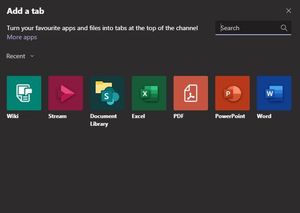
Hi there, One of our users have requested we enable the ability to add the SharePoint tab to Teams as described here - https://support.microsoft.com/en-us/office/add-a-sharepoint-page-or-list-to-a-channel-in-teams-131edef1-455f-4c67-a8ce-efa2ebf25f0b Here are the options we see - I have turned off all 3rd part apps, but since this is a Microsoft app I would expect that it would show up here? What am I missing? Thanks, Aled.1KViews1like0Comments
Recent Blog Articles
No content to show