User Profile

bvenhaus
Copper Contributor
Joined 6 years ago


User Widgets
Recent Discussions
The ms-appinstaller protocol has been disabled.
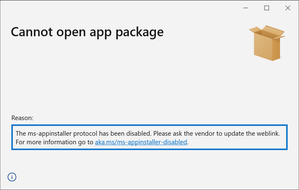
I just found out that users can no longer install my MSIX from my website. This is a WPF application packaged with "Windows Application Packaging Project" (wapproj). When users click the "Get the app" button they now see the error below saying the protocol has been disabled. Why is this? Is this permanent? Is there a way to enable it? There's a short mention of this in the docs but it doesn't mention why this is happening or how to enable it. https://docs.microsoft.com/en-us/windows/msix/app-installer/installing-windows10-apps-web Is this no longer supported? <html> <body> <h1> MyApp Web Page </h1> <a href="ms-appinstaller:?source=http://mywebservice.azureedge.net/HubApp.msix"> Install app package </a> <a href="ms-appinstaller:?source=http://mywebservice.azureedge.net/HubAppBundle.msixbundle"> Install app bundle </a> <a href="ms-appinstaller:?source=http://mywebservice.azureedge.net/HubAppSet.appinstaller"> Install related set </a> </body> </html> The ms-appinstaller protocol has been disabled. Please ask the vendor to update the weblink. For more information go to aka.ms/ms-appinstaller-disabledSolved69KViews3likes55CommentsRe: Windows 10 2004 - MSIX Not Updating -Please check whether the Msixvc support services are installed.
ShakersMSFT StephenWhiteD3G davidanthoff marcinotorowski I am also getting the 0xC00CEE23 errors. I see those when my Minor version number is >= 10. If I decrease the version to 9 things work perfectly. For whatever reason, App Installer may not like version numbers greater than 9. https://techcommunity.microsoft.com/t5/msix-deployment/error-0xc00cee23-when-minor-version-gt-10/td-p/1780808#.X4dBZY6BG74.link9.3KViews0likes0CommentsError 0xC00CEE23 when Minor Version >= 10
I found a strange issue the other day. When the Minor version number is greater than or equal to 10, Windows 10 2004 machines will not be able to install a package from a URI. UNC paths work. Here is the full error message: "App installation failed with error message: error 0xC00CEE23: The XML in the .appinstaller file is not valid: Line 14, Column 11, Reason: '>' expected. (0xc00cee23)" Everything works fine when the version is 9 or less. I just created a 3.10.X.X release for my WPF application & that's when I found the bug. For the time being I just kept my Minor version 9 in the package, & increased the Build number. Not sure what's going to happen when build number reaches 10. When I test the installer on my local network using a UNC path, everything works fine. It's only when I changed to my HTTPS URL that I receive this error. There were similar mentions of the error in the comments for this topic. https://techcommunity.microsoft.com/t5/msix-deployment/windows-10-2004-msix-not-updating-please-check-whether-the/td-p/1466701#.X4c90kyouCU.linkSolved8.3KViews4likes10Comments
Recent Blog Articles
No content to show