User Profile

Lars365
Iron Contributor
Joined 6 years ago


User Widgets
Recent Discussions
Re: Can't create a form in a Team from a template
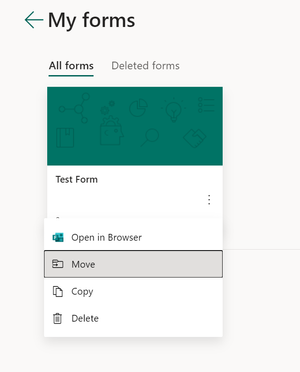
Hi JoeN-667 On the https://www.office.com/launch/forms?auth=2 and go to "All my Forms" (https://www.office.com/launch/forms/myforms?auth=2). There you can click on the three dots and move the form to the specific team. Hope this helps and regards. Lars1.8KViews0likes1CommentRe: Option "block download" not showing
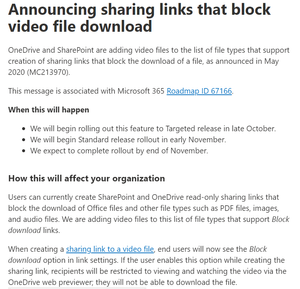
Hi trading_wizz In the Microsoft Roadmap it says February 2021 for blocking download of Teams meeting recordings for users with view-only permissions: https://www.microsoft.com/de-de/microsoft-365/roadmap?filters=Microsoft%20Stream&searchterms=block%2Cdownload This is only available with the https://docs.microsoft.com/en-us/stream/streamnew/new-stream based on OneDrive and SharePoint. Warm regards and happy new year! Lars7KViews0likes3CommentsRe: Merging two Plans into one
Hi NicoleNaviglia There is no option to merge two plans in Planner. But you can copy or move the tasks one by one from one plan to the other one: https://support.microsoft.com/en-us/office/copy-and-move-planner-tasks-ad43a5d8-c1ad-42fd-b3da-fe97d72c8a1b Hope this helps and merry Christmas. Lars19KViews0likes0CommentsRe: Teams phone system stats
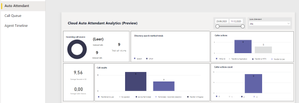
Hi Matthew99 There is a new Call Quality Dashboard (CQD) called Auto Attendant & Call Queue Historical Report available since a few weeks. https://docs.microsoft.com/en-us/microsoftteams/aa-cq-cqd-historical-reports You need to install it with Power BI Desktop and then publish it to Power BI web version. This template provides the following three reports: Auto Attendant – showing analytics for calls coming into your Auto Attendants. Call Queue – showing analytics for calls coming into your Call Queues. Agent Timeline – showing a timeline view of agents being active in Call Queue calls. To learn more, read https://docs.microsoft.com/en-us/microsoftteams/aa-cq-cqd-historical-reports. You can test this report. This one could fit your requirements. Warm regards. Lars9.7KViews0likes0CommentsRe: Pictures disappeared in MS Forms when duplicated
Hi C_an_di_ce It is important that all the pictures of the form are loaded and visible before you create the duplicate link. You can try to renew the duplicate link. Just make sure that you can see all the pictures in the form, before creating the link. Hope this helps and regards. Lars880Views0likes0CommentsRe: Can i edit a file that was aded as an anwer?
Hi TeacherJO You will find the uploaded photos in your OneDrive in the folder Apps --> Microsoft Forms https://support.microsoft.com/en-us/office/add-questions-that-allow-for-file-uploads-6a75a658-c02b-450e-b119-d068f3cba4cf (you need to scroll down on the site) If the form is shared with a Microsoft 365 Group, you can find it on the connected SharePoint Teamsite. You can download the photos from there and edit. The only ways I see to return the files to the students is sending per Teams chat message or mail. Hope this helps a bit and regards. Lars771Views0likes1CommentRe: Displaying Planner in a kiosk mode for free
Hi adminpc You could create a specific site on the SharePoint team site connected to the Planner. There you can display the Planner's kanban board with the https://support.microsoft.com/en-us/office/use-the-planner-web-part-a1e4ada8-8817-4e57-8e65-1bf546808843. This site could be displayed at the screen. Hope this helps and regards. Lars2.7KViews0likes0CommentsRe: Microsoft Forms -> SharePoint - > Power BI
Hi Gary_Gray For SharePoint list you can change the type of the column from "single line" to multiple lines. There is also a tech community post to this question. This should solve the issue and the flow should continue successfully. Hope this helps and regards. Lars1.1KViews0likes1CommentRe: Power Automate not detecting items with high ID
Hi Azaak As mentioned by stormin_30 there is the 5000-item limit for the "Get Item" trigger. Even when "Top Count" attribute is set higher than five thousand. I was confronted with a similar problem. This link was immensely helpful to me at that time. http://How%20to get more than 5000 items from SharePoint Online in Flow by https://alextofan.com/ Hope it can help you too. LarsRe: Microsoft Bookings - Approval before confirmation
Hi AbolajiO Maybe the Outlook add-on FindTime would meet your needs: https://findtime.microsoft.com/ Here is the link to the https://support.microsoft.com/en-us/office/install-findtime-2501ff38-0a47-4dc5-999f-bcca329f0f63 In FindTime you can choose if the meeting should be scheduled automatically or manually. I hope this helps and regards. Lars13KViews0likes2CommentsRe: Can anyone mute the organizer in Microsoft teams ?
Hi aalzhrani You can use the new feature for the meeting options called Don't allow attendees to unmute (also called hard mute). https://support.microsoft.com/en-us/office/manage-attendee-audio-permissions-in-teams-meetings-f9db15e1-f46f-46da-95c6-34f9f39e671a#bkmk_preventunmuting you can find the official Microsoft support documentation to the feature. This is also a https://www.youtube.com/watch?v=rgAfbkASjWM. The others shouldn't be able to mute you again. Hope this helps and regards.7.9KViews1like1CommentRe: Tick boxes in pages and sub pages menu
Hi EmilyBC Great suggestion. This would be immensely helpful indeed. As a workaround you could use https://support.microsoft.com/en-us/help/4534547/windows-10-keyboard-tips-and-tricks (Windows logo key + . ). Add a tick in front of the title. This is also visible in the pages list. Hope this helps and regards.777Views0likes0Comments

Recent Blog Articles
No content to show